Introduzzjoni
This manual provides essential instructions for the Pioneer Dedicated Home Theater Remote Control, model AXD7731. It covers basic setup, operation, maintenance, and troubleshooting to ensure optimal use with your compatible Pioneer home theater system. Please note that this product is a remote control only, and an instruction manual for the original home theater system or batteries for the remote are not included.
Setup
1. Installazzjoni tal-batterija
Il-kontroll remot jeħtieġ żewġ batteriji AAA (mhux inklużi). Segwi dawn il-passi biex tinstallahom:
- Sib l-għatu tal-kompartiment tal-batterija fuq wara tal-kontroll remot.
- Żerżaq l-għatu 'l isfel jew agħfas il-lukkett u erfa' biex tiftaħ.
- Daħħal żewġ batteriji AAA, waqt li tiżgura li t-terminali pożittivi (+) u negattivi (-) ikunu allinjati sew mal-marki ġewwa l-kompartiment.
- Erġa' poġġi l-għatu tal-kompartiment tal-batterija, billi żżerżaqha lura f'postha sakemm tikklikkja sew.
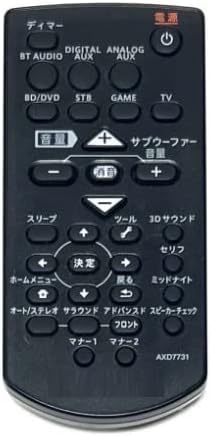
Image: The Pioneer AXD7731 remote control. The battery compartment is typically located on the back, requiring two AAA batteries.
2. Użu Inizjali
Once batteries are installed, the remote control should be ready for immediate use with compatible Pioneer home theater systems. No complex pairing or programming is typically required for dedicated replacement remotes. Point the remote directly at your home theater receiver or device and press the desired function button.
Istruzzjonijiet Operattivi
This section outlines the general functions of the buttons on your AXD7731 remote control. Button layouts may vary slightly depending on the specific home theater model, but core functions remain consistent.
Immaġni: Quddiem view of the Pioneer AXD7731 remote control, displaying its array of control buttons.
- QAWWA: Turns the home theater system ON or OFF.
- SELEKTUR TAL-INPUT: Cycles through available audio/video input sources (e.g., HDMI 1, HDMI 2, Optical, Coaxial).
- VOLUM +/-: Increases or decreases the master volume level.
- MUTE: Silences the audio output. Press again to restore sound.
- MENU / HOME: Accesses the system's main menu or returns to the home screen.
- NAVIGATION (Up/Down/Left/Right) & ENTER: Użat biex tinnaviga fil-menus u tikkonferma l-għażliet.
- RETURN / BACK: Jmur lura għall-menu jew l-iskrin preċedenti.
- PLAYBACK CONTROLS (Play, Pause, Stop, Fast Forward, Rewind, Skip): Controls media playback for connected devices (e.g., Blu-ray player, media server).
- SOUND MODE / SURROUND: Selects different audio processing modes or surround sound settings.
- TUNER (AM/FM): Switches to radio tuner mode and allows station selection.
For detailed functions of specific buttons, refer to the original instruction manual of your Pioneer home theater system.
Manutenzjoni
Tindif tal-Kontroll mill-bogħod
Biex iżżomm id-dehra u l-funzjonalità tal-kontroll remot:
- Imsaħ il-wiċċ b'ċarruta ratba u niexfa.
- Għal ħmieġ iebsa, ħafif dampLaħlaħ id-drapp bl-ilma jew b'tindif ħafif u mhux abrażiv. Tisprejjax it-tindif direttament fuq ir-remote.
- Evita li tuża kimiċi ħarxa, solventi, jew pads tat-tindif li joborxu, għax dawn jistgħu jagħmlu ħsara lill-finitura tar-remote jew lill-komponenti interni.
Sostituzzjoni tal-batterija
Ibdel il-batteriji meta l-kontroll remot ma jibqax jirrispondi jew il-firxa tiegħu tonqos b'mod sinifikanti. Dejjem ibdel iż-żewġ batteriji fl-istess ħin b'batteriji AAA ġodda. Tħallatx batteriji qodma u ġodda, jew tipi differenti ta' batteriji.
Ħażna
When not in use for extended periods, remove the batteries to prevent leakage and potential damage to the remote control.
Issolvi l-problemi
Jekk tesperjenza problemi bil-kontroll remot tiegħek, ipprova s-soluzzjonijiet li ġejjin:
| Problema | Kawża Possibbli | Soluzzjoni |
|---|---|---|
| Il-kontroll mill-bogħod ma jaħdimx. |
|
|
| Some buttons are unresponsive. |
|
|
| Ir-remote jaħdem b'mod intermittenti. |
|
|
Speċifikazzjonijiet
| Karatteristika | Dettall |
|---|---|
| Numru tal-Mudell | AXD7731 |
| Brand | Generic (Dedicated for Pioneer) |
| Apparat Kompatibbli | Sistemi tat-Teatru tad-Dar |
| Kulur | Iswed |
| Rekwiżit tal-batterija | AAA x 2 (Not included) |
| Numru ta' Buttuni | 25 |
| Dimensjonijiet tal-Pakkett | 15 x 12 x 2 ċm |
| Piż tal-oġġett | 100 g |
Garanzija u Appoġġ
As this product is often sold as a replacement part, specific warranty information or a dedicated support manual may not be included. For warranty details, technical support, or further assistance, please refer to the original documentation provided with your Pioneer home theater system or visit the official Pioneer support website. If purchased from a third-party seller, please consult their return and warranty policies.