
1. Introduzzjoni
This manual provides detailed instructions for the safe and efficient operation of your Xprinter XP-P323B Portable Thermal Printer. Please read this manual thoroughly before using the device to ensure proper functionality and to prevent damage. The XP-P323B is designed for printing receipts and labels, offering portability and high-speed capabilities for various business needs.
2. Informazzjoni dwar is-Sigurtà
- Tesponix il-printer għall-ilma jew għal umdità eċċessiva.
- Evita li twaqqa' l-istampatur jew li tissottomettih għal impatti qawwija.
- Uża biss l-adapter tal-enerġija u l-aċċessorji speċifikati.
- Żomm il-printer 'il bogħod minn sorsi ta' sħana u dawl tax-xemx dirett.
- Tippruvax tiżżarma jew issewwi l-istampatur int stess. Ikkuntattja persunal tas-servizz kwalifikat.
- Tiżgura ventilazzjoni xierqa waqt it-tħaddim.
3. Kontenut tal-Pakkett
Ivverifika li l-oġġetti kollha huma preżenti fil-pakkett:
- Xprinter XP-P323B Portable Thermal Printer
- Power Adapter (not explicitly listed but standard)
- USB Cable (not explicitly listed but standard)
- Sample Thermal Paper Roll (not explicitly listed but standard)
- Manwal għall-Utent (dan id-dokument)
4. Prodott Aktarview
The Xprinter XP-P323B is a compact and efficient thermal printer designed for various printing tasks. It supports NV logo download and picture printing (BMP format), along with concentration adjustment for print quality.
4.1. Komponenti tal-Printer

Figura 1: Quddiem view of the Xprinter XP-P323B Portable Thermal Printer, showing the power button, display, and a sample label being printed.
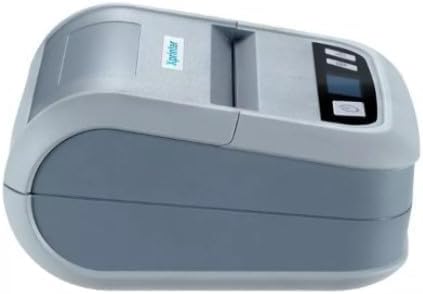
Figura 2: Ġenb view of the Xprinter XP-P323B, highlighting its compact design and the Xprinter logo.
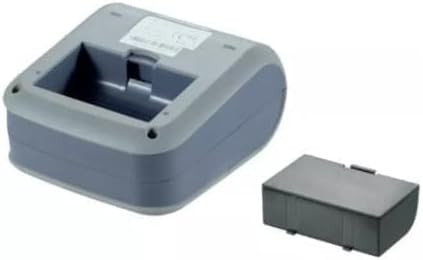
Figura 3: Taħt view of the Xprinter XP-P323B, showing the base and the removable battery compartment.
5. Setup
5.1. Iċċarġjar tal-batterija
- Qabbad l-adapter tal-enerġija mal-port tal-iċċarġjar tal-istampatur.
- Ipplaggja l-adapter tal-enerġija f'iżbokk tal-ħajt.
- The charging indicator light will illuminate. Allow the printer to charge fully before first use.
5.2. Loading Thermal Paper/Labels
- Open the paper compartment cover by gently pushing the release latch.
- Insert the thermal paper roll with the printing surface facing the print head. Ensure the roll is seated correctly.
- Iġbed ammont żgħir ta' karta 'l barra minn quddiem ir-ras tal-istampar.
- Agħlaq l-għatu tal-kompartiment tal-karta sew sakemm tikklikkja f'postu.
5.3. Konnessjoni ma 'Apparat
The XP-P323B supports USB and Bluetooth connectivity.
5.3.1. Konnessjoni USB
- Qabbad l-istampatur mal-kompjuter tiegħek billi tuża l-kejbil USB ipprovdut.
- Install the necessary printer drivers (available from the Xprinter website or included software).
5.3.2. Bluetooth Connection (for Smartphones/iOS)
- Kun żgur li l-istampatur huwa mixgħul.
- On your smartphone or iOS device, go to Bluetooth settings and enable Bluetooth.
- Fittex għal available devices and select 'XP-P323B' (or similar name).
- Enter the pairing PIN if prompted (refer to printer documentation for default PIN, often '0000' or '1234').
- Once paired, you can use a compatible printing application to send print jobs.
6. It-Tħaddim tal-Printer
6.1. Stampar Bażiku
- Ensure the printer is connected to your device and has paper loaded.
- Iftaħ id-dokument jew l-immaġni li tixtieq tipprintja fuq l-apparat konness tiegħek.
- Select the print option within your application.
- Choose 'XP-P323B' as the printer.
- Adjust print settings as needed (e.g., paper size, print quality).
- Ibda x-xogħol tal-istampar.
6.2. NV Logo and Picture Printing
The printer supports downloading and printing NV (Non-Volatile) logos and BMP format pictures. This functionality typically requires specific software or commands. Refer to the advanced programming guide or software documentation for detailed instructions on how to upload and print custom logos or images.
6.3. Adjusting Print Concentration
Print concentration can be adjusted to optimize print quality. This setting is usually accessible through the printer driver software on a computer or within the settings of a compatible mobile printing application. Consult your software's help section for specific steps.
7. Manutenzjoni
7.1. Tindif tal-Istampatur
- Barra: Imsaħ il-barra tal-istampatur b'ċarruta ratba u damp drapp. Tużax kimiċi ħarxa jew tindif li joborxu.
- Kap tal-Istampa: The thermal print head should be cleaned periodically to ensure optimal print quality. Use a cotton swab lightly dampImxarrab bl-alkoħol isopropiliku. Imsaħ bil-mod il-wiċċ tar-ras tal-istampar. Ħalliha tinxef kompletament qabel ma tagħlaq l-għatu u terġa' tibda l-operazzjoni.
- Mogħdija tal-Karta: Neħħi kwalunkwe trab jew debris tal-karta mill-mogħdija tal-karta billi tuża pinzell artab jew arja kkompressata.
7.2. Ħażna
When not in use for extended periods, store the printer in a cool, dry place, away from direct sunlight and extreme temperatures. Remove the paper roll if storing for a very long time to prevent dust accumulation.
8 Issolvi l-problemi
| Problema | Kawża Possibbli | Soluzzjoni |
|---|---|---|
| Il-printer ma jixgħelx | Low battery; Power adapter not connected; Faulty power adapter | Charge the battery; Ensure power adapter is securely connected; Try a different power outlet or adapter |
| L-ebda output tal-istampar | No paper; Paper loaded incorrectly; Printer not connected; Driver issue | Load paper correctly; Re-establish connection; Reinstall printer drivers |
| Kwalità fqira tal-istampar | Dirty print head; Low print concentration; Low battery | Clean the print head; Adjust print concentration in software; Charge the battery |
| Il-konnessjoni Bluetooth tfalli | Bluetooth off on device; Incorrect pairing PIN; Printer out of range | Enable Bluetooth; Re-enter correct PIN; Move device closer to printer |
9. Speċifikazzjonijiet
| Brand | Xprinter |
| Numru tal-Mudell | XP-P323B |
| Dimensjonijiet tal-oġġett (D x W x H) | 15D x 7W x 10H ċentimetri |
| Teknoloġija tal-Konnettività | USB |
| Teknoloġija tal-Istampatur | Termali |
| Karatteristiċi Speċjali | Portabbli |
| Kulur | Griż |
| Apparati Kompatibbli | Smartphones |
| Tip ta' Kontrollur | iOS |
| Daqs Massimu tal-Midja | 4 x 6 pulzier |
| Midja Stampata | Tikketti |
| Daqs tal-Karta | 4 x 6 pulzier |
| Output Printer | Monokromu |
| Veloċità Massima tal-Istampar (Iswed u Abjad) | 40 mm/s (estimated from context) |
| Piż tal-oġġett | 300 Gramm |
10. Garanzija u Appoġġ
For warranty information and technical support, please refer to the warranty card included with your product or visit the official Xprinter websit. Żomm l-irċevuta tax-xiri tiegħek bħala prova tax-xiri għal talbiet ta' garanzija.