1. Introduzzjoni
This manual provides detailed instructions for the installation, operation, and maintenance of your Xiaomi Outdoor Camera CW300. This camera is an entry-level outdoor Pan-Tilt-Zoom (PTZ) camera designed for various outdoor monitoring needs, including doors, shops, and farms. It features 2.5K ultra-clear picture quality, 4MP resolution, smart full-color night vision, bidirectional gimbal movement, IP66 water and dust resistance, and AI human tracking.
2. Prodott Aktarview
Iffamiljarizza ruħek mal-komponenti tal-Xiaomi Outdoor Camera CW300 tiegħek.

Figura 2.1: Quddiem view of the Xiaomi Outdoor Camera CW300, showing the lens, status indicator, and light sensor.
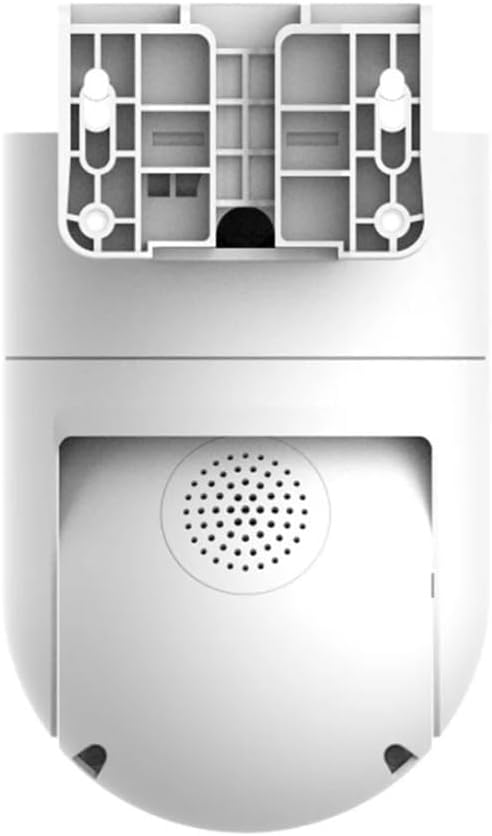
Figura 2.2: Lura view of the camera, highlighting the integrated speaker for two-way audio and alarm functions.
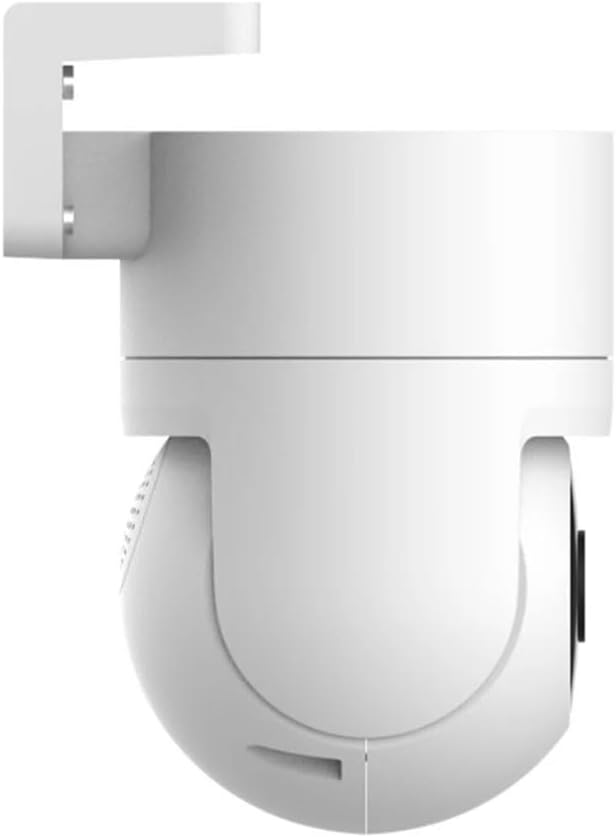
Figura 2.3: Ġenb view of the camera, illustrating its compact design and mounting bracket.
3. Gwida ta' Setup
3.1 Tneħħija tal-kaxxa u Spezzjoni Inizjali
Neħħi bir-reqqa l-komponenti kollha mill-imballaġġ. Ivverifika li l-oġġetti kollha elenkati fil-lista tal-ippakkjar huma preżenti u mhux imħassra.
3.2 Konnessjoni tal-Enerġija
Connect the camera to a suitable power source using the provided power adapter. Ensure the connection is secure to prevent interruptions.
3.3 Installazzjoni u Tqabbil tal-App
- Niżżel il- L-app Mi Home/Xiaomi Home mill-ħanut tal-apps tat-tagħmir tiegħek (Google Play Store jew Apple App Store).
- Iftaħ l-app u oħloq jew idħol fil-kont Xiaomi tiegħek.
- Tektek l-ikona "+" fir-rokna ta' fuq tal-lemin biex iżżid apparat ġdid.
- Select the "Xiaomi Outdoor Camera CW300" from the list of available devices.
- Follow the on-screen instructions to connect the camera to your Wi-Fi network and complete the pairing process. Ensure your Wi-Fi signal is strong at the installation location.
3.4 Immuntar tal-Kamera
The camera can be mounted on a wall or pole. Choose a location that provides optimal viewing angles and is within Wi-Fi range.
- Immuntar tal-ħajt: Use the provided mounting bracket and screws to secure the camera to a sturdy wall.
- Immuntar tal-arblu: Utilize the included straps or clamps to attach the camera securely to a pole.

Figura 3.1: Eżample of the camera mounted on a pole, demonstrating flexible installation options.
4. Istruzzjonijiet Operattivi
4.1 Ħaj View u Reġistrazzjoni
Access the live feed from your camera via the Mi Home/Xiaomi Home app. You can initiate manual recordings or set up continuous recording and event-triggered recording.
4.2 Pan-Tilt-Zoom (PTZ) Control
The bidirectional gimbal allows for 360° coverage. Use the controls within the app to remotely adjust the camera's viewing angle (pan and tilt) and zoom in on specific areas.
4.3 Smart Full-Color Night Vision
The camera features intelligent full-color night vision. When a human shape is detected at night, the camera automatically activates its white light, providing a clear, colored image even in dark environments.

Figure 4.1: The camera's intelligent full-color night vision in action, illuminating a dark area.
4.4 AI Human Tracking and Alarm
The camera intelligently tracks human movements. When a person is detected in the surveillance area, the camera automatically tracks and records their movement. Simultaneously, it triggers an acoustic alarm with high-frequency flashing lights to deter intruders and sends an alarm message to your Mi Home/Xiaomi Home app.
4.5 Awdjo b'żewġ direzzjonijiet
Utilize the built-in microphone and speaker for two-way communication through the app, allowing you to speak to visitors or deter unwanted individuals.
4.6 Daqq tal-Vidjo
Review irreġistrat footage stored on a microSD card (not included) or cloud storage (subscription may be required) directly from the Mi Home/Xiaomi Home app.
5. Manutenzjoni
5.1 Tindif tal-Kamera
Despite its IP66 water and dust resistance, regular cleaning is recommended to ensure optimal performance and image clarity. Use a soft, damp cloth to wipe the camera body and lens. Avoid abrasive cleaners or solvents.

Figure 5.1: The camera's IP66 rating ensures durability against water and dust, as shown in rainy conditions.
5.2 Aġġornamenti tal-Firmware
Periodically check the Mi Home/Xiaomi Home app for available firmware updates. Keeping your camera's firmware up-to-date ensures you have the latest features, security enhancements, and bug fixes.
5.3 Ġestjoni tal-Ħażna
If using a microSD card, regularly check its storage capacity and back up important recordings. Consider setting up automatic deletion of older footage if continuous recording is enabled.
6 Issolvi l-problemi
| Problema | Kawża Possibbli | Soluzzjoni |
|---|---|---|
| Il-kamera ma tikkonnettjax mal-Wi-Fi | Incorrect Wi-Fi password, weak signal, camera too far from router. | Verify Wi-Fi password. Move camera closer to router or use a Wi-Fi extender. Restart camera and router. |
| Kwalità ta 'immaġni fqira | Lenti maħmuġa, dawl insuffiċjenti, problemi bil-bandwidth tan-netwerk. | Clean the camera lens. Ensure adequate lighting for optimal performance. Check your internet speed. |
| Is-sejbien tal-moviment mhux qed jaħdem | Sensitivity settings too low, detection zone not configured correctly, obstructions. | Adjust motion detection sensitivity in the app. Redraw detection zones. Ensure no physical obstructions block the view. |
| Il-kamera ma tixgħelx | Problema bl-adapter tal-enerġija, problema bl-iżbokk tal-enerġija. | Check power cable connection. Try a different power outlet. Ensure the power adapter is functioning correctly. |
| Regional compatibility issues | Camera is designed for a specific region not matching your Mi Home/Xiaomi Home app region. | Ensure your Mi Home/Xiaomi Home app region setting matches the region for which the camera was manufactured. You may need to change your app's region or create a new account for the correct region. |
7. Speċifikazzjonijiet
| Karatteristika | Dettall |
|---|---|
| Mudell | CW300 |
| Riżoluzzjoni | 4MP (2.5K Ultra-Clear) |
| Konnettività | Wi-Fi |
| Klassifikazzjoni tal-Protezzjoni tad-Dħul (IP). | IP66 (Reżistenti għall-Ilma u t-Trab) |
| Viżjoni bil-lejl | Smart Full-Color Night Vision (Infrared Light Source) |
| Moviment | Bidirectional Gimbal (Pan-Tilt) |
| Traċċar | AI Human Tracking |
| Tip ta 'allarm | Motion Only (Acoustic and Visual Alarm) |
| Metodu ta' Kontroll | Voice (via Mi Home/Xiaomi Home app) |
| Input tal-Enerġija | 12V, 3W |
| Dimensjonijiet (L x W x H) | 6.61 x 3.94 x 4.84 pulzieri |
| Piż | 1.85 libbra (840 gramma) |
| Materjal | Metall |
| Temperatura operattiva | Sa 60°C |
| Użu Rakkomandat | Sigurtà ta 'barra |
| Batteriji Meħtieġa | Nru |
| Tip ta 'Focus | Focus Manwal |
| Zoom Tip | Zoom ottiku |
| Format tal-Qbid tal-Vidjo | MP4 |
8. Vidjo Uffiċjali tal-Prodott
Vidjo 8.1: Ħarsa fil-qosorview of the Xiaomi Outdoor Camera CW300, showcasing its key features such as 2.5K ultra-clear picture quality, full-color night vision, 360° coverage, and IP66 water and dust resistance. This video provides a visual demonstration of the product's capabilities and design.
9. Garanzija u Appoġġ
Information regarding the product warranty and customer support was not available in the provided data. Please refer to the official Xiaomi website or contact Xiaomi customer service for detailed warranty terms, technical support, and service options for your Xiaomi Outdoor Camera CW300.
You can often find support resources, FAQs, and contact information on the manufacturer's official product page or support section.