
1. Introduzzjoni
Thank you for choosing the Gigaset Pure 100 Cordless Phone. This manual provides essential information for setting up, operating, and maintaining your new phone. Please read these instructions carefully to ensure optimal performance and longevity of your device.
The Gigaset Pure 100 is designed for ease of use, featuring a call blocking button, a 50-contact address book, hearing aid compatibility, and programmable function keys to enhance your communication experience.

Image: The Gigaset Pure 100 cordless phone positioned in a home environment, showcasing id-disinn eleganti tiegħu.
2. X'hemm fil-Kaxxa
Before you begin, please check the contents of your package. Ensure all items listed below are present:
- 1 Handset
- 1 Stazzjon Bażi
- 2 Batteriji Riċarġabbli AAA
- 1 Qoxra tal-Batterija
- 1 Adapter tal-Enerġija
- 1 Telephone Connection Cable
- 1 Gwida ta 'malajr
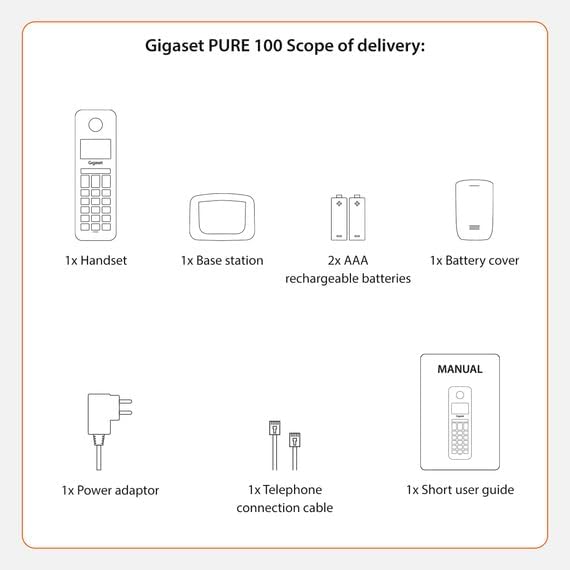
Image: A visual representation of the Gigaset Pure 100's scope of delivery, including handset, base, batteries, and cables.
3. Setup
3.1. Installazzjoni tal-batterija
- Remove the battery cover from the back of the handset.
- Daħħal iż-żewġ batteriji rikarikabbli AAA fornuti, filwaqt li tosserva l-polarità korretta (+/-).
- Erġa 'poġġi l-għatu tal-batterija sakemm jidħol f'postu.

Image: The rear side of the Gigaset Pure 100 handset, illustrating where the battery cover is located for installation.
3.2. Konnessjoni tal-Istazzjon Bażi
- Connect the power adapter to the base station and plug it into a wall outlet.
- Connect the telephone connection cable to the base station and plug the other end into your telephone wall socket.
- Poġġi l-istazzjon bażi fuq wiċċ ċatt u stabbli.
3.3. Reġistrazzjoni tal-handset
Il-handset ġeneralment ikun irreġistrat minn qabel mal-istazzjon bażi. Jekk le, jew jekk qed tirreġistra handset addizzjonali:
- Poġġi l-idejn fl-istazzjon bażi.
- Press and hold the registration/paging button on the base station for approximately 3 seconds. The base station will enter registration mode.
- Follow the on-screen prompts on the handset to complete the registration process. You may need to enter a PIN (default is 0000).

Image: The Gigaset Pure 100 handset securely placed in its charging and communication base station.
4. Istruzzjonijiet Operattivi
4.1. Nagħmlu Sejħiet
- Neħħi l-idejn jew agħfas il- Ċavetta tas-Sejħa Ħadra.
- Ċempel in-numru tat-telefon mixtieq.
- Agħfas il- Ċavetta tas-Sejħa Ħadra għal darb'oħra biex tibda s-sejħa.
- Biex ittemm sejħa, agħfas il- Ċavetta Ħamra tat-Tmiem tas-Sejħa jew poġġi l-handset lura fl-istazzjon bażi.
4.2. Jirċievu Sejħiet
Meta jdoqq it-telefon, agħfas il-buttuna Ċavetta tas-Sejħa Ħadra biex iwieġeb is-sejħa.
4.3. Address Book
The Gigaset Pure 100 can store up to 50 contacts in its address book.
- To access the address book, press the Ċavetta tad-Direttorju (usually an icon resembling an open book or person).
- Use the navigation keys to scroll through your contacts.
- To dial a contact, select their entry and press the Ċavetta tas-Sejħa Ħadra.
- To add a new contact, navigate to an empty entry or select the 'New Entry' option and follow the on-screen instructions to enter the name and number.
4.4. Imblukkar tas-Sejħiet
The Gigaset Pure 100 features a dedicated call blocking button to help manage unwanted calls.
- Waqt telefonata li tidħol minn numru mhux mixtieq, agħfas il-buttuna Call Blocking Button (often marked with a shield or 'Block' icon).
- The number will be added to your block list, and subsequent calls from this number will be rejected.
- Refer to the quick guide for detailed instructions on managing your block list.

Image: The Gigaset Pure 100 handset screen showing a 'Blocked Number' notification, highlighting its call blocking feature.
4.5. Ċwievet tal-Funzjoni Programmabbli
The phone includes programmable function keys that can be assigned to frequently used numbers or features. Consult your quick guide for instructions on how to program these keys to suit your needs.

Image: An illustration demonstrating the Gigaset Pure 100's effective range, allowing calls from various locations within a property.
5. Manutenzjoni
5.1. Tindif
Wipe the handset and base station with a soft, damp cloth. Do not use abrasive cleaners or solvents. Ensure no liquid enters the device openings.
5.2. Kura tal-batterija
Use only the recommended rechargeable AAA batteries. If the phone will not be used for an extended period, remove the batteries to prevent leakage. Replace batteries when their performance significantly degrades.
6 Issolvi l-problemi
- Ebda Ton tal-Dial:
Check if the power adapter and telephone connection cable are securely plugged into the base station and wall outlets. Ensure the handset is registered to the base. - Ma nistax nagħmel/nirċievi telefonati:
Verify that the telephone line is active. Check if the handset batteries are charged. Ensure the handset is within range of the base station. - Kwalità tal-Ħoss Fqira:
Move closer to the base station. Check for interference from other electronic devices. - Handset Display is Blank:
Place the handset in the base station to charge the batteries. If the issue persists, replace the batteries.
7. Speċifikazzjonijiet
| Karatteristika | Deskrizzjoni |
|---|---|
| Brand | Gigaset |
| Numru tal-Mudell | PURA 100 |
| Kulur | Iswed |
| Skrin | 1.5 Pulzier |
| Tip ta' Enerġija | Batterija |
| Tip ta 'Dial | Tastiera Unika |
| Identifikazzjoni ta' min iċempel | Iva |
| Materjal | Plastik |
| Tip ta' Sistema | Diġitali |
8. Garanzija u Appoġġ
For warranty information and technical support, please refer to the quick guide included in your package or visit the official Gigaset websit. Żomm il-prova tax-xiri tiegħek għal talbiet ta' garanzija.