
1. Introduzzjoni
Thank you for choosing the TECLAST Mini PC N15. This compact and powerful mini computer is designed for a wide range of applications, from home entertainment and office tasks to creative work and light gaming. Featuring an Intel N5095 processor, 16GB DDR4 RAM, and a 512GB PCI-e 3.0 SSD, it offers efficient performance in a small form factor. This manual provides essential information for setting up, operating, maintaining, and troubleshooting your device.
2. Kontenut tal-Pakkett
Please verify that all items listed below are included in your package. If any items are missing or damaged, please contact TECLAST customer support.
- 1x TECLAST N15 Mini PC
- 1x Manwal għall-Utent
- 1x Cable HDMI
- 1x Muntatura VESA
- 1x Adapter tal-Enerġija
- 1x Kejbil tal-Enerġija

Image: Package contents of the TECLAST N15 Mini PC.
3. Prodott Aktarview
3.1. Karatteristiċi ewlenin
- Proċessur: Intel N5095 (4 Cores, 4 Threads, up to 2.9GHz Turbo Frequency)
- Grafika: Grafika Intel UHD
- Memorja: 16GB DDR4 RAM
- Ħażna: 512GB PCI-e 3.0 SSD
- Konnettività: Dual 2.5GbE RJ45 Ethernet, Wi-Fi (2.4G+5G ac), Bluetooth 4.2
- Output tal-vidjo: Supports up to three 4K displays (HDMI, DisplayPort, Full-Function Type-C)
- Portijiet: Multiple USB 3.2, USB 2.0, Full-Function Type-C, DisplayPort, HDMI, COM Port, Micro SD Card Reader, Headphone Output, Microphone Input
- Disinn: Compact (0.53L volume, 400g weight), Aluminum Body, VESA Mountable

Image: Intel N5095 Processor specifications and architecture.
3.2. Portijiet u Interfaces
The TECLAST N15 Mini PC offers a comprehensive set of ports for versatile connectivity:
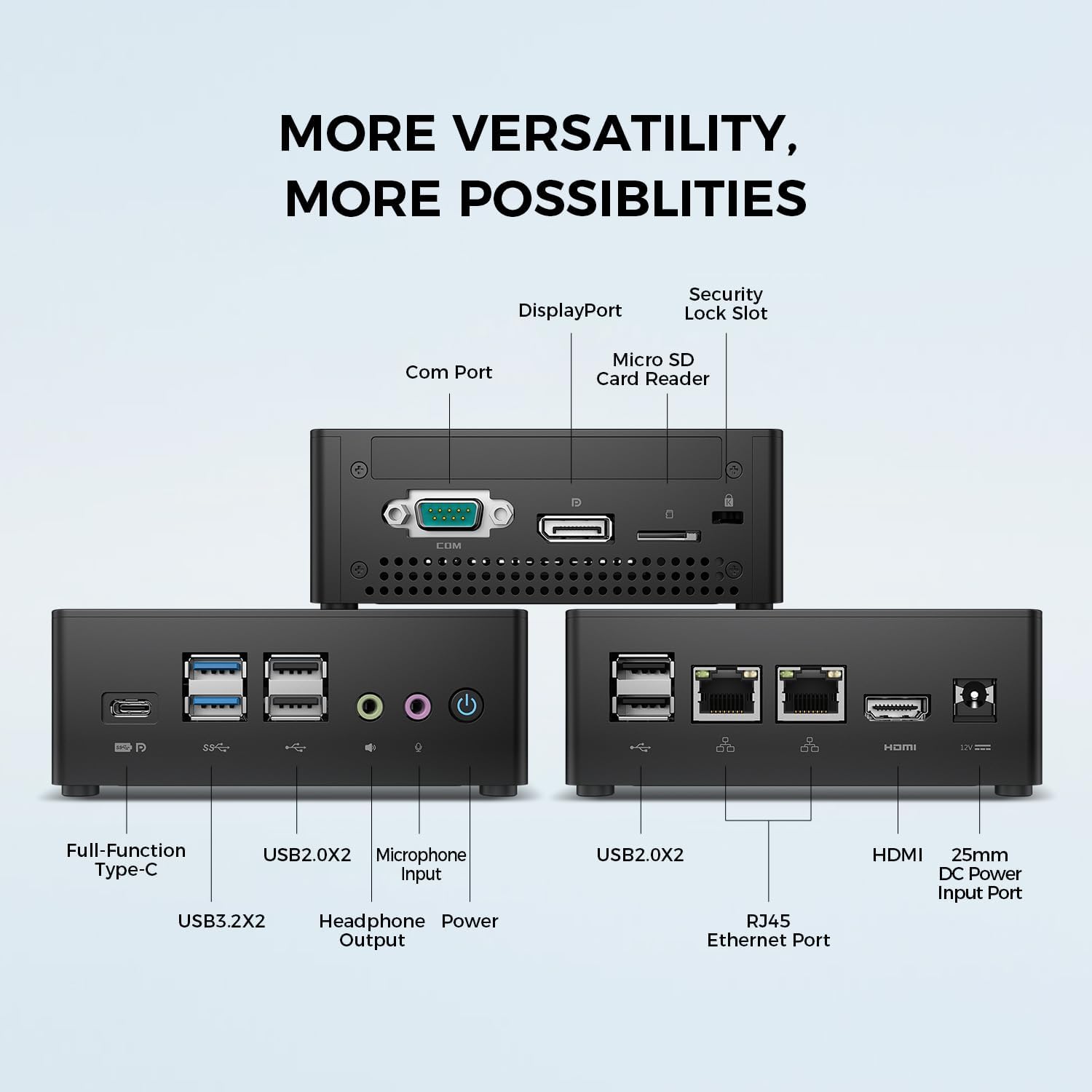
Immaġni: Dettaljata view of the TECLAST N15 Mini PC's front, side, and rear ports.
- Panel ta' quddiem: Full-Function Type-C (supports charging, data, video, audio), 2x USB 3.2, 2x USB 2.0, Headphone Output, Microphone Input, Power Button.
- Panel tal-ġenb: COM Port, DisplayPort, Micro SD Card Reader, Security Lock Slot.
- Panel ta 'wara: 2x USB 2.0, 2x RJ45 Ethernet Ports (2.5GbE), HDMI, DC Power Input.

Image: Dual 2.5GbE RJ45 Ethernet Ports for high-speed networking.
3.3. Sistema ta 'tkessiħ
The N15 Mini PC is designed for efficient heat dissipation to ensure stable and quiet operation. It features a 15W TDP, nickel-plated heat pipe, and a turbo fan, providing over 16000mm² of heat dissipation area.

Image: Internal cooling system design for quiet and efficient operation.
3.4. Disinn kompatt
With a compact volume of approximately 0.53L and a weight of 400g, the N15 Mini PC is highly portable and can be easily integrated into any workspace. Its aluminum body ensures durability.

Image: Compact size and lightweight design of the Mini PC.
4. Istruzzjonijiet ta' Setup
4.1. Konnessjoni Periferali
- Qabbad il-Monitor: Use the provided HDMI cable to connect your monitor to the HDMI port on the Mini PC. Alternatively, use a DisplayPort cable or a Full-Function Type-C cable for compatible monitors.
- Qabbad it-Tastiera u l-Maws: Plug your USB keyboard and mouse into any available USB ports on the Mini PC.
- Qabbad man-Netwerk (Mhux obbligatorju): For a wired connection, connect an Ethernet cable from your router or modem to one of the RJ45 ports on the Mini PC. For wireless, ensure your Wi-Fi network is available during initial setup.
- Qabbad l-Enerġija: Connect the power adapter to the DC Power Input port on the Mini PC, then plug the power cable into a wall outlet.
4.2. Tixgħel u Setup Inizjali
- Press the Power Button on the front of the Mini PC.
- The system will boot up. If it's the first time, it will guide you through the Windows operating system setup process. Follow the on-screen instructions to configure language, region, network, and user accounts.
- Kun żgur li d-drajvers kollha huma installati. Normalment, l-Aġġornament tal-Windows jieħu ħsieb dan awtomatikament.
5. Istruzzjonijiet Operattivi
5.1. Operazzjoni Bażika
Once setup is complete, your TECLAST N15 Mini PC functions like a standard desktop computer. You can launch applications, browse the internet, and manage files using your connected keyboard and mouse.
5.2. Konfigurazzjoni ta' Wiri Multiplu
The Mini PC supports connecting up to three 4K displays simultaneously, enhancing productivity and entertainment experiences.
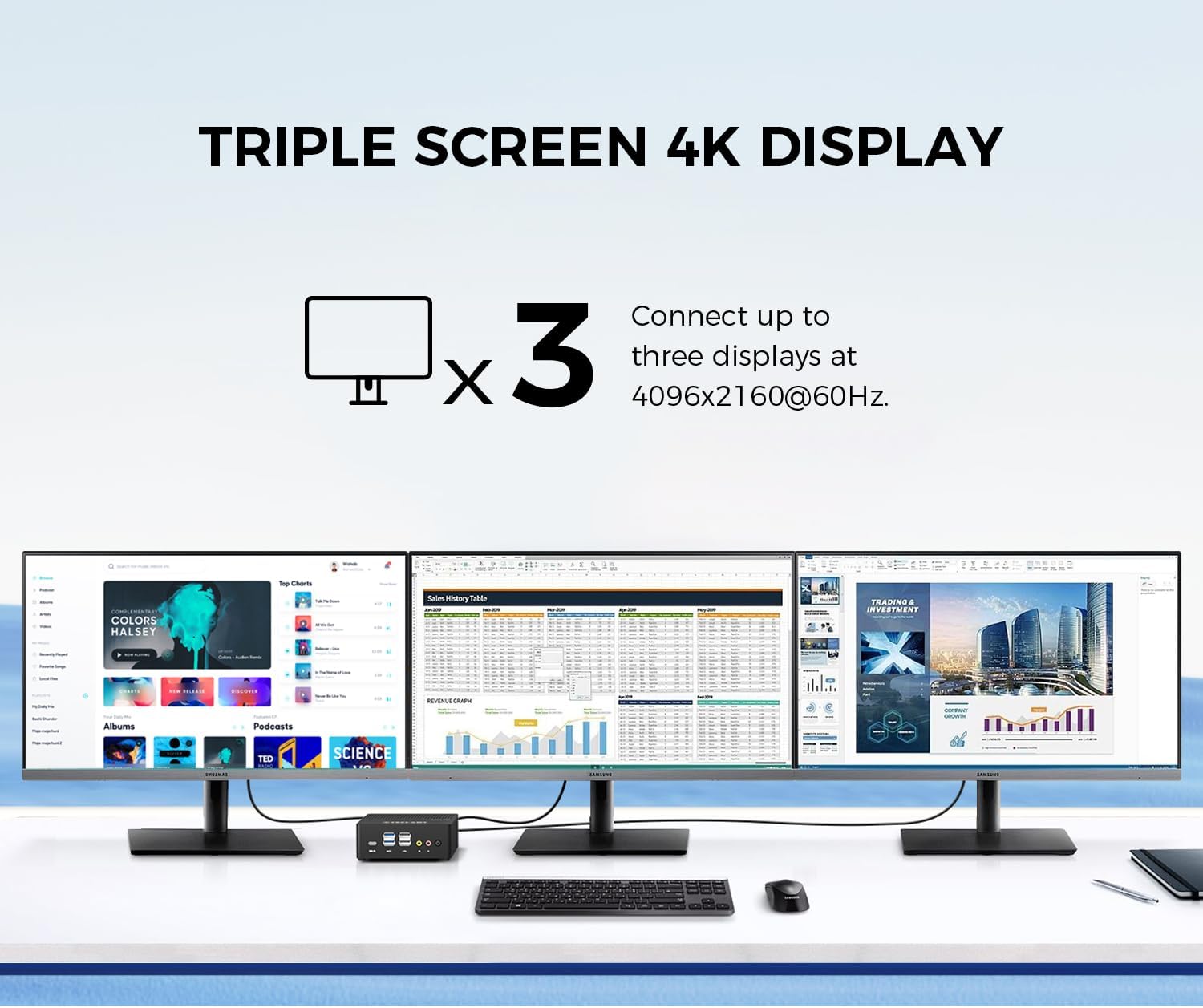
Image: Triple screen 4K display setup with the Mini PC.
- Connect your primary monitor via HDMI.
- Connect a second monitor via DisplayPort.
- Connect a third monitor via the Full-Function Type-C port (requires a compatible Type-C to DisplayPort/HDMI adapter or monitor).
- In Windows, right-click on the desktop and select "Display settings" to configure your multiple displays (extend, duplicate, or show only on one).
5.3. Konnettività bla fili
The Mini PC supports 2.4G+5G ac Wi-Fi and Bluetooth 4.2 for wireless connections.
- Wi-Fi: Access Wi-Fi settings in Windows to connect to your preferred wireless network.
- Bluetooth: Pair Bluetooth devices like keyboards, mice, or headphones through Windows Bluetooth settings.
6. Manutenzjoni
Manutenzjoni regolari tgħin biex tiżgura l-lonġevità u l-prestazzjoni ottimali tal-Mini PC tiegħek.
- Tindif: Use a soft, dry cloth to clean the exterior. For dust accumulation in vents, use compressed air. Ensure the device is powered off and unplugged before cleaning.
- Aġġornamenti tas-Software: Regularly check for and install Windows updates and driver updates to maintain system security and performance.
- Ġestjoni tal-Ħażna: Naddaf perjodikament dak li mhux meħtieġ files and applications to free up storage space and improve system responsiveness.
- Ventilazzjoni: Ensure the Mini PC is placed in a well-ventilated area and that its vents are not obstructed to prevent overheating.
7 Issolvi l-problemi
If you encounter issues with your TECLAST N15 Mini PC, refer to the following common troubleshooting steps:
| Ħruġ | Soluzzjoni Possibbli |
|---|---|
| L-ebda wiri fuq il-monitor | Check all cable connections (HDMI, DisplayPort, Type-C). Ensure the monitor is powered on and set to the correct input source. Try a different cable or monitor if possible. |
| Il-mini PC ma jixgħelx | Verify the power adapter is securely connected to both the Mini PC and a working power outlet. Try a different power outlet. |
| L-ebda konnessjoni tal-internet (Wi-Fi) | Check if Wi-Fi is enabled in Windows settings. Ensure you are connected to the correct network and have entered the password correctly. Restart your router/modem. |
| No internet connection (Wired) | Ensure the Ethernet cable is securely connected to both the Mini PC and your router/modem. Check the network status in Windows. Restart your router/modem. |
| Prestazzjoni bil-mod | Close unnecessary applications. Check for background processes consuming resources. Ensure sufficient free storage space. Run a system scan for malware. |
| Peripheral devices not recognized | Try connecting the device to a different USB port. Ensure device drivers are installed. Restart the Mini PC. |
If the issue persists after trying these steps, please contact TECLAST customer support for further assistance.
8. Speċifikazzjonijiet
Detailed technical specifications for the TECLAST N15 Mini PC:
| Karatteristika | Speċifikazzjoni |
|---|---|
| Brand | TECLAST |
| Numru tal-Mudell | N15 |
| Mudell tas-CPU | Intel Celeron N5095 |
| Veloċità tas-CPU | Up to 2.9 GHz (Turbo Frequency) |
| Għadd tal-proċessur | 4 |
| Memorja RAM Installata | 16 GB DDR4 |
| Daqs Massimu tal-Memorja RAM | 16 GB |
| Kapaċità tal-Ħżin tal-Memorja | 512 GB PCI-e 3.0 SSD |
| Koproċessur tal-Grafika | Grafika Intel UHD |
| Riżoluzzjoni tal-Wiri Massimu | 3840 x 2160 pixels (4K) |
| Interfaces tal-Output tal-Vidjo | HDMI, DisplayPort, Type-C |
| Teknoloġija tal-Konnettività | Ethernet (Dual RJ45 2.5GbE), HDMI, LAN, Wi-Fi (802.11ac), Bluetooth 4.2 |
| Portijiet USB totali | 6 (2x USB 3.2, 4x USB 2.0) |
| Piż tal-oġġett | 400 Gramm |
| Konsum tal-Enerġija | 15 Watts |
| Metodu tat-tkessiħ | Air (with Turbo Fan and Nickel-Plated Heat Pipe) |
| Kulur | Iswed |
9. Garanzija u Appoġġ
TECLAST products are designed for quality and reliability. For any product-related inquiries, technical support, or warranty claims, please contact TECLAST customer service. Most questions are answered within 24 hours.
For further assistance, please visit the official TECLAST webis-sit jew ikkuntattja direttament il-kanali ta' appoġġ tagħhom.
10. Vidjo tal-Prodott
Ara dan il-filmat uffiċjali tal-prodott għal idea viżwali aktar 'il fuqview of the TECLAST N15 Mini PC's features and connectivity.
Vidjo: Fuqview of the TECLAST N15 Mini PC, showcasing its design, ports, and internal components.