
1. Prodott Aktarview
The ASUS ROG G13CH is a high-performance gaming desktop PC designed to deliver an exceptional gaming experience. It features a 14th Gen Intel® Core™ i7 processor, an NVIDIA® GeForce RTX™ 4060 DUAL GPU, and runs on Windows 11. With 16GB of 4800MHz DDR5 RAM and fast NVMe™ PCIe® Gen4 SSD storage, this system ensures quick loading times and smooth multitasking.
The G13CH boasts a futuristic chassis with customizable interior RGB lighting and a front panel light bar. Its design is optimized for sustained performance, incorporating additional venting and distinct cooling zones for the CPU and GPU to maintain optimal temperatures and quiet operation.

Figure 1.1: ASUS ROG G13CH Gaming Desktop PC, showcasing id-disinn eleganti tiegħu u d-dawl integrat.
Karatteristiċi ewlenin:
- Prestazzjoni qawwija: Equipped with a 14th Gen Intel Core i7-14700F processor and NVIDIA GeForce RTX 4060 DUAL GPU for superior gaming and computing.
- Tkessiħ Effiċjenti: Airflow-optimized chassis with dedicated CPU and GPU zones and additional venting to keep components cool and noise levels low.
- Estetika personalizzabbli: Features interior RGB lighting and a front panel light bar, with options for a transparent or sleek metal side panel.
- Konnettività b'Veloċità Għolja: Supports Wi-Fi 6E for low-latency, high-speed wireless connections and a robust array of I/O ports for peripherals.
- Awdjo Immersiv: Dolby Atmos audio support and Two-Way AI Noise-Cancellation Technology for clear communication and rich soundscapes.
- Aura Sync Integration: Allows synchronization of lighting effects across compatible devices for a unified gaming setup.

Figura 1.2: Aktarview of the G13CH's core components: Windows 11, 14th Gen Intel Core i7-14700F, NVIDIA GeForce RTX 4060 DUAL, 16GB DDR5 RAM, and 1TB NVMe SSD.
2. X'hemm fil-Kaxxa
Upon unboxing your ASUS ROG G13CH, please verify that all the following components are included:
- ASUS ROG G13CH Desktop PC (Model: G13CHR-PS766)
- Tastiera bil-fili
- Ġurdien bil-fili
- Korda tal-Enerġija u Adapter
- Gwida għall-Utent (dan id-dokument)
3. Gwida ta' Setup
Follow these steps to set up your ASUS ROG G13CH gaming desktop:
- Iftaħ il-PC mill-pakkett: Carefully remove the desktop PC and all accessories from the packaging.
- Ikkonnettja l-Periferali:
- Connect your monitor(s) to the graphics card (GPU) ports on the back of the PC. These are typically located towards the bottom of the rear panel. Importanti: Ensure your monitor is connected to the dedicated graphics card (NVIDIA GeForce RTX 4060 DUAL) outputs, not the motherboard's integrated graphics ports, to utilize the full performance of your GPU.
- Connect the wired keyboard and mouse to the available USB ports.
- Qabbad kwalunkwe periferali ieħor bħal kelliema, headphones, jew drives esterni.
- Qabbad mal-Enerġija: Plug the power cord into the PC's power input, then plug the other end into a grounded electrical outlet.
- Qawwa Mixgħul: Press the power button located on the top front of the PC. The system will begin to boot up.
- Konfigurazzjoni Inizjali tal-Windows: Follow the on-screen instructions to complete the Windows 11 setup process. This includes selecting your region, language, connecting to a network, and creating a user account.
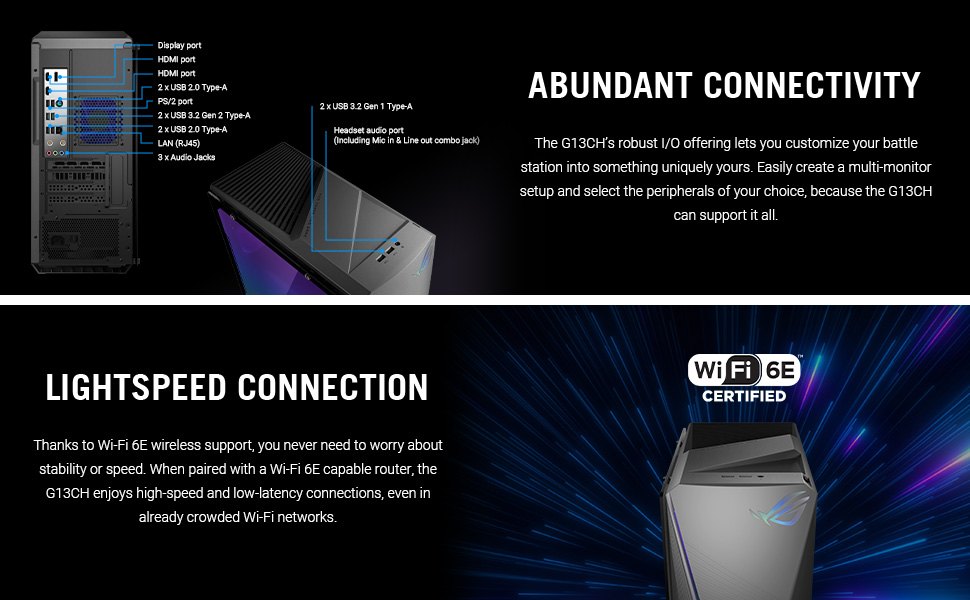
Figure 3.1: Rear and top panel I/O ports, illustrating connectivity options for monitors, USB devices, and audio.
4. It-Tħaddim tal-PC Tiegħek
Once set up, your ASUS ROG G13CH is ready for use. Here are some key operational aspects:
Sistema Operattiva Windows 11
Your PC comes pre-installed with Windows 11 Home. Familiarize yourself with the Windows 11 interface, including the Start Menu, Taskbar, and File Explorer. Regular Windows updates are crucial for security and performance.
Armoury Crate and Aura Sync
Armoury Crate is ASUS's unified software suite that allows you to monitor system performance, customize RGB lighting (Aura Sync), manage game profiles, and update drivers. Launch Armoury Crate from your desktop or Start Menu to personalize your gaming experience.

Figure 4.1: Aura Sync interface for customizing RGB lighting on your PC and compatible peripherals.
Esperjenza Awdjo
The G13CH supports Dolby Atmos audio, providing an immersive sound experience. Additionally, the Two-Way AI Noise-Cancellation Technology helps ensure clear voice communication during gaming or online meetings by filtering out background noise.

Figure 4.2: Visual representation of Dolby Atmos and AI Noise Cancellation features for enhanced audio.
5. Manutenzjoni
Proper maintenance ensures the longevity and optimal performance of your ASUS ROG G13CH.
Tindif
- Barra: Uża drapp ratba u mingħajr ħelu ftit dampImlaħlaħ bl-ilma jew b'soluzzjoni ħafifa tat-tindif biex timsaħ l-uċuħ ta' barra. Evita kimiċi ħarxa.
- Tneħħija tat-Trab: Regularly use compressed air to clear dust from the vents and fan grilles. This is crucial for maintaining optimal airflow and preventing overheating.

Figure 5.1: Illustration of the G13CH's airflow-optimized chassis with distinct cooling zones for CPU and GPU.
Aġġornamenti tas-Software
Keep your operating system, drivers (especially graphics drivers), and Armoury Crate software updated. This ensures compatibility, security, and performance improvements. You can typically check for updates through Windows Update and Armoury Crate.
6 Issolvi l-problemi
This section addresses common issues you might encounter with your ASUS ROG G13CH.
L-ebda Output tal-Wiri
- Iċċekkja l-Konnessjonijiet tal-Cable: Ensure your monitor cable is securely connected to the graphics card (GPU) ports on the back of the PC, not the motherboard's integrated graphics ports.
- Enerġija tal-monitor: Verify your monitor is powered on and set to the correct input source.
- Ibda mill-ġdid: Try restarting the PC.
Performance Issues / Lag
- Aġġornamenti tas-sewwieq: Ensure your graphics drivers and other system drivers are up to date.
- Sfond Applikazzjonijiet: Agħlaq l-applikazzjonijiet bla bżonn li jkunu qed jaħdmu fl-isfond.
- Akkumulazzjoni tat-Trab: Check for dust accumulation in the PC's vents and clean them as described in the Maintenance section. Overheating can lead to performance throttling.
- Kapaċità RAM: Note that while the system has four RAM slots, the maximum supported memory is 64GB. Attempting to install 128GB may prevent the system from booting. Ensure any RAM upgrades adhere to the 64GB maximum.
Ebda Konnessjoni tal-Internet
- Wi-Fi: Check if Wi-Fi is enabled in Windows settings and ensure you are connected to the correct network.
- Ethernet: If using a wired connection, ensure the Ethernet cable is securely plugged into both the PC and your router/modem.
- Router/Modem: Erġa' ibda r-router u l-modem tiegħek.
Jekk il-problemi jippersistu, jekk jogħġbok irreferi għat-taqsima tal-Garanzija u l-Appoġġ għal aktar assistenza.
7. Speċifikazzjonijiet
Detailed technical specifications for the ASUS ROG G13CH (G13CHR-PS766):
| Karatteristika | Speċifikazzjoni |
|---|---|
| Isem tal-Mudell | G13CHR-PS766 |
| Proċessur | Intel® Core™ i7-14700F (5.2 GHz) |
| Sistema Operattiva | Windows 11 Home |
| Karta Grafika | NVIDIA® GeForce RTX™ 4060 DUAL (8 GB GDDR6) |
| RAM | 16GB DDR5 (4800 MHz) - Max 64GB |
| Ħażna | 1TB NVMe™ PCIe® Gen4 SSD (expandable up to 2TB SSD and 1TB HDD) |
| Konnettività | Wi-Fi 6E, LAN (RJ45) |
| Portijiet USB | 4 x USB 2.0, 2 x USB 3.0, 2 x USB 3.2 Gen 2 Type-A, 1 x USB 3.2 Gen 1 Type-A (front) |
| Portijiet Awdjo | 3 x Audio Jacks (rear), Headset audio port (front) |
| Output tal-vidjo | DisplayPort, HDMI port (on GPU) |
| Dimensjonijiet (LxWxH) | 7.09 x 16.93 x 16.85 pulzieri |
| Piż tal-oġġett | 26.2 liri |
| Kulur | Griż Skur Estrem |
8. Garanzija u Appoġġ
ASUS is committed to providing reliable products and support for your ROG G13CH desktop PC.
Informazzjoni dwar Garanzija
Kull Desktop ROG jiġi b'minimu 12-il xahar garanzija, offering expert support, thorough diagnostics, and genuine parts if a repair is needed. Additionally, ASUS provides a Garanzija ta '90 jum fuq il-partijiet kollha ta' sostituzzjoni taħt garanzija, u b'hekk jiġu żgurati tiswijiet mingħajr tbatija.
Appoġġ għall-Klijent
Għal assistenza teknika, soluzzjoni ta' problemi lil hinn minn dan il-manwal, jew talbiet ta' garanzija, jekk jogħġbok ikkuntattja l-appoġġ għall-klijenti tal-ASUS. Tista' ssib informazzjoni ta' kuntatt u riżorsi addizzjonali fuq l-appoġġ uffiċjali tal-ASUS. websit:
- Appoġġ ASUS Websit: www.asus.com/support/
- Reġistrazzjoni tal-Prodott: Register your product through MyASUS to receive important updates and access full support features.

Figure 8.1: Information regarding ROG Desktop benefits and warranty details.