
Introduzzjoni
Thank you for choosing the Vieta Pro Karaoke Party Microphone. This device combines a high-quality microphone with an integrated speaker, designed for an engaging karaoke experience. It features True Wireless technology, allowing two microphones to connect to a single device, and offers various sound modes and connectivity options.
Kontenut tal-Pakkett
- Vieta Pro Karaoke Party Microphone with Integrated Speaker
- Kejbil tal-Iċċarġjar (USB-C)
- Manwal għall-Utent

Image: The retail box of the Vieta Pro Karaoke Party Microphone, showing the product and its features.
Prodott Overview
Familiarize yourself with the main components and controls of your Vieta Pro Karaoke Party Microphone.

Immaġni: Quddiem view of the Vieta Pro Karaoke Party Microphone, highlighting the control buttons for power, volume, mode, and Bluetooth.
Kontrolli u Portijiet:
- Buttuna tal-Qawwa: Press and hold to turn on/off. Short press to switch modes.
- Buttuni tal-Volum (+/-): Aġġusta l-volum tal-kelliem.
- Buttuna tal-Modalità (M): Cycle through sound effects or modes.
- Buttuna Bluetooth: Ibda l-akkoppjar tal-Bluetooth.
- Port USB-C: Għall-iċċarġjar tal-apparat.
- 3.5mm Audio Jack (Input): Qabbad sorsi awdjo esterni.
- 3.5mm Audio Jack (Output): Qabbad headphones jew kelliema esterni.
- Buttuna tal-Modalità Dawl: Change or turn off LED lighting effects.
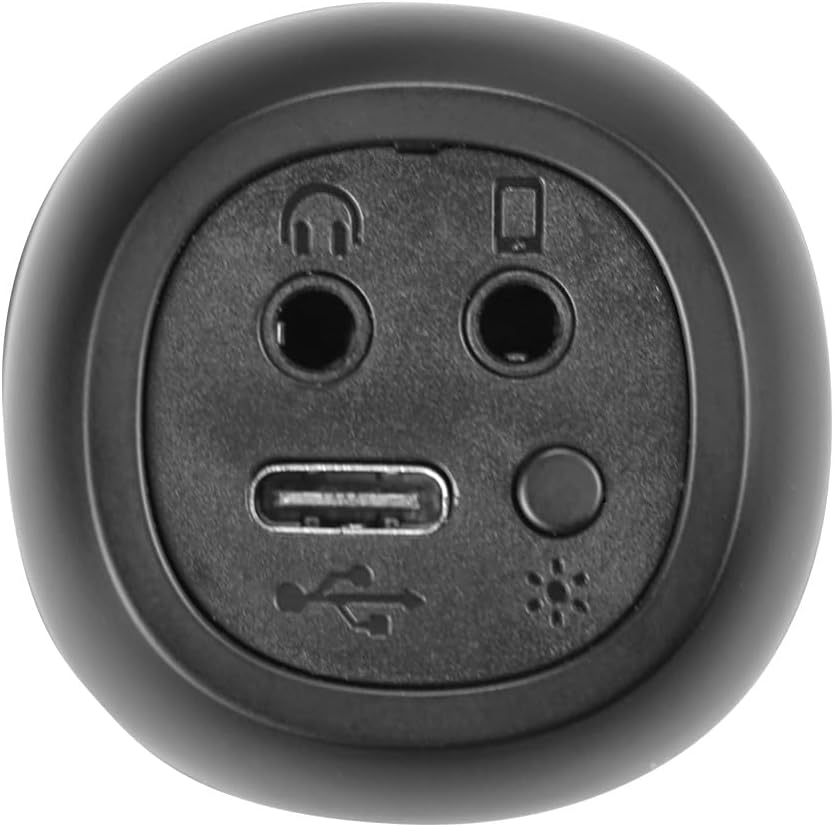
Immaġni: Close-up view of the bottom of the microphone, showing the USB-C charging port, 3.5mm audio input/output jacks, and the light mode button.
Setup u Konnessjoni
1. Iċċarġjar tal-Mikrofonu
Before first use, fully charge the microphone. Connect the provided USB-C cable to the microphone's USB-C port and the other end to a USB power adapter (not included) or a computer's USB port. The battery indicator light will show charging status.
2. Tixgħil / Mitfi
Agħfas u żomm il- Buttuna tal-Qawwa for approximately 3 seconds to turn the microphone on or off. A sound prompt will indicate the power status.
3. Tqabbil tal-Bluetooth
- Turn on the microphone. It will automatically enter Bluetooth pairing mode, indicated by a flashing Bluetooth light.
- Fuq l-ismartphone, it-tablet, jew il-kompjuter tiegħek, attiva l-Bluetooth u fittex apparati disponibbli.
- Select "Vieta Pro Karaoke Party" from the list of devices.
- Once connected, a sound prompt will confirm successful pairing, and the Bluetooth light will stop flashing.
4. True Wireless Connection (Connecting Two Microphones)
To use two Vieta Pro Karaoke Party microphones simultaneously with one device:
- Ensure both microphones are powered on and not connected to any other Bluetooth device.
- On one microphone (this will be the primary), double-press the Buttuna Bluetooth. It will enter True Wireless pairing mode.
- The primary microphone will search for the second microphone. Once connected, a sound prompt will confirm the True Wireless connection.
- Now, connect the primary microphone to your device via Bluetooth as described in step 3. Both microphones will now output audio from your device.

Image: Two individuals holding and using Vieta Pro Karaoke Party Microphones, demonstrating the True Wireless feature.
5. Konnessjoni bil-Wajer (AUX)
Connect an external audio source (e.g., MP3 player) to the microphone using a 3.5mm audio cable (not included) plugged into the 3.5mm audio input jack.
Istruzzjonijiet Operattivi
1. Volum ta 'aġġustament
Uża l- Volum + u Volum - buttons on the microphone to adjust the speaker output volume. You can also control the volume from your connected device.
2. Changing Sound Modes/Effects
Agħfas il- Buttuna tal-Modalità (M) repeatedly to cycle through the four available sound configuration modes or voice effects. Experiment to find your preferred sound.
3. Voice Reduction Feature
This feature allows you to reduce the vocal track of a song, making it easier to sing along. To activate or deactivate this feature, refer to the specific instructions in the full manual or experiment with the Buttuna tal-Modalità (M) or a dedicated button if present (not explicitly detailed in provided data, but mentioned as a feature).
4. Reġistrazzjoni
The microphone supports one-touch recording. Connect the microphone to a compatible recording device (e.g., smartphone with a recording app) via Bluetooth or the 3.5mm output jack. Press the dedicated Buttuna Reġistrazzjoni (if available, or refer to the full manual for specific button assignment) to start and stop recording.
5. Effetti tad-Dawl LED
Agħfas il- Buttuna tal-Modalità tad-Dawl (located near the ports at the bottom) to change the LED lighting patterns or turn them off.

Image: Close-up of the Vieta Pro Karaoke Party Microphone's speaker grille, showing the integrated LED lighting effects.
Manutenzjoni
- Tindif: Use a soft, dry cloth to clean the microphone's surface. Do not use abrasive cleaners or solvents.
- Ħażna: Aħżen il-mikrofonu f'post frisk u niexef 'il bogħod mix-xemx diretta u minn temperaturi estremi.
- Kura tal-batterija: Biex ittawwal il-ħajja tal-batterija, evita li tiċċarġja kompletament il-batterija ta' spiss. Iċċarġja l-apparat regolarment, anke jekk ma jkunx qed jintuża għal perjodi twal.
- Espożizzjoni għall-Ilma: Dan l-apparat mhuwiex reżistenti għall-ilma. Evita l-espożizzjoni għall-ilma jew umdità għolja.
Issolvi l-problemi
| Problema | Kawża Possibbli | Soluzzjoni |
|---|---|---|
| Ebda qawwa | Il-batterija hija eżawrita. | Iċċarġja l-mikrofonu billi tuża l-kejbil USB-C. |
| Ma tistax tikkonnettja permezz tal-Bluetooth | Bluetooth is off on the device; microphone is already connected to another device; microphone is out of range. | Ensure Bluetooth is enabled on your device. Disconnect from other devices. Move microphone closer to your device (within 10 meters). Restart both devices. |
| Ebda output tal-ħoss | Volume is too low; microphone is muted; incorrect input source. | Increase volume on both the microphone and your connected device. Check if the microphone is in the correct operating mode. |
| True Wireless connection fails | One or both microphones are already paired; microphones are too far apart. | Ensure both microphones are unpaired from other devices. Place them close to each other during True Wireless pairing. Follow True Wireless pairing steps carefully. |
Speċifikazzjonijiet
| Karatteristika | Dettall |
|---|---|
| Isem tal-Mudell | Karaoke Party |
| Brand | Vieta Pro |
| Teknoloġija tal-Konnettività | True Wireless, Bluetooth |
| Tip ta' Konnettur | USB-C, 3.5mm Jack |
| Output ta 'Qawwa | 18 W |
| Ħajja tal-batterija | Sa 10 sigħat |
| Tip ta 'batterija | 1 Lithium-ion (inkluża) |
| Medda ta' Frekwenzi | 50 sa 15,000 Hz |
| Impedenza | 600 Ohms |
| Mudell Polari | Unidirezzjonali |
| Apparati Kompatibbli | Kompjuter Personali, Smartphone |
| Karatteristiċi Speċjali | Volume Control, 1-Touch Recording, Lighting Modes, Battery Indicator, Radio |
| Piż | 337 Gramm |
| Materjal | Plastik |
Garanzija u Appoġġ
For warranty information and technical support, please contact the manufacturer, FRAMASON AUDIO SA, or your local retailer. Keep your proof of purchase for any warranty claims.
Manufacturer: FRAMASON AUDIO SA