
LENCENT BT23R
LENCENT Bluetooth 5.3 FM Transmitter User Manual
Model: BT23R
1. Introduzzjoni
This manual provides comprehensive instructions for the safe and effective use of your LENCENT Bluetooth 5.3 FM Transmitter. This device is designed to enhance your in-car audio experience by providing wireless audio streaming, hands-free calling, and fast charging capabilities through your vehicle's cigarette lighter socket.
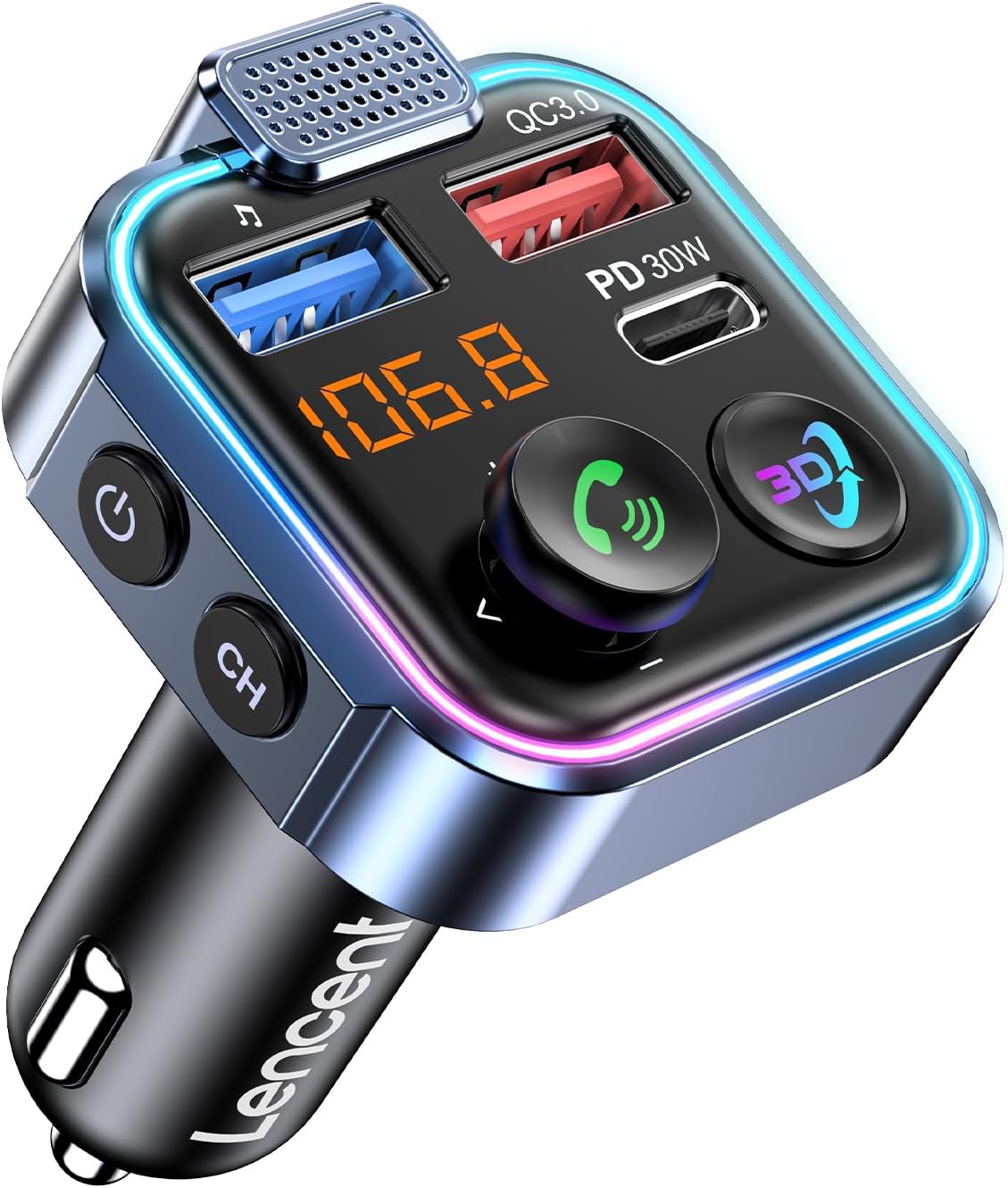
Image: The LENCENT Bluetooth 5.3 FM Transmitter, showing its compact design, LED display, USB-A and USB-C charging ports, and control buttons.
2. Karatteristiċi tal-prodott
- Immersive 3D Stereo Audio Effect: Experience enhanced sound quality with a dedicated 3D audio button for a concert-like atmosphere. Supports music playback from your phone or a U-Disk (up to 64GB, WMA/MP3/WAV/APE/FLAC formats).
- PD 30W and QC 18W Fast Charging: Equipped with PD3.0 30W (Type-C) and QC3.0 18W (USB-A) ports, allowing simultaneous high-speed charging for two devices, with a maximum total output of 48W.
- 7-Color LED Design and Light Off: Features customizable LED lights in 7 colors (red, purple, cyan, green, blue, gradient) that can sync with music or be turned off according to preference.
- Bluetooth V5.3 and Hands-Free Calling: Provides a fast and stable Bluetooth connection for audio streaming. Includes a built-in microphone and CVC noise reduction technology for clear hands-free calls. Voice assistant activation is supported.
- Advanced Security and Universal Compatibility: Built-in safety features protect against overcurrent, overvoltage, overheating, and short-circuits. Compatible with most Bluetooth-enabled devices (smartphones, tablets, etc.) and vehicles (12V-24V).

Image: Visual representation of the 3D audio effect feature, showing sound waves emanating from the device.

Image: The transmitter displaying its various 7-color LED lighting modes, enhancing the car's ambiance.
3. Kontenut tal-Pakkett
Jekk jogħġbok iċċekkja l-pakkett għall-oġġetti li ġejjin:
- LENCENT Bluetooth 5.3 FM Transmitter Unit
- Manwal għall-Utent
4. Dijagramma tal-Prodott u Komponenti
Immaġni: Quddiem view of the LENCENT FM Transmitter, highlighting its various ports and controls.
- Mikrofonu: Għal sejħiet mingħajr idejn.
- USB-A Port (QC3.0): Quick Charge 3.0 compatible port for fast charging.
- USB-C Port (PD 30W): Power Delivery 30W compatible port for ultra-fast charging.
- Wiri LED: Shows FM frequency and other status indicators.
- Multi-function Joystick (Call Button): Press to answer/end calls, push left/right for track control, push up/down for volume control.
- 3D Audio Button: Activates/deactivates the 3D stereo audio effect.
- Buttuna tal-Qawwa: Ixgħel/itfi l-apparat.
- CH (Channel) Button: Used to enter FM frequency adjustment mode.
- Cigarette Lighter Plug: Connects the device to your car's power socket.
5. Istruzzjonijiet ta' Setup
Follow these steps to set up your LENCENT FM Transmitter:
- Daħħal it-Trasmettitur: Plug the LENCENT FM Transmitter into your vehicle's 12V-24V cigarette lighter socket. The device will power on automatically and display the current FM frequency.
- Find an Empty FM Frequency: Tune your car's FM radio to an empty frequency. An empty frequency is one with static or no active broadcast. Ideally, choose a frequency between 87.5 MHz and 108.0 MHz that is not used by local radio stations.
- Frekwenza tat-Trasmettitur tal-Qabbel:
- Agħfas il- "CH" button on the transmitter. The frequency display will start flashing.
- Use the multi-function joystick (push left/right) to adjust the transmitter's frequency to match the empty frequency you found on your car radio.
- Once matched, wait a few seconds for the frequency to stop flashing, indicating it's set.
- Pair with Your Phone via Bluetooth:
- Fuq l-ismartphone tiegħek, attiva l-Bluetooth u fittex apparati disponibbli.
- Agħżel "BT23R" (or similar model name) from the list of devices.
- Once paired, the transmitter's display may show a Bluetooth icon, and you will hear a confirmation tone.

Image: A visual guide demonstrating the three setup steps: tuning the car radio, adjusting the transmitter's frequency, and Bluetooth pairing.
6. Istruzzjonijiet Operattivi
6.1 Daqq tal-Awdjo
After successful Bluetooth pairing, you can stream audio from your smartphone to your car's stereo system.
- Streaming Bluetooth: Play music or audio from your phone's apps (e.g., Spotify, YouTube, Apple Music) directly through your car speakers.
- Daqq tad-Diska U: Insert a U-Disk (USB flash drive) into the USB-A port. The transmitter will automatically detect and play audio files (WMA/MP3/WAV/APE/FLAC formats, up to 64GB).
- Kontroll tal-Volum: Push the multi-function joystick up or isfel to adjust the volume. It is recommended to set your phone's volume to maximum and control the overall volume using your car's stereo.
- Kontroll tal-binarji: Push the multi-function joystick xellug għall-binarju preċedenti u dritt għall-binarju li jmiss.
- 3D Audio Effect: Agħfas il- "3D" button to activate or deactivate the immersive 3D stereo audio effect.

Image: Diagram illustrating the simple operation of the multi-function joystick for volume and track control during music playback.
6.2 Sejħiet mingħajr idejn
The built-in microphone and CVC noise reduction technology ensure clear communication during calls.
- Irrispondi Sejħa: Press the multi-function joystick (call button) once.
- Sejjaħ Hang Up: Press the multi-function joystick (call button) once during a call.
- Irrifjuta Sejħa: Press and hold the multi-function joystick (call button) for 2 seconds.
- Isemmi mill-ġdid l-Aħħar Numru: Double-press the multi-function joystick (call button).
- Attiva l-Assistent tal-Vuċi: Press and hold the multi-function joystick (call button) for 3 seconds.

Image: A visual guide showing how to use the multi-function joystick for various hands-free calling operations.
6.3 Iċċarġjar tal-Apparat
Utilize the fast-charging ports to power your mobile devices.
- PD 30W (Type-C) Port: Ideal for fast charging compatible devices like iPhones and iPads.
- QC 18W (USB-A) Port: Suitable for quick charging Android phones and other QC3.0 compatible devices.

Image: The LENCENT FM Transmitter plugged into a car's power outlet, simultaneously charging an Apple phone via PD 30W and an Android phone via QC 18W.
7. Manutenzjoni
To ensure the longevity and optimal performance of your LENCENT FM Transmitter, follow these maintenance guidelines:
- Tindif: Use a soft, dry cloth to clean the device. Do not use liquid cleaners or aerosols, as they may damage the electronics.
- Ħażna: Meta ma tkunx qed tużah għal perjodi twal, aħżen l-apparat f'post frisk u niexef 'il bogħod mix-xemx diretta u minn temperaturi estremi.
- Immaniġġjar: Evita li twaqqa' l-apparat jew li tissottomettih għal impatti qawwija, li jistgħu jagħmlu ħsara lill-komponenti interni.
- Sors tal-Enerġija: Always ensure the device is plugged into a 12V-24V DC power supply as specified.
8 Issolvi l-problemi
If you encounter issues with your LENCENT FM Transmitter, refer to the following common problems and solutions:
| Problema | Kawża Possibbli | Soluzzjoni |
|---|---|---|
| Kwalità Awdjo Statika jew Fqira | Interference from other radio stations; weak FM signal. |
|
| Ma nistax nippara permezz tal-Bluetooth | Bluetooth not enabled; device not in pairing mode; incorrect device selected. |
|
| Ebda Output tal-Ħoss | Incorrect FM frequency; low volume; device not powered. |
|
| Iċċarġjar Mhux Taħdem | Loose connection; incompatible cable; device not supported. |
|
9. Speċifikazzjonijiet
| Karatteristika | Dettall |
|---|---|
| Numru tal-Mudell | BT23R |
| Verżjoni Bluetooth | 5.3 |
| Input Voltage | DC 12V-24V |
| Output USB-C | PD 30W |
| Output USB-A | QC 18W |
| Qawwa tal-Ħruġ Totali | Max 48W |
| Medda ta' Frekwenzi FM | 87.5 MHz - 108.0 MHz |
| U-Disk Support | ≤64GB (WMA/MP3/WAV/APE/FLAC formats) |
| Dimensjonijiet tal-Prodott | 3.35 x 1.85 x 1.85 pulzieri |
| Piż tal-oġġett | 1.45 uqija |
| Materjal | Plastic, Iron |
| Karatteristiċi Speċjali | 3D Audio Effect, 7-Color LED, Hands-Free Calls, Noise Cancellation |
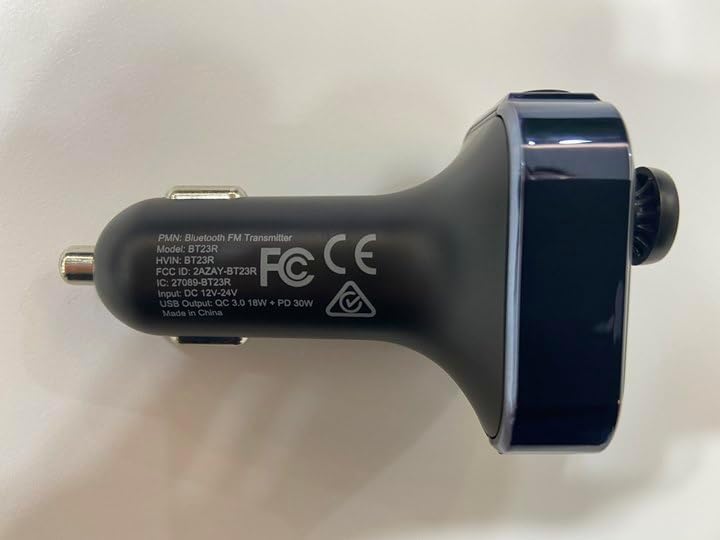
Image: The underside of the LENCENT FM Transmitter, displaying regulatory markings and model information.
10. Garanzija u Appoġġ
For warranty information and customer support, please refer to the documentation provided with your purchase or contact the seller directly. LENCENT is committed to providing quality products and attentive customer service.
Seller: LencentUS
Video: An official product video from LENCENT, demonstrating the key features and functionality of the Bluetooth FM Transmitter, including 3D audio, Bluetooth 5.3 connectivity, and fast charging capabilities.
Ask a question about this manual
Ask about setup, troubleshooting, compatibility, parts, safety, or missing instructions. Manuals+ will review the question and use this page’s manual context to help answer it.