
SYLVOX 15.6 inch Kitchen Smart TV
SYLVOX 15.6 inch Kitchen Smart TV User Manual
Model: 15.6 inch Kitchen Smart TV
1. Introduzzjoni
This user manual provides comprehensive instructions for the SYLVOX 15.6 inch Kitchen Smart TV. It covers setup, operation, maintenance, and troubleshooting to ensure optimal performance and user experience. Please read this manual thoroughly before using the product.
Prodott Overview
The SYLVOX 15.6 inch Kitchen Smart TV is designed for versatile use in kitchen environments, offering entertainment and smart functionalities. Its compact and foldable design allows for various installation options, including under-cabinet and wall mounting. Featuring a 1080P Full HD display, Google TV with voice assistant, built-in speakers, and multiple connectivity options, it provides a high-quality viewing and interactive experience.
2. Informazzjoni dwar is-Sigurtà
Dejjem segwi l-linji gwida tas-sigurtà li ġejjin biex tevita xokk elettriku, nar, jew ħsara lill-apparat:
- Tiżgura l-provvista tal-enerġija voltage jaqbel mar-rekwiżiti tal-prodott.
- Tesponix it-TV għax-xita jew l-umdità.
- Evita li timblokka l-fetħiet tal-ventilazzjoni biex tevita sħana żejda.
- Do not attempt to repair the device yourself. Refer all servicing to qualified personnel.
- Żomm it-TV 'il bogħod mix-xemx diretta u minn sorsi ta' sħana.
3. X'hemm fil-Kaxxa
Ivverifika li l-komponenti kollha huma preżenti meta tiftaħ il-kaxxa:
- 15.6 pulzier Smart TV
- Adapter
- Kontroll mill-bogħod
- Manwal tal-Utent
- Bażi ta 'kontroll mill-bogħod
- Fixed Fittings
- Batteriji (għall-kontroll remot)

Image: All items included in the SYLVOX 15.6 inch Kitchen Smart TV package, including the TV, remote, adapter, and mounting accessories.
4. Setup u Installazzjoni
Għażliet ta 'Immuntar
The SYLVOX Kitchen TV offers flexible installation to suit your space:
- Immuntar taħt il-Kabinett: The TV features a foldable bracket that allows it to be neatly tucked away under kitchen cabinets when not in use. It can fold from 0-90 degrees.
- Immuntar tal-ħajt: For a fixed position, the TV can be mounted on a wall. The bracket allows for horizontal adjustment of ±45 degrees.
- Poġġiment tal-Mejda: The TV can also be placed on a countertop or table using its integrated stand.

Image: The SYLVOX Kitchen TV shown with its foldable bracket extended, ready for under-cabinet or wall mounting.

Image: Diagram illustrating the dimensions of the SYLVOX Kitchen TV, including screen size and overall unit measurements.

Immaġni: Ġenb view of the SYLVOX Kitchen TV, highlighting its slim profile and the dimensions of the mounting bracket.

Immaġni: Wara view of the SYLVOX Kitchen TV, displaying the various input and output ports available for connectivity.
Qawwa tal-Konnessjoni
Connect the provided adapter to the TV's power input and then plug it into a standard electrical outlet. Ensure the connection is secure.
5. Istruzzjonijiet Operattivi
Kontroll mill-bogħod
The SYLVOX Kitchen TV comes with a Bluetooth remote control featuring voice control capabilities. Insert the provided batteries into the remote control before first use.
- Buttuna tal-Qawwa: Ixgħel jew jitfi t-TV.
- Pad tan-Navigazzjoni: Use the directional arrows and center 'OK' button to navigate menus and select options.
- Buttuna tal-Kontroll tal-Vuċi: Press and hold to activate the voice assistant for commands and searches.
- Buttuni tal-Volum: Aġġusta l-volum tal-awdjo.
- Buttuni tal-Kanal: Change TV channels (if connected to an antenna/cable).
- Buttuni ta' Shortcut tal-App: Dedicated buttons for popular streaming services like Netflix and YouTube.
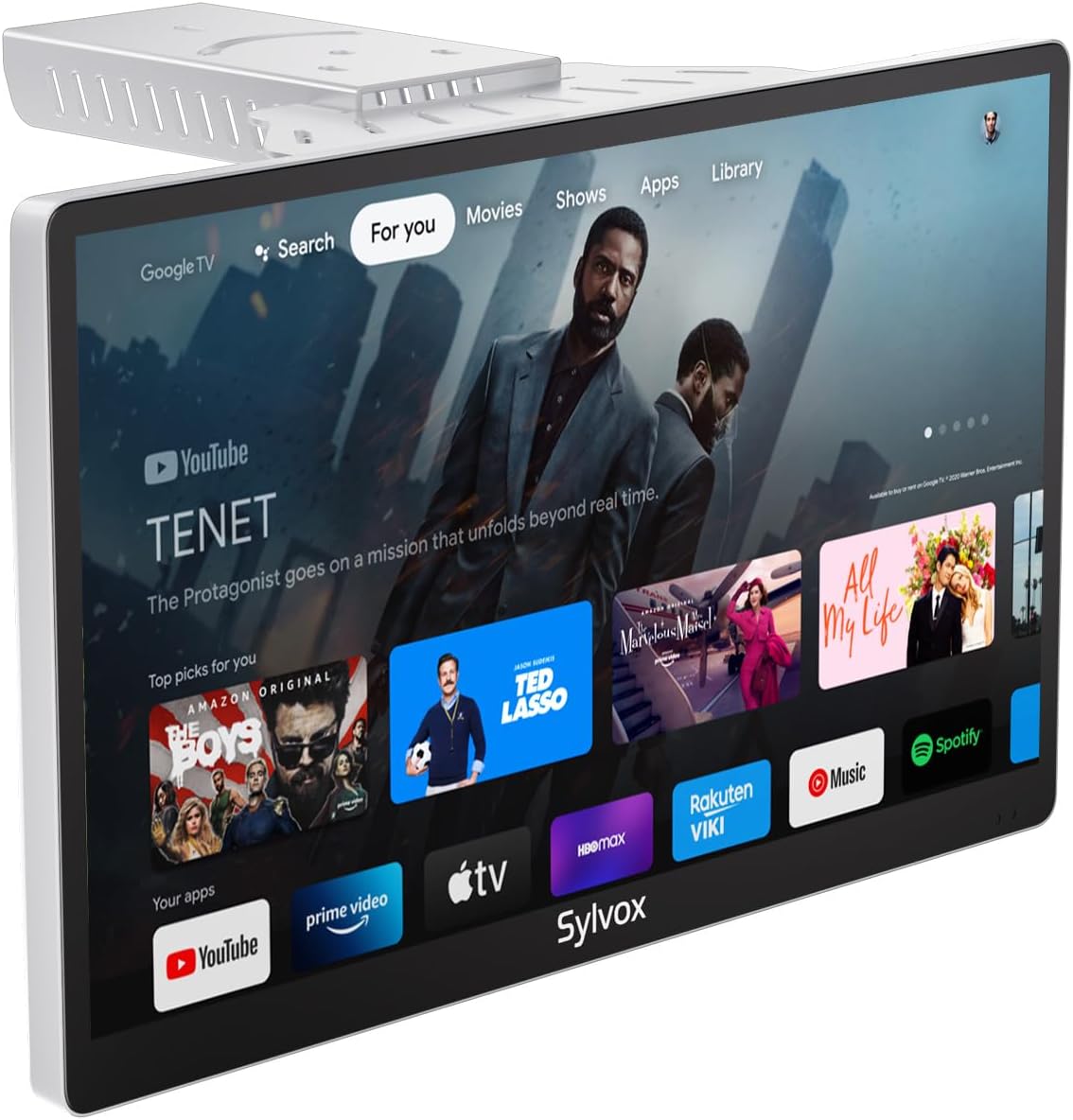
Image: The SYLVOX Kitchen TV screen showing the Google TV interface with various streaming app icons.
Interfaċċja tat-TV tal-Google
The TV runs on Google TV, providing access to a vast library of content and applications. The main interface offers personalized recommendations and easy access to your installed apps.
- Għalik: Rakkomandazzjonijiet ta' kontenut personalizzati.
- Live: Access to live TV channels (requires antenna or compatible service).
- Apps: Fittex u tniedi l-applikazzjonijiet installati.
- Librerija: Aċċessa l-kontenut mixtri jew mikri tiegħek.
Konnettività
It-TV jappoġġja diversi għażliet ta' konnettività:
- Wi-Fi: Qabbad man-netwerk mingħajr fili tad-dar tiegħek għal aċċess għall-internet u streaming.
- Bluetooth: Pair with external audio devices like headphones or speakers.
- Chromecast inkorporat: Itfa’ kontenut direttament mill-ismartphone jew mit-tablet tiegħek għat-TV.
- Portijiet HDMI: Connect external devices such as gaming consoles, Blu-ray players, or set-top boxes.
- Portijiet USB: Daqq tal-midja files minn USB drives.
- Coaxial Antenna Input: Qabbad antenna għal kanali tax-xandir bl-ajru.

Image: A user casting content from a smartphone to the SYLVOX Kitchen TV, demonstrating the built-in Chromecast feature.
6. Manutenzjoni u Kura
- Tindif: Uża drapp artab u niexef biex tnaddaf l-iskrin u l-barra. Għal marki iebsa, neħħi ftit.ampLaħlaħ id-drapp bl-ilma. Evita kimiċi ħarxa jew materjali li joborxu.
- Ventilazzjoni: Ensure adequate airflow around the TV to prevent overheating. Do not cover ventilation slots.
- Ħażna: Jekk se taħżen it-TV għal perjodu estiż, skonnettjah mill-elettriku u aħżnu f'post frisk u niexef.
7 Issolvi l-problemi
| Problema | Kawża Possibbli | Soluzzjoni |
|---|---|---|
| Ebda Qawwa | Power cable not connected; Outlet not working. | Iċċekkja l-konnessjoni tal-kejbil tal-enerġija; Ipprova sokit differenti. |
| Ebda Stampa | Incorrect input source; Loose HDMI/antenna cable. | Select correct input source; Secure cable connections. |
| Ebda Ħoss | Volume too low or muted; External audio device issue. | Increase volume/unmute; Check external audio connections. |
| Remote Mhux Jirrispondi | Batteries dead; Remote not paired. | Replace batteries; Re-pair remote control (refer to Google TV pairing instructions). |
| Kwistjonijiet ta' Konnessjoni Wi-Fi | Password mhux korretta; Router 'il bogħod wisq; Problema tan-netwerk. | Verify password; Move TV closer to router; Restart router. |
8. Speċifikazzjonijiet
| Karatteristika | Dettall |
|---|---|
| Brand | SYLVOX |
| Mudell | 15.6 inch Kitchen Smart TV |
| Daqs tal-Iskrin | 15.6 Pulzier |
| Teknoloġija tal-Wiri | LED |
| Riżoluzzjoni | Full HD ta '1080p |
| Riffriskar Rata | 60 Hz |
| Sistema Operattiva | Google TV |
| Karatteristiċi Speċjali | Google TV, Foldable bracket, Under-cabinet/Wall mountable, Lightweight, Voice Remote Control, Chromecast Built-in, Built-in Speakers |
| Konnettività | Ethernet, Wireless, WiFi, Bluetooth, HDMI, USB |
| Piż tal-oġġett | 6.25 liri |
| Dimensjonijiet tal-Prodott | 1.4 x 14.28 x 8.76 pulzieri |
| Konsum tal-enerġija fuq il-modalità | 16.0 watt |
| Konsum tal-enerġija (annwali) | 23040 Watt-hours per year |
9. Garanzija u Appoġġ
SYLVOX offers the following support for your product:
- 12-month free defect protection: Covers manufacturing defects for one year from the date of purchase.
- Free returns for quality issues: If the product has quality-related issues, free returns are available.
- 30-day hassle-free returns: Returns for any reason are accepted within 30 days, requiring original packaging.
For further assistance, please refer to the official SYLVOX websit jew ikkuntattja l-appoġġ tal-klijent.
10. Vidjows tal-Prodott
Watch these official product videos for visual guides and demonstrations:
Bħalissa m'hemm l-ebda vidjows uffiċjali tal-bejjiegħ disponibbli biex jiġu inkorporati.
Ask a question about this manual
Ask about setup, troubleshooting, compatibility, parts, safety, or missing instructions. Manuals+ will review the question and use this page’s manual context to help answer it.