
1. Introduzzjoni
Thank you for choosing the LogiLink Dual USB Charger (Model PA0310). This compact and powerful charger utilizes advanced Gallium Nitride (GaN) technology to deliver efficient and fast charging for your mobile devices. With both USB-A and USB-C ports, it supports Power Delivery (PD) and Programmable Power Supply (PPS) to optimize charging for a wide range of smartphones, tablets, and other compatible electronics.
This manual provides essential information for the safe and effective use of your charger. Please read it thoroughly before use and retain it for future reference.
2. Istruzzjonijiet tas-Sigurtà
Biex tiżgura tħaddim sikur u tevita ħsara, jekk jogħġbok osserva l-prekawzjonijiet ta' sigurtà li ġejjin:
- Tesponix il-ċarġer għall-ilma, umdità, jew temperaturi estremi.
- Tiżżarmax, timmodifikax, jew tippruvax issewwi l-ċarġer. Dan jannulla l-garanzija u jista' jikkawża xokk elettriku jew nar.
- Use the charger only with compatible devices and cables.
- Ensure the charger is plugged into a properly installed and grounded wall outlet.
- Unplug the charger from the power outlet during lightning storms or when unused for long periods.
- Żomm iċ-ċarġer fejn ma jintlaħaqx mit-tfal.
- The charger is equipped with protection against overcharge, deep discharge, overload, and short circuits. However, always monitor charging and disconnect devices once fully charged.
- Tħaddimx il-ċarġer jekk ikun ġie bil-ħsara b'xi mod.
3. Kontenut tal-Pakkett
Ivverifika li l-oġġetti kollha huma preżenti fil-pakkett tiegħek:
- 1 x LogiLink Dual USB Charger (Model PA0310, Black)
- 1 x Manwal għall-Utent
4. Prodott Aktarview
The LogiLink PA0310 is a high-performance wall charger designed for modern mobile devices. Its key features include:
- Teknoloġija GaN: Utilizes Gallium Nitride for higher efficiency, faster charging, and a more compact design compared to traditional silicon chargers.
- Portijiet doppji: Equipped with one USB-A port and one USB-C port for versatile charging options.
- 45W Output Totali: Delivers up to 45W of power for rapid charging of compatible devices.
- Power Delivery (PD) & Quick Charge (QC 3.0): Supports industry-standard fast charging protocols for a wide range of devices.
- Programmable Power Supply (PPS): Dynamically adjusts voltage and current in real-time to optimize charging for specific devices, ensuring maximum power delivery and battery health.
- Protezzjonijiet tas-Sigurtà: Built-in safeguards against overcharge, deep discharge, overload, and short circuits.
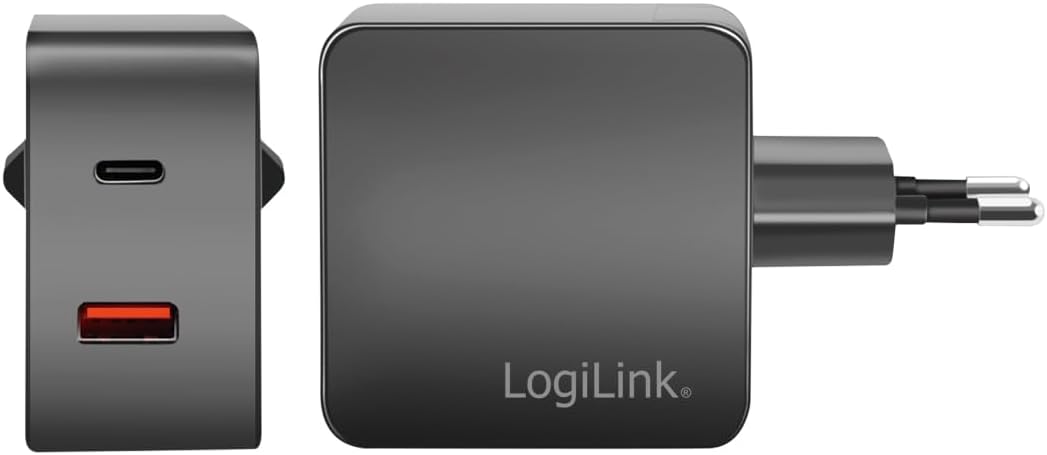
Immaġni: Minn quddiem u mill-ġenb view of the LogiLink PA0310 charger, highlighting the USB-A and USB-C ports.
5. Setup
Follow these steps to set up your LogiLink Dual USB Charger:
- Ipplaggja l-Power Outlet: Insert the charger's plug into a standard European CEE 7/16 wall socket.
- Qabbad Apparat: Use appropriate USB charging cables (not included) to connect your devices to the USB-A or USB-C ports on the charger.

Image: The LogiLink PA0310 charger plugged into a wall outlet, simultaneously charging a smartphone and a tablet.
6. Istruzzjonijiet Operattivi
The LogiLink PA0310 charger is designed for simple plug-and-play operation:
- Once connected to a power outlet and your device(s), the charger will automatically detect the connected device's charging requirements.
- The PPS feature ensures that the charger delivers the optimal power output for your device's current battery status, maximizing charging speed and efficiency.
- You can charge one or two devices simultaneously. The total output power is shared between the ports, with a maximum combined output of 45W.

Image: The LogiLink PA0310 charger connected to a smartphone and a tablet, with labels indicating USB-C PD3.0 and QC3.0 Fast Charging.

Image: The LogiLink PA0310 charger with a prominent '45W' graphic, emphasizing its maximum power output.
7. Manutenzjoni
To maintain the performance and longevity of your charger:
- Żomm il-ċarġer nadif u niexef. Uża drapp artab u niexef biex timsaħ il-wiċċ tiegħu.
- Evita li twaqqa' l-ċarġer jew li tissottomettih għal impatti qawwija.
- Aħżen il-ċarġer f'post frisk u niexef meta ma tkunx qed tuża.
- Do not wrap cables tightly around the charger, as this can damage the cables or ports.
8 Issolvi l-problemi
Jekk tiltaqa' ma' problemi bil-ċarġer tiegħek, irreferi għas-soluzzjonijiet komuni li ġejjin:
- Apparat mhux qed jiċċarġja:
- Kun żgur li l-ċarġer huwa mdaħħal sew f'sokit tal-ħajt li jaħdem.
- Check that the USB cable is properly connected to both the charger and your device.
- Try using a different USB cable or a different port on the charger.
- Test the charger with a different device to rule out a device-specific issue.
- Iċċarġjar bil-mod:
- Ensure your device and cable support fast charging protocols (PD, QC).
- If charging two devices simultaneously, the total 45W output is shared, which might result in slower charging for individual devices compared to single-device charging.
- Check if your device's battery is very low; charging speed can vary depending on the battery level.
- Il-ċarġer iħoss sħun:
- It is normal for the charger to become warm during operation, especially during fast charging or when charging multiple devices. If it becomes excessively hot or emits smoke/odor, unplug it immediately and discontinue use.
9. Speċifikazzjonijiet
| Numru tal-Mudell | PA0310 |
| Input | 100-240 V AC, 50/60 Hz, 1 A |
| Output USB-A | 5 V/3 A (15 W), 9 V/2.22 A (20 W), 12 V/1.67 A (20 W) |
| Output USB-C | 5 V/3 A (15 W), 9 V/3 A (27 W), 12 V/3 A (36 W), 15 V/3 A (45 W), 20 V/2.25 A (45 W) |
| Output PPS | 3.3-11 V/3 A (33 W), 3.3-21 V/2.15 A (45 W max) |
| Output Totali Max | 45 W |
| Tip ta' Konnettur | USB Tip A, USB Tip C |
| Apparati Kompatibbli | Smartphones, Tablets, Mobile devices |
| Karatteristiċi Speċjali | Fast charging, Short circuit protection |
| Kulur | Iswed |
| Piż | 84 Gramm |
| Sors tal-Enerġija | Kejbil elettriku |
| Tip ta' Ipplaggja | European CEE 7/16 plug |
| Standard tas-Sigurtà | UL |
| Manifattur | 2direct GmbH |
10. Garanzija u Appoġġ
LogiLink products are manufactured with quality and reliability in mind. For information regarding warranty terms, technical support, or service, please refer to the warranty card included with your product or visit the official LogiLink websit. Jekk jogħġbok żomm il-prova tax-xiri tiegħek għal talbiet ta' garanzija.