
Introduzzjoni
Grazzi tax-xiriasing the LDNIO Portable Wireless Bluetooth Speaker GTS-1393. This manual provides essential information for the safe and efficient use of your speaker. Please read these instructions carefully before use and retain them for future reference.
Informazzjoni Importanti dwar is-Sigurtà
- Tesponix l-ispiker għal temperaturi estremi, dawl tax-xemx dirett, jew umdità għolja.
- Evita li twaqqa’ jew tissuġġetta lill-kelliem għal impatti qawwija.
- Do not disassemble, repair, or modify the speaker yourself. Contact qualified service personnel for any repairs.
- Żomm il-kelliem 'il bogħod mill-ilma u likwidi oħra.
- Uża biss il-kejbil tal-iċċarġjar u l-adapter tal-enerġija speċifikati.
- Armi l-batterija u l-ispiker skont ir-regolamenti lokali.
Kontenut tal-Pakkett
Jekk jogħġbok iċċekkja li l-oġġetti kollha huma preżenti fil-pakkett tiegħek:
- LDNIO Portable Wireless Bluetooth Speaker GTS-1393
- Kejbil tal-Iċċarġjar tal-USB (x1)
- Batterija tal-litju rikarikabbli (500mAh)
- Kontroll mill-bogħod
- Detentur
- Manwal għall-Utent (dan id-dokument)
Prodott Overview
Iffamiljarizza ruħek mal-komponenti u l-kontrolli tal-ispiker. Note: The image below displays a similar model (GTS-1173) for illustrative purposes. The functionality described in this manual applies to the GTS-1393 model.
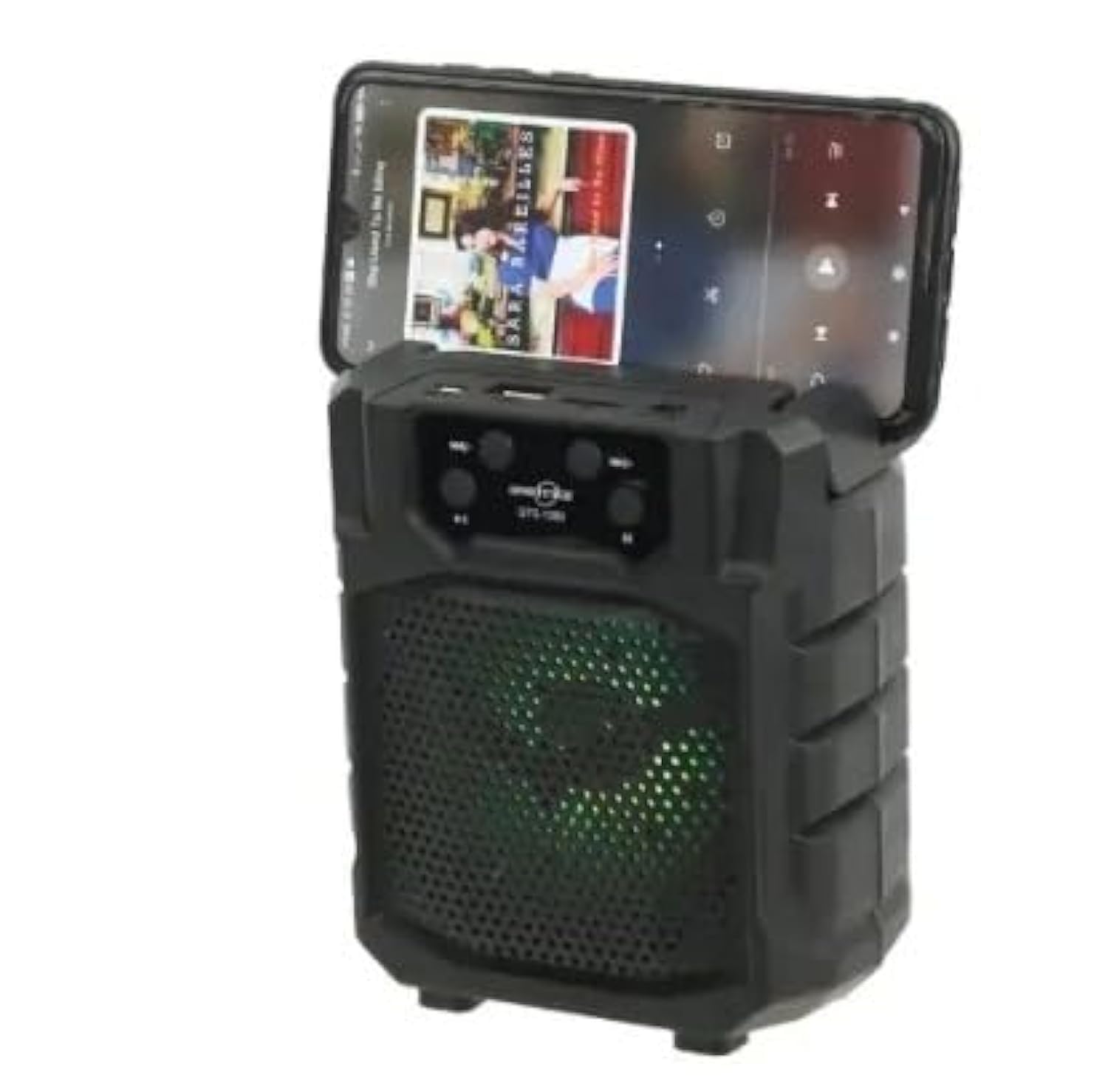
Immaġni: Quddiem view of a portable wireless Bluetooth speaker, model GTS-1173, featuring control buttons at the top and a speaker grille with multi-color LED lights. This image is for illustrative purposes, showing a similar product design to the GTS-1393.
Controls and Ports (Based on typical speaker design and OCR from image):
- Buttuna tal-Qawwa: Usually long press to turn on/off.
- Buttuna tal-Modalità (M): Short press to switch between Bluetooth, FM Radio, USB, and TF card modes.
- Buttuna Play/Pause: Jikkontrolla l-plejbek tal-midja.
- Trakka Preċedenti / Volum 'l isfel (-): Agħfas qasir għat-trakka ta' qabel, agħfas twil biex tnaqqas il-volum.
- It-Trakka li Jmiss / Volum 'il Fuq (+): Agħfas qasir għat-trakka li jmiss, agħfas twil biex iżżid il-volum.
- Port USB: Għall-plejbek ta' flash drive tal-USB.
- Slott tal-Karta TF: Għall-daqq ta' karta MicroSD/TF.
- Port tal-Iċċarġjar: Għall-konnessjoni tal-kejbil tal-iċċarġjar USB.
Setup
1. Iċċarġja l-Ispeaker
- Qabbad it-tarf iż-żgħir tal-kejbil tal-iċċarġjar USB provdut mal-port tal-iċċarġjar fuq l-ispiker.
- Qabbad it-tarf l-akbar tal-kejbil USB ma' adapter tal-enerġija USB (mhux inkluż) jew mal-port USB tal-kompjuter.
- Id-dawl indikatur tal-iċċarġjar se jixgħel (il-kulur jista' jvarja) biex juri li l-ispiker qed jiċċarġja.
- Ladarba jkun iċċarġjat kompletament, id-dawl indikatur jista' jibdel il-kulur jew jintefa. Skonnettja l-kejbil tal-iċċarġjar.
2. Tixgħil / Mitfi
- To power on: Long press the Buttuna tal-Qawwa until you hear an audible prompt or see the indicator lights activate.
- Biex titfi: Agħfas fit-tul il- Buttuna tal-Qawwa għal darb'oħra sakemm l-ispiker jintefa.
Istruzzjonijiet Operattivi
1. Bluetooth Mode (Default)
- Ensure the speaker is powered on. It will typically enter Bluetooth pairing mode automatically, indicated by a flashing LED light and an audible prompt.
- Fuq l-apparat mobbli tiegħek (smartphone, tablet, eċċ.), attiva l-Bluetooth u fittex apparati disponibbli.
- Select "GTS-1393" (or similar name) from the list of devices.
- Ladarba jkun imqabbad, l-ispiker se joħroġ konferma li tinstema', u d-dawl LED jieqaf iteptep.
- You can now play audio from your device through the speaker. Use the speaker's controls or your device's controls to adjust volume and navigate tracks.
2. Daqq tal-Karta USB/TF
- Daħħal USB flash drive jew TF (MicroSD) card li fiha awdjo MP3 files fil-port rispettiv.
- Agħfas il- Buttuna tal-Modalità (M) to switch to USB or TF card mode. The speaker will automatically begin playing audio from the inserted storage device.
- Uża l-buttuni Play/Pause, Preċedenti Track, u Li Jmiss Track biex tikkontrolla l-plejbek.
3. Modalità tar-Radju FM
- Agħfas il- Buttuna tal-Modalità (M) repeatedly until you enter FM Radio mode.
- To auto-scan for stations: Long press the Buttuna Play/Pause. The speaker will scan and save available FM stations.
- To switch between saved stations: Use the Previous Track (-) u Next Track (+) buttuni.
4. Funzjoni TWS (Stereo Veru Mingħajr Fili)
The TWS function allows you to connect two GTS-1393 speakers together for a stereo sound experience.
- Kun żgur li ż-żewġ kelliema huma mitfija.
- Power on both speakers simultaneously. They should both enter Bluetooth pairing mode.
- On one of the speakers, long press the Buttuna tal-Modalità (M) or a dedicated TWS button (if available) until you hear a confirmation tone, indicating they are paired with each other.
- Now, connect your mobile device to one of the speakers via Bluetooth as described in "1. Bluetooth Mode". The audio will play in stereo through both connected speakers.
Manutenzjoni
- Tindif: Use a soft, dry cloth to wipe the speaker. Do not use abrasive cleaners or solvents.
- Ħażna: Aħżen l-ispiker f'post frisk u niexef 'il bogħod mix-xemx diretta u minn temperaturi estremi.
- Kura tal-batterija: Biex ittawwal il-ħajja tal-batterija, evita li tiċċarġja kompletament il-batterija ta’ spiss. Iċċarġja l-ispiker regolarment, anke jekk ma jkunx qed jintuża għal perjodi twal.
Issolvi l-problemi
| Problema | Soluzzjoni Possibbli |
|---|---|
| L-ispiker ma jixgħelx. | Kun żgur li l-batterija hija ċċarġjata. Qabbad l-ispiker ma' sors ta' enerġija permezz tal-kejbil USB. |
| L-ebda ħoss mill-kelliem. | Check the volume level on both the speaker and your connected device. Ensure the speaker is in the correct mode (Bluetooth, USB, TF, FM). |
| Ma tistax tqabbad permezz tal-Bluetooth. | Ensure the speaker is in Bluetooth pairing mode (flashing LED). Turn off and on Bluetooth on your device. Move your device closer to the speaker. Forget the device from your phone's Bluetooth list and try pairing again. |
| Il-karta USB/TF mhux qed tilgħab. | Ensure the card is inserted correctly. Verify that the audio files are in a supported format (e.g., MP3). Press the Mode button to select the correct input. |
| Riċeviment ħażin tar-radju FM. | Relocate the speaker to an area with better signal. Extend any built-in antenna if available. |
Speċifikazzjonijiet
| Ditta: | LDNIO |
| Isem tal-Mudell: | GTS-1393 |
| Qawwa massima tal-Ħruġ tal-Ispeaker: | 5 Watts |
| Teknoloġija tal-Konnettività: | Wireless (Bluetooth) |
| Modalità tal-Ħruġ tal-Awdjo: | Stereo |
| Tip ta' Installazzjoni: | Mejda |
| Tip ta' Kelliem: | Barra (Portabbli) |
| Karatteristika Speċjali: | Portabbli |
| Użi Rakkomandati: | Smartphones, Tablets, Music Players, Computers |
| Apparati Kompatibbli: | Tablet, Laptop, Smartphone |
| Dijametru tal-Ispeaker: | 4 pulzieri |
| Kulur: | Iswed |
| Metodu ta' Kontroll: | Remote |
| Sors tal-Enerġija: | Mħaddma bil-batterija |
| Tip ta' Sewwieq: | Sewwieq Dinamika |
| Komponenti Inklużi: | Remote control, Holder |
| Numru ta' Oġġetti: | 1 |
| Konfigurazzjoni tal-Kanal tal-Ħsejjes Surround: | 2 |
| Protokoll tal-Komunikazzjoni mingħajr Fili: | Bluetooth |
| Kapaċità tal-batterija: | 500 mAh |
Garanzija u Appoġġ
Għal informazzjoni dwar il-garanzija jew appoġġ tekniku, jekk jogħġbok irreferi għad-dokumentazzjoni pprovduta max-xiri tiegħek jew ikkuntattja lill-bejjiegħ tiegħek. Żomm il-prova tax-xiri tiegħek għal talbiet ta' garanzija.