
ADATA Premier
ADATA Premier 512GB microSDXC Memory Card User Manual
Comprehensive instructions for your ADATA Premier 512GB microSDXC A1 UHS-I CL10 Memory Card with SD Adapter.
1. Prodott Aktarview
The ADATA Premier 512GB microSDXC A1 UHS-I Class 10 V10 Memory Card is a high-speed storage solution designed for mobile phones, tablets, and other compatible mobile devices. It offers a substantial 512GB capacity, allowing for extensive storage of applications, photos, and videos. The card is A1 qualified, enhancing app performance on Android devices, and supports read speeds up to 100MB/sec. It comes with a full-size SD adapter for broader compatibility and ease of use with various devices.

Image 1: ADATA Premier 512GB microSDXC Memory Card.
Karatteristiċi ewlenin:
- 512GB Storage Capacity: Ample space for high-resolution photos, 4K videos, and applications.
- A1 Performance Rating: Optimized for faster app loading and performance on Android smartphones and tablets.
- UHS-I Class 10 V10: Ensures smooth Full HD and 4K video recording and playback.
- High Read Speed: Up to 100MB/sec for quick data transfers.
- Included SD Adapter: Provides compatibility with devices that use standard SD card slots.
- Disinn Durabbli: Features X-ray proof, temperature proof, and magnetic resistance for enhanced data security.
2. Setup u Installazzjoni
This section guides you through the proper installation of your ADATA microSDXC card into compatible devices.
2.1 Inserting the microSD Card into a Device
- Identifika s-Slott tal-microSD: Locate the microSD card slot on your smartphone, tablet, or other compatible device. Refer to your device's user manual if unsure.
- Orjenta l-Karta: Hold the microSD card with the gold contacts facing down (or as indicated by your device's slot design).
- Daħħal il-Karta: Gently push the microSD card into the slot until it clicks into place. Do not force the card.
- Ivverifika l-Installazzjoni: Your device should recognize the new storage. You may receive a notification or see the storage listed in your device's settings.
2.2 Using the SD Adapter
The included SD adapter allows you to use your microSDXC card with devices that have a standard SD card slot, such as digital cameras, laptops, or desktop computers.

Image 2: ADATA microSDXC Memory Card with its full-size SD Adapter.
- Insert microSD into Adapter: Slide the microSD card into the designated slot on the side of the SD adapter until it locks securely.
- Daħħal l-Adapter fl-Apparat: Insert the SD adapter (with the microSD card inside) into the SD card slot of your computer or camera.
- Dejta ta' Aċċess: Your device will now recognize the card, allowing you to transfer files, view photos, or record data.
Nota: Ensure the write-protection switch on the side of the SD adapter is in the "unlocked" position if you intend to write data to the card.
3. Istruzzjonijiet Operattivi
The ADATA Premier microSDXC card is designed for seamless operation across various applications.
3.1 Ħażna u Trasferiment tad-Data
- File Ġestjoni: Uża t-tagħmir tiegħek file manager or connect to a computer to transfer photos, videos, music, and documents to and from the card.
- Prestazzjoni ta' Veloċità Għolja: With read speeds up to 100MB/sec, large files can be transferred efficiently.
3.2 App Storage (A1 Rating)
The A1 Application Performance Class rating means the card is optimized for running applications directly from the memory card, providing faster app launch times and smoother performance on compatible Android devices.
- Apparat Android: In your Android device settings, you can often move installed applications to the microSD card to free up internal storage.
- Benefiċċji: This improves device performance by offloading app data and allows for more internal storage for other critical functions.
3.3 Video Recording (V10 Rating)
The V10 Video Speed Class ensures a minimum sustained write speed of 10MB/s, making it suitable for recording Full HD (1080p) video without dropped frames.
- Apparati Kompatibbli: Ideal for use in smartphones, tablets, action cameras, and drones for recording high-quality video.

Image 3: ADATA microSDXC card in use with multiple electronic devices.
4. Manutenzjoni u Kura
To ensure the longevity and optimal performance of your ADATA microSDXC card, follow these maintenance guidelines:
- Tneħħija Sikura: Always safely eject the card from your device before physically removing it to prevent data corruption.
- Protezzjoni Fiżika: Store the card in its protective case or the SD adapter when not in use to prevent physical damage to the contacts or card body.
- Protezzjoni Ambjentali: The card is designed to be X-ray proof, temperature proof, and magnetic resistant. However, avoid exposing it to extreme conditions unnecessarily.
- Backups regolari: Periodically back up important data from your microSD card to another storage medium (e.g., computer hard drive, cloud storage) to prevent data loss.
- Avoid Formatting: Only format the card when necessary, as formatting erases all data. If formatting is required, use your device's built-in formatting utility or a reliable computer utility.
5 Issolvi l-problemi
If you encounter issues with your ADATA microSDXC card, consider the following troubleshooting steps:
- Karta Mhux Rikonoxxuta:
- Kun żgur li l-kard hija mdaħħla kompletament fl-islott.
- Try inserting the card into a different compatible device or using the SD adapter with a computer to rule out a device-specific issue.
- Check if the SD adapter's write-protection switch is in the "unlocked" position if using the adapter.
- Clean the gold contacts on the card with a soft, dry, lint-free cloth.
- Prestazzjoni bil-mod:
- Kun żgur li t-tagħmir tiegħek jappoġġja veloċitajiet UHS-I. Tagħmir eqdem jista' ma jużax bis-sħiħ il-kapaċitajiet ta' veloċità tal-kard.
- Evita li timla l-kard sal-kapaċità massima tagħha, għax dan xi kultant jista' jaffettwa l-prestazzjoni.
- If using for app storage, ensure your Android device is optimized for A1 performance.
- Korruzzjoni/Żbalji fid-Data:
- Dejjem oħroġ il-karta b'mod sigur qabel ma tneħħiha.
- Run a disk check or error-checking utility on a computer to scan for and repair bad sectors.
- If issues persist, back up any recoverable data and then format the card.
- Card Capacity Incorrect:
- Some devices or operating systems may display slightly less than the advertised capacity due to formatting overhead. This is normal.
6. Speċifikazzjonijiet
| Karatteristika | Dettall |
|---|---|
| Brand | ADATA |
| Isem tal-Mudell | Premier |
| Kapaċità tal-Ħżin tal-Memorja | 512 GB |
| Tip ta' Memorja Flash | Mikro SDXC |
| Klassi tal-Veloċità tal-Assoċjazzjoni Diġitali Sikura | Class 10, UHS-I, V10, A1 |
| Aqra Veloċità | Sa 100 MB/s |
| Ikteb Veloċità | 50.0 MB/s (typical, based on V10 rating) |
| Karatteristiċi Speċjali | Temperature Proof, X-Ray Proof, Magnetic Resistant |
| Apparati Kompatibbli | Smartphones, Tablets, Action Cameras, Drones, etc. |
| Kulur | Iswed |
| Piż tal-oġġett | 9.07 g (0.32 uqija) |
| Dimensjonijiet tal-Pakkett | 4.53 x 3.94 x 0.02 pulzieri |
| Manifattur | Adata |
| UPC | 842243030518 |
| Numru tal-Mudell tal-Oġġett | 842243030518 |
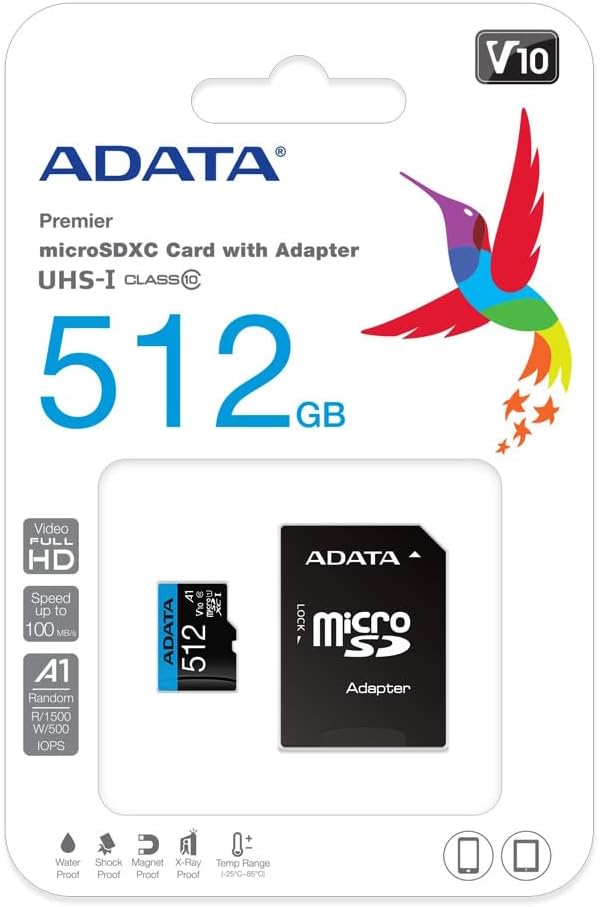
Image 4: Retail packaging of the ADATA Premier microSDXC Memory Card.
7. Garanzija u Appoġġ
ADATA offers a Lifetime Warranty for this product, ensuring long-term reliability and customer satisfaction.
- Tip ta' Garanzija: Garanzija tul il-ħajja
- Appoġġ: For technical assistance, warranty claims, or further inquiries, please visit the official ADATA websit jew ikkuntattja lill-appoġġ tal-klijenti tagħhom.
8. Vidjows tal-Prodott
Watch the official product video for more information on the ADATA 512GB microSDXC card.
Vidjo 1: Wirja uffiċjali tal-vidjo tal-prodottasing the features and benefits of the 512GB microSD card. This video highlights its storage capacity, speed, and compatibility with various devices.
Ask a question about this manual
Ask about setup, troubleshooting, compatibility, parts, safety, or missing instructions. Manuals+ will review the question and use this page’s manual context to help answer it.