
1. Introduzzjoni
This manual provides essential information for the safe and efficient operation of your BOSYTRO 0-12V 0-50A 600W Adjustable Power Supply. This switching power supply is designed to convert AC input to a stable, adjustable DC output, making it suitable for a wide range of applications including industrial automation, LED strips, CCTV systems, 3D printers, and laboratory use.
The unit features adjustable output voltage from 0-12V and adjustable output current from 0-50A, with a maximum power output of 600W. It incorporates an intelligent cooling system and multiple protection mechanisms to ensure reliable and safe performance.
2. Istruzzjonijiet tas-Sigurtà
Please read all safety instructions carefully before operating the device. Failure to follow these instructions may result in electric shock, fire, or damage to the product.
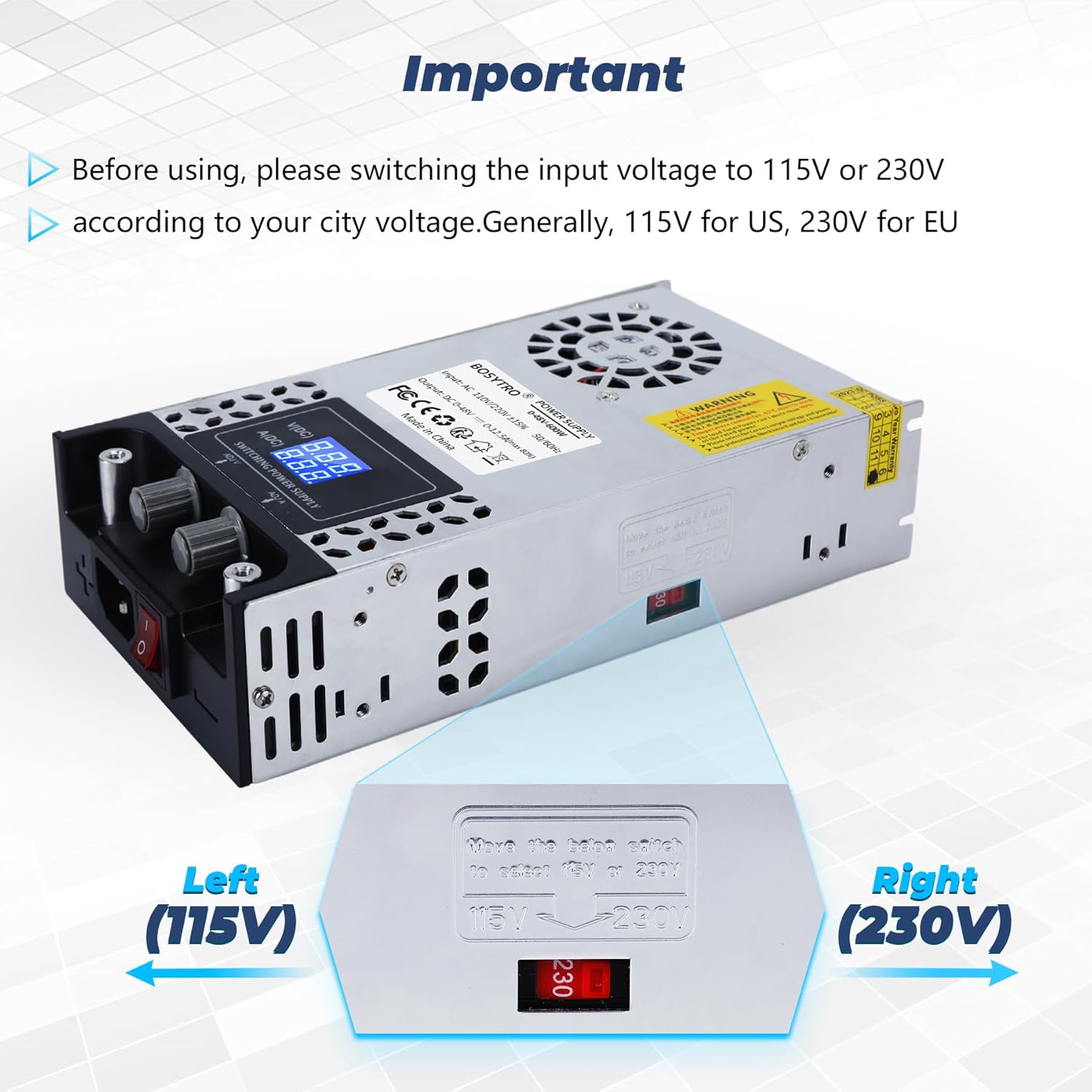
- Input Voltage Għażla: Dejjem kun żgur li l-volum tad-dħultage switch (115V/230V) is set correctly according to your local power supply before connecting the unit to the mains. Incorrect selection can cause severe damage.
- L-ertjar: Kun żgur li l-provvista tal-enerġija hija ertjata sew biex tevita xokk elettriku.
- Ventilazzjoni: Do not block the ventilation openings. Ensure adequate airflow around the unit to prevent overheating.
- Ambjent: Do not operate the power supply in wet, damp, or high-humidity environments. Avoid exposure to direct sunlight or extreme temperatures.
- Tagħbija żejda: Do not exceed the maximum output voltage (12V) or current (50A) ratings. Overloading can damage the unit and connected devices.
- Manutenzjoni: Tippruvax tiftaħ jew issewwi l-unità int stess. Irreferi għal kull manutenzjoni f'idejn persunal kwalifikat.
- Konnessjoni: Ensure all connections are secure and correct before applying power.
3. Prodott Aktarview
The BOSYTRO 0-12V 0-50A 600W Adjustable Power Supply is designed for versatility and reliability. Key features include:
- Output aġġustabbli: Precisely control output voltage from 0-12V and current from 0-50A.
- Ħruġ ta' Enerġija Għolja: Delivers up to 600W of power.
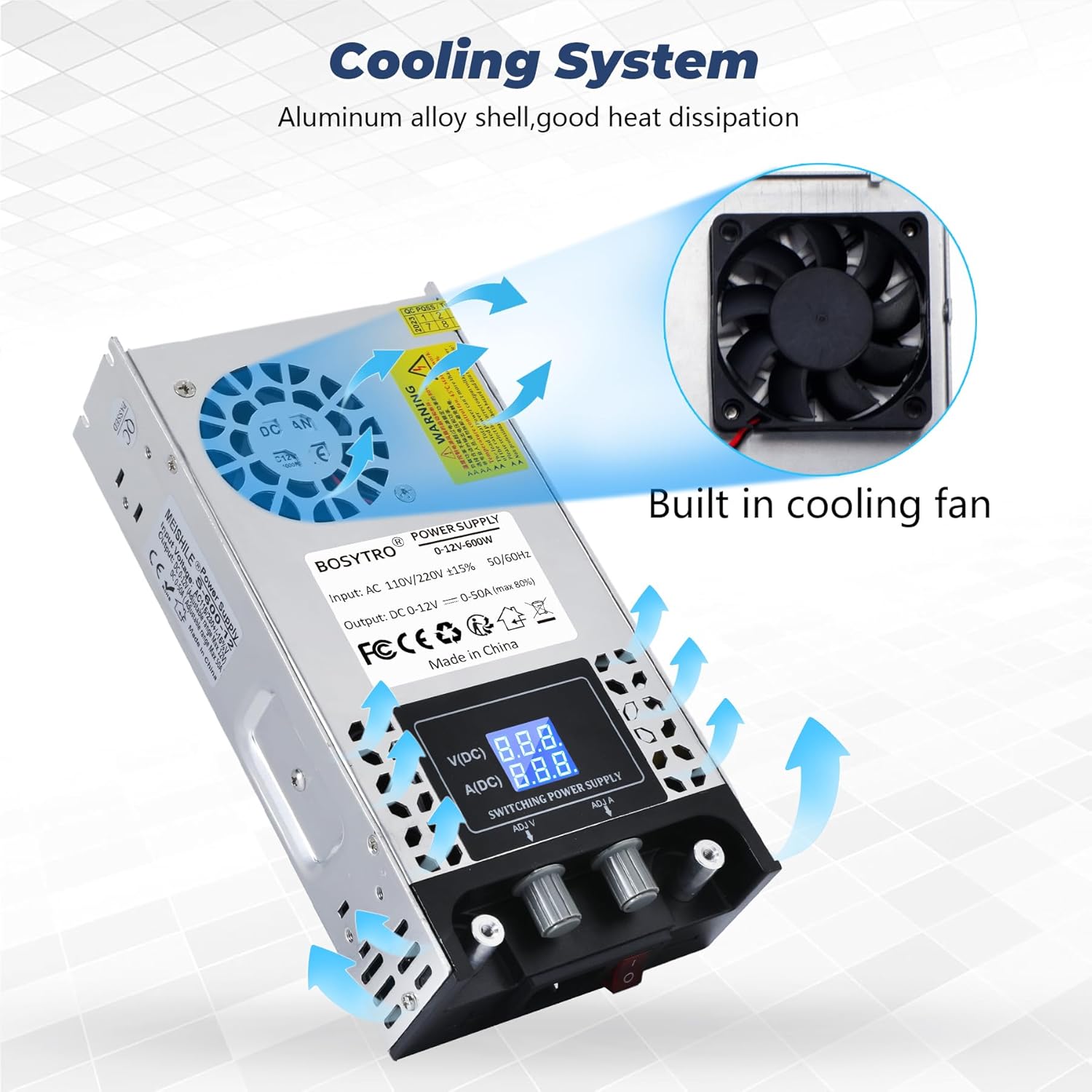
- Tkessiħ Intelliġenti: Equipped with an integrated fan and aluminum alloy casing for efficient heat dissipation, preventing overheating.
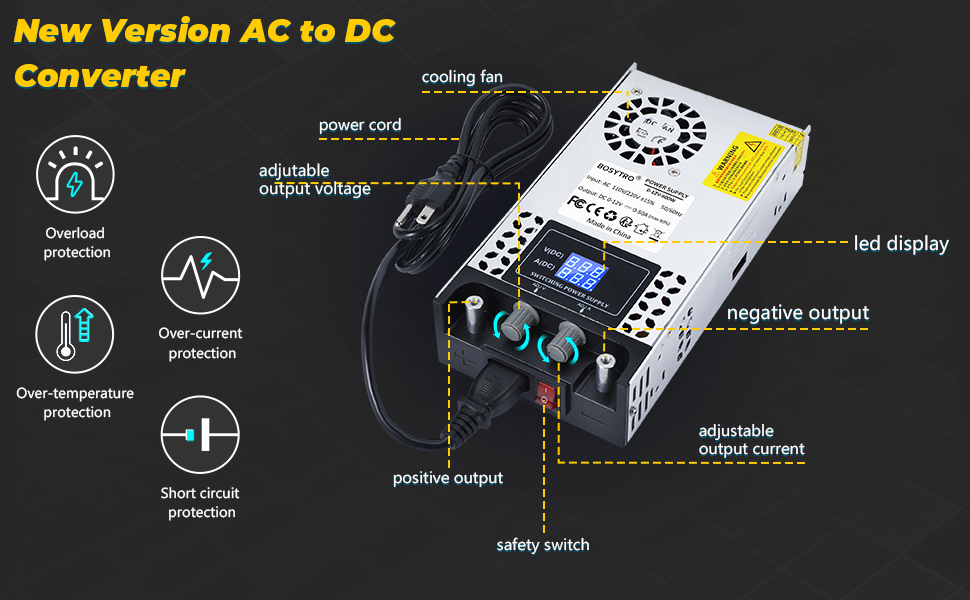
- Protezzjonijiet Multipli: Includes overload, over-current, over-voltage, over-temperature, and short-circuit protection to safeguard the unit and connected devices.
- Konnettività faċli: Features nickel-plated copper connectors for direct and secure wiring.
- Wirja Diġitali: High-precision LED display for real-time monitoring of voltage u kurrenti.
Components and Features Diagram


4. Setup
Follow these steps to set up your power supply:
- Ippakkja: Neħħi l-provvista tal-enerġija mill-imballaġġ tagħha bir-reqqa. Spezzjona għal kwalunkwe sinjal ta' ħsara.
- Input Voltage Għażla: Locate the red switch on the side of the unit. This switch allows you to select between 115V and 230V input voltage. Ensure this switch is set to match your local mains voltage before plugging in the power cord.

- Qabbad Kejda tal-Enerġija: Insert the provided power cord into the AC input socket on the unit.
- Qabbad it-Tagħbija: Connect your device or load to the output terminals. The power supply features two nickel-plated copper connectors for easy and secure connections. Ensure correct polarity (positive to positive, negative to negative).

5. Istruzzjonijiet Operattivi
Once the power supply is set up and connected, follow these steps for operation:
- Qawwa Mixgħul: Plug the power cord into a suitable wall outlet. Flip the red safety switch on the front panel to the 'ON' position. The LED display should illuminate, showing the current voltage u settings kurrenti.
- Aġġusta Voltage: Use the 'ADJ V' knob to adjust the output voltage. Turn clockwise to increase voltage, counter-clockwise to decrease. The LED display will show the set voltage.
- Aġġusta l-Kurrent: Use the 'ADJ A' knob to adjust the output current limit. Turn clockwise to increase the current limit, counter-clockwise to decrease. The LED display will show the set current.


- Riżultat tal-Monitoraġġ: Continuously monitor the LED display for real-time voltage and current readings during operation.
- Itfi: When finished, flip the safety switch to the 'OFF' position and disconnect the power cord from the wall outlet.
6. Manutenzjoni
Manutenzjoni xierqa tiżgura l-lonġevità u l-prestazzjoni ottimali tal-provvista tal-enerġija tiegħek.
- Tindif: Regularly clean the exterior of the unit with a soft, dry cloth. Do not use liquid cleaners or solvents. Ensure the ventilation openings are free from dust and debris.
- Ventilazzjoni: Periodically check the cooling fan for obstructions. The integrated fan is crucial for heat dissipation.

- Ħażna: Meta ma tkunx qed tużaha għal perjodi twal, aħżen il-provvista tal-enerġija f'post frisk u niexef, 'il bogħod mix-xemx diretta u minn temperaturi estremi.
- Kuxxinetti kontra ż-żliq: The unit is equipped with anti-slip pads on the bottom, which also aid in heat dissipation by providing clearance. Ensure these are intact.

7 Issolvi l-problemi
Jekk tiltaqa' ma' problemi bil-provvista tal-enerġija tiegħek, irreferi għall-problemi u s-soluzzjonijiet komuni li ġejjin:
- Ebda Qawwa/Wiri Mitfi:
- Check if the power cord is securely plugged into both the unit and the wall outlet.
- Ensure the safety switch is in the 'ON' position.
- Verify the input voltage selector (115V/230V) is set correctly for your region. - Nru Vol. Outputtage/kurrent:
- Check if the output terminals are correctly connected to your load.
- Ensure the output voltage and current knobs are adjusted to desired levels.
- The unit's protection features (overload, short-circuit) may have activated. Disconnect the load, power cycle the unit, and re-evaluate your setup. - Is-sħana żejda:
- Ensure the ventilation openings are not blocked.
- Check if the cooling fan is operating. If not, contact support.
- Reduce the load if operating continuously at maximum capacity in a high ambient temperature. - Output Instabbli:
- Check all connections for looseness.
- Ensure the load is within the specified voltage and current range of the power supply.
If the problem persists after attempting these troubleshooting steps, please contact customer support.
8. Speċifikazzjonijiet
| Karatteristika | Speċifikazzjoni |
|---|---|
| Numru tal-Mudell | BSC-0-12V-600W |
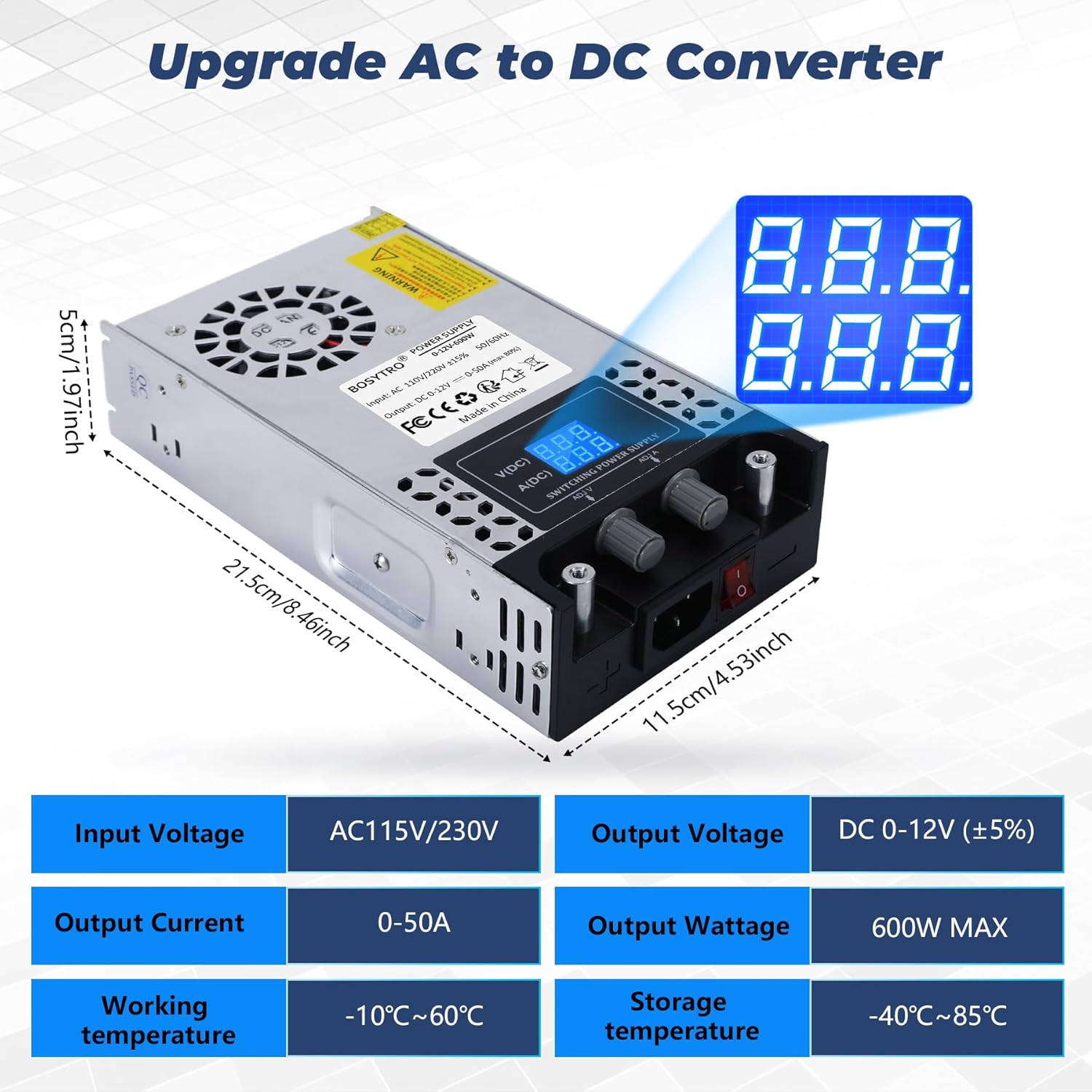
| Input Voltage | AC 110V-240V (Adjustable via switch) |
| Ħruġ Voltage | DC 0-12V (Adjustable) |
| Kurrent tal-Ħruġ | 0-50A (Adjustable) |
| Qawwa tal-Ħruġ | 600W Max |
| Dimensjonijiet (L x W x H) | 21.5 x 11.5 x 5 ċm (8.46 x 4.53 x 1.97 pulzieri) |
| Piż | Kilogramma waħda (2.2 lbs) |
| Kulur | Fidda |
| Materjal | Metall |
| Temperatura operattiva | -10°C sa 60°C (14°F sa 140°F) |
| Temperatura tal-Ħażna | -40°C sa 85°C (-40°F sa 185°F) |
| Komponenti Inklużi | Unità tal-Provvista tal-Enerġija |
| Konformità | CE, RoHS |
9. Garanzija u Appoġġ
This BOSYTRO power supply comes with a commitment to quality. Spare parts availability is guaranteed for 3 years from the date of purchase.
For technical support, warranty claims, or any questions not covered in this manual, please contact the seller or manufacturer directly through your purchase platform. Provide your model number (BSC-0-12V-600W) and a detailed description of the issue for faster assistance.