
1. Introduzzjoni
This manual provides detailed instructions for the installation, operation, and maintenance of your EVTSCAN Digital Thermoregulator. This device is designed to precisely control heating equipment, such as wall-mounted boilers and gas boilers, ensuring a stable and energy-efficient temperature environment. Please read this manual thoroughly before installation and use to ensure proper function and safety.
2. Informazzjoni dwar is-Sigurtà
Always observe the following safety precautions to prevent damage to the device or personal injury:
- Kun żgur li l-provvista tal-enerġija hija skonnettjata qabel l-installazzjoni jew il-manutenzjoni.
- Installation should be performed by a qualified professional if you are unsure about electrical wiring.
- Tesponix l-apparat għall-ilma jew għal umdità eċċessiva.
- Uża biss it-tip ta' batterija speċifikat (2 batteriji AA) u kun żgur li l-polarità hija korretta.
- Żomm l-apparat 'il bogħod minn materjali li jaqbdu.
3. Prodott Aktarview
The EVTSCAN Digital Thermoregulator features a clear LCD display for easy monitoring and a simple interface for temperature control. Its compact design allows for discreet integration into your living space.

Figura 3.1: Quddiem view of the Digital Thermoregulator. The LCD screen displays current settings and room temperature, with a rotary knob below for adjustments.
Komponenti Ewlenin:
- Display LCD: Shows set temperature, room temperature, time, and operational icons.
- Control Knob/Button: Użat għan-navigazzjoni tal-menus u l-aġġustament tas-settings.
- Kompartiment tal-batterija: Located on the rear or side for 2 AA batteries.
- Terminali tal-Wiring: For connection to the heating system.
4. Speċifikazzjonijiet
| Karatteristika | Speċifikazzjoni |
|---|---|
| Mudell | EVTSCANok0g9ct2zq |
| Modalità tal-Enerġija | 2 batteriji AA (mhux inklużi) |
| Screen Accuracy | 0.5 ℃ |
| Sensor tas-Sonda | NTC (10k) 1% |
| Kuntatt Kapaċità | Greater than 30-230 V DC working voltage, lower current. Reference: 5 A 30 V (HF relay) or 2 A 30 V (NEC relay) |
| Firxa tal-Wiri tat-Temperatura | 1 sa 40 ℃ |
| Default Temperature Adjustment Range | 5 sa 35 ℃ |
| Firxa tat-Temperatura Operattiva | 0 sa 50 ℃ |
| Programm ta' Tmexxija | Set once a week |
| Output | Relay tal-bidla |
| Materjal | Polikarbonat ritardant tal-fjammi |
| Piż | 170 g |
5. Setup u Installazzjoni
The EVTSCAN Digital Thermoregulator is designed for simple installation. Follow these steps carefully:
5.1. Spakkjar u Spezzjoni
Neħħi bir-reqqa l-komponenti kollha mill-imballaġġ. Ivverifika li l-oġġetti kollha elenkati fil-kontenut tal-pakkett huma preżenti u mhux imħassra.
- 1 Digital Temperature Controller
- 2 Viti
5.2. Installazzjoni tal-batterija
The device requires 2 AA batteries for operation. These are not included in the package.
- Locate the battery compartment on the back of the thermoregulator.
- Iftaħ l-għatu tal-kompartiment tal-batterija.
- Daħħal 2 batteriji AA, filwaqt li tiżgura polarità korretta (+/-).
- Agħlaq l-għatu tal-kompartiment tal-batterija sew.

Figura 5.1: Angolat view of the thermoregulator, illustrating its compact size and potential location for battery access or mounting points.
5.3. Immuntar u Wiring
The thermoregulator is designed for wall mounting. Ensure the power to your heating system is turned off before proceeding with wiring.
- Agħżel post adattat fuq ħajt intern, 'il bogħod mix-xemx diretta, kurrenti tal-arja, jew sorsi ta' sħana li jistgħu jaffettwaw il-qari tat-temperatura.
- Mount the backplate (if detachable) to the wall using the provided screws.
- Connect the thermoregulator to your boiler or heating system according to the wiring diagram provided with your boiler and the thermoregulator's terminal markings. This typically involves connecting the switching relay output to the boiler's control input.
- Secure the thermoregulator onto the mounted backplate.
Nota: For wiring, consult a qualified electrician if you are unfamiliar with electrical installations.
6. Istruzzjonijiet Operattivi
The EVTSCAN Digital Thermoregulator uses a microcomputer control technology to maintain your desired temperature efficiently.
6.1. Powering On and Initial Display
Once batteries are installed, the LCD display will illuminate, showing the current room temperature, set temperature, and time.
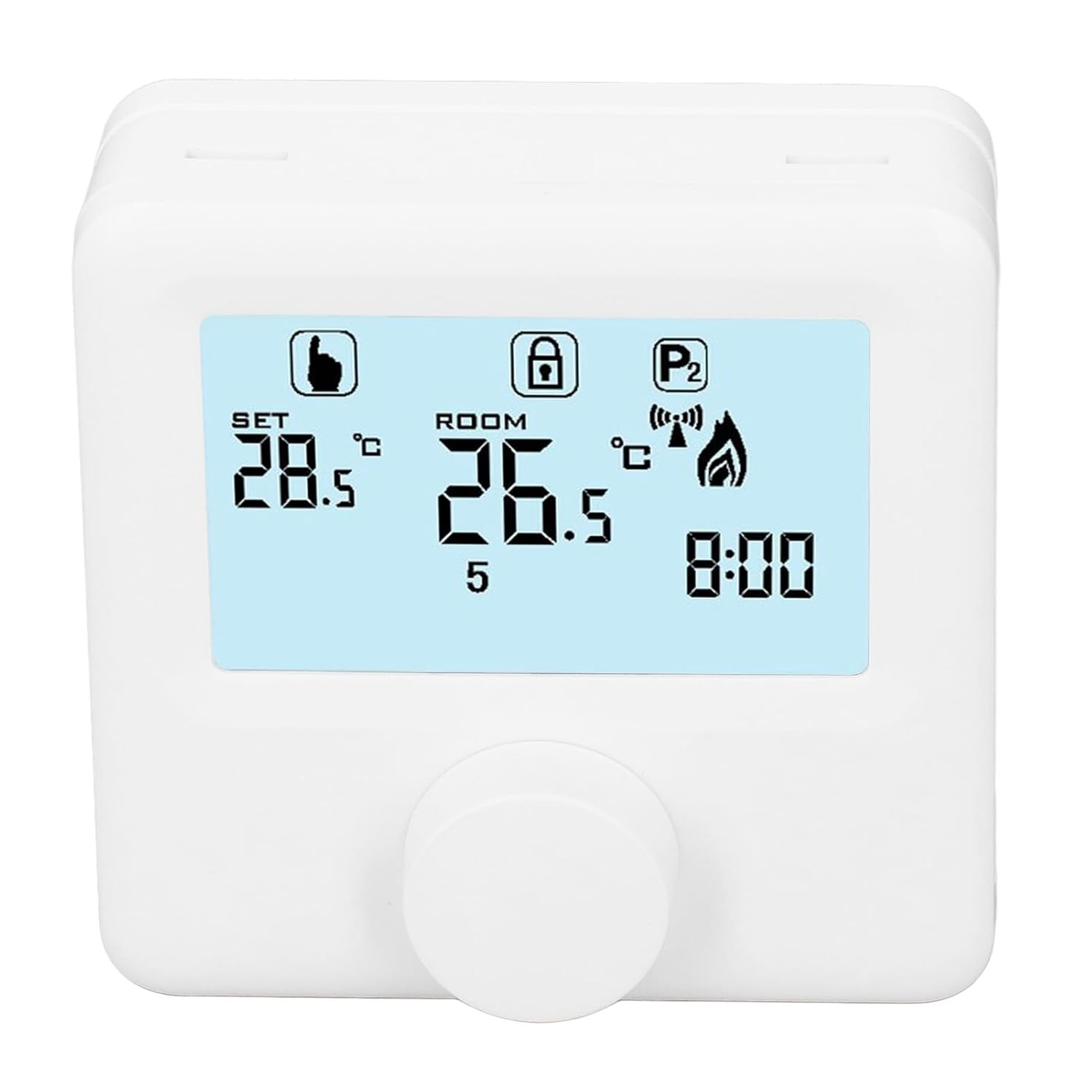
Figura 6.1: Dettaljat view of the LCD display. It shows the set temperature (SET), room temperature (ROOM), a lock icon, a program icon (P2), a signal icon, a flame icon indicating heating, and the current time.
6.2. L-issettjar tat-Temperatura
Biex taġġusta t-temperatura mixtieqa:
- Rotate the control knob to increase or decrease the set temperature. The "SET" value on the display will change accordingly.
- The device will automatically activate or deactivate the heating system to maintain the set temperature within the range of 1 to 40 ℃. The default adjustment range is 5 to 35 ℃.
6.3. Skeda ta' Programmazzjoni ta' Kull Ġimgħa
The thermoregulator supports a weekly programming schedule. This allows you to set different temperatures for various times of the day across the week.
- Press and hold the control knob (or a designated button, if available) to enter programming mode.
- Use the control knob to navigate through days of the week and time slots.
- Adjust the desired temperature for each programmed period.
- Confirm your settings to save the weekly program. The device will then operate according to this schedule.
6.4. Understanding Display Icons
- SET: Indicates the target temperature you have set.
- kamra: Juri t-temperatura ambjentali attwali tal-kamra.
- Ikona tal-Fjamma: Jixgħel meta s-sistema tat-tisħin tkun attiva.
- Lock Icon: May indicate a keypad lock feature to prevent accidental changes.
- P1/P2 Icon: Indicates the current program mode (e.g., P1 for comfort, P2 for economy, or specific weekly program segments).
- Ikona tas-Sinjal: May indicate wireless communication status if applicable.
7. Manutenzjoni
Regular maintenance ensures the longevity and optimal performance of your thermoregulator.
- Tindif: Imsaħ l-apparat b'ċarruta ratba u niexfa. Tużax prodotti tat-tindif jew solventi li joborxu.
- Sostituzzjoni tal-batterija: Replace batteries when the low battery indicator appears on the display. Always replace both batteries simultaneously with new AA batteries.
- Żona tas-Sensor: Ensure the temperature sensor area (usually a small vent on the device) is free from dust and obstructions for accurate readings.
8 Issolvi l-problemi
If you encounter issues with your EVTSCAN Digital Thermoregulator, refer to the following common problems and solutions:
- Il-wiri huwa vojt:
- Iċċekkja jekk il-batteriji humiex installati sew.
- Ibdel batteriji qodma b'oħrajn ġodda.
- Is-sistema tat-tisħin ma tirrispondix:
- Ensure the thermoregulator is powered on and the flame icon is displayed when heating is expected.
- Verify wiring connections to the boiler are secure and correct.
- Check the boiler's power supply and status.
- Ensure the set temperature is higher than the current room temperature.
- Qari tat-temperatura mhux preċiż:
- Ensure the device is not exposed to direct sunlight, drafts, or heat sources.
- Clean any dust or debris from the sensor area.
- Cannot change settings:
- Check if the lock icon is displayed. If so, refer to the operating instructions to unlock the keypad.
Jekk il-problema tippersisti, ikkuntattja l-appoġġ tal-klijent.
9. Garanzija u Appoġġ
Specific warranty information for this product is not provided in the available data. Please refer to the product packaging or the retailer's websit għad-dettalji tal-garanzija.
For technical support or further assistance, please contact EVTSCAN customer service through their official channels or the retailer from whom you purchased the product.
You can visit the EVTSCAN store on Amazon for more information: EVTSCAN Store