
1. Introduzzjoni
Thank you for choosing the Fosmon Wall Mount Kit with Fast Charging Controller Charger Station. This product is designed to optimize your gaming space by securely mounting your PlayStation 5 console and providing a convenient, illuminated charging solution for two controllers. Its robust metal construction ensures durability and stability, while the integrated RGB lighting adds a customizable aesthetic to your setup.

Image: The Fosmon Wall Mount Kit, showcasing the PS5 console mounted and two controllers charging on the illuminated station.
This wall mount is compatible with all PS5 editions, including Disc, Digital, Slim Disc, Slim Digital, and Pro versions, offering a versatile solution for various console models.

Image: Visual representation of the wall mount's compatibility with various PlayStation 5 console models.
2. Kontenut tal-Pakkett
Jekk jogħġbok ivverifika li l-oġġetti kollha elenkati hawn taħt huma inklużi fil-pakkett tiegħek:
- 1x Mount Wall
- 1x Baċir tal-Iċċarġjar
- 6x Viti tal-Ħitan
- 6x Ankri
- 1x PS5 Base Screw
- 1x USB-C to USB-C Cable (3.28ft)
- 1x Manwal għall-Utent

Immaġni: Komprensiva view of all components included in the Fosmon Wall Mount Kit package.
3. Setup u Installazzjoni
Follow these steps to properly install your Fosmon Wall Mount Kit:
- Level and Mark the Holes: Choose your desired wall location. Use a level to ensure the mount is straight, then mark the positions for the screw holes on the wall.
- Toqob tat-Tħaffir u Ankri tad-Daħħal: Drill pilot holes at the marked locations. Insert the 6 included wall anchors into the drilled holes. These high-quality anchors are designed to support up to 50lbs, ensuring maximum stability.
- Installa l-Muntanja tal-Ħajt: Align the wall mount with the inserted anchors and secure it to the wall using the 6 wall screws. Ensure the mount is firmly attached.
- Secure the PS5 Console: Place your PS5 console onto the wall mount. Use the provided PS5 base screw to secure the console to the mount from the bottom. This ensures the console remains stable and safe.
- Hang the Charging Dock: The charging dock is designed to hang securely on the hook of the metal wall mount. Connect the USB-C cable from the charging dock to a power source (e.g., a USB port on your PS5 or a USB wall adapter).
- Place PS5 Controllers: Once the charging dock is powered, place your PS5 DualSense controllers onto the charging points. The controllers will begin charging automatically.

Image: A visual guide detailing each step of the wall mount installation process.
The metal construction of the wall mount provides superior durability and heat dissipation compared to plastic alternatives, ensuring a robust and stable setup for your console.
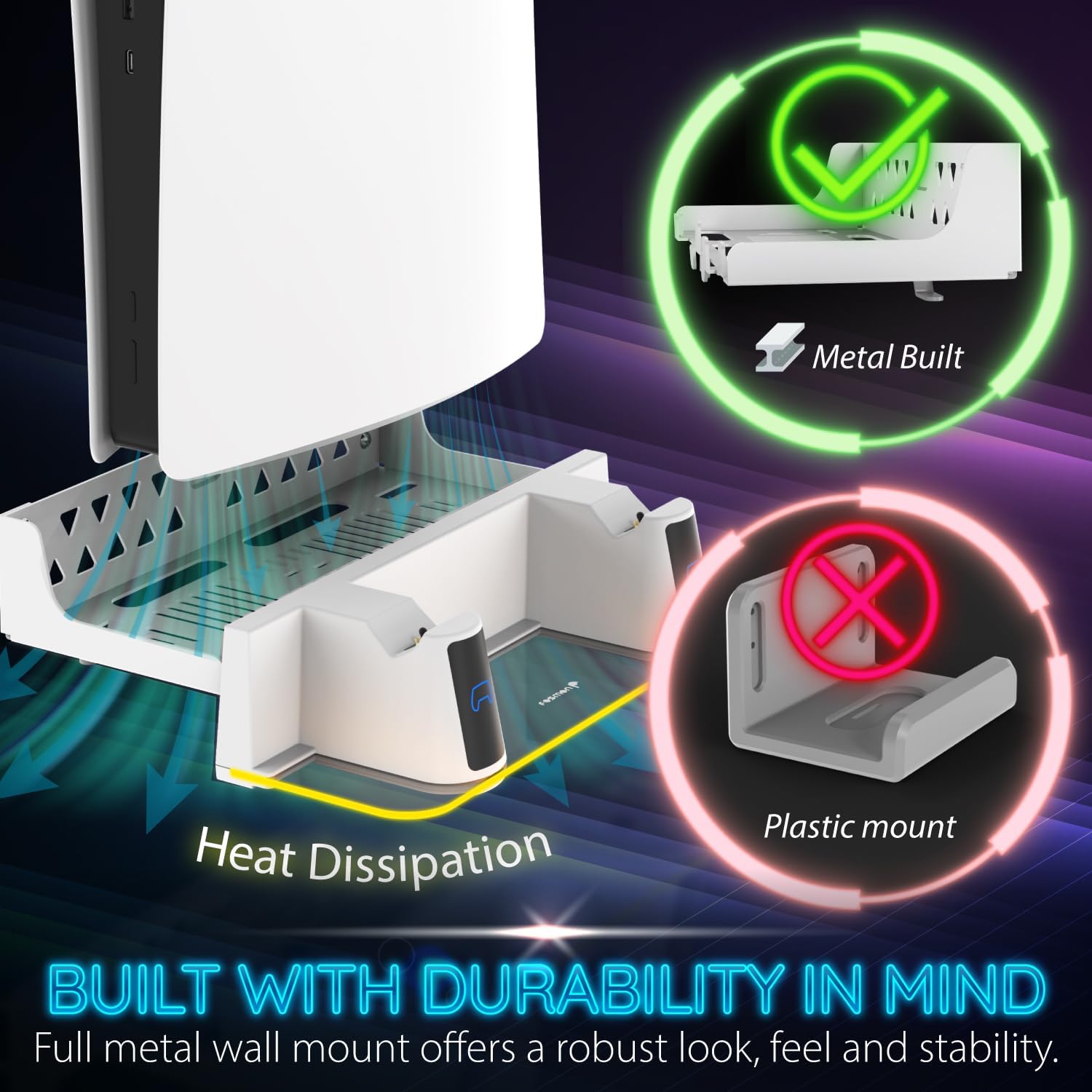
Image: Illustration emphasizing the metal construction and heat dissipation benefits of the Fosmon wall mount.

Image: A visual comparison demonstrating the strength and reliability of the included anchors.
4. Istruzzjonijiet Operattivi
4.1 Iċċarġjar tal-Kontrollur
The dual charging station allows you to simultaneously charge two PS5 DualSense controllers. Simply place the controllers onto the designated charging points on the dock. The charging process is indicated by the RGB lights on the dock:
- Indikatur Oranġjo: Controller is currently charging.
- Indikatur Blu: Controller is fully charged.
L-iċċarġjar tipikament jieħu madwar 2.5 sigħat għal iċċarġjar sħiħ.

Immaġni: Dettaljata view of the charging indicators and wireless charging feature.
4.2 Personalizzazzjoni tad-Dawl RGB
The charging dock features unique RGB LED lighting with 17 different combinations to personalize your gaming environment. You can cycle through various lighting modes using the dedicated button on the charging dock:
- Mod tan-nifs: Different neon RGB lights will cycle through, creating a dynamic effect.
- Modalità Statika: The lighting will stop on the current RGB color that is cycling through, providing a constant color.
- Modalità Dinamika: Offers various animated lighting patterns.
- Modalità Mitfija: Turns off the RGB light completely.

Immaġni: Eżempju viżwaliamples of the various RGB lighting modes available on the charging station.

Image: A vibrant display of the customizable RGB lighting feature.
5. Manutenzjoni
To ensure the longevity and optimal performance of your Fosmon Wall Mount Kit, please follow these maintenance guidelines:
- Tindif: Use a soft, dry cloth to wipe down the wall mount and charging dock regularly. For stubborn marks, a slightly damp cloth can be used, followed by immediate drying. Avoid abrasive cleaners or solvents, as they may damage the finish.
- Kuntatti tal-Iċċarġjar: Periodically inspect the charging contacts on the dock and your controllers for any dust or debris. Gently clean them with a cotton swab if necessary to ensure efficient charging.
- Ġestjoni tal-Kejbil: Ensure the USB-C cable is not kinked or strained. Proper cable management helps prevent wear and tear.
- Stabbiltà tal-muntanji: Occasionally check the wall screws and anchors to ensure they remain tight and secure. If any looseness is detected, re-tighten the screws.
6 Issolvi l-problemi
If you encounter any issues with your Fosmon Wall Mount Kit, please refer to the following common troubleshooting steps:
- Kontrolluri Mhux Qed Jiċċarġjaw:
- Ensure the USB-C cable is securely connected to the charging dock and a powered USB port (on the PS5 or a wall adapter).
- Verify that the controllers are correctly seated on the charging contacts. Remove and re-seat them.
- Try using a different USB-C cable or a different USB power source to rule out cable or power supply issues.
- Check if the controller's charging port is clean and free of debris.
- Dwal RGB Ma Jaħdmux:
- Ensure the charging dock is receiving power.
- Press the RGB mode button on the charging dock to cycle through the modes, ensuring it's not in "Off Mode".
- Wall Mount Feels Unstable:
- Re-check all wall screws and ensure they are tightened securely into the anchors.
- Confirm that the PS5 base screw is properly installed and tightened, securing the console to the mount.
- Ensure the wall material is suitable for mounting and that the anchors were installed correctly.
If these steps do not resolve your issue, please contact Fosmon Customer Service for further assistance.
7. Speċifikazzjonijiet
| Karatteristika | Dettall |
|---|---|
| Numru tal-Mudell | C-10808FK |
| Dimensjonijiet tal-Pakkett | 11.61 x 5.08 x 3.94 pulzieri |
| Piż tal-oġġett | 2.03 liri |
| Teknoloġija tal-Konnettività | USB |
| Tip ta' Konnettur | USB |
| Apparati Kompatibbli | PlayStation 5 (Disc, Digital, Slim Disc, Slim Digital, Pro) |
| Input Voltage | 5 Volts |
| Tip ta 'Immuntar | Mount Wall |
| Karatteristiċi Speċjali | Charging Indicator, Fast Charging, RGB Lighting |
8. Garanzija u Appoġġ
Fosmon stands behind the quality of its products. This product is covered by a Garanzija Limitata tul il-Ħajja. For any inquiries or support needs, our experienced and dedicated USA-based customer service team is available to assist you.
For more information or to contact support, please visit the official Fosmon Store on Amazon: Fosmon Store