
FOREVER GSM169761
FOREVER Smartwatch SW-800 User Manual
Model: SW-800 (GSM169761)
Introduzzjoni
This manual provides essential information for the proper use and maintenance of your FOREVER Smartwatch SW-800. Please read it thoroughly before operating the device to ensure optimal performance and longevity. The SW-800 features a 1.3-inch AMOLED display, Bluetooth connectivity, and various fitness tracking capabilities.

Image: The FOREVER Smartwatch SW-800, showcasing its versatile design with both metal and silicone strap options, and various digital watch faces.
Setup
1. Iċċarġjar tal-Ismartwatch
Before first use, fully charge your smartwatch. Connect the charging cable to the charging port on the back of the watch and plug the USB end into a power adapter (not included) or a computer's USB port. The watch display will indicate charging status.

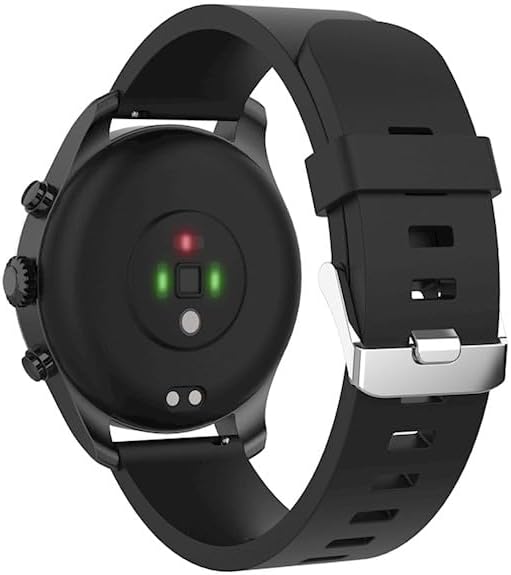
Immaġni: In-naħa ta' wara view of the smartwatch, highlighting the magnetic charging pins and the optical heart rate sensors.
2. Tixgħil / Mitfi
- To power on: Press and hold the side button until the FOREVER logo appears.
- To power off: Press and hold the side button, then select "Power Off" on the screen.
3. It-tqabbil mal-Ismartphone Tiegħek
- Download the companion application from the App Store (for iOS) or Google Play Store (for Android). Fittex għal "FOREVER Smartwatch" or refer to the QR code in the watch's settings.
- Kun żgur li l-Bluetooth huwa attivat fuq l-ismartphone tiegħek.
- Open the application and follow the on-screen instructions to create an account or log in.
- Select "Add Device" or "Pair Device" within the app.
- Select "SW-800" from the list of available devices.
- Ikkonferma t-talba ta' tqabbil kemm fuq l-ismartphone tiegħek kif ukoll fuq l-ismartwatch.

Image: A smartphone displaying the FOREVER companion app interface, with the smartwatch screen prompting the user to "Connect APP" via Bluetooth.
Tħaddim tal-Ismartwatch
1. Navigazzjoni Bażika
- Touchscreen: Swipe left, right, up, or down to navigate through menus and notifications. Tap to select an item.
- Buttuna tal-ġenb: Agħfas biex terġa' lura għall-iskrin tad-dar jew tqajjem id-displej. Agħfas fit-tul għall-għażliet tal-enerġija.
2. Karatteristiċi ewlenin
- Monitoraġġ tar-Rata tal-Qalb: The smartwatch continuously monitors your heart rate. Access the heart rate widget or app on the watch to view dejta f'ħin reali u xejriet storiċi.
- Pedometer: Isegwi l-passi tiegħek ta' kuljum, id-distanza, u l-kaloriji maħruqa.
- Modi sportivi: The SW-800 supports 14 different sports modes, including running, cycling, and walking. Select a mode before starting an activity to track specific metrics.
- Traċċar tal-irqad: Jimmonitorja x-xejriet tal-irqad tiegħek, inkluż irqad fil-fond, irqad ħafif, u l-ħinijiet tal-qawmien.
- Monitoraġġ tal-Ossiġenu tad-Demm (SpO2): Kejjel il-livelli ta' saturazzjoni tal-ossiġnu fid-demm tiegħek.
- Monitoraġġ tat-temperatura: Provides body temperature readings.
- Kontroll tal-Mużika: Control music playback on your connected smartphone directly from the watch.
- Notifiki: Receive call, message, and app notifications from your smartphone.

Image: A collage of watch faces illustrating the various health and fitness tracking features, including heart rate, step count, calorie burn, sleep analysis, body temperature, and blood oxygen levels.

Image: The smartwatch displaying a graph of body temperature measurements over time, indicating current and historical readings.

Image: The smartwatch screen showing a blood oxygen saturation (SpO2) reading of 97%, along with a trend graph.

Image: The smartwatch worn by a runner, actively tracking fitness metrics during an outdoor exercise session.
Manutenzjoni
1. Tindif
Regularly clean your smartwatch and strap to prevent skin irritation and maintain device functionality. Use a soft, lint-free cloth. If necessary, slightly dampLaħlaħ id-drapp bl-ilma. Evita li tuża kimiċi ħarxa jew materjali li joborxu.
2. Reżistenza għall-Ilma (IP68)
The SW-800 is rated IP68, meaning it is resistant to dust and can withstand immersion in water up to 1.5 meters for up to 30 minutes. It is suitable for daily use, such as hand washing or light rain. However, it is not recommended for swimming, diving, or high-pressure water activities.
3. Kura tal-batterija
- Evita li tiċċarġja l-batterija kompletament ta' spiss.
- Tesponix l-apparat għal temperaturi estremi.
- Uża biss il-kejbil tal-iċċarġjar ipprovdut.
Issolvi l-problemi
1. L-Għassa Ma Tixgħelx
- Kun żgur li l-arloġġ ikun iċċarġjat kompletament. Qabbad mal-ċarġer għal mill-inqas 30 minuti.
- Ipprova agħfas u żomm il-buttuna tal-ġenb għal 10-15-il sekonda biex terġa' tibda.
2. Connectivity Issues (Bluetooth)
- Kun żgur li l-Bluetooth huwa attivat kemm fuq l-ismartwatch kif ukoll fuq l-ismartphone tiegħek.
- Kun żgur li l-ismartwatch jinsab fil-firxa tal-Bluetooth tat-telefon tiegħek.
- Erġa' ibda kemm l-ismartwatch kif ukoll l-ismartphone tiegħek.
- Unpair the device from your phone's Bluetooth settings and re-pair it through the companion app.
3. Qari tas-Saħħa Mhux Preċiż
- Kun żgur li l-arloġġ jintlibes sew fuq il-polz tiegħek, iżda mhux issikkat wisq.
- Naddaf is-sensuri fuq wara tal-arloġġ.
- Evita moviment eċċessiv waqt il-kejl.
- Innota li dawn l-apparati mhumiex strumenti mediċi u l-qari huwa għal referenza biss.
4. App Not Syncing Data
- Iċċekkja l-konnessjoni tal-internet tiegħek fuq l-ismartphone tiegħek.
- Ensure the companion app has all necessary permissions enabled in your phone's settings.
- Close and reopen the app, or restart your phone.
Speċifikazzjonijiet
| Isem tal-Mudell | SW-800 (GSM169761) |
| Wiri | 1.3-inch AMOLED, 360 x 360 pixels |
| Konnettività | Bluetooth |
| Reżistenza għall-Ilma | IP68 |
| Sensuri | Heart Rate Monitor, Pedometer, SpO2, Temperature |
| Tip ta 'batterija | Jonju tal-litju |
| Apparati Kompatibbli | Smartphone |
| Input tal-Interface tal-Bniedem | Buttuni, Skrin tattili |
| Dimensjonijiet (Pakkett) | 11.2 x 9.2 x 7.1 ċm |
| Piż (Pakkett) | 240 g |
Immaġni: Dettaljata view of the smartwatch, emphasizing its 1.3-inch display with 360x360 pixel resolution, and the sleek design of the metal band.
Garanzija u Appoġġ
Your FOREVER Smartwatch SW-800 comes with a standard manufacturer's warranty. Please refer to the warranty card included in your product packaging for specific terms and conditions, including the warranty period and coverage details.
For technical support, troubleshooting assistance, or warranty claims, please contact FOREVER customer service. Contact information can typically be found on the official FOREVER webis-sit jew fuq l-imballaġġ tal-prodott.
Ask a question about this manual
Ask about setup, troubleshooting, compatibility, parts, safety, or missing instructions. Manuals+ will review the question and use this page’s manual context to help answer it.