
FOREVER SW-320
Forever Smartwatch 3 SW-320 User Manual
Model: SW-320 | Brand: FOREVER
Introduzzjoni
Thank you for choosing the Forever Smartwatch 3 SW-320. This device is designed to assist you in monitoring your daily activities, health metrics, and staying connected. This manual will guide you through the essential steps to get started and make the most of your smartwatch.

Image: The Forever Smartwatch 3 SW-320, displaying both digital and analog watch face options.
Setup
1. Iċċarġjar tal-Ismartwatch
Before initial use, fully charge your smartwatch. Connect the charging cable to the charging contacts on the back of the watch and to a USB power source. The watch display will indicate charging status.
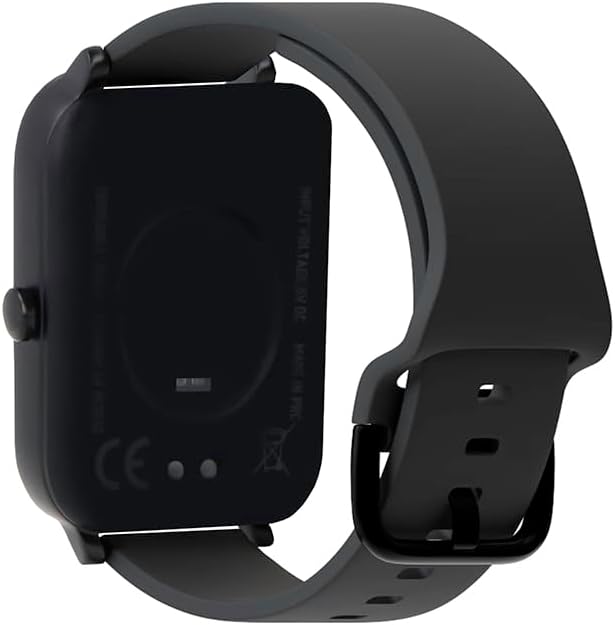
Immaġni: Wara view tal-ismartwatch, li jenfasizza l-kuntatti tal-iċċarġjar u s-sensuri tas-saħħa.
2. Tixgħil / Mitfi
To power on, press and hold the side button until the screen lights up. To power off, navigate to the power off option in the settings menu or press and hold the side button and select "Power Off".
3. It-tqabbil mal-Ismartphone Tiegħek
- Download the official Forever Smartwatch application from your smartphone's app store (iOS or Android).
- Kun żgur li l-Bluetooth huwa attivat fuq l-ismartphone tiegħek.
- Open the Forever Smartwatch app and follow the on-screen instructions to search for and pair with your SW-320 smartwatch.
- Ikkonferma t-talba ta' tqabbil kemm fuq l-ismartphone kif ukoll fuq l-ismartwatch tiegħek.
The smartwatch is compatible with smartphones and tablets via Bluetooth connectivity.
Istruzzjonijiet Operattivi
Navigazzjoni Bażika
The Forever Smartwatch 3 SW-320 features a full touchscreen interface. Swipe left, right, up, or down to navigate through menus and features. Tap to select an option or open an application.
Karatteristiċi Ewlenin
- Traċċar tal-Attività: Immonitorja l-passi, id-distanza, il-kaloriji maħruqa, u l-minuti attivi.
- Monitoraġġ tar-Rata tal-Qalb: Żomm rekord kontinwu tar-rata tal-qalb tiegħek matul il-ġurnata.
- Pedometer: Counts your steps automatically.
- Analiżi tal-Irqad: Isegwi x-xejriet tal-irqad tiegħek, inkluż irqad profond u ħafiftages.
- Notifiki: Irċievi allerti għal telefonati, messaġġi, u notifiki tal-app direttament fuq il-polz tiegħek.
- Uċuħ ta' l-arloġġi personalizzabbli: Personalize your smartwatch with various pre-installed watch faces or upload your own images.
- Modi sportivi: Access various sports modes for accurate tracking during different physical activities.
- Tfakkira dwar l-Idrazzjoni: Issettja tfakkiriet biex tixrob l-ilma matul il-ġurnata.
- Termometru: Measures body temperature.
- Oximeter (SpO2): Jimmonitorja l-livelli tal-ossiġnu fid-demm.
- Traċċar taċ-Ċiklu Menstruwali: Jgħin biex isegwi u jbassar iċ-ċikli mestrwali.

Image: Smartwatch screen showing real-time activity data during a workout, including heart rate and calories burned.

Image: Visual representation of key features: sports modes, thermometer, oximeter, IP68 water resistance, sleep analysis, dual strap options, and 1.7-inch display.

Image: The smartwatch showing sleep duration and quality metrics, with a person sleeping peacefully.
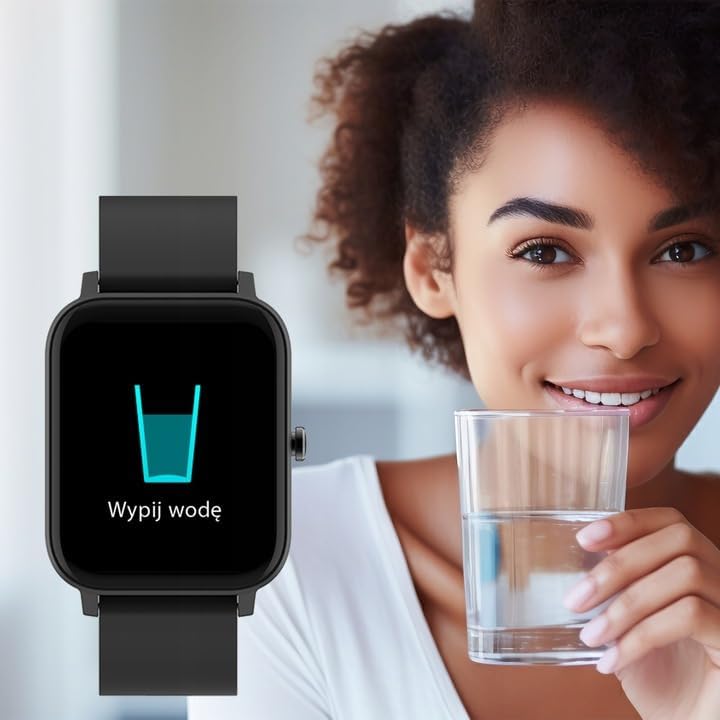
Image: Smartwatch displaying a "Drink Water" reminder, encouraging hydration.
Manutenzjoni
Tindif tal-Ismartwatch Tiegħek
Naddaf l-ismartwatch u ċ-ċinga tiegħek regolarment biex tevita irritazzjoni tal-ġilda u żżomm il-funzjonalità tal-apparat. Uża drapp artab u nadif.amp drapp biex timsaħ l-iskrin u ċasing. For the strap, follow the manufacturer's recommendations based on the material. Avoid harsh chemicals or abrasive materials.
Reżistenza għall-Ilma
The Forever Smartwatch 3 SW-320 features IP68 water resistance. This means it is protected against dust and can withstand immersion in water up to 1.5 meters for up to 30 minutes. It is suitable for daily use and light water activities, but not recommended for diving, hot showers, or high-pressure water exposure.
Kura tal-batterija
To prolong battery life, avoid exposing the smartwatch to extreme temperatures. Charge the device fully before its first use and when the battery is low. Do not leave the battery completely drained for extended periods.
Issolvi l-problemi
Smartwatch Not Turning On
Ensure the smartwatch is fully charged. Connect it to the charger for at least 30 minutes before attempting to power it on again.
Ma nistax inqabbad ma' Smartphone
- Make sure Bluetooth is enabled on your smartphone and the smartwatch.
- Ensure the smartwatch is within the Bluetooth range of your phone (typically 10 meters).
- Restart both your smartphone and smartwatch.
- Check if the Forever Smartwatch app is updated to the latest version.
- Jekk qabel kien imqabbad, ipprova neħħi l-akkoppjar u erġa' waħħal l-apparat permezz tas-settings tal-Bluetooth tat-telefon tiegħek u l-app.
Qari tas-Saħħa Mhux Preċiż
For accurate heart rate and activity tracking, ensure the smartwatch is worn snugly on your wrist, about one finger's width above your wrist bone. Avoid excessive movement during measurements. Environmental factors and skin conditions can affect sensor accuracy.
Notifiki li ma jidhrux
Verify that notification permissions are granted for the Forever Smartwatch app in your smartphone's settings. Also, check the app's settings to ensure notifications are enabled for the desired applications.
Speċifikazzjonijiet
| Brand | GĦAL DEJJEM |
| Isem tal-Mudell | 3 SW-320 |
| Numru tal-Mudell | GSM169759 |
| Daqs tal-Wiri | 1.7 Pulzier |
| Riżoluzzjoni tal-Wiri | 240 x 280 |
| Konnettività | Bluetooth |
| Apparati Kompatibbli | Smartphone, Pillola |
| Karatteristiċi Speċjali | Heart Rate Monitor, Pedometer, Thermometer, Oximeter |
| Tip ta 'batterija | 1 Lithium Ion |
| Ħajja Medja tal-Batterija | Up to 1 Day (usage dependent) |
| Piż | 180 g |
| Dimensjonijiet | 11.5 x 9 x 7 ċm |
| Reżistenza għall-Ilma | IP68 |
| Input tal-Interface tal-Bniedem | Touchscreen |
Note: Battery life and charging times can vary based on usage and environmental conditions. The "1 Day" for charging time in the original data is likely an error and typically refers to battery life.
Garanzija u Appoġġ
For warranty information and technical support, please refer to the documentation included with your product or visit the official FOREVER websit. Żomm il-prova tax-xiri tiegħek għal talbiet ta' garanzija.
If you encounter issues not covered in this manual, please contact FOREVER customer service for assistance.
Ask a question about this manual
Ask about setup, troubleshooting, compatibility, parts, safety, or missing instructions. Manuals+ will review the question and use this page’s manual context to help answer it.