
C IDEA CM822
C IDEA CM822 8-inch Smart Android Tablet User Manual
Mudell: CM822
Introduzzjoni
Thank you for choosing the C IDEA CM822 8-inch Smart Android Tablet. This manual provides essential information for setting up, operating, and maintaining your device. Please read it carefully to ensure optimal performance and longevity of your tablet.
Informazzjoni dwar is-Sigurtà
- Tesponix il-pillola għal temperaturi estremi, dawl tax-xemx dirett, jew umdità għolja.
- Evita li twaqqa’ jew li tissottometti t-tablet għal impatt qawwi.
- Uża biss chargers u aċċessorji approvati mill-manifattur.
- Tippruvax tiżżarma jew issewwi t-tablet int stess. Irreferi għal persunal tas-servizz kwalifikat.
- Żomm il-pillola 'l bogħod mill-ilma u likwidi oħra.
- Armi t-tablet u l-batterija tiegħu b'mod responsabbli skont ir-regolamenti lokali.
Kontenut tal-Pakkett
Jekk jogħġbok immarka l-kaxxa għall-oġġetti li ġejjin:
- C IDEA CM822 Tablet
- Adapter tal-Enerġija
- Cable tal-Iċċarġjar tal-USB
- Manwal għall-Utent (dan id-dokument)
- Note: Additional accessories such as a stylus or protective case may be included depending on the specific package.
Immaġni: The C IDEA CM822 tablet shown with its standard accessories including a charger, USB cable, and documentation. Other items like a stylus and drawing kit may be part of a bundle.
Layout tal-Apparat
Familiarize yourself with the physical features of your C IDEA CM822 tablet.

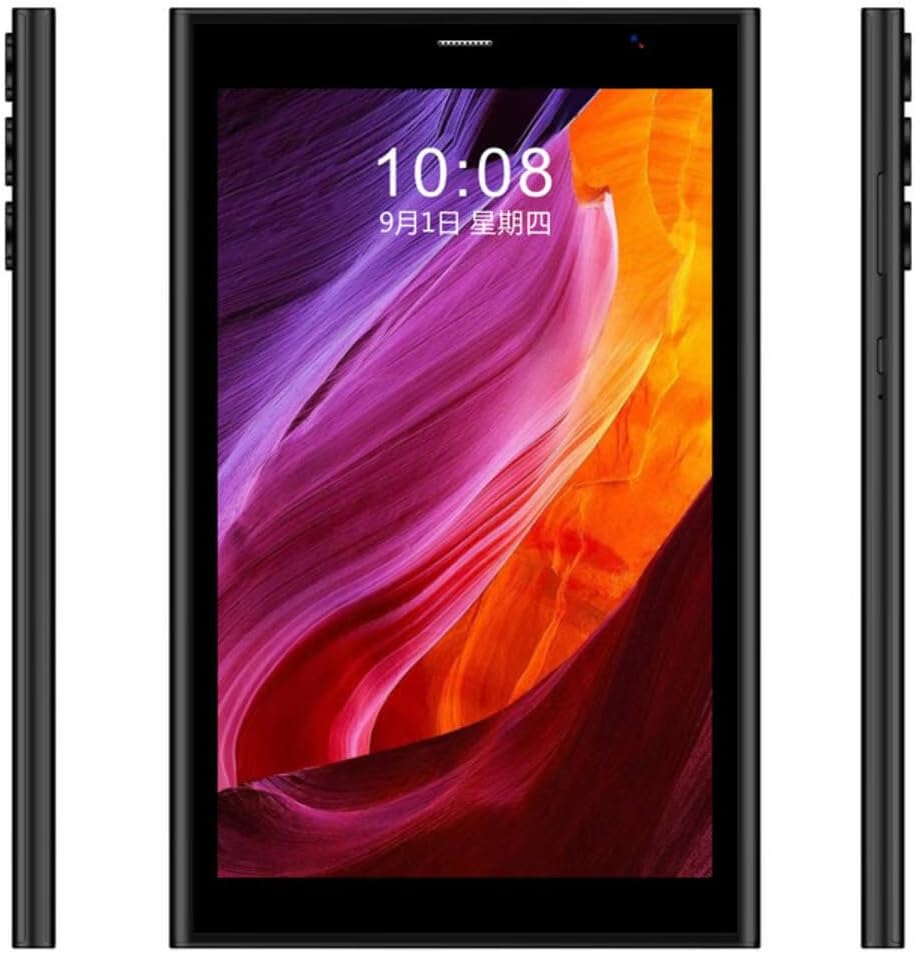
Immaġni: Quddiem view of the C IDEA CM822 tablet displaying the screen, and a rear view showing the multi-lens camera module and branding.

Immaġni: Side profile of the C IDEA CM822 tablet, illustrating the placement of physical buttons (such as power and volume) and various ports.
- Kamera ta' quddiem: Jinsab 'il fuq mill-iskrin, użat għal sejħiet bil-vidjo u selfies.
- Wiri: 8-inch IPS Touch Screen LCD.
- Buttuna tal-Qawwa: Typically on the side, used to turn the tablet on/off or wake/sleep the screen.
- Buttuni tal-Volum: Usually adjacent to the power button, for adjusting audio levels.
- Kamera ta' wara: Jinsab fuq wara, użat biex jieħu ritratti u vidjows.
- Port USB: Għall-iċċarġjar u t-trasferiment tad-dejta.
- Slott tal-Karta SIM/SD: For inserting SIM cards for cellular connectivity and a microSD card for expandable storage.
Setup
1. Iċċarġja l-Pillola
- Qabbad il-kejbil tal-iċċarġjar tal-USB mal-port USB tat-tablet.
- Ipplaggja t-tarf l-ieħor tal-kejbil USB fl-adapter tal-enerġija.
- Daħħal l-adapter tal-enerġija f'sokit tal-ħajt.
- Ħalli t-tablet jiċċarġja kompletament qabel l-ewwel użu. L-indikatur tal-batterija fuq l-iskrin se juri l-istatus tal-iċċarġjar.
2. Daħħal il-Kards SIM u SD
The CM822 supports Dual SIM and expandable storage via an SD card.
- Locate the SIM/SD card slot on the side of the tablet.
- Use the provided SIM ejector tool (if applicable) to open the tray.
- Carefully place your SIM card(s) and/or microSD card into the designated slots on the tray. Ensure correct orientation.
- Imbotta t-trej bil-mod lura fit-tablet sakemm tikklikkja f'postu.
3. L-Ewwel Tixgħel u l-Konfigurazzjoni
- Press and hold the Power button until the C IDEA logo appears on the screen.
- Follow the on-screen prompts to complete the initial setup, which includes selecting your language, connecting to a Wi-Fi network, and signing in with your Google account.
It-tħaddim tal-Pillola
Navigazzjoni Bażika
- Tektek: Touch the screen once to select an item or open an application.
- Tektek u Żomm: Agħfas u żomm oġġett biex taċċessa l-menus kuntestwali jew iċċaqlaq l-ikoni.
- Swipe: Iddreggja subgħajk fuq l-iskrin biex tiskrollja minn paġni jew listi.
- Oqros: Uża żewġ swaba’ biex tkabbar jew tkabbar l-immaġnijiet u web paġni.
Konnessjoni man-Netwerks
- Wi-Fi: Mur fuq Settings > Netwerk u internet > Wi-Fi. Turn Wi-Fi on and select your desired network. Enter the password if prompted.
- Bluetooth: Mur fuq Settings > Apparati konnessi > BluetoothIxgħel il-Bluetooth u qabbad ma' apparati disponibbli.
- Cellular (5G): Ensure your SIM card is correctly inserted. Go to Settings > Netwerk u internet > Netwerk mobbli to configure data settings.
Bl-użu tal-Kameras
It-tablet għandu kamera ta’ quddiem ta’ 5MP u kamera ta’ wara ta’ 8MP.
- Iftaħ l-applikazzjoni tal-Kamera mill-iskrin tad-dar jew mill-kexxun tal-app.
- Tektek l-ikona tal-kamera biex taqleb bejn il-kameras ta' quddiem u ta' wara.
- Tektek il-buttuna tax-shutter biex tieħu ritratt jew tibda/twaqqaf ir-reġistrazzjoni tal-vidjow.
Face Unlock
The CM822 supports Face Unlock for convenient security.
- Mur fuq Settings > Sigurtà u privatezza > Sblokkjar tal-apparat > Sblokkjar bil-wiċċ.
- Segwi l-istruzzjonijiet fuq l-iskrin biex tirreġistra wiċċek.
- Ensure good lighting conditions when using Face Unlock.
Manutenzjoni
- Tindif: Use a soft, lint-free cloth to clean the screen and body of the tablet. Avoid abrasive materials or chemical cleaners.
- Aġġornamenti tas-Software: Iċċekkja regolarment għal aġġornamenti tas-sistema permezz ta' Settings > Sistema > Aġġornament tas-sistema to ensure your tablet has the latest features and security patches.
- Kura tal-batterija: To prolong battery life, avoid fully discharging the battery frequently. Charge the tablet when the battery level is low.
- Ġestjoni tal-Ħażna: Neħħi perjodikament bla bżonn files u apps biex tinżamm prestazzjoni ottimali.
Issolvi l-problemi
| Problema | Soluzzjoni Possibbli |
|---|---|
| It-tablet ma jixgħelx. | Kun żgur li l-batterija hija ċċarġjata. Qabbad il-ċarġer u stenna ftit minuti qabel ma tipprova tixgħelha mill-ġdid. |
| L-iskrin ma jirrispondix. | Restart the tablet by pressing and holding the Power button for about 10-15 seconds. If unresponsive, force restart by holding Power and Volume Down buttons simultaneously (method may vary). |
| Ma tistax tikkonnettja mal-Wi-Fi. | Check if Wi-Fi is enabled in settings. Ensure the password is correct. Restart your Wi-Fi router and the tablet. |
| L-apps qed jiġġarraf jew qed jaħdmu bil-mod. | Close background applications. Clear app cache (Settings > Apps > [App Name] > Storage & cache > Clear cache). Restart the tablet. |
| Face Unlock is not working. | Ensure you are in a well-lit environment. Re-register your face in the security settings. Clean the front camera lens. |
Speċifikazzjonijiet
| Karatteristika | Dettall |
|---|---|
| Brand | C IDEA |
| Mudell | CM822 |
| Sistema Operattiva | Android |
| Daqs tal-Iskrin | 8 Pulzier |
| Riżoluzzjoni tal-Iskrin | 1920 x 1080 pixel |
| RAM | 8 GB |
| Ħażna Interna | 256 GB |
| Kamera ta' Quddiem | 5 MP |
| Kamera ta' wara | 8 MP |
| Konnettività tan-Netwerk | 5G, Wi-Fi (802.11ac), Bluetooth, Cellular |
| Karatteristiċi Speċjali | Dual SIM, IPS Touch Screen LCD, Face Unlock |
| Brand tal-proċessur | MediaTek |
| Marka taċ-Ċipset tal-Grafika | DRIEGĦ |
Garanzija u Appoġġ
For warranty information and technical support, please refer to the warranty card included in your package or contact your retailer. Keep your proof of purchase for warranty claims.
Ask a question about this manual
Ask about setup, troubleshooting, compatibility, parts, safety, or missing instructions. Manuals+ will review the question and use this page’s manual context to help answer it.