
1. Introduzzjoni
This manual provides essential information for the safe and efficient operation of your NETUM PDA58-02 Portable Receipt Printer. Please read it thoroughly before using the device and keep it for future reference.
The NETUM PDA58-02 is a versatile portable terminal designed for various business applications. It integrates receipt printing, 1D barcode scanning, and supports multiple connectivity options including 3G, Wi-Fi, and Bluetooth 4.0. Running on Android 6.0, it offers a stable and user-friendly experience with its 5.5-inch IPS capacitive touch screen.
2. Informazzjoni dwar is-Sigurtà
- Tesponix l-apparat għal temperaturi estremi, dawl tax-xemx dirett, jew umdità għolja.
- Evita li twaqqa’ jew tissuġġetta l-apparat għal impatti qawwija.
- Use only the original charger and accessories provided with the device.
- Tippruvax tiżżarma jew issewwi l-apparat int stess. Ikkuntattja persunal tas-servizz kwalifikat.
- Żomm l-apparat 'il bogħod mill-ilma u likwidi oħra.
- Kun żgur li tivventila sew meta tkun qed tiċċarġja biex tevita li tissaħħan iżżejjed.
3. Kontenut tal-Pakkett
Ivverifika li l-oġġetti kollha huma preżenti fil-pakkett:
- NETUM PDA58-02 Portable Receipt Printer
- Charger Adapter (UK Plug)
- User Manual (English and Chinese)
- Thermal Printer Paper Roll (58 x 35mm)

Image: NETUM PDA58-02 printer and its accessories including charger, manual, and paper roll.
4. Prodott Aktarview
The NETUM PDA58-02 features a compact design with an integrated thermal printer and a large touch screen for easy interaction. It includes a built-in barcode scanner for efficient data capture.

Immaġni: Quddiem view of the NETUM PDA58-02 portable printer, showing the screen displaying time and date.

Image: NETUM PDA58-02 portable printer with the paper compartment open, showing a printed receipt.
5. Setup
5.1 Iċċarġjar tal-Apparat
Before first use, fully charge the device. Connect the provided charger adapter to the DC charging port (12V 1.5A) on the device and plug it into a power outlet. The battery indicator will show charging status.
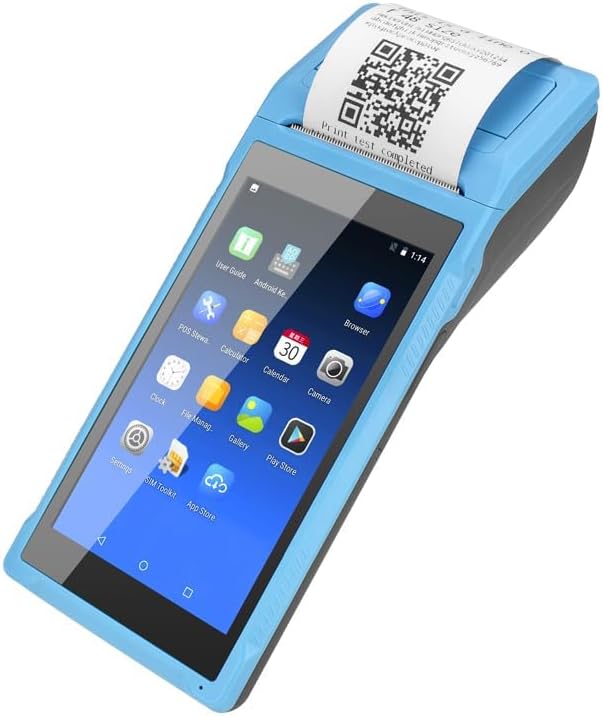
Image: Close-up of the charging port on the NETUM PDA58-02, with a charger cable connected, highlighting the 5000mAh rechargeable battery.
5.2 Tagħbija ta' Karta Termali
- Open the printer cover by gently pushing the latch.
- Insert a 58 x 35mm thermal paper roll into the compartment, ensuring the printing side faces the print head.
- Iġbed ammont żgħir ta' karta 'l barra mill-cutter.
- Agħlaq l-għatu tal-istampatur sew sakemm tikklikkja f'postu.
5.3 Tixgħel/Jitfi
- To power on: Press and hold the power button until the screen lights up.
- To power off: Press and hold the power button, then select 'Power off' from the options on the screen.
6. Istruzzjonijiet Operattivi
6.1 Navigazzjoni Bażika
The device runs on Android 6.0. Navigate the interface using the 5.5-inch capacitive touch screen. Swipe, tap, and use gestures similar to a standard Android smartphone.

Image: NETUM PDA58-02 portable printer displaying various Android application icons on its screen, indicating its smart functionality.
6.2 Konnettività
- Wi-Fi: Go to Settings > Wi-Fi to connect to available wireless networks (802.11 b/g/n).
- Bluetooth: Go to Settings > Bluetooth to pair with other Bluetooth 4.0 enabled devices.
- 3G: Insert a compatible SIM card (if applicable) and configure network settings under Settings > More > Mobile networks for 3G connectivity (GSM850/900/1800/1900, WCDMA B1).
- USB: Connect the device to a computer using the Micro USB 2.0 port for data transfer or charging.
6.3 Stampar ta' Riċevuti
The integrated thermal printer allows for fast receipt printing. Use compatible POS applications or built-in printing functions to generate receipts. Ensure paper is loaded correctly.
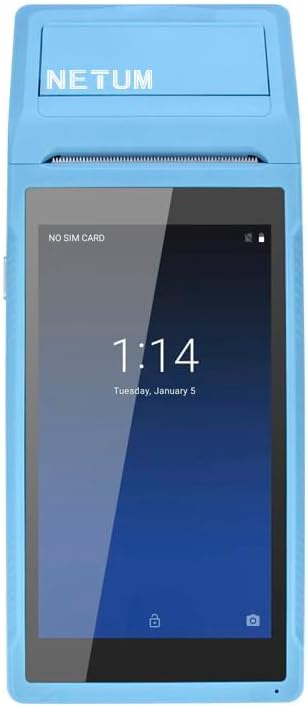
Image: NETUM PDA58-02 portable printer showing a receipt with a QR code being printed, demonstrating its receipt printing capability.
6.4 Skennjar tal-Barcode
The device supports 1D barcode scanning. Open the scanning application or a compatible POS application that utilizes the scanner. Point the scanner at the barcode to capture the data.
7. Manutenzjoni
7.1 Tindif tal-Apparat
Wipe the exterior of the device with a soft, dry cloth. For stubborn dirt, use a slightly damp cloth and then dry immediately. Do not use harsh chemicals or abrasive cleaners.
7.2 Tindif tar-Ras tal-Istampar
If print quality degrades, the thermal print head may need cleaning. Use a cotton swab lightly dampImxarrab bl-alkoħol isopropiliku biex timsaħ bil-mod ir-ras tal-istampar. Ħalliha tinxef kompletament qabel l-użu.
7.3 Kura tal-Batterija
To prolong battery life, avoid fully discharging the battery frequently. Charge the device regularly. If storing the device for an extended period, charge it to about 50% and store in a cool, dry place.
8 Issolvi l-problemi
- Apparat mhux mixgħul: Ensure the battery is charged. Connect the charger and try again. If the issue persists, contact support.
- Printer not printing: Check if thermal paper is loaded correctly and if the printer cover is closed. Verify that the application is sending print commands.
- Kwalità tal-istampar fqira: Clean the thermal print head as described in the Maintenance section. Ensure you are using suitable thermal paper.
- Problemi ta' konnettività (Bluetooth/Wi-Fi): Ensure Bluetooth/Wi-Fi is enabled in settings. Check if the device is within range of the network/paired device. Restart the device and try reconnecting.
- L-iskrin tattili ma jirrispondix: Restart the device. If the problem continues, contact support.
9. Speċifikazzjonijiet
| Karatteristika | Dettall |
|---|---|
| Mudell | PDA58-02 |
| Kulur | Blu |
| Konfigurazzjoni | 3G + Camera |
| CPU | Quad-core 1.3GHz MT6580V/WA |
| RAM | 1GB |
| NAND Flash | 8GB |
| Sistema Operattiva | Android 6.0 |
| Skrin Prinċipali | 5.5 inch IPS Capacitive Touch Screen 1280*720 |
| Metodu ta' Komunikazzjoni | 3G (supports all network types) |
| Kamera ta' wara | 8MP |
| Batterija | 7.4V, 5000mAh |
| Interface tal-iċċarġjar | DC Charging, 12V 1.5A |
| Interface tal-headphone | Standard 3.5mm Headphone |
| Appoġġ OTG | Iva |
| Interface USB | Micro USB 2.0 x 1 |
| Sistema Awdjo | Speaker integrat, Buzzer, Mikrofonu |
| Wi-Fi | 802.11 b/g/n |
| GSM | 850/900/1800/1900 |
| WCDMA | B1 |
| Bluetooth | Bluetooth 4.0 |
| Teknoloġija tal-Istampar | Printer Termali |
| Paper Roll Size | 58 x 35mm (inkluż) |
| Printer Dimensions (L x W x H) | 21.5 x 8.6 x 5.3 ċm / 8.46 x 3.39 x 2.1 pulzieri |
| Piż tal-printer | 462g / 16.3oz |
| Tip ta' Output | Monokromu |
| Max Mono Print Speed | 1 (unit not specified, likely pages/minute or lines/second) |
| Tip ta' Kontroll | Android, Touch |
| Tip tal-Midja | Tikketti |
| Tip ta' Skaner | Portabbli |
| Tip ta 'Wiri | LCD |
| Apparati Kompatibbli | Smartphones |
| Funzjonijiet Addizzjonali tal-Printer | Skennja |
| Numru ta' Proċessuri | 4 |
| Daqs Max tal-Midja | 5.5 x 8.5 pulzier |
| Stampar Duplex | Nru |
| Interface tal-Ħardwer | USB, USB 2.0 |
| Portijiet USB totali | 1 |
10. Informazzjoni dwar Garanzija
NETUM products are covered by a manufacturer's warranty. Please refer to the warranty card included in your package or visit the official NETUM websit għal termini u kundizzjonijiet dettaljati tal-garanzija. Żomm l-irċevuta tax-xiri tiegħek bħala prova tax-xiri għal talbiet ta' garanzija.
11. Appoġġ
For technical assistance, troubleshooting, or product inquiries, please contact NETUM customer support. Contact information can typically be found on the official NETUM webis-sit jew fid-dokumentazzjoni tal-garanzija.
Riżorsi onlajn: Visit the NETUM official websit għal FAQs, aġġornamenti tas-softwer, u materjali ta' appoġġ addizzjonali.