Introduzzjoni
This manual provides essential instructions for the setup, operation, and maintenance of your new Generic replacement remote control for various DYON Smart 4K UHD LCD LED HDTV TV models. Please read this manual carefully to ensure proper use and to maximize the functionality of your remote control.
Nota Importanti:
- This remote is an infrared (IR) replacement and is designed to function similarly to your original remote.
- Ensure your television model is listed in the compatible models for full functionality.
- No programming is required for this replacement remote; it operates directly with compatible DYON TV models.
Konfigurazzjoni: Installazzjoni tal-Batterija
To begin using your remote control, you must first install the batteries.
- Sib il-kompartiment tal-batterija fuq wara tal-kontroll remot.
- Agħfas 'l isfel fuq il-lukkett u żżerżaq l-għatu tal-batterija 'l isfel biex tiftaħu.
- Daħħal żewġ (2) batteriji AAA, waqt li tiżgura li t-terminali pożittivi (+) u negattivi (-) jaqblu mad-dijagrammi ġewwa l-kompartiment.
- Żerġa l-għatu tal-batterija fil-post sakemm tikklikkja sew.
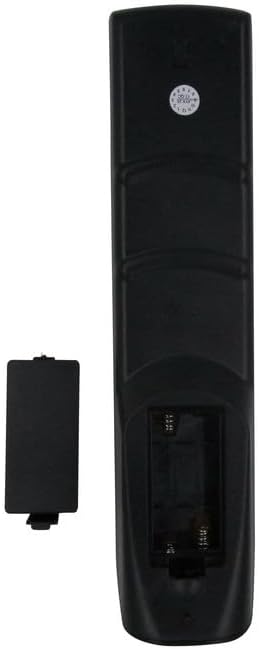
Immaġni: Wara view of the remote control with the battery cover open, illustrating the correct orientation for AAA battery insertion.
Informazzjoni dwar is-Sigurtà tal-batterija:
- Tħallatx batteriji qodma u ġodda.
- Tħallatx batteriji alkalini, standard (karbonju-żingu), jew rikarikabbli (nikil-kadmju).
- Neħħi l-batteriji jekk il-kontroll remot ma jkunx se jintuża għal perjodu twil ta’ żmien.
- Armi l-batteriji użati b'mod responsabbli skont ir-regolamenti lokali.
Istruzzjonijiet Operattivi
This section details the primary functions of the buttons on your remote control.
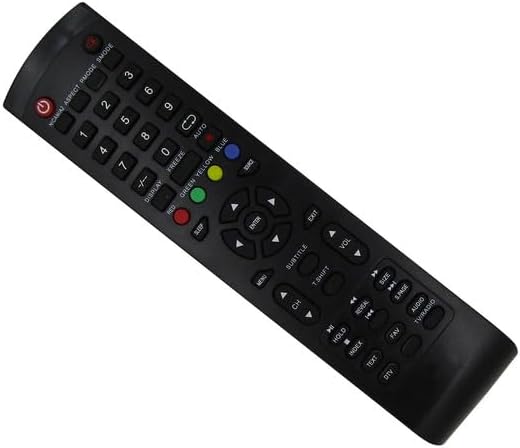
Immaġni: Quddiem view of the replacement remote control, highlighting the layout of all functional buttons.
Funzjonijiet Bażiċi:
- POWER (Red Button): Jixgħel jew jitfi t-TV.
- Buttuni tan-Numri (0-9): Selects channels directly.
- CH +/-: Changes channels sequentially.
- VOL +/-: Jaġġusta l-livell tal-volum.
- MUTE: Jislef jew ineħħi l-ħoss tat-TV.
- MENU: Jaċċessa l-menù prinċipali tat-TV.
- DĦUL: Jikkonferma l-għażliet fil-menus.
- Buttuni tan-Navigazzjoni (L fuq, 'l isfel, Xellug, Lemin)Jinnaviga fil-menus u l-għażliet.
- ĦRUĠ: Joħroġ mill-menù jew mill-funzjoni kurrenti.
- SOURCE / INPUT: Jagħżel is-sors tad-dħul (HDMI, AV, eċċ.).
Funzjonijiet Avvanzati:
- DISPLAY: Shows current channel information or status.
- L-IRQAD: Jissettja tajmer biex it-TV jintefa awtomatikament.
- Iffriżar: Pauses the current image on screen.
- RED / GREEN / YELLOW / BLUE Buttons: Functionality varies depending on the TV's current mode or application (e.g., teletext, smart TV features).
- AUTO: Automatic channel tuning or picture adjustment.
- SUBTITOLU: Jixgħel jew jitfi s-sottotitli.
- T.SHIFT (Spostament fil-Ħin): For pausing live TV (requires compatible TV and storage).
- INDIĊI: Accesses teletext index page.
- TEST: Toggles teletext mode.
- KIVEL: Reveals hidden text in teletext mode.
- ŻOMM: Holds the current teletext page.
- FAV (Favorite): Accesses favorite channel lists.
- awdjo: Jagħżel it-traċċi jew il-modi tal-awdjo.
- TV / RADJU: Jaqleb bejn il-modi tat-TV u tar-Radju.
- DAQS: Jaġġusta l-proporzjon tal-aspett tal-iskrin.
- P.PAGE / S.PAGE: Page up/down in teletext or other modes.
Note: Specific functions of advanced buttons may depend on your DYON TV model and its features. Refer to your TV's original manual for detailed information on these functions.
Manutenzjoni
Kura xierqa se testendi l-ħajja tal-kontroll remot tiegħek.
- Tindif: Use a soft, dry cloth to wipe the remote control. Do not use liquid cleaners, sprays, or abrasive materials, as these can damage the remote.
- Ħażna: Aħżen il-kontroll remot f'post frisk u niexef 'il bogħod mix-xemx diretta u minn temperaturi estremi.
- Sostituzzjoni tal-batterija: Ibdel il-batteriji meta r-rispons tar-remote isir kajman jew jieqaf jaħdem. Dejjem ibdel iż-żewġ batteriji fl-istess ħin.
- Evita Qtar: Ipproteġi r-remote minn waqgħat u impatti, li jistgħu jagħmlu ħsara lill-komponenti interni.
Issolvi l-problemi
Jekk tiltaqa' ma' problemi bil-kontroll remot tiegħek, ipprova s-soluzzjonijiet li ġejjin:
- Ir-remote mhux qed jirrispondi:
- Iċċekkja jekk il-batteriji humiex imdaħħla sew bil-polarità korretta (+/-).
- Ibdel il-batteriji b'batteriji AAA ġodda.
- Kun żgur li m'hemm l-ebda ostaklu bejn il-kontroll remot u s-senser infra-aħmar tat-TV.
- Kun żgur li tinsab fil-medda effettiva tar-riċevitur IR tat-TV.
- Xi buttuni mhux qed jaħdmu:
- Verify that your TV model is explicitly listed as compatible with this remote.
- Some advanced functions may not be supported by all DYON TV models or may require specific TV settings.
- Clean the remote control, especially around the unresponsive buttons, to remove any debris.
- TV is not turning on/off:
- Ensure the TV is plugged into a working power outlet.
- Confirm the remote's power button is functioning by checking if the IR emitter lights up (can be seen through a smartphone camera).
If the problem persists after trying these steps, please contact the seller for further assistance.
Speċifikazzjonijiet
| Tip ta' Prodott | Kontroll mill-bogħod infra-aħmar (IR) ta' sostituzzjoni |
| Apparati Kompatibbli | DYON Smart 4K UHD LCD LED HDTV Televisions (Sigma 20 PRO, Sigma 24 PRO, Sigma 32 PRO, Live 22C, Movie 32) |
| Sors tal-Enerġija | 2 x Batteriji AAA (mhux inklużi) |
| Apparati Max Appoġġjati | 1 (Televiżjoni) |
| Kulur | Iswed |
| Karatteristiċi Speċjali | Ergonomic design, Direct replacement functionality |
Garanzija u Appoġġ
As a generic replacement product, specific warranty terms may vary. Please retain your purchase receipt for any warranty claims or support inquiries.
For technical assistance, troubleshooting beyond this manual, or warranty information, please contact the seller directly through your purchase platform.


