
1. Istruzzjonijiet Importanti dwar is-Sigurtà
Please read and understand all safety instructions before operating this product. Keep this manual for future reference.
- Tesponix l-unità għax-xita, umdità, jew temperaturi estremi.
- Avoid placing the unit near heat sources such as radiators, heat registers, stoves, or other apparatus that produce heat.
- Uża biss aċċessorji/aċċessorji speċifikati mill-manifattur.
- Aqla 'din l-unità waqt maltempati tas-sajjetti jew meta ma tintużax għal perjodi twal ta' żmien.
- Irreferi l-manutenzjoni kollha lil persunal tas-servizz kwalifikat. Il-manutenzjoni hija meħtieġa meta l-apparat ikun sar xi ħsara.
- Aċċerta ruħek li jkun hemm ventilazzjoni xierqa madwar l-unità. Timblokkax xi fetħiet tal-ventilazzjoni.
- Ipproteġi l-korda tad-dawl milli jimxi fuqu jew maqrusa.
2. Kontenut tal-Pakkett
Iċċekkja li l-oġġetti kollha elenkati hawn taħt huma inklużi fil-pakkett tiegħek:
- 1x syitren PARON II Record Player
- 1x Manwal għall-Utent
- 1x Qoxra tat-Trab
- 1x 12V AC Power Adapter

3. Prodott Aktarview
Familiarize yourself with the main components of your syitren PARON II Record Player.


4. Setup
- Ħoll l-Unità: Oħroġ bir-reqqa r-rekord player u l-aċċessorji kollha mill-imballaġġ.
- Place the Dust Cover: Position the dust cover onto the hinges at the back of the unit.
- Qabbad l-Enerġija: Plug the 12V AC power adapter into the DC IN port on the back of the record player, then plug the adapter into a wall outlet.
- Adjust Counterweight: The tonearm features an adjustable counterweight. Carefully balance the tonearm so it floats horizontally. Then, rotate the counterweight to the recommended tracking force (refer to cartridge specifications, typically around 2.5g for the AT3600L). This ensures optimal sound quality and prevents record damage.
- Aġġustament Kontra l-Iskejzjar: The anti-skating system helps prevent the stylus from skipping. Adjust this setting according to the instructions provided with the cartridge or by testing with a blank record.

5. Istruzzjonijiet Operattivi
5.1 Daqq ta' Rekord tal-Vinil
- Qawwa Mixgħul: Turn the power knob to switch on the unit.
- Agħżel Veloċità: Choose the appropriate speed (33 or 45 RPM) for your vinyl record using the speed selector switch.
- Rekord tal-Post: Carefully place your vinyl record on the platter. If playing a 45 RPM single, use the included adapter.
- Driegħ tat-Tonearm tal-Irfigħ: Uża l-lieva tal-lift tat-tonearm biex tgħolli t-tonearm.
- Pożizzjoni tal-Istilus: Mexxi bil-mod id-driegħ tat-tone fuq il-kanal tal-bidu mixtieq tar-rekord.
- Driegħ t'isfel: Niżżel bil-mod id-driegħ tat-ton billi tuża l-lieva tal-irfigħ. L-istilus jagħmel kuntatt mar-rekord u jibda d-daqq.
- Aġġusta Volum: Uża l-pum tal-volum biex tissettja l-livell tas-smigħ mixtieq.
The record player features an auto-stop function that will stop the platter approximately three minutes after the record ends. The tonearm will not auto-return.

5.2 Konnettività Bluetooth
The syitren PARON II Record Player can receive audio wirelessly from Bluetooth-enabled devices.
- Ippermetti Bluetooth: Switch the function selector to Bluetooth mode. The indicator light will flash, indicating it's in pairing mode.
- Apparat Par: On your smartphone, tablet, or other Bluetooth device, enable Bluetooth and search for available devices. Select "syitren PARON II" (or similar name) from the list.
- Konferma: Once paired, the indicator light on the record player will stop flashing and remain solid. You can now stream audio from your device to the record player's built-in speakers.
5.3 External Audio Connections
The unit supports both Aux-in and RCA output for versatile audio connections.
- Aux-in: Connect an external audio source (e.g., MP3 player, CD player) to the AUX IN port using a 3.5mm audio cable. Select AUX mode on the record player to play audio from the connected device.
- Output RCA: Connect the RCA output jacks on the back of the record player to an external amplifier or powered speakers using RCA cables. This allows you to use the record player as a source for a larger audio system.
6. Manutenzjoni
6.1 Tindif tal-Istilus
A clean stylus ensures optimal sound quality and extends the life of your records. Use a soft brush designed for stylus cleaning, brushing gently from back to front.
6.2 Tindif tal-Unità
Wipe the unit with a soft, dry cloth. For stubborn marks, a slightly damp Jista' jintuża drapp, segwit minn drapp niexef. Evita prodotti tat-tindif jew solventi li joborxu.
6.3 Kura tal-Għatu tat-Trab
The dust cover protects your turntable. Clean it with a soft, lint-free cloth. Avoid harsh chemicals that may scratch or cloud the plastic.
7 Issolvi l-problemi
Jekk tiltaqa' ma' problemi, irreferi għall-problemi u s-soluzzjonijiet komuni li ġejjin:
| Problema | Soluzzjoni Possibbli |
|---|---|
| Ebda qawwa | Kun żgur li l-adapter tal-enerġija huwa konness sew mal-unità u ma' sokit tal-enerġija li jaħdem. |
| L-ebda ħoss mill-kelliema | Check volume level. Ensure correct input mode (Phono, Aux, Bluetooth) is selected. |
| Ħoss li jaqbeż jew li jkun distort | Clean the record and stylus. Re-adjust the tonearm counterweight and anti-skating. Ensure the record player is on a stable, level surface. |
| Bluetooth mhux pairing | Ensure the record player is in Bluetooth pairing mode. Disable and re-enable Bluetooth on your device. Move closer to the record player. |
Jekk il-problemi jippersistu, jekk jogħġbok ikkuntattja l-appoġġ għall-klijenti għall-għajnuna.
8. Speċifikazzjonijiet
| Karatteristika | Dettall |
|---|---|
| Isem tal-Mudell | PARON II |
| Numru tal-Mudell tal-Oġġett | SN13 |
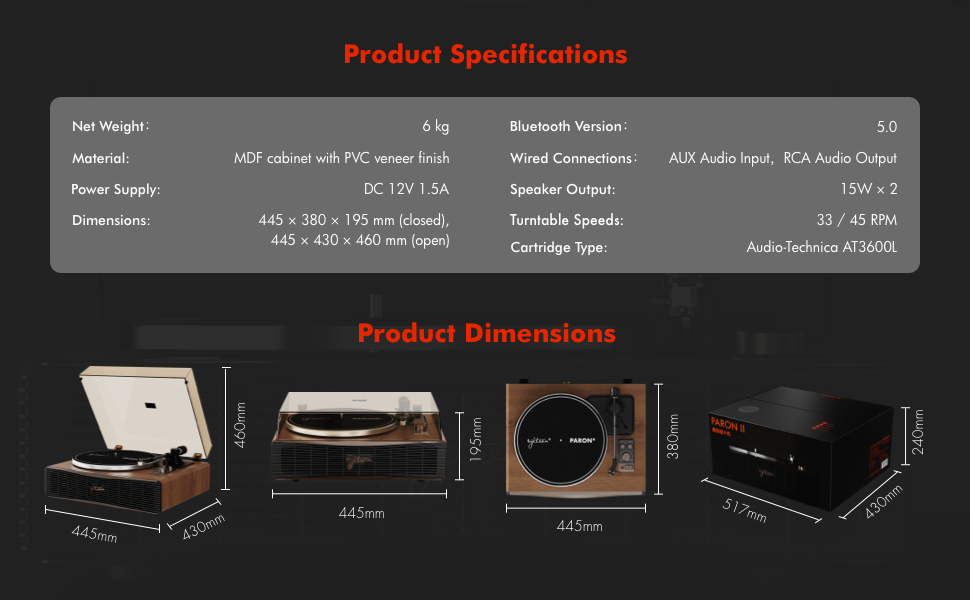
| Dimensjonijiet tal-Prodott | 17.4 x 14.96 x 7.48 inches (445 x 380 x 195 mm closed) |
| Piż tal-oġġett | 16 liri (6 kg) |
| Materjal | MDF cabinet with PVC veneer finish (Wood, Metal, Plastic) |
| Veloċitajiet tat-turntable | 33 1/3, 45 RPM |
| Tip ta 'Skartoċċ | Audio-Technica AT3600L (Magnet-type) |
| Verżjoni Bluetooth | 5.0 |
| Konnessjonijiet bil-fili | AUX Audio Input, RCA Audio Output |
| Output Speaker | 15W x 2 (Built-in 2.5" woofer and 2" tweeter) |
| Provvista tal-Enerġija | DC 12V 1.5A |
| Karatteristiċi Speċjali | Adjustable Counterweight, Built-In Speaker, Built-In Bluetooth Receiver, RCA Output, Suspension Shock Absorption System, S5 Motor System |
9. Garanzija u Appoġġ
The syitren PARON II Record Player is designed for reliable performance. For warranty information or technical support, please refer to the contact details provided with your purchase documentation or visit the official syitren websit.
Jekk jogħġbok żomm il-prova tax-xiri tiegħek għal kwalunkwe talba ta' garanzija.