
GOOJODOQ M06 Bluetooth Keyboard and Mouse
Manwal għall-Utent
Introduzzjoni
Thank you for choosing the GOOJODOQ M06 Bluetooth Keyboard and Mouse. This 3-in-1 device is designed to enhance your productivity across multiple platforms. This manual provides detailed instructions on how to set up, operate, and maintain your new device. Please read this manual carefully before use and keep it for future reference.
Kontenut tal-Pakkett
- 1 x Keyboard Bluetooth
- 1 x Mouse Bluetooth
- 1 x Kejbil tal-Iċċarġjar (USB Tip-C)
- 1 x Manwal għall-Utent
Prodott Overview
The GOOJODOQ M06 is a versatile input solution featuring a 10-inch keyboard and a compact mouse, both utilizing Bluetooth connectivity. The keyboard supports simultaneous connection to up to three devices and is compatible with Android, iOS, and Windows operating systems. It features silent scissor-switch keys for a comfortable typing experience.
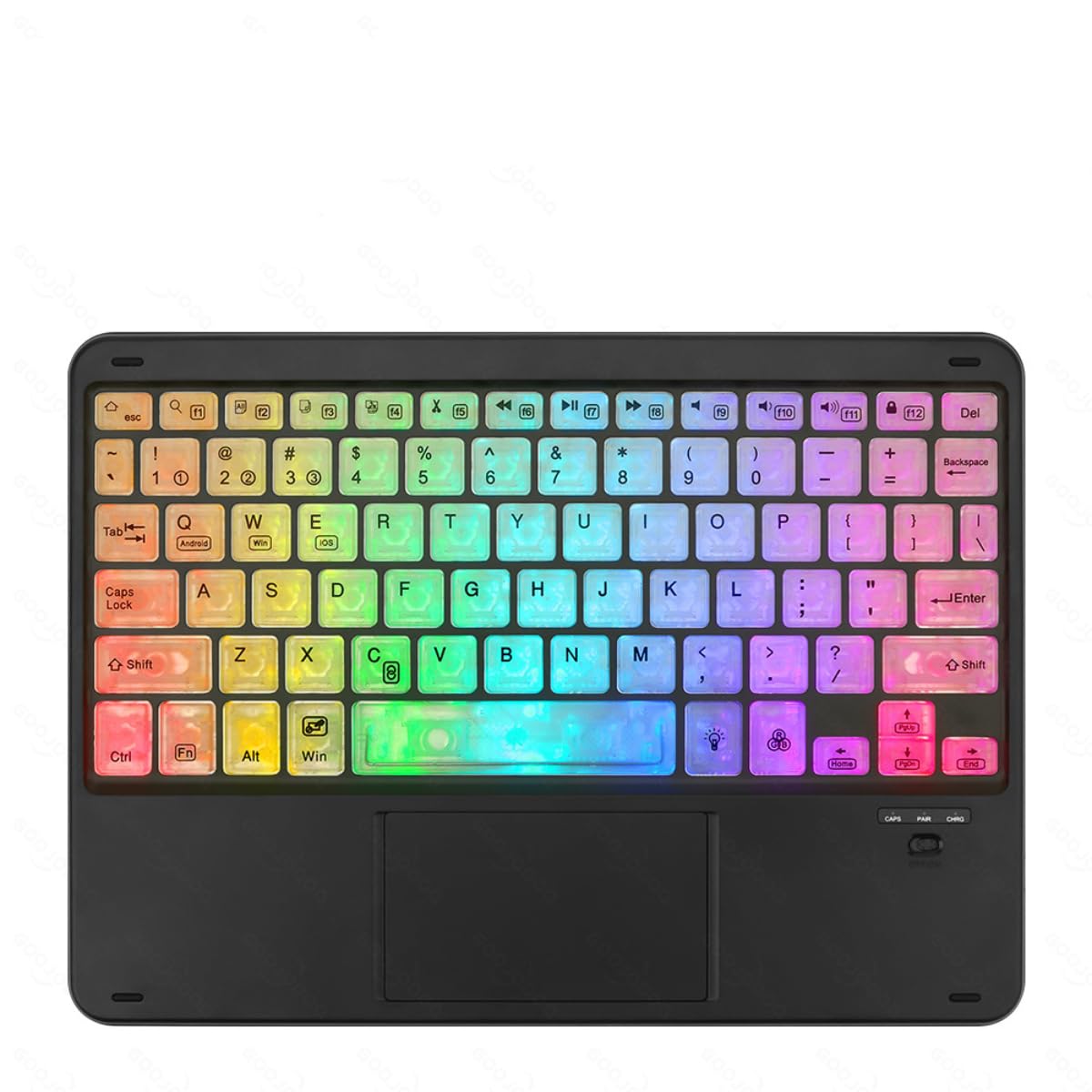
Image showing the GOOJODOQ M06 Bluetooth Keyboard and the accompanying mouse, both in black.
Setup: Bluetooth Connection
Follow these steps to connect your GOOJODOQ M06 Keyboard and Mouse via Bluetooth:
- Qawwa Mixgħul: Turn on the power switch located on the keyboard and mouse. The Bluetooth indicator light on the keyboard will illuminate.
- Daħħal il-Mod tat-Tqabbil:
- For the first device, press FN + 1. The Bluetooth light will blink, indicating it's ready for pairing.
- For the second device, press FN + 2.
- For the third device, press FN + 3.
- Qabbad fuq l-Apparat Tiegħek: On your device (e.g., tablet, smartphone, computer), go to Bluetooth settings and search for available devices. Select "Bluetooth Keyboard" from the list to connect.
- Agħżel is-Sistema Operattiva: After successful connection, press the corresponding key combination to select your device's operating system:
- For Android devices, press FN+Q.
- For Windows devices, press FN + W.
- For iOS devices, press FN + E.
- Konnessjoni mill-ġdid Awtomatika: Once successfully paired, the keyboard will automatically reconnect to the last used device when powered on.
Istruzzjonijiet Operattivi
Qlib bejn Apparati Konnessi
If you have paired the keyboard with multiple devices, you can easily switch between them by pressing the corresponding FN key combination:
- Agħfas FN + 1 biex taqleb għall-ewwel apparat imqabbad.
- Agħfas FN + 2 biex taqleb għat-tieni apparat imqabbad.
- Agħfas FN + 3 biex taqleb għat-tielet apparat imqabbad.
Ensure the target device's Bluetooth is enabled and within range for a successful switch.
Użu Ġenerali
The keyboard features a standard QWERTY layout. The mouse operates like a conventional Bluetooth mouse. Ensure both devices are charged for optimal performance.
Manutenzjoni
- Tindif: Uża drapp artab u niexef biex tnaddaf il-wiċċ tat-tastiera u l-maws. Għal ħmieġ iebes, neħħi ftit drapp.amp Jista' jintuża drapp b'sapun ħafif, biex tiżgura li l-ebda likwidu ma jidħol fl-apparat.
- Ħażna: Aħżen l-apparat f'post frisk u niexef 'il bogħod mix-xemx diretta u minn temperaturi estremi.
- Iċċarġjar: Charge the devices using the provided USB Type-C cable. Avoid using damaged cables or chargers.
- Evita Likwidi: Do not expose the keyboard or mouse to water or other liquids.
Issolvi l-problemi
- Apparat Mhux Qed Jikkonnettja:
- Ensure both the keyboard and mouse are powered on and fully charged.
- Make sure Bluetooth is enabled on your host device.
- Try re-entering pairing mode (FN + 1/2/3) and re-pairing with your device.
- Ensure the correct operating system mode is selected (FN + Q/W/E).
- Move the devices closer to each other to ensure they are within Bluetooth range.
- Iċ-Ċwievet Ma Jirrispondux:
- Check if the keyboard is connected to the correct device (FN + 1/2/3).
- Iċċarġja mill-ġdid it-tastiera.
- Erġa' ibda t-tagħmir ospitanti tiegħek.
- Il-Maws Mhux Jirrispondi:
- Erġa' ċċarġja l-maws.
- Kun żgur li l-maws ikun mixgħul.
- Re-pair the mouse with your device if necessary.
Speċifikazzjonijiet
- Mudell: M06
- Materjal: ABS + metall
- Kulur: Iswed
- Daqs: 10 inches (Keyboard)
- Port tal-Iċċarġjar: USB Tip-Ċ
- Konnettività: Bluetooth (supports 3 devices simultaneously)
- Kompatibilità: Android, iOS, Windows
- Karatteristiċi tat-Tastiera: Scissor-switch keys, Silent operation
Garanzija u Appoġġ
GOOJODOQ products are designed for reliability and performance. For warranty information, please refer to the warranty card included with your purchase or visit the official GOOJODOQ website. For technical support or further assistance, please contact GOOJODOQ customer service through the contact information provided on our webis-sit jew il-pjattaforma tax-xiri tiegħek.