
1. Introduzzjoni
The Rakstore XY-AP50H is a compact and versatile TPA3116D2 stereo digital amplifier board featuring Bluetooth 5.0 connectivity. It delivers 50W+50W output, making it suitable for various audio applications including home theater systems. This manual provides detailed instructions for setup, operation, and maintenance to ensure optimal performance and longevity of your device.
2. Informazzjoni dwar is-Sigurtà
- Tiżgura l-provvista tal-enerġija voltage is within the specified range of DC 5-27V. Using an incorrect voltage jistgħu jagħmlu ħsara lill-apparat.
- Always connect speakers and power supply before powering on the ampaktar ħaj.
- Avoid short-circuiting the speaker outputs or power input terminals.
- Tesponix l-apparat għall-umdità, l-ilma, jew temperaturi estremi.
- Żomm l-apparat 'il bogħod mit-tfal.
- Skonnettja l-enerġija qabel ma tagħmel xi manutenzjoni jew konnessjonijiet.
3. Karatteristiċi tal-prodott
- Ħruġ ta' Enerġija Għolja: 50W + 50W stereo output.
- Konnettività Bluetooth 5.0: Stable wireless audio transmission up to 15 meters (unobstructed).
- VoltagFirxa e: Operates on DC 5-27V / 2A or above.
- Inputs Awdjo Multipli: Supports Bluetooth, AUX, and USB Sound Card functions.
- Mekkaniżmi ta' Protezzjoni: Includes power supply reverse connection protection, short circuit protection, and self-recovery overheating protection.
- Kompatibbiltà tal-Ispeaker: Adaptable for 10W-200W, 4Ω/8Ω speakers.
4. Prodott Aktarview u Komponenti
Familiarize yourself with the various components and connection points of the XY-AP50H ampbord aktar ħaj.
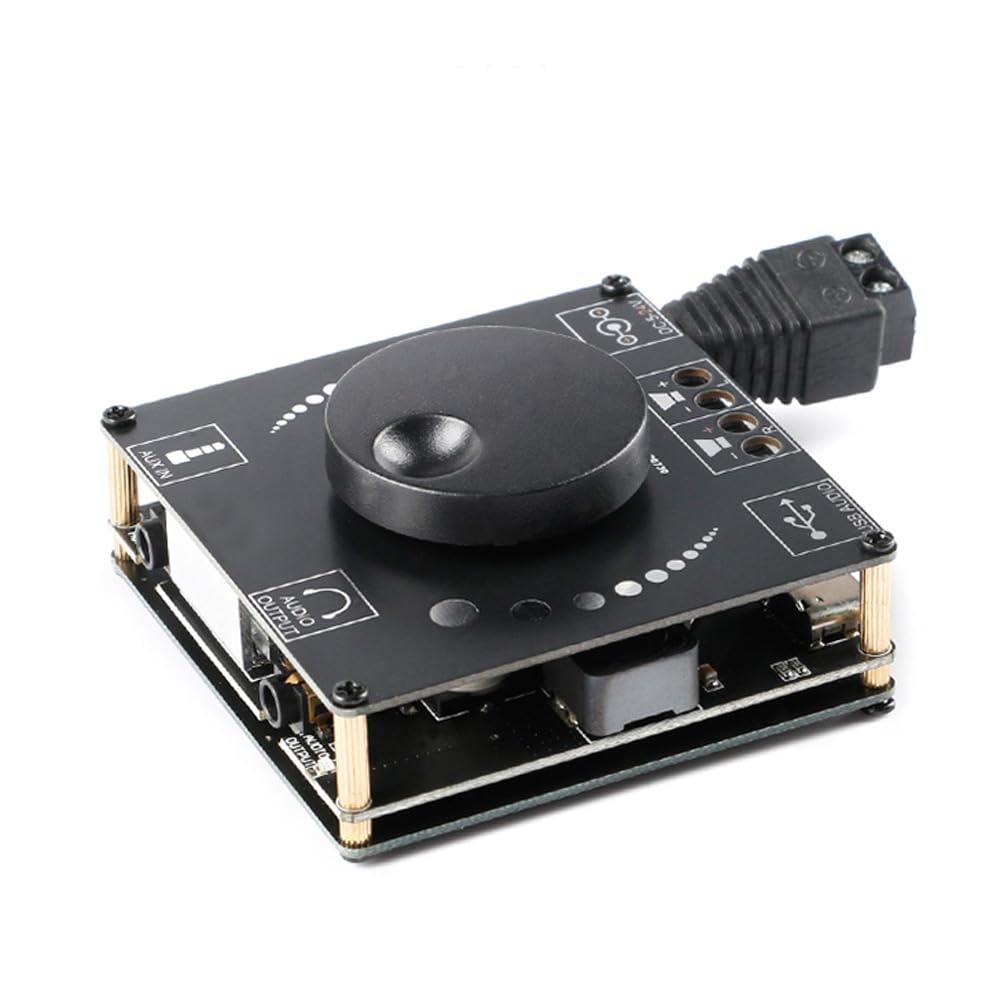
Stampa 4.1: Fuq view of the XY-AP50H amplifier board, showing the main components including the volume knob, power input, speaker terminals, AUX input, and USB port.

Stampa 4.2: Qiegħ view of the XY-AP50H amplifier board, indicating the USB Audio input, speaker outputs (SPKR, SPKL), and DC 5-24V power input.

Stampa 4.3: Dimensions of the XY-AP50H amplifier board, measuring approximately 60mm by 60mm.
5. Istruzzjonijiet ta' Setup
5.1 Konnessjoni tal-Enerġija
- Tiżgura l- amplifier is powered off and disconnected from any power source.
- Connect a DC 5-27V / 2A or above power adapter to the DC power input jack on the board. Observe polarity if using bare wires.
5.2 Konnessjoni tal-Ispeaker
- Identify the left (SPKL) and right (SPKR) speaker output terminals on the board.
- Connect your passive speakers (10W-200W, 4Ω/8Ω) to the corresponding terminals. Ensure correct polarity (+ to + and - to -) for each speaker.
5.3 Għażliet ta' Input tal-Awdjo
The XY-AP50H supports three audio input methods: Bluetooth, AUX, and USB Sound Card.
5.3.1 Konnessjoni Bluetooth
- Qawwa fuq il- ampbord aktar ħaj.
- On your audio source device (e.g., smartphone, tablet), enable Bluetooth and search for available devices.
- Select "XY-AP50H" from the list to pair. A confirmation sound will indicate successful pairing.
5.3.2 Konnessjoni tad-Dħul AUX
- Connect a 3.5mm audio cable from your audio source device's headphone jack to the AUX input port on the ampbord aktar ħaj.
- Il- amplifier will automatically switch to AUX input mode when a cable is detected.
5.3.3 USB Sound Card Function

Stampa 5.1: Illustration of connecting the XY-AP50H to a computer via a data cable to utilize its USB sound card function, providing improved audio output quality.
- Qabbad il- amplifier board to your computer using a USB data cable (Type-C to USB-A or Type-C to Type-C, depending on your computer's ports).
- Most computers will automatically recognize the amplifier as an external sound card.
- If prompted, select the XY-AP50H as the audio output device in your computer's sound settings.
- Open your computer's audio playback software to play music. The amplifier will output the audio.
6. Istruzzjonijiet Operattivi
6.1 Power On/Off
Connect or disconnect the DC power supply to power on or off the ampbord aktar ħaj.
6.2 Kontroll tal-Volum
Rotate the potentiometer knob on the board clockwise to increase volume and counter-clockwise to decrease volume.
6.3 Input Mode Switching
Il- amplifier automatically prioritizes inputs. Bluetooth is typically the default. Connecting an AUX cable will switch to AUX. Connecting via USB to a computer will activate the USB sound card mode.
7. Speċifikazzjonijiet
| Karatteristika | Speċifikazzjoni |
|---|---|
| Mudell | XY-AP50H |
| AmpĊippa lifier | TPA3116D2 |
| Verżjoni Bluetooth | BLE 5.0 |
| Qawwa tal-Ħruġ | 50W + 50W (Stereo) |
| Provvista Voltage | DC 5-27V / 2A above |
| Distanza tat-Trażmissjoni | 15 metru (mingħajr xkiel) |
| Numru ta 'Kanali | Left and Right Dual Channels (Stereo) |
| Adapted Speakers | 10W-200W, 4Ω/8Ω |
| Mekkaniżmi ta' Protezzjoni | Power supply reverse connection protection, short circuit protection, self-recovery overheating protection |
8 Issolvi l-problemi
- Ebda Ħsejjes:
- Check power supply connection and ensure it meets DC 5-27V / 2A or above.
- Verify speaker connections are secure and correctly polarized.
- Ensure the correct audio input mode is selected (Bluetooth paired, AUX cable connected, or USB sound card active).
- Aġġusta l-pum tal-volum fuq il- amplifier u l-apparat tas-sors tal-awdjo tiegħek.
- Ħoss Mgħawġ:
- Naqqas il-volum miż-żewġ amplifier u s-sors tal-awdjo.
- Check speaker impedance and power rating to ensure compatibility.
- Ensure power supply is stable and sufficient (at least 2A).
- Skonnettjar Bluetooth:
- Ensure the audio source device is within 15 meters of the amplifier and there are no major obstructions.
- Ipprova neħħi l-akkoppjar u erġa' qabbad l-apparat.
- Kun żgur li l-ebda apparat ieħor ma jkun qed jinterferixxi mas-sinjal Bluetooth.
- Is-sħana żejda:
- Tiżgura ventilazzjoni adegwata madwar il- ampbord aktar ħaj.
- Reduce output volume or check speaker impedance. The board has self-recovery overheating protection, which may temporarily shut down output.
9. Manutenzjoni
- Żomm il- amplifier board clean and free from dust. Use a soft, dry cloth for cleaning.
- Avoid placing the board in environments with high humidity or extreme temperatures.
- Do not attempt to disassemble or modify the board, as this may void any potential warranty and cause damage.
10. Garanzija u Appoġġ
For warranty information and technical support, please refer to the seller's policies or contact Rakstore customer service directly. Keep your purchase receipt as proof of purchase.