
XTUGA X-4
XTUGA USB Condenser Microphone (X-4) Instruction Manual
Model: X-4 | Brand: XTUGA
Introduzzjoni
This manual provides comprehensive instructions for the setup, operation, and maintenance of your XTUGA USB Condenser Microphone (Model X-4). Please read this manual thoroughly before using the product to ensure proper functionality and longevity.
Karatteristiċi Ewlenin
- Four Pickup Patterns: Stereo, Cardioid, Bidirectional, and Omnidirectional for versatile recording applications.
- Buttuna ta' Silenzju Instant: Physical mute button for immediate audio cutoff during live streams or recordings.
- Kontrolli tal-Volum Integrati: Separate knobs for microphone gain and headphone monitoring volume.
- Monitoraġġ f'ħin reali: 3.5mm headphone output for zero-latency audio monitoring.
- Kostruzzjoni tal-Metall Durabbli: Aircraft-grade aluminum unibody for enhanced durability and protection.
- Universal Plug & Play: USB-C and USB-A compatibility for instant connection to various devices.
- 3/8" Threaded Mount: Compatible with standard microphone boom arms for flexible positioning.
Kontenut tal-Pakkett
Kun żgur li l-oġġetti kollha huma preżenti qabel ma tipproċedi bis-setup:
- XTUGA USB Condenser Microphone (X-4)
- USB-C għal USB-A Cable
- USB-C għal USB-C Cable
- Kaxxa tal-Ġarr Portabbli
- Manwal ta 'Istruzzjoni (dan id-dokument)
Gwida ta' Setup
1. Unpacking the Microphone
Carefully open the carrying case and remove the microphone and accessories. The case is designed to protect the microphone during transport.

Immaġni: The XTUGA USB Condenser Microphone (X-4) positioned on a wooden desk, showcasing its design and integrated stand.
2. Konnessjoni mal-Apparat Tiegħek
The X-4 microphone is plug-and-play compatible with most computers and recording devices. Use the provided USB-C to USB-A or USB-C to USB-C cable to connect the microphone to your device.
- Għal PC/Laptop: Connect the USB-C end of the cable to the microphone's port (located at the bottom) and the USB-A or USB-C end to an available port on your computer.
- Għal Apparati Oħra: Ensure your device supports USB audio input and use the appropriate cable.

Immaġni: Diagram illustrating the USB-C interface and wide compatibility of the XTUGA USB Condenser Microphone (X-4) with computers and mobile devices.

Immaġni: Close-up view of the bottom of the XTUGA USB Condenser Microphone (X-4), highlighting the earphone output, power interface, and audio output ports.
3. Aġġustament tal-Istand
The integrated stand allows for 360° rotation, enabling optimal positioning for your recording needs. Loosen the knobs on the sides of the microphone to adjust the angle, then tighten them to secure the position.

Immaġni: Visual representation of the XTUGA USB Condenser Microphone's integrated stand, demonstrating its 360° rotation capability and non-slip mat.
For alternative mounting, the microphone features a 3/8" threaded interface at the bottom, compatible with standard boom arms (not included).
Istruzzjonijiet Operattivi
1. L-Għażla ta' Mudelli ta' Ġbir
The X-4 microphone offers four distinct pickup patterns, selectable via the "DIRECTIVITY" knob on the front of the microphone. Choose the pattern that best suits your recording environment and purpose:
- Kardjojde: Ideal for solo podcasts, streaming, and gaming. Focuses on sound directly in front of the microphone, minimizing background noise.
- Stereo: Captures a wide, immersive soundstage. Suitable for musical performances or ambient recordings.
- Omnidirezzjonali: Picks up sound from all directions (360°). Best for conference calls, group discussions, or capturing room ambiance.
- Bidirezzjonali: Records sound from the front and rear of the microphone, while rejecting side noise. Perfect for two-person interviews or duets.

Immaġni: Visual guide illustrating the four available pickup patterns (Stereo, Cardioid, Bidirectional, Omnidirectional) for the XTUGA USB Condenser Microphone (X-4).

Immaġni: Close-up of the XTUGA USB Condenser Microphone (X-4) highlighting the Four Pickup Patterns Switch and the Mute Button.
2. Funzjoni Mute
Press the physical Mute button on the front of the microphone to instantly cut off audio input. The button will illuminate or blink to indicate the mute status. Press again to unmute.

Immaġni: Promotional image demonstrating the one-click mute function of the XTUGA USB Condenser Microphone (X-4), showing the light flicker when muted.
3. Volume Controls and Monitoring
The microphone features two volume knobs on its front panel:
- Microphone Volume (Top Knob): Adjusts the input gain of the microphone. Turn clockwise to increase sensitivity, counter-clockwise to decrease.
- Headphone Volume (Bottom Knob): Controls the volume of the 3.5mm headphone output for real-time monitoring.
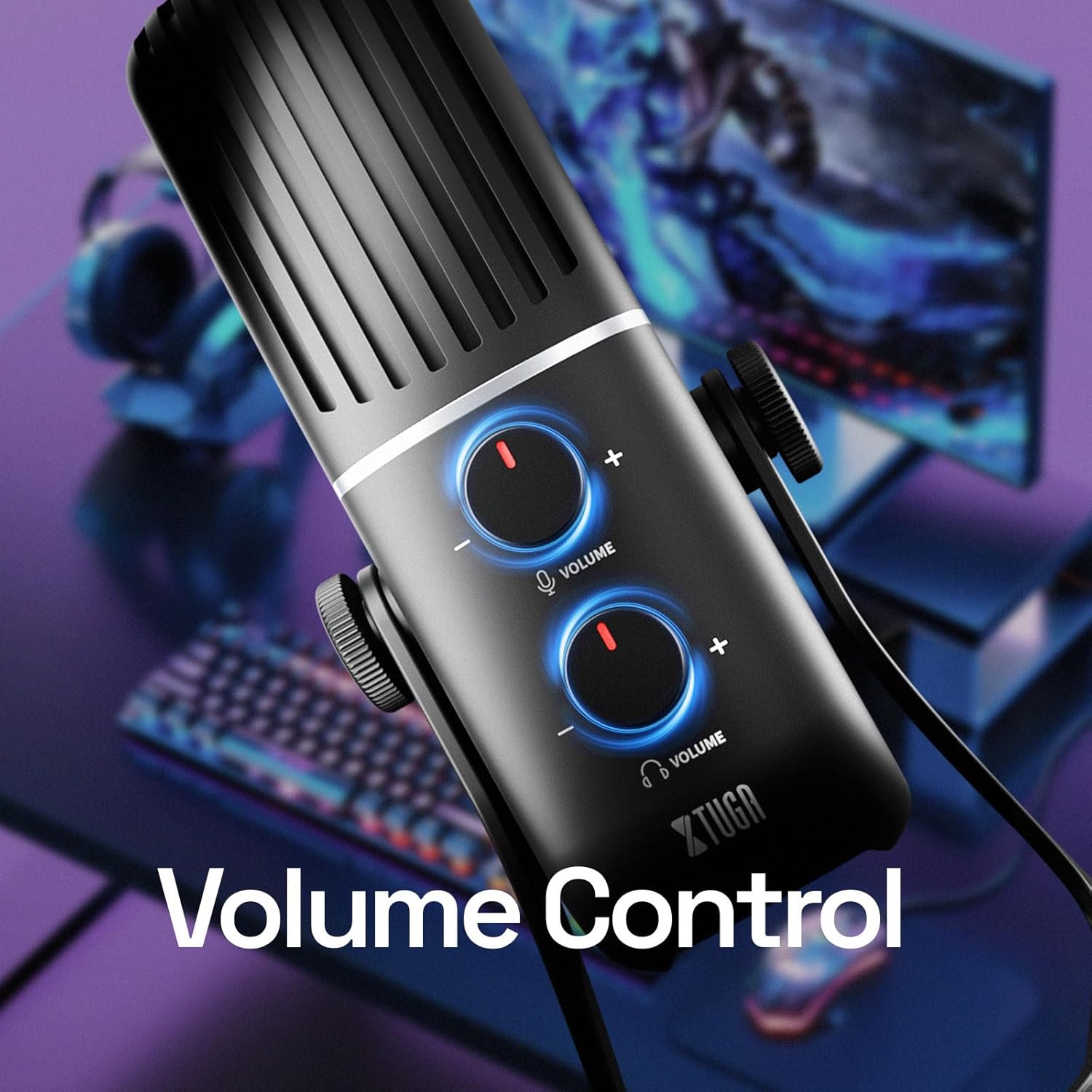
Immaġni: Close-up of the XTUGA USB Condenser Microphone (X-4) showing the two volume control knobs for microphone input and headphone output.

Immaġni: The XTUGA USB Condenser Microphone (X-4) with headphones connected, illustrating the real-time monitoring feature for zero-latency audio feedback.
Manutenzjoni
- Tindif: Uża drapp artab u niexef biex tnaddaf il-barra tal-mikrofonu. Evita li tuża kimiċi ħarxa jew materjali li joborxu.
- Ħażna: Meta ma tkunx qed tuża l-mikrofonu, aħżen il-kaxxa tal-ġarr provduta biex tipproteġih mit-trab, l-umdità, u l-ħsara fiżika.
- Immaniġġjar: Immaniġġja l-mikrofonu b'attenzjoni. Evita li twaqqgħu jew tesponih għal temperaturi jew umdità estremi.
Issolvi l-problemi
| Problema | Kawża Possibbli | Soluzzjoni |
|---|---|---|
| L-ebda ħruġ ta' ħoss mill-mikrofonu. | Il-mikrofonu huwa siekta. Magħżulx apparat tad-dħul mhux korrett. Konnessjoni tal-kejbil maħlula. | Press the Mute button to unmute. Check your computer's sound settings and select "XTUGA X-4" as the input device. Ensure USB cable is securely connected to both microphone and computer. |
| L-ebda ħoss mill-headphones. | Headphone volume is too low. Loose headphone connection. Magħżulx apparat tal-ħruġ korrett. | Increase the Headphone Volume knob. Ensure headphones are fully plugged into the 3.5mm jack. Check your computer's sound settings and ensure "XTUGA X-4" is selected as the output device for monitoring. |
| Sound is distorted or too quiet/loud. | Microphone gain is too high/low. Proximity to microphone. | Adjust the Microphone Volume knob. Adjust your distance from the microphone. Speak 6-12 inches away for optimal sound. |
| Background noise is prominent. | Incorrect pickup pattern selected. Storbju ambjentali. | Switch to Cardioid pattern for single-source recording. Reduce ambient noise in your recording environment. |
Speċifikazzjonijiet
| Karatteristika | Dettall |
|---|---|
| Numru tal-Mudell | X-4 |
| Tip ta 'mikrofonu | Kondensatur |
| Disinji Polari | Stereo, Cardioid, Omnidirectional, Bidirectional |
| Konnettività | USB Tip-Ċ |
| Rispons ta' Frekwenza | 18000 Hz (up to 48 KHz maximum frequency) |
| Sinjal-mal-ħoss Ratio | 66 dB |
| Livell ta' Storbju | 85 dB |
| Impedenza | 16 Ohm |
| Materjal | Metal (Aircraft-grade aluminum unibody) |
| Piż tal-oġġett | 4.2 liri |
| Apparati Kompatibbli | PC, Laptop, Gaming Console, Audio Interface, Audio Mixer |
Garanzija u Appoġġ
For warranty information and technical support, please visit the official XTUGA webis-sit jew ikkuntattja lis-servizz tal-konsumatur tagħhom direttament. Żomm l-irċevuta tax-xiri tiegħek għal talbiet ta' garanzija.
XTUGA Official Store: Visit XTUGA Store on Amazon
Ask a question about this manual
Ask about setup, troubleshooting, compatibility, parts, safety, or missing instructions. Manuals+ will review the question and use this page’s manual context to help answer it.