
Asus A303 TG H1 GEN II MIKU
ASUS TUF Gaming H1 GEN II Hatsune Miku Edition Wired Gaming Headset User Manual
Model: A303 TG H1 GEN II MIKU
Introduzzjoni
Thank you for choosing the ASUS TUF Gaming H1 GEN II Hatsune Miku Edition Wired Gaming Headset. This manual provides essential information for setting up, operating, maintaining, and troubleshooting your new headset. Please read it thoroughly to ensure optimal performance and longevity of your device.
Prodott Overview
The ASUS TUF Gaming H1 GEN II Hatsune Miku Edition headset is designed for immersive gaming audio and clear communication. It features 40mm ASUS Essence drivers, virtual 7.1 surround sound, and a TeamSpeak-certified unidirectional microphone. Its lightweight design and durable ear cushions ensure comfort during extended use.

Figure 1: ASUS TUF Gaming H1 GEN II Hatsune Miku Edition Headset with in-line controls.
Karatteristiċi ewlenin:
- Disinn ħafif u ergonomiku: Weighing approximately 297 grams with a metal suspension headband for comfortable, extended gaming sessions.
- Kwalità tal-Awdjo Eċċezzjonali: Equipped with 40mm ASUS Essence drivers and virtual 7.1 surround sound for immersive in-game audio.
- Enhanced Communication: Features a TeamSpeak-certified unidirectional microphone for clear voice chat.
- Durable Ear Cushions: Easy-to-remove and resistant to alcohol and hypochlorous acid for convenient daily cleaning.
- Kontrolli fil-linja: Convenient controls for volume adjustment, audio mute, virtual 7.1 surround sound activation, and lighting.
- Eye-catching Style: Incorporates Hatsune Miku’s signature teal color and lighting for a distinctive look.
- Kompatibilità Multi-Pjattaforma: Connects via USB Type-A, compatible with PCs, PlayStation 4, and PlayStation 5.
Kontenut tal-Pakkett
Iċċekkja li l-oġġetti kollha huma preżenti u f'kundizzjoni tajba malli tiftaħ il-pakkett.
- ASUS TUF Gaming H1 GEN II Hatsune Miku Edition Gaming Headset
- Manwal għall-Utent
- Additional accessories (refer to packaging for specific items like stickers or promotional materials)
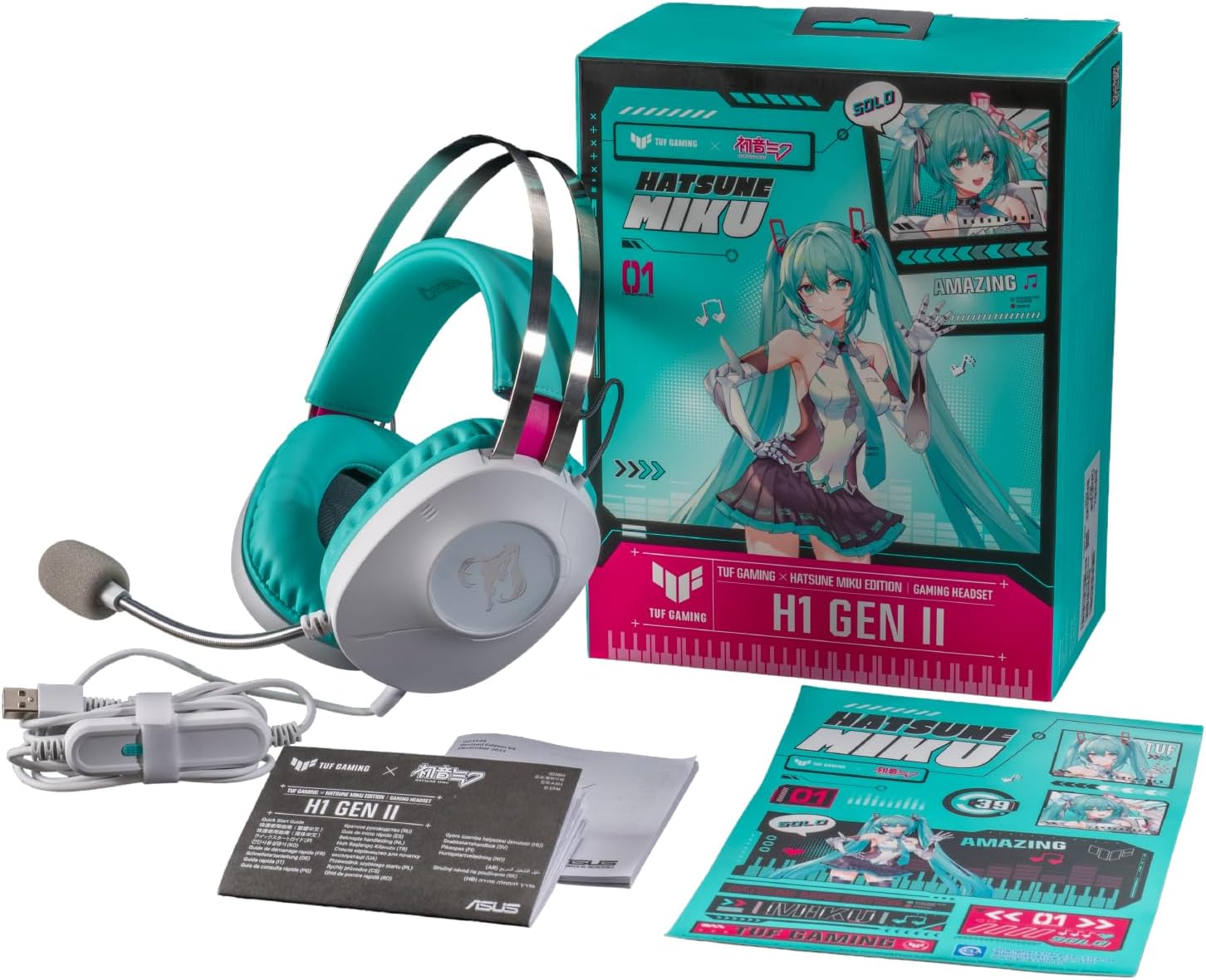
Figure 2: Contents of the headset package, including the headset, manual, and stickers.
Setup
Konnessjoni tal-headset:
- Locate the USB Type-A connector on your headset cable.
- Plug the USB Type-A connector into an available USB port on your PC, PlayStation 4, or PlayStation 5.
- The headset should be automatically recognized by your device. You may need to select it as the default audio input/output device in your system settings.
Microphone Adjustment:
- The unidirectional microphone is designed for clear voice pickup. Position the microphone boom arm close to your mouth for optimal clarity.
- Use the in-line controls to mute or unmute the microphone as needed.
It-tħaddim tal-Headset
Kontrolli fil-linja:
The headset features convenient in-line controls for quick adjustments during use.
- Kontroll tal-Volum: Use the scroll wheel or buttons to adjust the audio volume.
- Awdjo Mute: Press the dedicated button to mute or unmute the headset audio.
- Mute tal-mikrofonu: Press the dedicated button to mute or unmute the microphone.
- Ħoss Virtwali 7.1 Surround: Activate or deactivate virtual 7.1 surround sound for an immersive audio experience.
- Kontroll tad-Dawl: Adjust or toggle the headset's lighting effects.

Figure 3: Headset with visible in-line controls for volume, mute, and 7.1 surround sound.

Figure 4: Close-up of the headset earcup, emphasizing the 40mm ASUS Essence drivers for exceptional audio quality.

Figure 5: Headset with its TeamSpeak-certified unidirectional microphone for clear communication.
Manutenzjoni
Tindif tal-headset:
- Use a soft, dry cloth to wipe down the headset's exterior.
- The ear cushions are designed to be easy to remove and are resistant to alcohol and hypochlorous acid. For thorough cleaning, gently remove the ear cushions and wipe them with a suitable cleaning solution. Ensure they are completely dry before reattaching.
- Avoid using abrasive cleaners or solvents that may damage the headset's finish.
Ħażna:
- Aħżen il-headset f'post frisk u niexef 'il bogħod mix-xemx diretta u minn temperaturi estremi.
- Evita li tpoġġi oġġetti tqal fuq il-headset biex tevita l-ħsara.
Issolvi l-problemi
| Problema | Kawża Possibbli | Soluzzjoni |
|---|---|---|
| L-ebda awdjo mill-headset |
|
|
| Mikrofonu mhux qed jaħdem |
|
|
| Virtual 7.1 surround sound not working |
|
|
Speċifikazzjonijiet
| Karatteristika | Dettall |
|---|---|
| Mudell | A303 TG H1 GEN II MIKU |
| Konnettività | Bil-fili (USB Tip-A) |
| Sewwieqa | 40mm ASUS Essence Drivers |
| Impedenza | 32 Ohms |
| Rispons ta' Frekwenza | 20 Hz - 20 KHz |
| Mikrofonu | TeamSpeak-certified unidirectional microphone |
| Sound Surround Virtwali | Ħoss Surround Virtwali 7.1 |
| Piż | Madwar 297g (0.7 lbs) |
| Kuxxini tal-widnejn | Durable, easy-to-remove, alcohol- and hypochlorous acid-resistant |
| Kontrolli | In-line: Volume, Audio Mute, Virtual 7.1 Surround Sound, Lighting |
| Apparati Kompatibbli | Desktops, Laptops, PlayStation 4, PlayStation 5 |
| Materjal | Metall, plastik |
| Kulur | White with Teal accents |
Garanzija u Appoġġ
For warranty information, please refer to the warranty card included in your product packaging or visit the official ASUS support website. You can find drivers, FAQs, and contact information for technical support there.
Appoġġ ASUS Websit: www.asus.com/support/
Ask a question about this manual
Ask about setup, troubleshooting, compatibility, parts, safety, or missing instructions. Manuals+ will review the question and use this page’s manual context to help answer it.