
Introduzzjoni
This manual provides detailed instructions for the setup, operation, and maintenance of your SSK Powered USB 3.2 Hub (Model SC221). Please read this manual thoroughly before using the device to ensure proper functionality and to prevent damage.
Karatteristiċi tal-Prodott
- Konnettività ta' 7 Portijiet: Equipped with two 10Gbps USB-A ports, two 10Gbps USB-C ports, dual 4K HDMI ports, and one 100W PD 3.0 charging port.
- Super-Fast Data Transfer: Four data ports (2x USB-A, 2x USB-C) support up to 10Gbps, allowing rapid transfer of large files.
- Kunsinna tal-Enerġija 100W: The dedicated USB-C PD 3.0 port provides efficient charging for compatible laptops and devices.
- Dual 4K HDMI Display: Supports dual monitor output at 4K@30Hz simultaneously, or a single monitor at up to 4K@60Hz.
- Kompatibilità Wiesgħa: Compatible with various operating systems including Windows, Mac OS, Linux, Android, and Chromebook, and devices such as MacBook Pro/Air, Dell XPS, ASUS laptops, HUAWEI MateBook, HP Spectre Notebook, LENOVO ThinkPad, iPad, iPhone 15, and more.

Immaġni: Fuqview of the SSK 7-in-1 USB 3.2 Hub, highlighting its various ports including USB 3.2 Gen 2 Type-C, USB 3.2 Gen 2 Type-A, HDMI 1 (4K@60Hz), HDMI 2 (4K@30Hz), and Type-C PD (100W).
Kontenut tal-Pakkett
- SSK Powered USB 3.2 Hub (Model SC221)
- Manwal għall-Utent
Setup Istruzzjonijiet
- Qabbad mat-Tagħmir Ospitanti: Plug the integrated USB-C cable from the SSK Hub into a full-function USB-C port on your laptop, tablet, or smartphone. Ensure the host device's USB-C port supports Power Delivery, DisplayPort Alternate Mode, and Data transfer.
- Qabbad l-Adapter tal-Enerġija (Mhux obbligatorju iżda rakkomandat): For optimal performance, especially when using multiple peripherals or charging your host device, connect a USB-C PD power adapter (not included) to the hub's 100W PD charging port.
- Ikkonnettja l-Periferali: Connect your USB devices (flash drives, external hard drives, keyboards, mice, etc.) to the available USB-A and USB-C data ports.
- Qabbad id-Displays: Connect your HDMI monitors to the HDMI 1 and HDMI 2 ports on the hub.
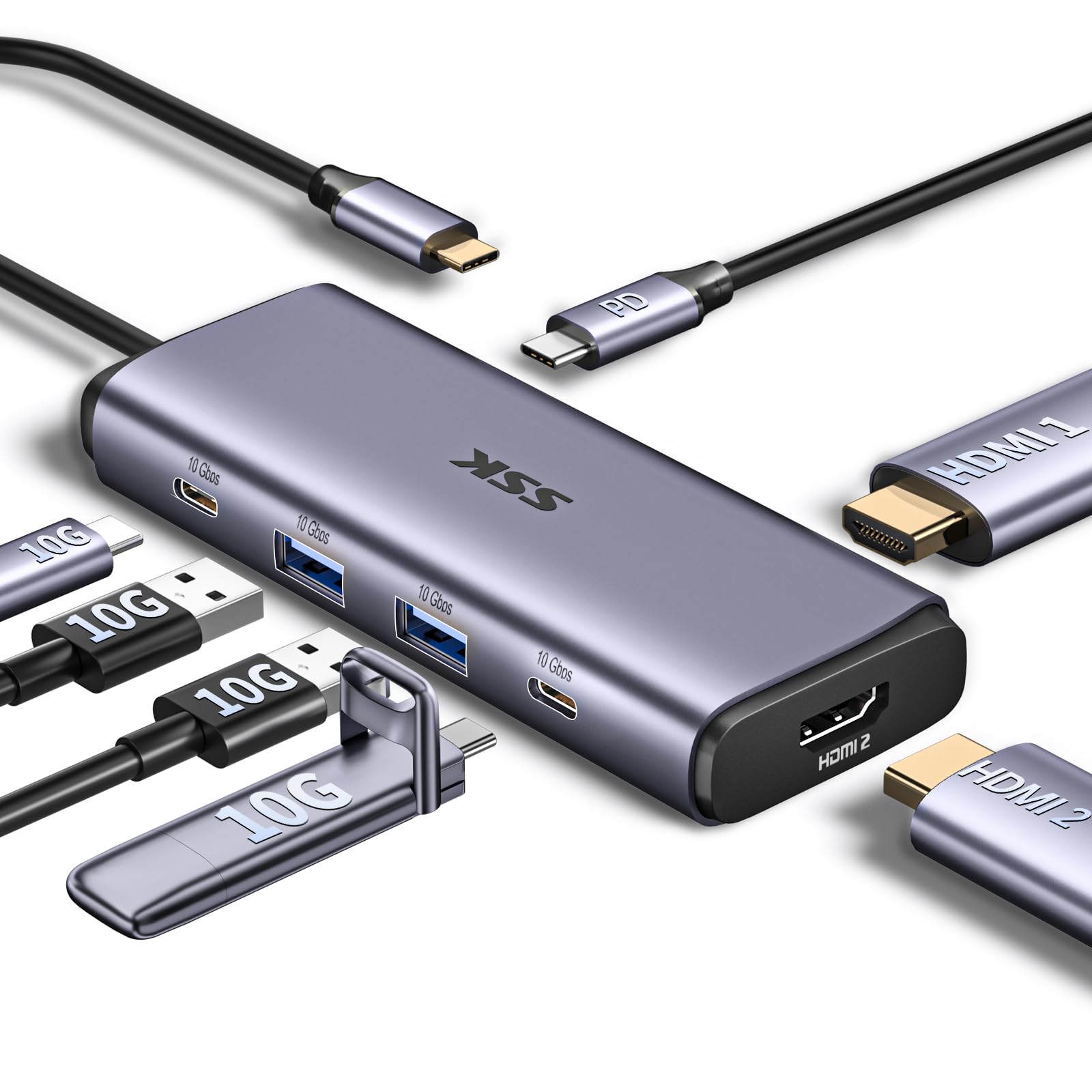
Image: The SSK USB 3.2 Hub connected to a laptop, demonstrating its compact size and how various cables can be attached.

Image: A diagram illustrating various USB-C port types on laptops, indicating which support full functionality (Power Delivery, DisplayPort, Data) and which only support data, charging, or data+charging. Ensure your laptop's USB-C port is full-function for optimal hub performance.
Istruzzjonijiet Operattivi
Trasferiment tad-Data
The hub features two USB-A 3.2 Gen 2 ports and two USB-C 3.2 Gen 2 ports, each capable of data transfer speeds up to 10Gbps. Simply connect your compatible storage devices (e.g., flash drives, external SSDs) to these ports for high-speed data access.

Image: Illustration of the four 10Gbps USB-C and USB-A data ports, emphasizing their high-speed data transfer capabilities.
Kunsinna tal-Enerġija (PD)
The dedicated USB-C PD port supports up to 100W power input. When a compatible USB-C PD charger is connected to this port, the hub can pass through power to charge your host laptop or device, while also powering connected peripherals. Note that a portion of the power is used by the hub itself.

Image: A visual representation of the 100W USB-C PD3.0 charging feature, showing power input to the hub and output to a MacBook Pro.
Konfigurazzjoni tal-Wiri
The hub supports connecting up to two external monitors via its dual HDMI ports. The HDMI 1 port supports up to 4K@60Hz when used alone, while both HDMI 1 and HDMI 2 ports support up to 4K@30Hz when used simultaneously.
Windows OS:
- Modalità Estendi: Allows for an extended desktop across your laptop screen and two external monitors (A+B+C).
- Modalità mera: Displays the same content on all connected screens (A+A+A).
macOS:
- Modalità Estendi: Due to macOS limitations, extended monitors will display the same content (A+AA or A+BB). True MST (Multi-Stream Transport) for independent extended displays is not supported on macOS.
- Modalità mera: Displays the same content on all connected screens (A+A+A).

Image: A workstation setup demonstrating a laptop connected to two external monitors via the SSK Hub, enabling dual 4K HDMI high-definition display for multitasking.

Image: A detailed diagram showing the differences in multi-display modes (Extend and Mirror) between Mac OS and Windows when using the hub, specifically noting macOS limitations regarding MST.
Kompatibilità
The SSK USB 3.2 Hub is designed for broad compatibility with devices featuring a full-function USB-C port. This includes:
- Laptops: MacBook Pro, MacBook Air, Dell XPS, ASUS laptops, HUAWEI MateBook, HP Spectre Notebook, LENOVO ThinkPad, and other laptops with USB-C.
- Pilloli: iPad Pro, iPad Air, and other tablets with USB-C.
- Smartphones: iPhone 15 series, HUAWEI P20/30, LG G5, HTC 10, and other smartphones with USB-C.
- Sistemi Operattivi: Windows, Mac OS, Linux, Android, Chromebook.
Note: Before purchasing, please verify that your laptop's USB-C interface supports Power Delivery, DisplayPort Alternate Mode, and Data transfer for full functionality.

Image: A visual guide to the universal compatibility of the SSK Hub, showing various devices (USB flash drives, laptops, tablets, smartphones, HDDs, TVs) and operating systems (Windows, Mac OS, iPad OS, Android) it supports.
Manutenzjoni
- Żomm il-hub nadif u ħieles mit-trab. Uża drapp artab u niexef għat-tindif.
- Evita li tesponi l-hub għal temperaturi estremi, umdità, jew dawl tax-xemx dirett.
- Tippruvax tiżżarma jew issewwi l-apparat int stess. Dan jannulla l-garanzija.
- Disconnect the hub from your host device and power source when not in use for extended periods.
Issolvi l-problemi
| Ħruġ | Soluzzjoni Possibbli |
|---|---|
| No display output / Display flickering |
|
| USB devices not recognized or slow transfer speeds |
|
| Host device not charging via PD port |
|
| Hub feels warm during operation |
|
Speċifikazzjonijiet
| Karatteristika | Dettall |
|---|---|
| Numru tal-Mudell | SC221 |
| Portijiet USB totali | 7 |
| Portijiet tad-Dejta USB | 2 x USB-A 3.2 Gen 2 (10Gbps), 2 x USB-C 3.2 Gen 2 (10Gbps) |
| Portijiet HDMI | 2 x HDMI (HDMI 1: up to 4K@60Hz single, HDMI 2: up to 4K@30Hz dual) |
| Port ta' Kunsinna tal-Enerġija | 1 x USB-C PD 3.0 (up to 100W input) |
| Interface tal-Ħardwer | USB |
| Piż tal-oġġett | 4.6 uqija (130 gramma) |
| Dimensjonijiet tal-Pakkett | 7.91 x 3.98 x 0.94 pulzieri |
| Apparati Kompatibbli | MacBook Pro, Dell XPS, ASUS laptops, HUAWEI MateBook, HP Spectre Notebook, LENOVO ThinkPad, HUAWEI P20/30, LG G5, HTC 10, etc. |
| Sistemi Operattivi | Windows, Mac OS, Linux, Android, Chromebook |
Garanzija u Appoġġ
SSK products are designed for reliability and performance. For warranty information or technical support, please refer to the official SSK webis-sit jew ikkuntattja lis-servizz tal-konsumatur tagħhom direttament. Żomm l-irċevuta tax-xiri tiegħek għal talbiet ta' garanzija.