
Introduzzjoni
Thank you for choosing the BOROFONE BW37 BT 5.3 Wireless Noise Reduction Earphones. This manual provides essential information for the proper setup, operation, and maintenance of your new earphones. Please read this guide thoroughly before use to ensure optimal performance and longevity of your device.
Kontenut tal-Pakkett
- BOROFONE BW37 Wireless Earphones (Left and Right)
- Kawża tal-Iċċarġjar
- Cable tal-Iċċarġjar tal-USB
- Manwal għall-Utent
Prodott Overview
The BOROFONE BW37 earphones are designed for a superior audio experience with true wireless stereo sound and effective noise reduction. Their compact and portable design makes them ideal for daily use and travel.
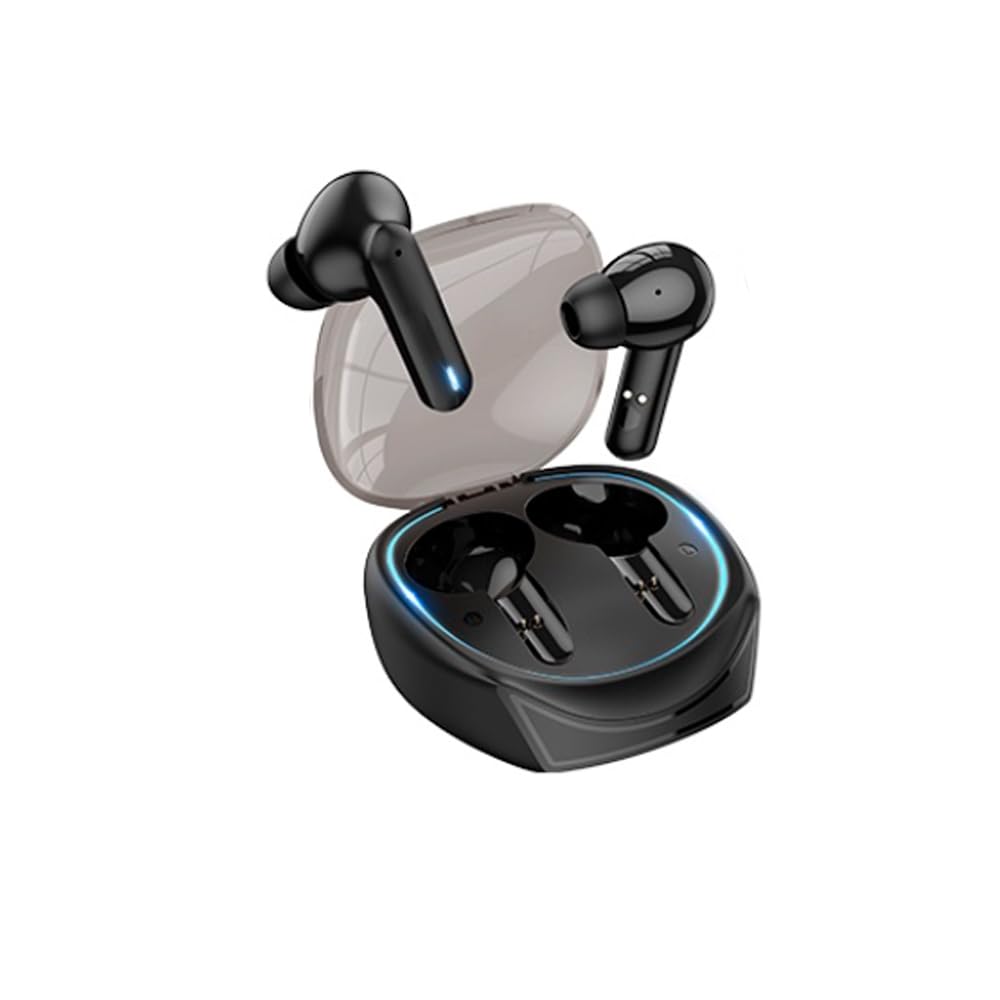
Image: The BOROFONE BW37 wireless earphones are shown nestled within their compact charging case. The case is black, sleek, and designed for portability, with the two individual earbuds visible inside.
Setup
1. Iċċarġjar Inizjali
Before first use, fully charge the earphones and the charging case. Place the earphones into the charging case and connect the USB charging cable to the case and a power source. The indicator lights on the case will show the charging status.
2. Tqabbil ma' Apparat
- Iftaħ il-kaxxa tal-iċċarġjar. Il-earphones jixegħlu awtomatikament u jidħlu fil-modalità ta' tqabbil.
- Fuq l-apparat tiegħek (smartphone, tablet, eċċ.), attiva l-Bluetooth.
- Fittex għal "BOROFONE BW37" in the list of available Bluetooth devices.
- Select "BOROFONE BW37" to connect. Once connected, you will hear an audible confirmation.
The earphones support automatic pairing. After the initial pairing, they will automatically connect to the last paired device when removed from the case.
Istruzzjonijiet Operattivi
Qawwa mixgħul/mitfi
- Qawwa Mixgħul: Open the charging case, or long-press the touch area on both earphones for 3 seconds.
- Itfi: Place the earphones back into the charging case and close the lid, or long-press the touch area on both earphones for 5 seconds.
Daqq tal-Mużika
- Play/Pawsa: Tektek darba waħda ż-żona tal-mess fuq kwalunkwe earphone.
- Track li jmiss: Tektek darbtejn iż-żona tal-mess fuq il-earphone tal-lemin.
- Track preċedenti: Tektek darbtejn iż-żona tal-mess fuq il-earphone tax-xellug.
Ġestjoni tas-Sejħiet
- Tweġiba/Tmiem Sejħa: Tektek darba waħda ż-żona tal-mess fuq kwalunkwe earphone.
- Irrifjuta Sejħa: Agħfas fit-tul iż-żona tal-mess fuq kwalunkwe earphone għal żewġ sekondi.
Assistent tal-Vuċi
- Attiva l-Assistent tal-Vuċi: Triple tap the touch area on either earphone.
Master-Slave Switching Technology
The earphones support master-slave switching, allowing either earphone to be used independently. Simply remove one earphone from the case to use it in mono mode. To switch back to stereo, remove the other earphone.
Iċċarġjar
Iċċarġjar tal-Earphones
Place the earphones into the charging case. They will automatically begin charging. The charging time for the earphones is approximately 1 hour.
Iċċarġjar tal-Każ
Connect the provided USB charging cable to the charging port on the case and a 5V DC power adapter. The indicator lights on the case will show the charging status. The charging case has a battery capacity of 250mAh.
Manutenzjoni
- Naddaf il-earphones u l-kaxxa tal-iċċarġjar regolarment b'ċarruta ratba u niexfa.
- Evita li tuża kimiċi ħarxa jew materjali li joborxu għat-tindif.
- Keep the charging contacts on both the earphones and the case clean to ensure proper charging.
- Aħżen il-earphones fil-kaxxa tal-iċċarġjar tagħhom meta ma tkunx qed tużahom biex tipproteġihom u żżomm il-ħajja tal-batterija.
Issolvi l-problemi
| Problema | Soluzzjoni Possibbli |
|---|---|
| Il-earphones ma jixegħlux. | Kun żgur li l-earphones u l-kaxxa tal-iċċarġjar huma ċċarġjati kompletament. |
| Ma tistax tqabbad mat-tagħmir. | Make sure Bluetooth is enabled on your device. Ensure earphones are in pairing mode. Try forgetting the device in your Bluetooth settings and re-pairing. |
| Only one earphone is working. | Place both earphones back into the charging case, close the lid, then open it again to reset the connection. Ensure both earphones are charged. |
| Kwalità tal-ħoss fqira jew skonnessjonijiet. | Ensure earphones are within the 10m operating range of your device. Check for interference from other wireless devices. |
| Il-earphones mhux qed jiċċarġjaw. | Clean the charging contacts on both earphones and the case. Ensure the charging cable is securely connected and the power source is active. |
Speċifikazzjonijiet
| Karatteristika | Dettall |
|---|---|
| Mudell | BW37 |
| Verżjoni Bluetooth | V5.3 |
| Medda Operattiva | Sa 10 metri |
| Daqs tal-Kelliem | 13mm |
| Frekwenza tat-Trażmissjoni | 2.4GHz |
| Protokolli Appoġġjati | Hands-free headset, A2DP, AVRCP |
| Ħin tal-Iċċarġjar tal-Earphone | Appross. 1 siegħa |
| Sensittività | 95±3dB |
| Iċċarġjar Voltage | DC 5V |
| Piż Nett tal-Prodott | 29.5g |
| Single Earphone Net Weight | 3g |
| Ħin ta' Standby | 120 sigħat |
| Ħin ta 'Daqq tal-Mużika | Appross. 4 sigħat |
| Ħin tat-Tkellem | Appross. 4 sigħat |
| Impedenza | 320Ω±15% |
| Kawża tal-Iċċarġjar Kapaċità tal-Batterija | 250mAh |
| Dimensjonijiet tal-Prodott | 50 x 40 x 25mm |
| Kontroll tal-Ħoss | Kanċellazzjoni Attiva tal-Ħoss |
| Livell ta 'Reżistenza għall-Ilma | Waterproof |
| Metodu ta' Kontroll | Mess |
Informazzjoni dwar is-Sigurtà
- Do not expose the earphones or charging case to extreme temperatures, direct sunlight, or fire.
- Evita li twaqqa', tiżżarma, jew timmodifika l-apparat.
- Żomm fejn ma jintlaħaqx mit-tfal u l-annimali domestiċi.
- Tużax il-earphones b'volum għoli għal perjodi twal biex tevita ħsara fis-smigħ.
- Uża biss il-kejbil tal-iċċarġjar provdut jew wieħed ekwivalenti ċċertifikat.
Garanzija u Appoġġ
BOROFONE products are designed and manufactured to the highest quality standards. For warranty information and customer support, please refer to the warranty card included in your package or visit the official BOROFONE websit. Jekk tiltaqa' ma' xi kwistjonijiet li mhumiex koperti f'dan il-manwal, jekk jogħġbok ikkuntattja lis-servizz tal-konsumatur għall-għajnuna.