
1. Informazzjoni Importanti dwar is-Sigurtà
Please read all instructions carefully before using the EVTSCAN Projection Clock. Keep this manual for future reference.
- Tesponix l-apparat għal temperaturi estremi, dawl tax-xemx dirett, jew umdità għolja.
- Evita li twaqqa’ l-arloġġ jew li tissottomettih għal impatti qawwija.
- Tippruvax tiżżarma jew issewwi l-apparat int stess. Ikkuntattja persunal tas-servizz kwalifikat.
- Use only the specified power adapter (DC 5.0V, 1.2A) or appropriate batteries (2xAAA, not included).
- Żomm fejn ma jintlaħaqx mit-tfal.
2. Prodott Aktarview
The EVTSCAN Projection Clock is a versatile digital alarm clock featuring a 3-inch backlit LCD screen that displays time, date, day of the week, temperature, and humidity. It includes a projection function to display time and temperature on a wall or ceiling, dual alarms with snooze, and a USB port for charging mobile phones.
Karatteristiċi ewlenin:
- 12/24-hour time format display.
- Date and day of the week display (7 languages for week).
- Temperature detection (-9℃ to +50℃) and humidity detection (20% to 95%).
- Projection function with 180-degree rotation for time and temperature.
- Dual alarm clocks with slowly increasinvolum ta' g.
- 5-minute snooze function.
- USB charging port for mobile devices.
- Adjustable backlight with 4 levels (high, medium, low, off).

Figura 2.1: Quddiem view of the EVTSCAN Projection Clock, showing the LCD display and projection lens.
3. Kontenut tal-Pakkett
Meta tiftaħ il-pakkett, jekk jogħġbok kun żgur li l-oġġetti kollha elenkati hawn taħt huma preżenti u f'kundizzjoni tajba:
- 1 x EVTSCAN Projection Clock
- 1 x USB Cable
- 1 x Manwal għall-Utent bl-Ingliż
Note: 2xAAA batteries are required for battery power and are not included in the package.
4. Setup
4.1 It-Tħaddim tal-Apparat
The EVTSCAN Projection Clock can be powered by either AAA batteries or via the included USB cable.
4.1.1 Installazzjoni tal-batterija
- Sib l-għatu tal-kompartiment tal-batterija fuq wara tal-arloġġ.
- Slide open the cover.
- Daħħal żewġ (2) batteriji AAA, waqt li tiżgura l-polarità korretta (+/-).
- Agħlaq l-għatu tal-kompartiment tal-batterija sew.
Note: When powered by batteries, the backlight will only light up for 8 seconds when activated to conserve power. The projection lamp will also light up for 8 seconds.
4.1.2 USB Power Connection
- Connect the small end of the provided USB cable to the DC 5.0V 1.2A input port on the back of the clock.
- Connect the larger end of the USB cable to a compatible USB power adapter (not included) or a powered USB port.
Note: When powered by USB, the backlight and projection lamp can remain continuously on, with adjustable brightness for the backlight.
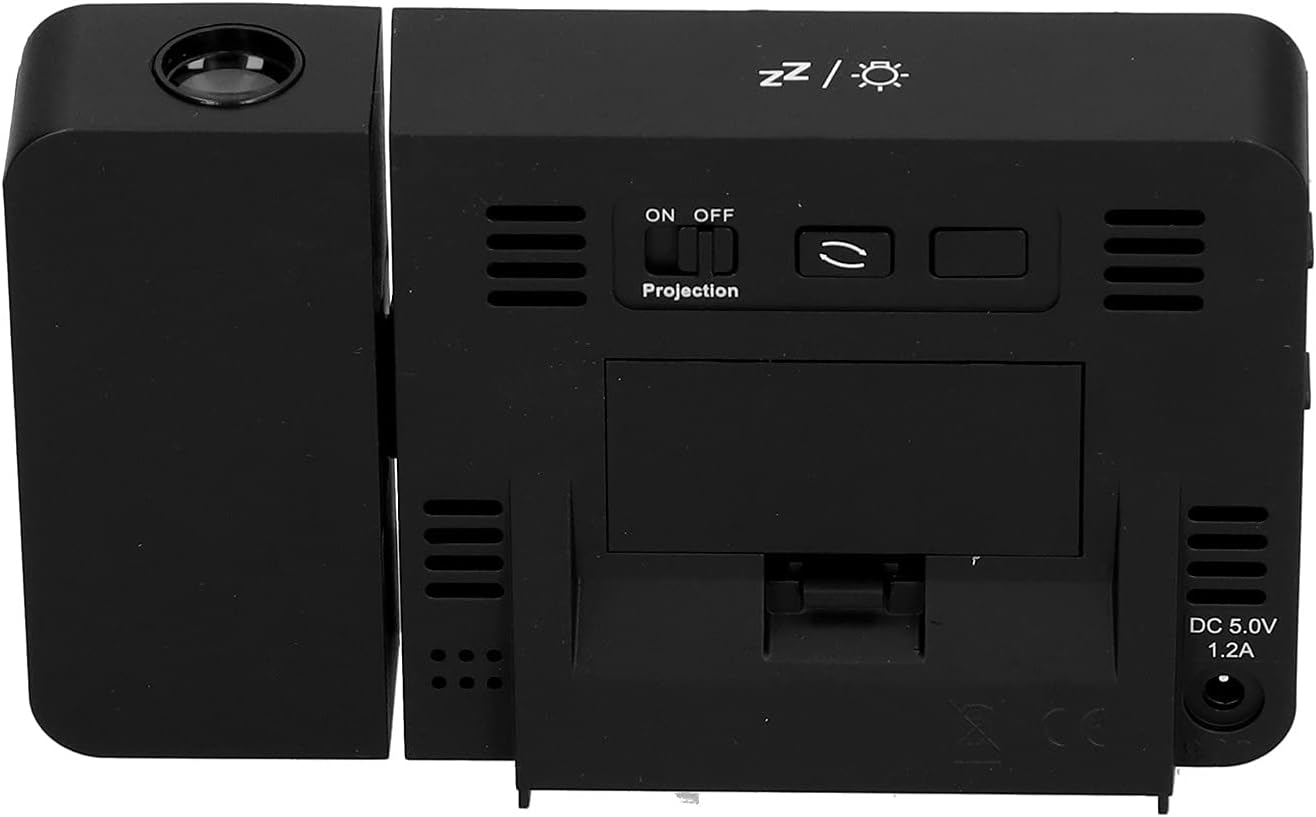
Figura 4.1: Wara view of the clock, indicating the battery compartment and DC 5.0V 1.2A power input.
5. Istruzzjonijiet Operattivi
5.1 Funzjonijiet tal-buttuni
Familiarize yourself with the control buttons located on the front and sides of the clock:
- ĦIN: Jidħol fil-modalità tal-issettjar tal-ħin.
- ALLARM: Jidħol fil-modalità tas-setting tal-allarm.
- +: Increases values, switches 12/24HR format, adjusts backlight.
- -: Decreases values, switches temperature units (℃/℉).
- Projection ON/OFF Switch: Activates or deactivates the projection. (Located on the back/side)
- Alarm 1 ON/OFF Switch: Activates or deactivates Alarm 1. (Located on the side)
- Alarm 2 ON/OFF Switch: Activates or deactivates Alarm 2. (Located on the side)
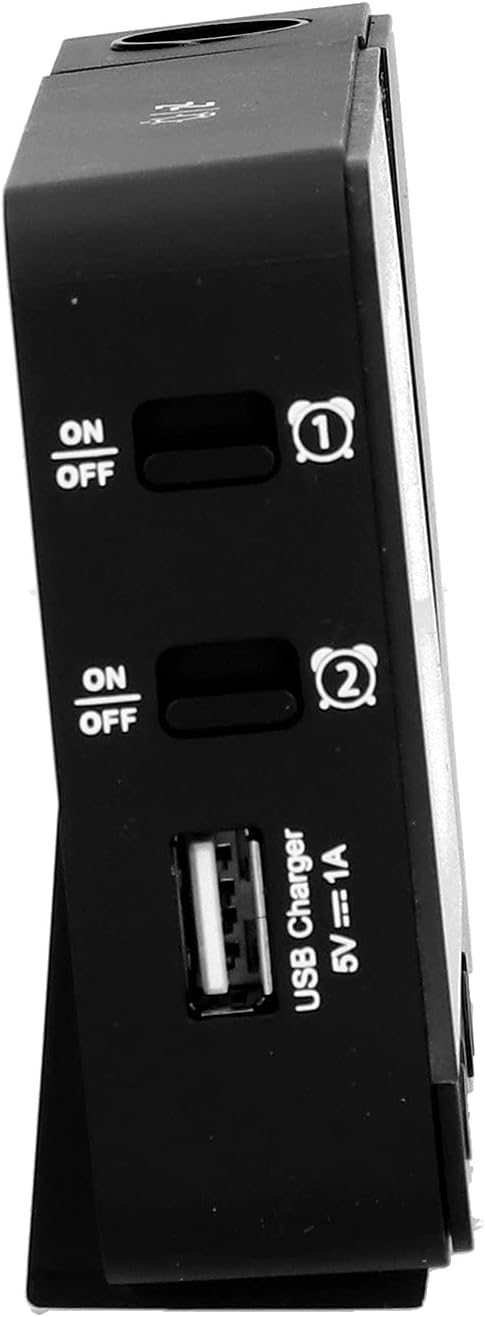
Figura 5.1: Ġenb view showing Alarm 1 and Alarm 2 ON/OFF switches, and the USB charging port.
5.2 L-issettjar tal-Ħin u d-Data
- Agħfas u żomm il- ĦIN Agħfas il-buttuna biex tidħol fil-modalità tal-issettjar tal-ħin. Id-displej tas-siegħa se jteptep.
- Uża l- + or - buttuni biex taġġusta s-siegħa.
- Agħfas ĦIN għal darb'oħra biex tikkonferma s-siegħa u tmur għall-issettjar tal-minuti. Aġġusta b' + or -.
- Kompli agħfas ĦIN to cycle through setting year, month, and day. Adjust each with + or -.
- Wara li tissettja l-jum, agħfas ĦIN darba oħra biex toħroġ mill-modalità tas-settings.
- Biex taqleb bejn il-format ta' 12-il siegħa u ta' 24 siegħa, agħfas il-buttuna + button during normal time display.
- To switch between Celsius (℃) and Fahrenheit (℉) for temperature, press the - button during normal time display.
5.3 Issettjar tal-Allarmi
The clock features two independent alarms (Alarm 1 and Alarm 2).
- Agħfas u żomm il- ALLARM button to enter Alarm 1 setting mode. The Alarm 1 hour display will flash.
- Uża l- + or - buttuni biex taġġusta s-siegħa tal-allarm.
- Agħfas ALLARM again to confirm the hour and move to Alarm 1 minute setting. Adjust with + or -.
- Agħfas ALLARM again to move to Alarm 2 hour setting, and repeat the process for Alarm 2.
- After setting Alarm 2 minutes, press ALLARM darba oħra biex toħroġ mill-modalità tas-settings.
- To activate or deactivate an alarm, use the corresponding Allarm 1 ON/OFF or Allarm 2 ON/OFF switch on the side of the clock. An alarm icon will appear on the display when active.
5.3.1 Funzjoni Snooze
When an alarm sounds, press any button (except the alarm ON/OFF switch) to activate the 5-minute snooze function. The alarm will sound again after 5 minutes. To turn off the alarm completely, slide the corresponding alarm ON/OFF switch to OFF.
5.4 Projection Function
The clock can project the time and temperature onto a wall or ceiling.
- Sib il- Projezzjoni ON/OFF switch on the back of the clock. Slide it to ON to activate the projection.
- Adjust the angle of the projection arm (the part with the lens) to direct the projection as desired. The arm can rotate nearly 180 degrees.
- The projection will display the current time and temperature in a soft red color.

Figura 5.2: Ġenb view showing the projection arm extended and ready for use.

Figura 5.3: The clock projecting time and temperature onto a wall in a bedroom setting.
5.5 Aġġustament tad-dawl ta' wara
When the clock is powered by USB, the backlight can be adjusted to four levels: high, medium, low, or off. Repeatedly press the + button during normal time display to cycle through the brightness levels.
When powered by batteries, the backlight will illuminate for 8 seconds when any button is pressed, then turn off to conserve power.
5.6 Port tal-Iċċarġjar tal-USB
The clock features a USB charging port (5V=1A) on its side. You can use this port to charge your mobile phone or other small electronic devices while the clock is connected to USB power.
Note: The USB charging port only functions when the clock is powered via the USB cable. It does not work when the clock is running on battery power.
6. Manutenzjoni
6.1 Tindif
- Imsaħ il-wiċċ tal-arloġġ b'ċarruta ratba u niexfa.
- Do not use abrasive cleaners, solvents, or chemical sprays, as these may damage the finish or electronic components.
- Keep the projection lens clean for clear projection. Use a soft, lint-free cloth.
6.2 Sostituzzjoni tal-batterija
When the display becomes dim or the clock functions erratically while on battery power, it's time to replace the AAA batteries. Refer to Section 4.1.1 for battery installation instructions. Always replace both batteries at the same time with new ones.
7 Issolvi l-problemi
| Problema | Kawża Possibbli | Soluzzjoni |
|---|---|---|
| Id-displej tal-arloġġ huwa vojt jew mudlam. | No power, low batteries, or USB cable not connected. | Check battery installation and replace if necessary. Ensure USB cable is securely connected to a power source. |
| Projection is unclear or not visible. | Projection switch is OFF, lens is dirty, or projection distance is too far/close. | Ensure Projection switch is ON. Clean the projection lens. Adjust the clock's distance from the projection surface. |
| L-allarm ma jdoqqx. | L-allarm mhux issettjat jew huwa diżattivat. | Verify alarm time is set correctly. Ensure the corresponding Alarm ON/OFF switch is in the ON position. |
| Il-port tal-iċċarġjar USB mhux qed jaħdem. | Clock is running on battery power, or USB cable is not connected to a power source. | Ensure the clock is powered via the USB cable and connected to a functional power adapter. |
| Ħin/data mhux korretti. | Time/date not set correctly. | Irreferi għat-Taqsima 5.2 biex tirrisettja l-ħin u d-data. |
8. Speċifikazzjonijiet
| Mudell: | B0CLGDFCGX |
| Ditta: | EVTSCAN |
| Materjal: | ABS (Akrilonitrile Butadien Styrene) |
| Dimensjonijiet tal-Prodott: | Madwar 13.5 x 8 x 2.5 ċm (5.3 x 3.1 x 1.0 pulzieri) |
| Piż: | Appross. 242g (8.5 oz) |
| Tip ta' wiri: | LCD diġitali b'dawl ta' wara |
| Sors tal-Enerġija: | 2xAAA batteries (not included) or DC 5.0V 1.2A via USB cable |
| Output tal-Iċċarġjar tal-USB: | 5V=1A |
| Firxa ta' Sejbien tat-Temperatura: | -9℃ to +50℃ (1℃ resolution) |
| Medda ta' Sejbien ta' Umdità: | 20% to 95% (1% resolution) |
| Temperature/Humidity Calibration Time: | 30 sekonda |
| Livelli tad-dawl ta' wara: | 4 levels (High, Medium, Low, Off) when USB powered; 8s illumination when battery powered. |
| Projezzjoni Lamp: | Always on when USB powered; 8s illumination when battery powered. |

Figura 8.1: Product dimensions: 5.3 inches wide by 3.1 inches high.
9. Garanzija u Appoġġ
EVTSCAN products are manufactured to high quality standards. For specific warranty information, please refer to the warranty card included with your purchase or contact your retailer.
If you encounter any issues or have questions regarding your EVTSCAN Projection Clock, please contact the seller or EVTSCAN customer support for assistance. Please have your model number (B0CLGDFCGX) ready when contacting support.
Għal aktar għajnuna, tista' żżur il- EVTSCAN Store on Amazon.