
Introduzzjoni
Dan il-manwal tal-utent jipprovdi struzzjonijiet dettaljati għat-twaqqif, it-tħaddim, u l-manutenzjoni tal-RGBlink ASKnano 4K-1V2 Wireless HDMI Transmitter and Receiver Kit tiegħek. Din is-sistema plug-and-play tippermetti trasmissjoni mingħajr fili bla xkiel u ta' definizzjoni għolja ta' vidjow u awdjo 4K minn sors wieħed għal sa żewġ displays simultanjament, ideali għal diversi applikazzjonijiet inkluż divertiment fid-dar, preżentazzjonijiet, u xandiriet diretti.
Kontenut tal-Pakkett
Ivverifika li l-oġġetti kollha huma preżenti fil-pakkett tiegħek:
- 1 x ASK nano 4K TX (Trasmettitur)
- 2 x ASK nano 4K RX (Riċevituri)
- 3 x Kejbils tal-Enerġija USB AC
- 3 x Kejbils tal-Estensur HDMI minn Raġel għal Mara
- 1 x Adapter Mikro/Mini HDMI għal HDMI
- 1 x Manwal tal-Utent (dan id-dokument)

Kontenut tal-Kit RGBlink ASKnano 4K-1V2 li jinkludi trasmettitur, żewġ riċevituri, kejbils, u adapters.
Gwida ta' Setup
1. Konnessjoni tat-Trasmettitur (TX)
It-trasmettitur (TX) jikkonnettja mat-tagħmir tas-sors tal-vidjo tiegħek (eż. laptop, PC, console tal-logħob, kamera).
- Ipplaggja l-interfaċċja maskili HDMI tat-TX direttament fil-port tal-ħruġ HDMI tat-tagħmir tas-sors tiegħek.
- Jekk il-port HDMI huwa diffiċli biex taċċessah, uża wieħed mill-Kejbils tal-Estensur HDMI Male għal Female pprovduti.
- Għal apparati b'outputs Micro HDMI jew Mini HDMI (eż., xi kameras), uża l-Adapter Micro/Mini HDMI għal HDMI.
- Provvista tal-Enerġija għat-TX: L-unità TX tipikament tieħu l-enerġija direttament mill-port HDMI (speċjalment portijiet kompatibbli mal-USB 3.0). Jekk tkun meħtieġa enerġija addizzjonali, qabbad wieħed mill-Kejbils tal-Enerġija USB AC mal-port tal-provvista tal-enerġija tat-Tip C fuq it-TX u ma' sors ta' enerġija USB ta' 5V/1A (eż., port USB fuq il-kompjuter tiegħek jew adapter tal-ħajt USB).

Dijagramma li turi t-Trasmettitur (TX) RGBlink ASKnano 4K li jikkonnettja ma' diversi apparati tal-output HDMI bħal PC, laptop, kamera, u PS4.
Vidjo: Kif tikkonnettja t-Trasmettitur u r-Riċevitur HDMI Wireless RGBlink Ask Nano 4K. Dan il-vidjo juri l-proċess ta' konnessjoni fiżika kemm għall-unitajiet tat-trasmettitur kif ukoll għar-riċevitur.
2. Konnessjoni tar-Riċevituri (RX)
Ir-riċevituri (RX) jikkonnettjaw mat-tagħmir tal-wiri tiegħek (eż., TV, monitor, proġettazzjoni).
- Ipplaggja l-interfaċċja maskili HDMI ta' kull RX direttament f'port tad-dħul HDMI disponibbli fuq l-apparat tal-wiri tiegħek.
- Jekk il-port HDMI huwa diffiċli biex taċċessah, uża wieħed mill-Kejbils tal-Estensur HDMI Male għal Female pprovduti.
- Provvista tal-Enerġija għal RX: Qabbad wieħed mill-Kejbils tal-Enerġija USB AC mal-port tal-provvista tal-enerġija tat-Tip C fuq l-RX u ma' sors ta' enerġija USB ta' 5V/1A (eż., port USB fuq it-TV/monitor tiegħek jew adapter tal-ħajt USB). Kun żgur li għandek biżżejjed enerġija għal prestazzjoni ottimali.

Dijagramma li turi r-Riċevitur (RX) RGBlink ASKnano 4K li jikkonnettja ma' apparati ta' input HDMI bħal projettur u TV/displej.
3. Tqabbil (Jekk Meħtieġ)
L-unitajiet TX u RX huma mqabbdin minn qabel mill-fabbrika. Jekk it-tqabbil jintilef jew qed iżżid riċevituri ġodda, segwi dawn il-passi:
- Agħfas fit-tul il-buttuna tan-nofs tal-RX sakemm jidher is-"simbolu tar-reset" fuq id-displej konness.
- Ixgħel l-unità TX u stenna li tqabbad awtomatikament mar-RX.
- Stenna 10-20 sekonda. Id-displej se juri "Paired is OK" ladarba l-konnessjoni tkun stabbilita.
Istruzzjonijiet Operattivi
Operazzjoni Plug and Play
Ladarba l-unitajiet TX u RX ikunu konnessi u mħaddma, is-sistema tkun iddisinjata għal użu immedjat. It-TX awtomatikament jipproġetta l-iskrin tas-sors tas-sinjal tiegħek lejn id-displays RX konnessi.
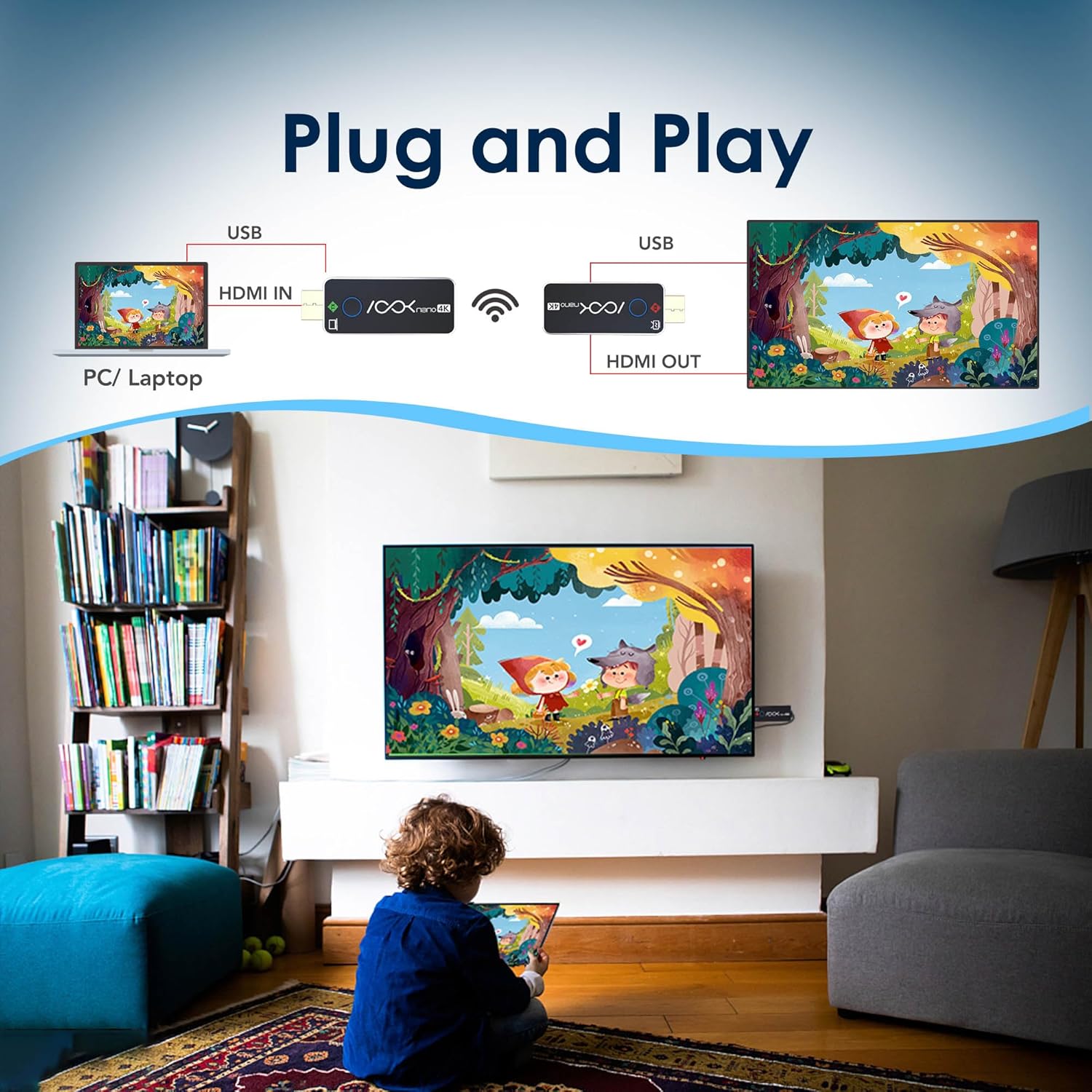
Illustrazzjoni tas-sistema RGBlink ASKnano 4K f'setup plug-and-play, li turi PC/laptop imqabbad mat-TX, li jittrażmetti mingħajr fili lil RX imqabbad ma' TV.
Appoġġ għal Wirjiet Multipli (Trasmettitur 1 għal Riċevituri 2)
Dan il-kit jappoġġja t-trażmissjoni ta' kontenut minn sors wieħed (TX) għal żewġ displays (RX) simultanjament, u jipprovdi flessibilità mingħajr paragun għal setups ta' monitor doppju, preżentazzjonijiet, jew laqgħat estiżi. viewing.

Immaġni li turi laptop li qed jittrażmetti mingħajr fili lil żewġ displays separati, u li turi l-kapaċità ta' riċevitur 1-għal-2 tal-RGBlink ASKnano 4K.
Vidjo: Kif tittrasferixxi vidjo HDMI mingħajr fili għal 4 skrins. Dan il-vidjo juri kif twaqqaf diversi riċevituri għal wiri fuq diversi skrins.
Medda ta 'Trażmissjoni bla Fili
L-RGBlink ASKnano 4K joffri sinjal stabbli f'medda ta' 65 pied (20 metru) f'żoni miftuħa mingħajr ostakli. Għal streaming ottimali u mingħajr interruzzjoni, hija rakkomandata distanza ta' 32 pied (10 metri).
Nota Importanti:
Tpoġġix it-trasmettitur jew ir-riċevitur mingħajr fili fi spazji magħluqa bħal kxaxen jew wara t-televiżjonijiet, għax dan jista' jaffettwa t-trażmissjoni tas-sinjal u jwassal għal interferenza jew telf tas-sinjal.

Immaġni li turi s-sistema RGBlink ASKnano 4K f'kamra tal-laqgħat, li turi trasmissjoni mingħajr fili fuq medda twila sa 100 pied (30 metru) minn laptop għal display kbir.
Mirroring tal-Iskrin (permezz ta' RX)
L-unità RX tista' tiffunzjona wkoll b'mod indipendenti għall-iscreen mirroring minn smartphones jew tablets kompatibbli (mhux kompatibbli ma' mowbajls jew tablets direttament permezz tat-TX, iżda RX jista' jagħmel mirroring minnhom). Jappoġġja l-protokoll ta' trasmissjoni WIFI 5G u jagħżel awtomatikament il-kanal ottimali.
Vidjo: Trasmettitur RGBLink HDMI + Operazzjoni u Demo tal-Iscreen mirroring. Dan il-vidjo juri l-funzjonalità tal-iskrin mirroring bl-użu ta' smartphone.
Manutenzjoni
Biex tiżgura l-lonġevità u l-prestazzjoni ottimali tal-kit RGBlink ASKnano 4K-1V2 tiegħek, segwi dawn il-linji gwida ta' manutenzjoni:
- Żomm l-apparati nodfa u ħielsa mit-trab. Uża drapp artab u niexef għat-tindif.
- Evita li tesponi l-unitajiet għal temperaturi estremi, umdità, jew dawl tax-xemx dirett.
- Timblokkax it-toqob tal-ventilazzjoni fuq l-apparati biex tevita li jisħnu żżejjed.
- Immaniġġja l-konnetturi HDMI u l-portijiet USB-C b'attenzjoni biex tevita l-ħsara.
- Aħżen il-kit f'post frisk u niexef meta ma jkunx qed jintuża.
Issolvi l-problemi
Jekk tiltaqa' ma' problemi bil-kit RGBlink ASKnano 4K-1V2 tiegħek, irreferi għall-problemi u s-soluzzjonijiet komuni li ġejjin:
| Problema | Kawża Possibbli | Soluzzjoni |
|---|---|---|
| Ebda Sinjal / Skrin Iswed | Qawwa insuffiċjenti, input HDMI mhux korrett, problema ta' tqabbil, interferenza tas-sinjal. | Kun żgur li kemm it-TX kif ukoll l-RX għandhom enerġija stabbli ta' 5V/1A. Ivverifika l-input HDMI korrett fuq id-displej. Erġa' qabbad l-unitajiet jekk meħtieġ (ara l-Gwida tas-Setup). Naqqas id-distanza bejn it-TX/RX jew neħħi l-ostakli. |
| Dewmien / Tfixkil fil-Vidjo | Interferenza tas-sinjal, distanza eċċessiva, ostakli, qawwa baxxa. | Mexxi t-TX/RX eqreb lejn xulxin (rakkomandat fi żmien 32 pied). Neħħi l-ostakli fiżiċi. Kun żgur li l-enerġija tiegħek hija stabbli ta' 5V/1A. Evita li tpoġġi l-unitajiet fi spazji magħluqa. |
| Nru Awdjo | Issettjar tal-awdjo fuq is-sors/displej, kompatibilità HDCP. | Iċċekkja s-settings tal-output tal-awdjo fuq l-apparat tas-sors tiegħek u s-settings tad-dħul fuq id-displej tiegħek. Kun żgur li hija kompatibbli mal-HDCP (TX jappoġġja 1.4, RX jappoġġja 2.2). |
| Nuqqas ta 'tqabbil | Proċedura ta' tqabbil mhux korretta, problemi bl-enerġija. | Segwi l-passi manwali tat-tqabbil preċiżament (ara l-Gwida tas-Setup). Kun żgur li ż-żewġ unitajiet huma mħaddma kif suppost. |
| Mhux kompatibbli ma' mowbajls/tablets | Il-konnessjoni diretta TX mhijiex appoġġjata għal apparati mobbli. | L-unità TX hija ddisinjata għal apparati b'output HDMI. Għal apparati mobbli, uża l-funzjoni ta' mirroring tal-iskrin tal-unità RX (AirPlay/Miracast) jekk tkun appoġġjata mill-apparat mobbli tiegħek. |
Speċifikazzjonijiet
| Karatteristika | Dettall |
|---|---|
| Mudell | ASKnano 4K-1V2 |
| Brand | RGBlink |
| Riżoluzzjoni Massima tat-Trasmettitur (TX) | 4K (3840x2160) @ 24/25/30Hz; 1080P @ 24/25/30/50/60Hz; 720P @ 50/60Hz |
| Riżoluzzjoni Massima tal-Ħruġ tar-Riċevitur (RX) | Sa 4K (3840x2160) @ 60Hz |
| HDMI Standard | HDMI 2.0 (RX), HDMI 2.0 / HDCP 2.2 (TX) |
| Appoġġ HDCP | Trażmissjoni: HDCP 1.4, Reċezzjoni: HDCP 2.2 |
| Teknoloġija tal-Konnettività | Wireless (protokoll ta' trasmissjoni WIFI 5G) |
| Firxa Wireless | Sa 65 pied (20 metru) f'żoni miftuħa; 32 pied (10 metri) rakkomandati għal konnessjoni stabbli. |
| Provvista tal-Enerġija | USB-C, DC 5V/1A (Massimu 3.0W) |
| Dimensjonijiet | 6.7 x 4.72 x 2 pulzieri |
| Piż tal-oġġett | 12.6 uqija |
Garanzija u Appoġġ
Għal informazzjoni dwar il-garanzija u appoġġ tekniku, jekk jogħġbok irreferi għall-RGBlink uffiċjali webis-sit jew ikkuntattja lis-servizz tal-konsumatur tagħhom direttament. Żomm l-irċevuta tax-xiri tiegħek għal talbiet ta' garanzija.
Manwal Uffiċjali għall-Utent (PDF): Niżżel PDF