
1. Introduzzjoni
This user manual provides detailed instructions for the Tuwei TDL401 Thermal Label Printer. It covers the setup, operation, maintenance, and troubleshooting of your device. Please read this manual thoroughly before using the printer to ensure proper function and to maximize its lifespan.
The Tuwei TDL401 is a high-speed thermal label printer designed for efficient and clear printing. It features a 203dpi resolution, a print speed of 180mm/s, and supports thermal adhesive label paper with widths ranging from 40mm to 80mm. Connectivity options include USB and Bluetooth, allowing for flexible integration with various devices.
2. Kontenut tal-Pakkett
Jekk jogħġbok ivverifika li l-oġġetti kollha elenkati hawn taħt huma inklużi fil-pakkett tiegħek:
- 1 x Tuwei TDL401 Thermal Label Printer
- 1 x Manwal tal-Utent (dan id-dokument)
- 1 x Power Adapter (US plug 100-240V)
- 1 x USB Cable
3. Prodott Aktarview
Familiarize yourself with the main components and interfaces of your Tuwei TDL401 printer.

Figura 3.1: Quddiem view of the Tuwei TDL401 Thermal Label Printer, showing the sleek white casing and paper output slot.

Figura 3.2: Wara view of the printer indicating the cover opening button, power interface, and data interface (USB/Bluetooth). Dimensions are also shown: 149mm (length), 79mm (width), 72mm (height).
4. Setup
4.1 Spakkjar u Tqegħid
- Oħroġ il-printer u l-aċċessorji kollha mill-imballaġġ bir-reqqa.
- Place the printer on a stable, flat surface with adequate ventilation.
- Ensure there is enough space around the printer for paper loading and operation.
4.2 Konnessjoni tal-Enerġija
- Connect the power adapter to the printer's power interface (refer to Figure 3.2).
- Ipplaggja l-adapter tal-enerġija f'sokit elettriku adattat (100-240V).
- The printer will typically power on automatically or indicate readiness with an LED light.
4.3 Tagħbija tal-Karta tat-Tikketti
The printer supports thermal adhesive label paper with a roll width of 40mm to 80mm.
- Agħfas il-buttuna tal-ftuħ tal-qoxra biex tiftaħ il-qoxra tal-printer.
- Insert the label roll into the paper compartment, ensuring the printable side of the labels faces upwards.
- Adjust the paper guides to fit the width of your label roll snugly, allowing for free movement but preventing excessive side-to-side play.
- Pull a small length of labels out past the print head and close the printer cover firmly until it latches.

Figura 4.1: Printer with the top cover open, revealing the paper compartment and internal mechanisms for loading labels.
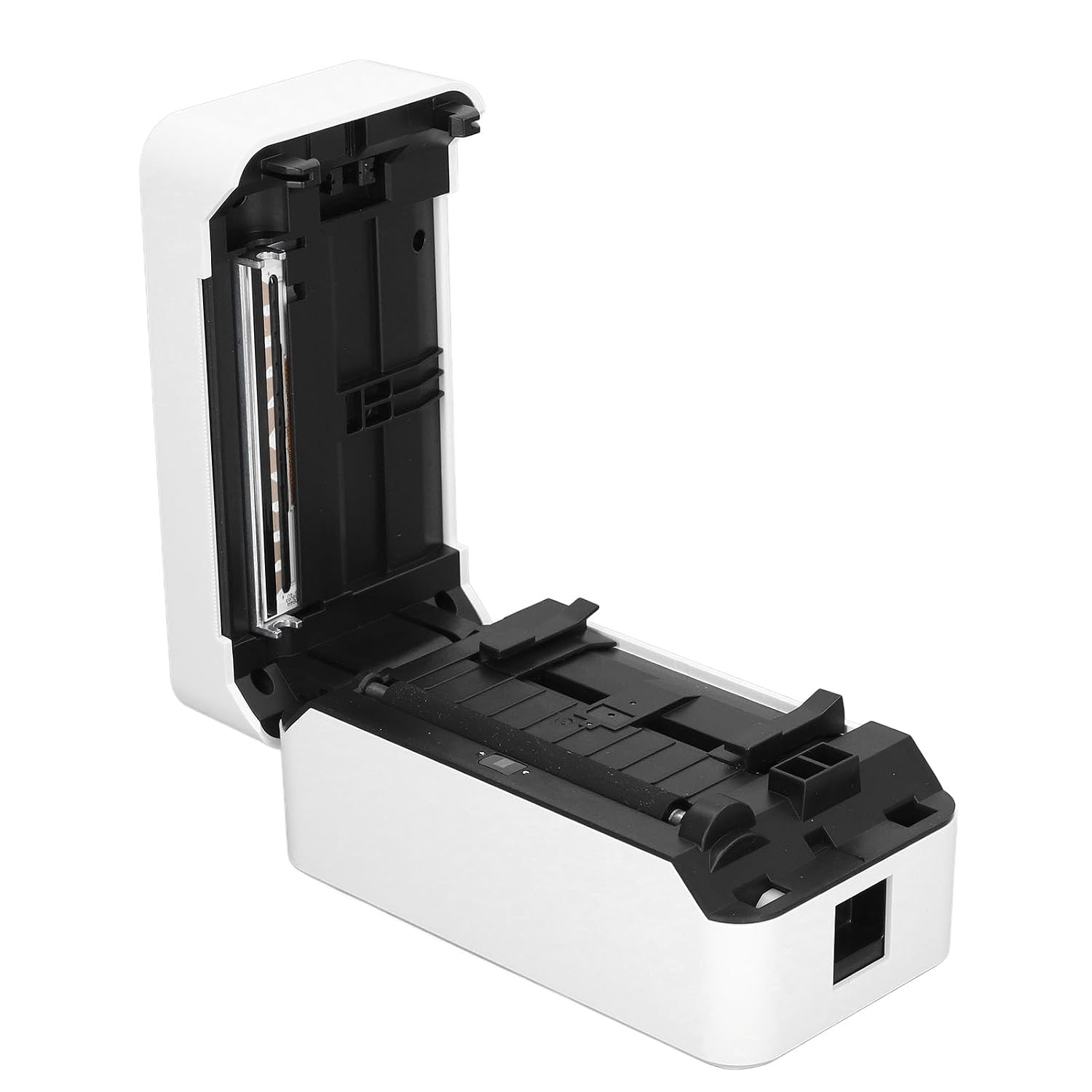
Figura 4.2: Dettaljati view of the incisive paper cutting edge and the adjustable guides for setting the printing width.
4.4 Connecting to a Device (USB/Bluetooth)
4.4.1 Konnessjoni USB
- Connect one end of the provided USB cable to the printer's USB port and the other end to your computer.
- Your operating system may automatically detect the printer and install basic drivers. For full functionality, it is recommended to install the official drivers from the manufacturer's websit (jekk disponibbli).
4.4.2 Konnessjoni Bluetooth
- Ensure Bluetooth is enabled on your mobile device or computer.
- Turn on the printer. The Bluetooth indicator light (if present) should be blinking or solid, indicating it's ready for pairing.
- On your device, search for available Bluetooth devices and select 'TDL401' or a similar name.
- Follow any on-screen prompts to complete the pairing process. A PIN (e.g., 0000 or 1234) may be required.
- Once paired, you can print directly from compatible applications on your device.
5. Istruzzjonijiet Operattivi
5.1 Stampar Bażiku
- Ensure the printer is powered on and connected to your device via USB or Bluetooth.
- Open the document or label design software on your computer or mobile device.
- Select the print option within your application.
- Choose the 'Tuwei TDL401' printer from the list of available printers.
- Adjust print settings such as label size, orientation, and number of copies as needed.
- Click 'Print' to send the job to the printer.
5.2 Print Speed and Quality
- The TDL401 printer offers a high print speed of 180mm/s, allowing for rapid completion of printing tasks.
- With a print resolution of 203dpi, the printer produces clear images and fine text, ensuring excellent label quality.
5.3 Midja Appoġġjata
The printer is designed for use with thermosensitive adhesive label paper. It supports roll widths from 40mm to 80mm, with a maximum paper width of 80 ± 0.5 mm.
6. Manutenzjoni
Manutenzjoni regolari tiżgura prestazzjoni ottimali u testendi l-ħajja tal-istampatur tiegħek.
6.1 Tindif tar-Ras tal-Istampar
The print head is a critical component and should be cleaned regularly, especially if print quality degrades.
- Itfi l-istampatur u skonnettja l-kejbil tal-enerġija.
- Iftaħ il-qoxra tal-printer.
- Uża swab tal-qoton ħafifampened with isopropyl alcohol (70% or higher) to gently wipe the print head surface. Avoid touching the print head with bare hands.
- Ħalli r-ras tal-istampar tinxef kompletament qabel ma tagħlaq l-għatu u terġa' tikkonnettja l-enerġija.

Figura 6.1: Close-up view of the thermal print head, which requires careful cleaning to maintain print quality.
6.2 Tindif Ġenerali
- Imsaħ il-barra tal-istampatur b'ċarruta ratba u damp drapp. Tużax kimiċi ħarxa jew tindif li joborxu.
- Remove any dust or paper debris from the paper compartment using a soft brush or compressed air.
7 Issolvi l-problemi
This section addresses common issues you might encounter with your Tuwei TDL401 printer.
| Problema | Kawża Possibbli | Soluzzjoni |
|---|---|---|
| Il-printer ma jixgħelx | No power supply; Faulty power adapter/cable | Ensure power cable is securely connected to printer and outlet. Test outlet with another device. Check power adapter for damage. |
| Kwalità tal-istampar fqira (linji vojta u bla kulur) | Dirty print head; Incorrect paper type; Low quality labels | Clean the print head as described in Section 6.1. Ensure you are using high-quality thermal adhesive label paper. |
| Printer not detected via USB | Loose USB cable; Driver not installed; Faulty USB port | Ensure USB cable is securely connected. Install the correct printer drivers. Try a different USB port on your computer. |
| Ma tistax tikkonnettja permezz tal-Bluetooth | Bluetooth off on device; Printer not in pairing mode; Incorrect PIN | Ensure Bluetooth is enabled on your device. Restart the printer. Re-attempt pairing and ensure the correct PIN (e.g., 0000 or 1234) is entered. |
| Ġamm tal-karta | Improper paper loading; Damaged labels | Turn off the printer and open the cover. Carefully remove any jammed paper. Reload paper correctly, ensuring it's aligned and not wrinkled. |
8. Speċifikazzjonijiet
Detailed technical specifications for the Tuwei TDL401 Thermal Label Printer.
| Karatteristika | Speċifikazzjoni |
|---|---|
| Mudell | TDL401 |
| Brand | Tuwei |
| Teknoloġija tal-Istampar | Termali |
| Riżoluzzjoni tal-Istampar | 203 dpi (203 x 203 DPI) |
| Veloċità tal-Istampar | 180 mm/s |
| Print Wisa | Madwar 72mm / 2.83 pulzieri |
| Wisa' tar-Romblu tal-Karta | 40 sa 80 mm / 1.57 sa 3.15 pulzier |
| Maximum Paper Width | 80 ± 0.5 mm |
| Printing Medium | Thermosensitive Adhesive Label Paper |
| Konnettività | USB, Bluetooth (BT) |
| Sett ta' Istruzzjonijiet | TSPL |
| Materjal | ABS |
| Input tal-Enerġija | 100-240V (US plug specification) |
| Output Printer | Monokromu |
| Apparati Kompatibbli | Computers, Smartphones |
| Pajjiż ta' Oriġini | USA |
9. Garanzija u Appoġġ
For warranty information and technical support, please refer to the documentation provided with your purchase or contact your retailer. Keep your purchase receipt as proof of purchase for warranty claims.