Introduzzjoni
This manual provides instructions for the use and maintenance of your new replacement remote control. This remote is designed to function as a substitute for the original remote control of Chiq GCBLTV6EA-C4 L32H7N Smart LED TVs. Please note that as a replacement, some advanced or specific functions of your original remote may not be fully replicated.
Setup
Installazzjoni tal-batterija
Il-kontroll remot jeħtieġ żewġ batteriji AAA (mhux inklużi). Segwi dawn il-passi biex tinstallahom:
- Sib l-għatu tal-kompartiment tal-batterija fuq wara tal-kontroll remot.
- Agħfas 'l isfel fuq it-tab u żżerżaq l-għatu 'l isfel biex tiftaħ il-kompartiment.
- Daħħal żewġ batteriji AAA, waqt li tiżgura li t-terminali pożittivi (+) u negattivi (-) ikunu allinjati sew mal-marki ġewwa l-kompartiment.
- Żerżaq l-għatu tal-kompartiment tal-batterija lura f'postu sakemm tikklikkja sew.
Once batteries are installed, the remote control is ready for use. No pairing or programming is typically required for this replacement remote.
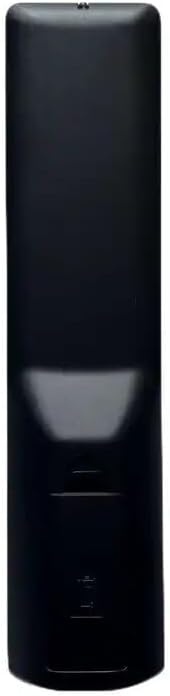
Immaġni: Wara view of the remote control, illustrating the location of the battery compartment. The compartment is a rectangular indentation on the lower half of the remote's back, designed to hold two AAA batteries.
Istruzzjonijiet Operattivi
This section outlines the general functions of the buttons on your replacement remote control. Button layouts may vary slightly depending on the specific model received (black or white version).

Immaġni: Quddiem view of the replacement remote control. It is black with various grey and colored buttons, including a power button, number pad, navigation arrows, volume and channel controls, and dedicated buttons for Netflix and YouTube.
- Buttuna tal-Qawwa (●): Ixgħel jew jitfi t-TV.
- Tastiera tan-Numri (0-9): Idaħħal direttament in-numri tal-kanali.
- Volum 'il fuq/Niżżel (+/-): Jaġġusta l-volum tal-awdjo.
- Kanal 'il fuq/'l isfel (P+/P-): Tibdel il-kanal tat-TV.
- Mute (Mute): Iċċekkja jew jaqleb is-sordina l-awdjo tat-TV.
- Vleġeġ tan-Navigazzjoni ('il fuq, 'l isfel, xellug, lemin): Jinnaviga permezz tal-menus u l-għażliet.
- Buttuna OK: Jikkonferma l-għażliet fil-menus.
- Lura/Ritorn: Terġa' lura għall-iskrin jew il-menu preċedenti.
- Sors/Input: Tibdel is-sors tad-dħul (HDMI, AV, eċċ.).
- Buttuna Netflix: Aċċess dirett għall-applikazzjoni Netflix.
- Buttuna tal-YouTube: Aċċess dirett għall-applikazzjoni ta' YouTube.
- Menu/Dar: Opens the TV's main menu or smart TV home screen.
For specific functions not listed, refer to your television's original user manual, as this remote is designed to mimic common functions.
Manutenzjoni
Tindif tal-Bogħod
Biex tnaddaf il-kontroll remot, uża drapp artab u niexef. Għal ħmieġ iebes, nixxef ftit.ampLaħlaħ id-drapp bl-ilma jew b'tindif ħafif u mhux abrażiv. Tużax kimiċi ħarxa jew tgħaddasx il-kontroll remot fl-ilma.
Sostituzzjoni tal-batterija
Ibdel il-batteriji meta r-remote ma jibqax jirrispondi jew jieqaf jaħdem. Dejjem ibdel iż-żewġ batteriji fl-istess ħin b'batteriji AAA ġodda. Tħallatx batteriji qodma ma' batteriji ġodda, jew tipi differenti ta' batteriji.
Issolvi l-problemi
| Problema | Kawża Possibbli | Soluzzjoni |
|---|---|---|
| Remote mhux jaħdem. | Batteriji mejta jew installati ħażin. Ostruzzjoni bejn ir-remote u t-TV. | Check battery polarity and replace batteries. Ensure clear line of sight to TV's IR receiver. |
| Xi funzjonijiet mhux qed jaħdmu. | This is a replacement remote; some specific functions may not be supported. | Confirm if the function is standard. If not, it may be a limitation of the replacement remote. |
| Il-kontroll remot ma jirrispondix. | Low batteries. Remote sensor blocked. | Replace batteries. Clean the remote's IR emitter and TV's IR receiver. |
Speċifikazzjonijiet
- Ditta: Ġeneriċi
- Mudell: Kontroll mill-Bogħod ta' Sostituzzjoni (ASIN: B0CKWGC1KD)
- Apparati Kompatibbli: Television, Stereo System, Set Top Box, DVD/Blu-ray Player, Home Theater
- Numru Massimu ta' Apparat Appoġġjat: 5
- Karatteristika Speċjali: Ergonomiku
- Kulur: Black/White (sent randomly)
- Materjal: plastik ABS
Garanzija u Appoġġ
Specific warranty information for this generic replacement remote control is not provided in the product details. For any issues or support inquiries, please contact the seller directly through the platform where the purchase was made. It is recommended to provide your original remote part number or unit model to the seller for better assistance.


