
1. Introduzzjoni
This manual provides essential information for the setup, operation, maintenance, and troubleshooting of your DELTACO GAMING WM87 Gaming Mouse. Please read these instructions carefully to ensure proper use and to maximize your gaming experience.
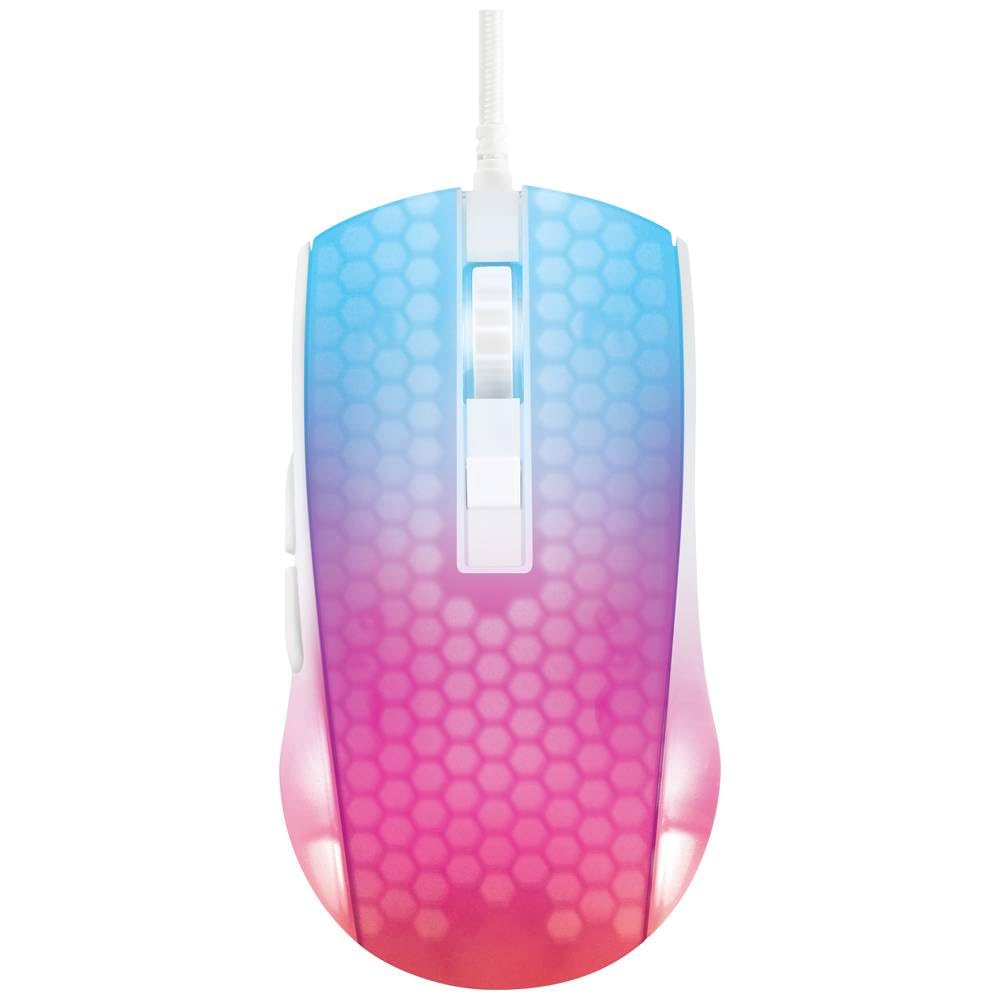
An overhead view of the DELTACO GAMING WM87 Gaming Mouse. The mouse features a translucent white body with an illuminated honeycomb pattern that transitions from blue at the front to pink and red at the rear. It has a scroll wheel and two main buttons, along with two side buttons visible on the left.
2. Prodott Aktarview
The DELTACO GAMING WM87 is a high-performance gaming mouse designed for precision and comfort. It features a transparent design with integrated illumination, a high-accuracy optical sensor, and six programmable buttons.
Karatteristiċi ewlenin:
- Konnettività: USB bil-fili
- Sensor: Optical, up to 6200 DPI
- Buttuni: 6 (Left, Right, Scroll Click, DPI Cycle, Forward, Back)
- Disinn: Transparent shell with illuminated honeycomb pattern
- Kompatibilità: Kompjuter Personali, Laptop
3. Istruzzjonijiet ta' Setup
- Oħroġ il-Maws mill-pakkett: Carefully remove the DELTACO GAMING WM87 mouse from its packaging.
- Qabbad mal-Kompjuter: Locate an available USB port on your personal computer or laptop. Insert the USB connector of the mouse firmly into the USB port.
- Installazzjoni tas-sewwieq: The mouse is plug-and-play. Your operating system should automatically detect and install the necessary drivers. No additional software installation is typically required for basic functionality.
- Ivverifika l-Funzjonalità: Once connected, move the mouse and click the buttons to ensure it is working correctly. The integrated illumination should light up.
4. Istruzzjonijiet Operattivi
Funzjonijiet Bażiċi:
- Ikklikkja Xellug: Azzjoni primarja, għażla.
- Ikklikkja bil-lemin: Menù tal-kuntest, azzjoni sekondarja.
- Scroll Wheel: Scroll up/down pages. Pressing the scroll wheel typically acts as a middle click.
- Buttuni 'l Quddiem/Lura: Located on the left side of the mouse, these buttons are commonly used for navigation in web browsers jew file esploraturi.
Aġġustament DPI:
The DELTACO GAMING WM87 mouse features adjustable DPI (Dots Per Inch) settings, allowing you to change the cursor sensitivity on the fly. A dedicated DPI button (often located behind the scroll wheel) cycles through preset DPI levels up to 6200 DPI. Press this button to adjust the sensitivity to your preference.
Illuminazzjoni:
The mouse features integrated illumination. The lighting pattern and colors are typically pre-programmed and may change based on DPI settings or automatically cycle through colors. Refer to any potential software for advanced customization, if available.
5. Manutenzjoni
- Tindif: Uża drapp artab, niexef u mingħajr suf biex tnaddaf il-barra tal-maws. Għal ħmieġ iebes, nixxef ftit.ampen the cloth with water. Avoid using harsh chemicals, solvents, or abrasive materials.
- Tindif tas-Sensor: Kultant, trab jew debris jistgħu jakkumulaw madwar is-senser ottiku fuq in-naħa ta’ taħt tal-maws. Uża swab tal-qoton jew arja kkompressata biex tnaddaf bil-mod iż-żona tas-senser.
- Ħażna: Meta ma tkunx qed tuża l-maws, aħżen il-maws f'ambjent nadif u niexef 'il bogħod minn temperaturi estremi u dawl tax-xemx dirett.
- Kura tal-Cable: Evita li tgħawweġ jew iddawwar il-kejbil USB b'mod eċċessiv biex tevita l-ħsara.
6 Issolvi l-problemi
- Il-Maws Mhux Jirrispondi:
- Kun żgur li l-kejbil tal-USB huwa mdaħħal sew f'port tal-USB li jaħdem.
- Ipprova qabbad il-maws ma' port USB differenti fuq il-kompjuter tiegħek.
- Ibda mill-ġdid il-kompjuter tiegħek.
- Moviment Erratiku tal-Kurser:
- Naddaf is-senser ottiku fuq in-naħa ta' taħt tal-maws.
- Kun żgur li qed tuża l-maws fuq wiċċ adattat (eż., mouse pad). Evita uċuħ li jirriflettu ħafna jew trasparenti.
- Id-Dawl Mhux Taħdem:
- Iċċekkja l-konnessjoni USB.
- If the mouse has a dedicated lighting control button or software, ensure it is enabled.
7. Speċifikazzjonijiet
| Karatteristika | Dettall |
|---|---|
| Brand | LOGĦOB DELTACO |
| Numru tal-Mudell | GAM-144-W (WM87) |
| Teknoloġija tal-Konnettività | USB |
| Teknoloġija ta 'Sejbien tal-Moviment | Ottiċi |
| Numru ta' Buttuni | 6 |
| DPI | Sa 6200 |
| Orjentazzjoni tal-Idejn | Dritt |
| Użu Rakkomandat tal-Prodott | Logħob |
| Apparati Kompatibbli | Laptop, Kompjuter Personali |
| Dimensjonijiet tal-Prodott | 180 x 0.07 x 0.12 cm (Note: These dimensions appear to be for the cable or packaging, not the mouse itself. Please refer to product packaging for accurate mouse dimensions.) |
| Piż | Approximately 65 Grams (Lithium battery weight, likely referring to overall mouse weight if no battery is present) |
| L-Ewwel Data Disponibbli | 16 ta’ Settembru, 2023 |
8. Garanzija u Appoġġ
For warranty information, technical support, or service inquiries regarding your DELTACO GAMING WM87 Gaming Mouse, please refer to the warranty card included with your product or visit the official DELTACO GAMING websit. Żomm il-prova tax-xiri tiegħek għal talbiet ta' garanzija.