
Introduzzjoni
Welcome to the user manual for your new Altice F2 GSM Mobile Phone. This guide provides comprehensive instructions to help you set up, operate, maintain, and troubleshoot your device. Please read this manual carefully to ensure proper use and to maximize the performance of your phone.
Prodott Overview
The Altice F2 is a practical and user-friendly mobile phone designed for essential communication. It features dual SIM capability, a compact design, and a long-lasting battery.
Karatteristiċi ewlenin:
- Dual SIM functionality for convenient usage.
- 0.08 MP rear camera for basic photography.
- Bluetooth 3.0 for wireless document and music sharing.
- Integrated FM Radio.
- Flashlight inkorporat.
- Micro-SD card slot, expandable up to 32 GB (memory card not included).
- 1000 mAh Lithium-ion battery providing up to 10 days standby or 10 hours talk time.
- Supported languages: French, English, Spanish, Portuguese.
Kontenut tal-Pakkett:
Malli tiftaħ il-kaxxa, jekk jogħġbok ivverifika li l-oġġetti kollha elenkati hawn taħt huma preżenti:
- 1x Altice F2 Mobile Phone
- 1x Battery
- 1x Pair of Earphones
- 1x Ċarġer tal
- 1x Gwida għall-Utent
- 1x Notice (Additional documentation)

Immaġni 1: Minn quddiem u minn wara view of the Altice F2 GSM Mobile Phone. The phone is black with a physical keypad and a small display screen. The back shows the camera lens.
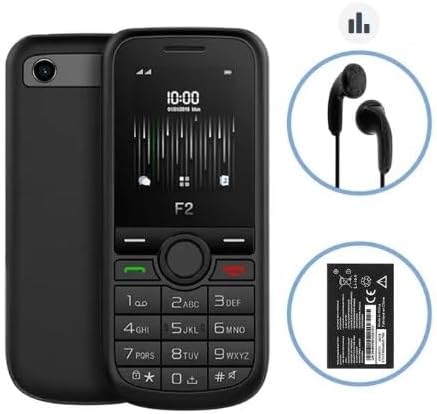
Image 2: The Altice F2 Mobile Phone displayed alongside its included accessories: a pair of black wired earphones and the removable Lithium-ion battery.
Setup
1. Installazzjoni tal-batterija:
- Gently remove the back cover of the phone by prying it from the notch usually located at the bottom or side.
- Allinja l-kuntatti tal-batterija mat-terminals ġewwa l-kompartiment tal-batterija.
- Press the battery down firmly until it is securely in place.
- Erġa' poġġi l-għatu ta' wara, waqt li tiżgura li jikklikkja f'postu.
2. SIM Card(s) Installation:
The Altice F2 supports dual SIM cards.
- With the back cover and battery removed, locate the SIM card slots. There are typically two slots labeled SIM1 and SIM2.
- Insert your SIM card(s) into the respective slots with the gold contacts facing down and the cut corner aligned as indicated.
- Ensure the SIM cards are fully inserted.
3. Micro-SD Card Installation (Optional):
To expand storage, you can install a Micro-SD card (up to 32 GB).
- Locate the Micro-SD card slot, usually adjacent to the SIM card slots.
- Insert the Micro-SD card with the gold contacts facing down until it clicks into place.
4. Iċċarġjar inizjali:
Qabel l-ewwel użu, iċċarġja l-batterija tat-telefon kompletament.
- Qabbad il-ċarġer mal-port tal-iċċarġjar tat-telefon.
- Ipplaggja l-ċarġer fi żbokk tad-dawl.
- Allow the phone to charge until the battery indicator shows full. This may take several hours for the first charge.
5. Tixgħel/Jitfi:
- Biex Tixgħel: Press and hold the Power/End Call button (usually red or marked with a power symbol) until the screen lights up.
- Biex Tifi: Press and hold the Power/End Call button until a power-off menu appears, then select "Power Off" or similar option.
Istruzzjonijiet Operattivi
Tagħmel Sejħiet:
- Mill-iskrin tad-dar, daħħal in-numru tat-telefon billi tuża t-tastiera.
- Press the Call button (usually green or marked with a phone symbol) to initiate the call.
- To end a call, press the End Call button (usually red).
Tibgħat Messaġġi:
- Innaviga lejn il-menù "Messaġġi" jew "SMS" mill-menù prinċipali.
- Agħżel "Messaġġ Ġdid" jew "Oħloq Messaġġ".
- Daħħal in-numru tat-telefon tar-riċevitur jew agħżel mill-kuntatti.
- Ittajpja l-messaġġ tiegħek billi tuża t-tastiera.
- Agħfas "Ibgħat".
Uża l-Kamera:
- Aċċessa l-applikazzjoni "Kamera" mill-menù prinċipali.
- Ifrejmja x-xbieha tiegħek billi tuża l-iskrin bħala viewfinder
- Press the designated camera button or the center navigation key to capture the photo.
Radju FM:
To use the FM Radio, ensure the earphones are plugged into the 3.5mm audio jack, as they act as the antenna.
- Plug in the earphones.
- Go to the "FM Radio" application in the menu.
- Uża ċ-ċwievet tan-navigazzjoni biex tiskennja għall-istazzjonijiet jew issettjahom manwalment.
Konnettività Bluetooth:
- Innaviga għal "Settings" > "Bluetooth".
- Ixgħel il-Bluetooth.
- Agħżel "Fittex għal apparati" jew "Imqabbad apparat ġdid".
- Choose the desired device from the list and follow the on-screen prompts to pair.
Flashlight:
The flashlight can usually be activated quickly from the home screen or through a dedicated menu option.
- Check your phone's specific shortcut (e.g., long-press a key) or find "Flashlight" in the Tools/Utilities menu.
Manutenzjoni
Tindif:
- Use a soft, lint-free cloth to clean the phone's screen and body.
- Evita li tuża kimiċi ħarxa, sprejs tat-tindif, jew materjali li joborxu.
Kura tal-batterija:
- Tesponix il-batterija għal temperaturi estremi.
- Use only the original or approved charger.
- Evita li l-batterija tixxotta kompletament ta' spiss biex ittawwal il-ħajja tagħha.
Ħażna:
- Aħżen it-telefon f'post frisk u niexef 'il bogħod mix-xemx diretta u mill-umdità.
- Jekk taħżen għal perjodu estiż, kun żgur li l-batterija tkun parzjalment iċċarġjata (madwar 50%).
Issolvi l-problemi
If you encounter issues with your Altice F2 phone, refer to the common problems and solutions below:
Phone Does Not Turn On:
- Kun żgur li l-batterija tkun installata sew u kompletament iċċarġjata.
- Try connecting the charger and attempting to power on while connected.
- Verify the charger and charging cable are not damaged.
Ebda Sinjal tan-Netwerk:
- Iċċekkja jekk is-SIM card tiddaħħalx sew.
- Kun żgur li tinsab f'żona b'kopertura tan-netwerk.
- Ibda mill-ġdid it-telefon.
- Verify with your service provider if there are any network issues in your area or with your SIM card.
Batterija Tixxotta malajr:
- Naqqas il-luminożità tal-iskrin.
- Agħlaq l-applikazzjonijiet li ma tużax.
- Turn off Bluetooth when not in use.
- Jekk il-kwistjoni tippersisti, il-batterija jista 'jkollha bżonn sostituzzjoni.
Cannot Connect to Bluetooth Device:
- Kun żgur li l-Bluetooth huwa attivat fuq iż-żewġ apparati.
- Make sure both devices are within the effective Bluetooth range (typically 10 meters).
- Ipprova neħħi l-akkoppjar u erġa' qabbad l-apparati.
Speċifikazzjonijiet
| Karatteristika | Dettall |
|---|---|
| Mudell | F2 |
| Dimensjonijiet (L x W x H) | 11.00 x 4.80 x 1.40 ċm |
| Piż Gross | 77g |
| Daqs tal-Iskrin | 1.7 inches (4.5 cm) / 1.77 inches |
| Verżjoni Bluetooth | 3.0 |
| Tip ta' Netwerk | 2G |
| Frekwenzi GSM | 900/1800 Mhz |
| Awdjo Jack | 3.5 mm |
| Tip ta 'batterija | Lithium-ion |
| Kapaċità tal-batterija | 1000 mAh |
| Ħażna espansibbli | Micro-SD up to 32 GB (card not included) |
| Manifattur | SFR / Mobiwire SAS |
| Kulur | Iswed |
| Sistema Operattiva | Android 10.0 |
| Kapaċità tal-Ħżin tal-Memorja | 32 GB |
| Riżoluzzjoni | 1548 x 862 |
Nota: L-ispeċifikazzjonijiet huma soġġetti għal tibdil mingħajr avviż minn qabel.
Garanzija u Appoġġ
For warranty information, please refer to the warranty card included in your product packaging or visit the manufacturer's official websit. It-termini u l-kundizzjonijiet tal-garanzija jistgħu jvarjaw skont ir-reġjun u l-bejjiegħ bl-imnut.
For technical support, troubleshooting assistance beyond this manual, or service inquiries, please contact the retailer or the manufacturer's customer service department. Contact details are typically available on the product packaging or the official brand websit.
- Manifattur: SFR / Mobiwire SAS
- Mudell: Altice F2