
Audizio Frisco
Audizio Frisco Turntable User Manual
Model: Frisco (102.200)
1. Introduzzjoni
Grazzi tax-xiriasing the Audizio Frisco Turntable. This multifunctional audio system combines vintage aesthetics with modern technology, allowing you to enjoy your vinyl collection, digital radio, and streaming services. This manual provides essential information for safe operation, setup, and maintenance of your device. Please read it thoroughly before use and retain it for future reference.
2. Istruzzjonijiet tas-Sigurtà
- Sors tal-Enerġija: Tiżgura l-provvista tal-enerġija voltage matches the rating label on the unit. Use only the provided power cable.
- Ilma u Umdità: Tesponix l-unità għax-xita, umdità, taqtir, jew titjir tal-ilma. Tpoġġix oġġetti mimlija b'likwidi, bħal vażuni, fuq l-unità.
- Ventilazzjoni: Ensure adequate ventilation. Do not cover ventilation openings with items like newspapers, tablecloths, or curtains.
- Sħana: Tpoġġix l-unità ħdejn sorsi tas-sħana bħal radjaturi, reġistri tas-sħana, stufi, jew apparat ieħor (inkluż amplifiers) li jipproduċu sħana.
- Tindif: Naddaf biss b'ċarruta niexfa.
- Servizzi: Tippruvax tagħmel manutenzjoni fuq l-unità int stess. Irreferi għal kull manutenzjoni għand persunal tas-servizz kwalifikat.
- Pjazzament: Poġġi l-unità fuq wiċċ stabbli u livellat biex tevita li ssirilha ħsara jekk taqa'.
3. Kontenut tal-Pakkett
Carefully unpack your Audizio Frisco Turntable and ensure all items are present and in good condition.
- Audizio Frisco Turntable Unit
- Kejbil tal-Enerġija
- Manwal għall-Utent (dan id-dokument)
4. Prodott Aktarview
Familiarize yourself with the various parts and controls of your Audizio Frisco Turntable.
4.1 Kontrolli ta' Front Panel

This image displays the front panel of the Audizio Frisco turntable, highlighting the control knobs for volume and tuning/selection, along with buttons for power, scan, menu, info, alarm, mode, and preset. The central display shows 'BBC WS WORLD SERVICE' and 'DAB', indicating DAB+ radio functionality.
- Buttuna POWER: Ixgħel jew jitfi l-unità.
- Buttuna SCAN: Initiates scanning for radio stations.
- Buttuna MENU: Jaċċessa l-għażliet tal-menu.
- Buttuna INFO: Juri informazzjoni dwar it-trakka jew l-istazzjon attwali.
- Buttuna ALLARM: Jissettja u jimmaniġġja l-funzjonijiet tal-allarm.
- Buttuna MODE: Switches between different input modes (Phono, DAB+, FM, Bluetooth, USB, AUX).
- Buttuna PRESET: Aċċessa l-presets tar-radju ssejvjati.
- Buttuna tal-VOLUM: Jaġġusta l-livell tal-ħruġ tal-awdjo.
- TUNE / SELECT Knob: Tunes radio frequencies or navigates menu options and confirms selections.
- Skrin tad-displej: Shows current mode, station information, track details, and menu options.
4.2 Komponenti Turntable

Din l-immaġni tipprovdi close-up view of the turntable's platter area, showing the speed selector switch (33, 45, 78 RPM) and the auto-stop switch (ON/OFF). These controls are essential for proper vinyl playback.
- Qoxra tat-Trab: Jipproteġi t-turntable mit-trab meta ma jkunx qed jintuża.
- Platter: The rotating platform where records are placed.
- Magħżel: Holds the record in place on the platter.
- Arma tat-ton: Iżomm l-istilus u jsegwi l-iskanalaturi tar-rekord.
- Stilus (Labra): Il-komponent li jaqra l-iskanalaturi tar-rekords.
- Lieva tal-irfigħ tat-tonarm: Tgħolli u tbaxxi l-armar.
- Swiċċ tas-Selettur tal-Veloċità: Allows selection of 33, 45, or 78 RPM playback speeds.
- Swiċċ ta' Waqfien Awtomatiku: When ON, the platter stops rotating automatically at the end of a record. When OFF, the platter continues to rotate.
4.3 Konnessjonijiet ta' wara
- Port USB: For connecting USB storage devices for playback.
- Jack AUX IN: Għall-konnessjoni ta' apparati awdjo esterni permezz ta' kejbil awdjo ta' 3.5mm.
- Jack tal-headphone: Għall-konnessjoni tal-headphones għal smigħ privat.
- Input ta' Enerġija: Għall-konnessjoni tal-kejbil tad-dawl.
5. Setup
5.1 Spakkjar u Tqegħid
- Neħħi bir-reqqa l-unità mill-ippakkjar tagħha.
- Poġġi t-turntable fuq wiċċ stabbli u livellat 'il bogħod mix-xemx diretta, sorsi ta' sħana, u trab jew vibrazzjoni eċċessiva.
- Kun żgur li hemm biżżejjed spazju madwar l-unità għall-ventilazzjoni.

This image shows the Audizio Frisco turntable positioned on a cabinet in a living room, demonstrating a typical setup environment. The dust cover is open, and the unit is ready for use.
5.2 Konnessjoni tal-Enerġija
- Connect the provided power cable to the Power Input on the rear of the unit.
- Ipplaggja t-tarf l-ieħor tal-kejbil tal-enerġija f'sokit tal-ħajt adattat.
5.3 Qawwa Inizjali
- Agħfas il- QAWWA button on the front panel to turn on the unit.
- The display screen will illuminate.
6. Istruzzjonijiet Operattivi
6.1 Vinyl Playback
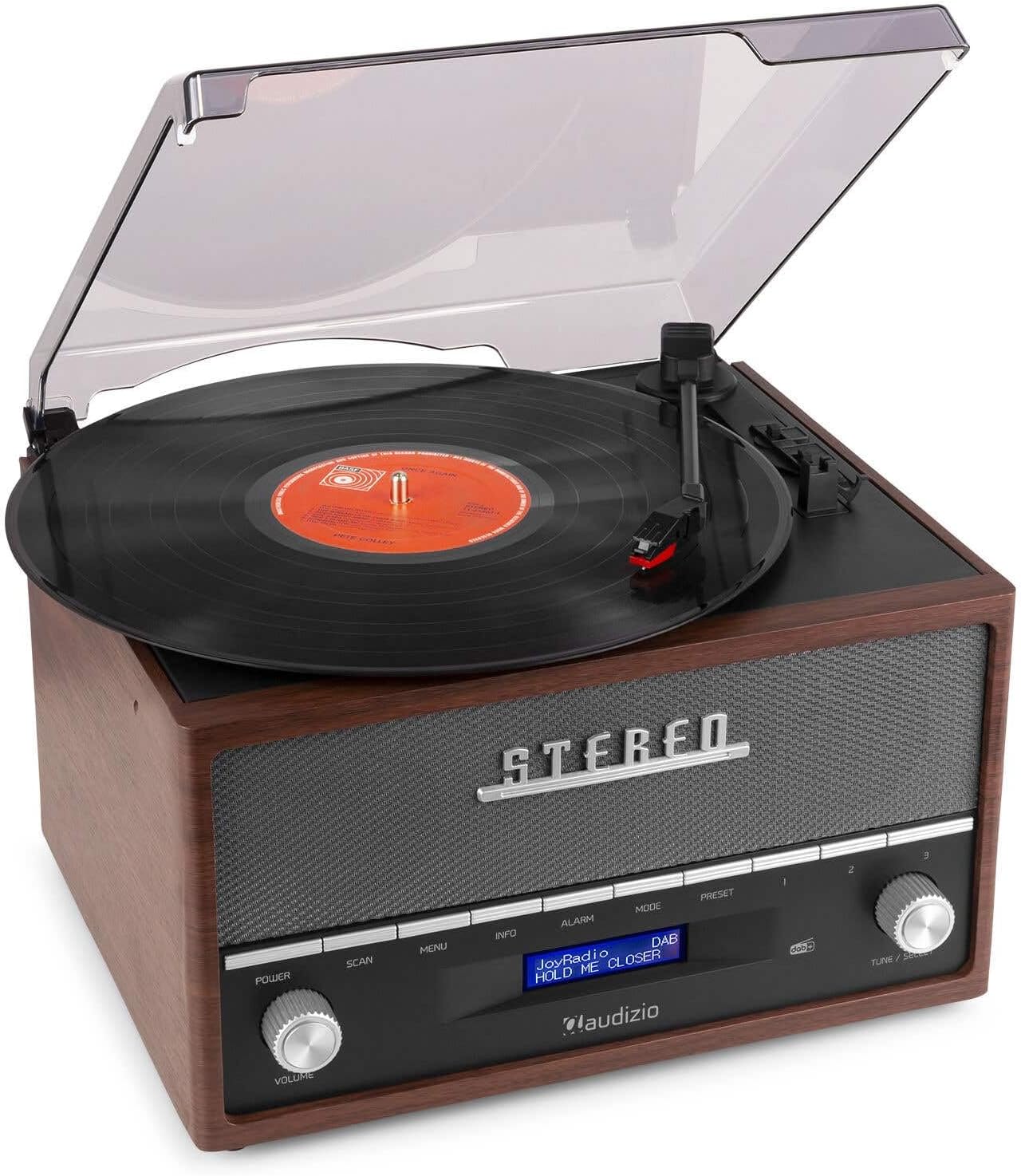
This image shows a vinyl record spinning on the Audizio Frisco turntable, with the tonearm positioned over the record, indicating active playback.
- Iftaħ l-għatu tat-trab.
- Poġġi rekord tal-vinil fuq il-platter.
- Select the correct speed (33, 45, or 78 RPM) using the Swiċċ tas-Selettur tal-Veloċità. For 45 RPM records, place the included adapter on the spindle if needed.
- Issettja l- Iswiċċ Auto-Stop to ON if you want the platter to stop automatically at the end of the record, or OFF for continuous rotation.
- Gently move the tonearm over the record and use the Tonverm Lift Lever to lower the stylus onto the desired track.
- Aġġusta l-volum billi tuża VOLUM pum.
- At the end of the record, lift the tonearm using the lever and return it to its rest.
6.2 DAB+ / FM Digital Radio
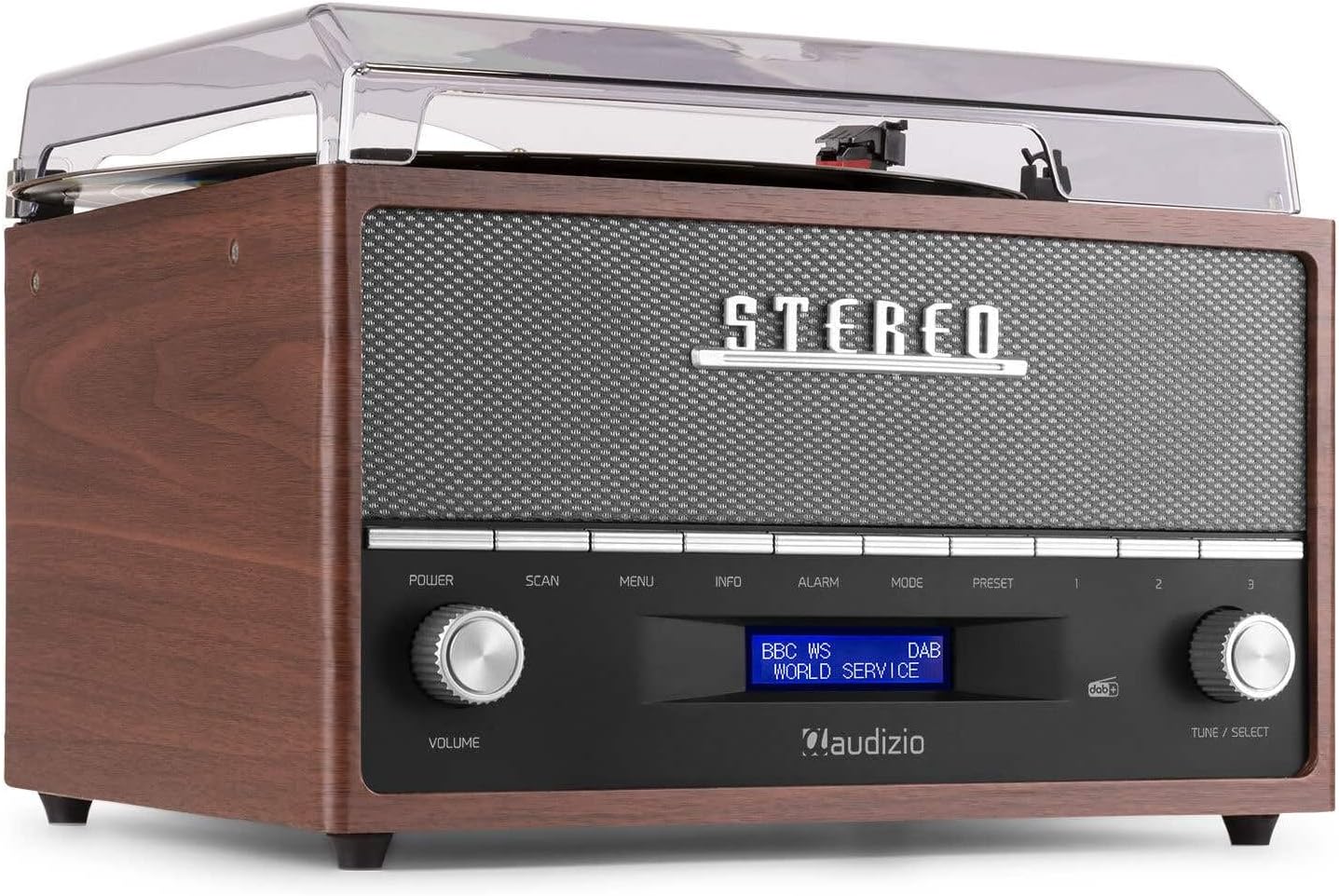
This image focuses on the display screen of the Audizio Frisco turntable, showing 'BBC WS WORLD SERVICE' and 'DAB', confirming active DAB+ radio reception and station identification.
- Agħfas il- MODALITÀ button to select DAB+ or FM radio mode.
- Fil-modalità DAB+, agħfas il- SKANJA button to perform an auto-scan for available stations.
- Fil-modalità FM, uża l- TUNE / SELECT knob to manually tune to a station or press SKANJA for auto-scan.
- Biex issalva preset, sintonizza fuq l-istazzjon mixtieq, imbagħad agħfas u żomm il-buttuna Issettjat minn qabel buttuna. Uża l- TUNE / SELECT knob to choose a preset number, then press the knob to confirm.
- Biex tirrevoka preset, agħfas il-buttuna Issettjat minn qabel buttuna, imbagħad uża l-buttuna TUNE / SELECT knob to select the desired preset.
6.3 Streaming tal-Bluetooth
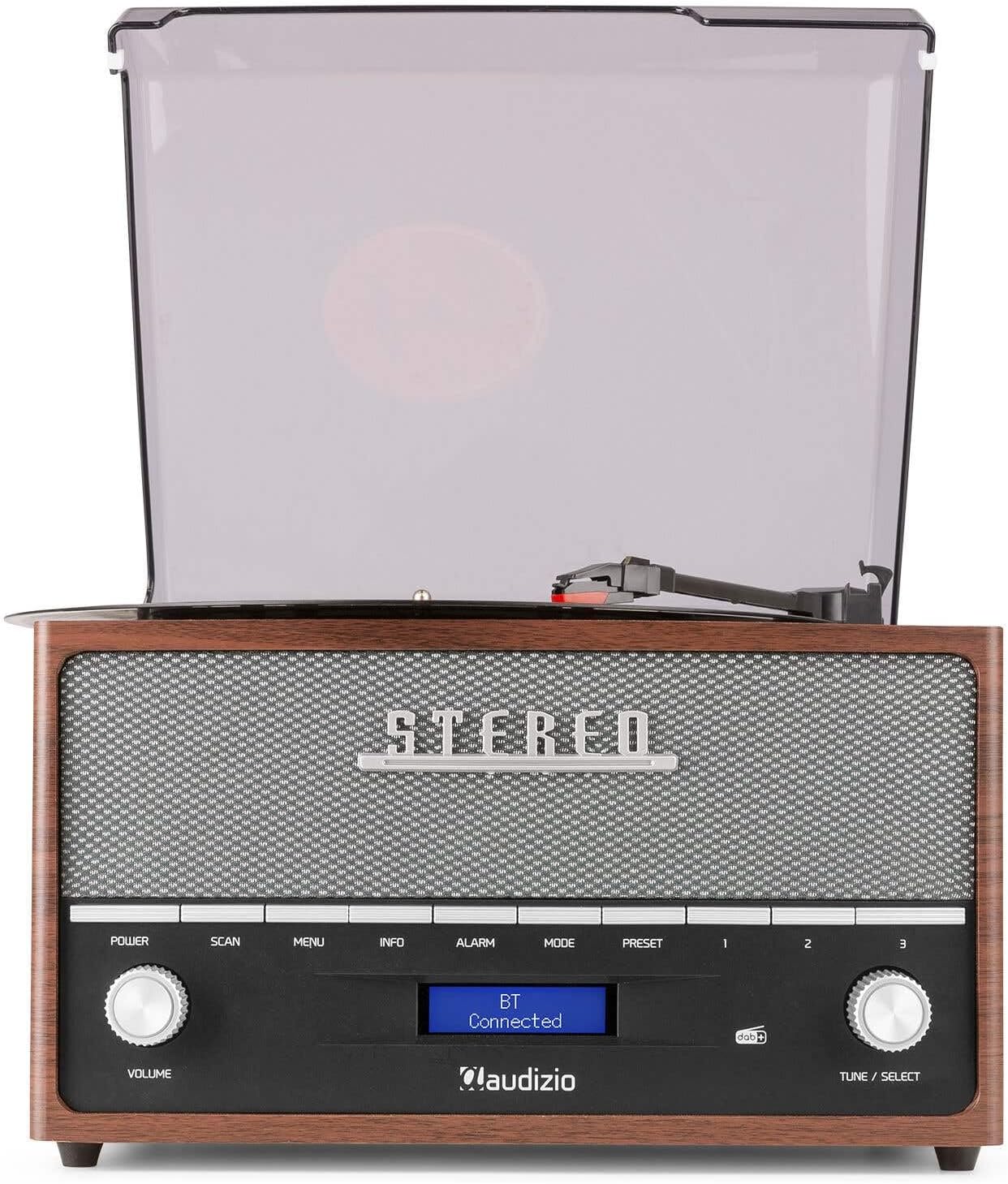
This image shows the Audizio Frisco turntable's display screen indicating 'BT Connected', signifying a successful Bluetooth connection with an external device.
- Agħfas il- MODALITÀ button to select Bluetooth mode. The display will show "BT Pairing" or similar.
- Fuq l-ismartphone tiegħek jew apparat ieħor Bluetooth, attiva l-Bluetooth u fittex apparati disponibbli.
- Select "Audizio Frisco" from the list of devices.
- Once connected, the display will show "BT Connected". You can now play audio from your device through the turntable's speakers.
6.4 Daqq tal-USB
- Insert a USB flash drive into the USB port on the rear of the unit.
- Agħfas il- MODALITÀ buttuna biex tagħżel il-modalità USB.
- L-unità awtomatikament tibda ddoqq awdjo kompatibbli files mill-USB drive.
- Uża l- TUNE / SELECT knob to navigate tracks or folders.
6.5 Input AUX
- Qabbad apparat awdjo estern (eż., MP3 player, CD player) mal- KAJN IN jack on the rear of the unit using a 3.5mm audio cable (not included).
- Agħfas il- MODALITÀ buttuna biex tagħżel il-modalità AUX.
- Play audio from your external device. The sound will be output through the turntable's speakers.
6.6 Funzjoni tal-Arloġġ tal-Allarm
- Agħfas il- ALLARM buttuna biex taċċessa s-settings tal-allarm.
- Uża l- TUNE / SELECT knob to set the alarm time and select the alarm source (e.g., DAB+, FM, Buzzer).
- You can set alarms for daily, weekend, or specific days of the week. Follow the on-screen prompts and use the TUNE / SELECT knob to confirm your selections.
7. Manutenzjoni
7.1 Tindif tal-Unità
- Dejjem aqla 'l-unità mill-iżbokk tad-dawl qabel it-tindif.
- Uża drapp artab u niexef biex timsaħ l-uċuħ ta’ barra.
- Tużax prodotti tat-tindif, xama', jew solventi li joborxu għax jistgħu jagħmlu ħsara lill-finitura.
- For the dust cover, use a soft cloth and a mild, non-abrasive cleaner if necessary.
7.2 Kura tal-Istilus
- L-istilus huwa komponent delikat. Immaniġġjah b'attenzjoni.
- Naddaf l-istilus perjodikament billi tuża pinzell artab, billi tfarfar bil-mod minn wara għal quddiem.
- A worn or damaged stylus can harm your records and degrade sound quality. Replace the stylus when necessary.
8 Issolvi l-problemi
| Problema | Kawża Possibbli | Soluzzjoni |
|---|---|---|
| Ebda qawwa | Kejbil tal-enerġija mhux imqabbad; Sokit tal-ħajt mhux attiv | Ensure power cable is securely connected; Try a different outlet |
| L-ebda ħoss | Volum baxx wisq; Modalità żbaljata magħżula; Headphones imqabbda | Increase volume; Select correct input mode; Disconnect headphones if using speakers |
| Turntable mhux għażil | Power off; Auto-stop engaged at end of record | Ensure unit is powered on; Check Auto-Stop switch position |
| Taqbeż ir-rekords | Record dirty or scratched; Stylus worn or dirty; Turntable not level | Clean record; Clean or replace stylus; Place turntable on a level surface |
| Il-Bluetooth mhux qed jgħaqqad | Turntable not in Bluetooth mode; Device too far; Device already connected to another unit | Select Bluetooth mode; Move device closer; Disconnect from other devices and try again |
| Riċeviment ħażin tar-radju | Sinjal dgħajjef; Antenna mhux estiża | Adjust antenna position; Try repositioning the unit for better signal |
9. Speċifikazzjonijiet
| Brand | Audizio |
| Isem tal-Mudell | Frisco |
| Numru tal-Mudell | 102.200 |
| Veloċità Max Rotazzjoni | 78 RPM |
| Materjal | Injam |
| Piż tal-oġġett | 3.8 Kilogrammi |
| Karatteristiċi Speċjali | DAB+ Radio, Bluetooth streaming, USB playback, Alarm Clock |
| Teknoloġija tal-Konnettività | Awżiljarju, Bluetooth, USB |
| Sors tal-Enerġija | Corded Elettriku |
| Voltage | 220 Volts |
| Konsum tal-Enerġija | 60 Watt |
| Sinjal-mal-ħoss Ratio | 60 dB |
| Tip ta' Mutur | Mutur DC |
| Dimensjonijiet (L x W x H) | Refer to product packaging for accurate dimensions (Note: Provided dimensions of 2.8L x 3.18W x 2.35H meters are likely incorrect and should be verified) |
10. Informazzjoni dwar Garanzija
This product is designed and manufactured to the highest quality standards. For specific warranty terms and conditions, please refer to the warranty card included with your purchase or the retailer's policy where the product was acquired. Information regarding the availability of spare parts is typically for a period of 2 years from the date of purchase.
11. Appoġġ għall-Klijent
If you encounter any issues or have questions regarding your Audizio Frisco Turntable that are not covered in this manual, please contact your retailer or the manufacturer's customer support for assistance. Please have your model number (Frisco, 102.200) and purchase details ready when contacting support.
Ask a question about this manual
Ask about setup, troubleshooting, compatibility, parts, safety, or missing instructions. Manuals+ will review the question and use this page’s manual context to help answer it.