
Syble XB-8602
User Manual: Syble 2D Desktop Barcode Scanner
Model: XB-8602
1. Introduzzjoni
This manual provides comprehensive instructions for the installation, operation, and maintenance of your Syble XB-8602 2D Desktop Barcode Scanner. Please read this manual thoroughly before using the device to ensure optimal performance and longevity.
2. Prodott Aktarview
The Syble XB-8602 is a high-performance 2D desktop barcode scanner designed for efficient and accurate barcode reading in various commercial and industrial environments. It is capable of scanning both 1D and 2D barcodes from printed labels, paper, and digital screens such as mobile phones. Its automatic sensing feature and high scan rate make it ideal for point-of-sale (POS) systems, libraries, warehouses, and other applications requiring rapid data capture.

Figura 1: Quddiem view of the Syble XB-8602 2D Desktop Barcode Scanner, showing the scanning window and the Syble logo.
3. Karatteristiċi
- Effiċjenza Għolja: Equipped with an automatic sensor for quick and hands-free scanning.
- Fast Scan Rate: Achieves up to 1500 scans per second for rapid data processing.
- Kompatibilità versatili: Reads both 1D and 2D barcodes (e.g., QR Code, Data Matrix, PDF417).
- Multi-Surface Scanning: Capable of scanning barcodes from printed materials, labels, and digital screens (smartphones, tablets).
- Konnettività Plug-and-Play: Simple USB connection requires no additional software or driver installation.
- Applikazzjoni wiesgħa: Suitable for retail stores, libraries, warehouses, parking systems, and various commercial settings.
- Disinn Durabbli: Built for reliable performance in demanding environments.
4. Setup
The Syble XB-8602 barcode scanner is designed for easy setup and immediate use. Follow these steps to get started:
- Iftaħ l-iskaner mill-pakkett: Carefully remove the scanner and its USB cable from the packaging.
- Qabbad mat-Tagħmir Ospitanti: Locate an available USB port on your computer (desktop, laptop) or POS system.
- Ipplaggja: Insert the USB cable from the scanner into the USB port of your host device.
- Rikonoxximent Awtomatiku: The operating system (Windows, macOS, Linux) will automatically detect and install the necessary drivers. No manual driver installation is required.
- Lest għall-Użu: Once the installation is complete (usually indicated by a system notification), the scanner is ready to begin scanning barcodes.

Figura 2: Lura view of the scanner, highlighting the USB connection port.
5. Istruzzjonijiet Operattivi
The XB-8602 scanner operates with an intuitive automatic sensing mechanism.
- Pożizzjonament: Place the item with the barcode in front of the scanner's reading window.
- Skennjar Awtomatiku: The scanner will automatically detect the barcode and illuminate to read it.
- Successful Read: Upon a successful scan, the scanner will typically emit an audible beep and/or a visual indicator (e.g., a green light flash). The barcode data will then be transmitted to your connected computer or POS system, appearing as if typed via a keyboard.
- Pożizzjoni ta' Aġġustament: If a barcode is not read immediately, slightly adjust the distance or angle of the item relative to the scanner window. Ensure the barcode is flat and not excessively creased or damaged.
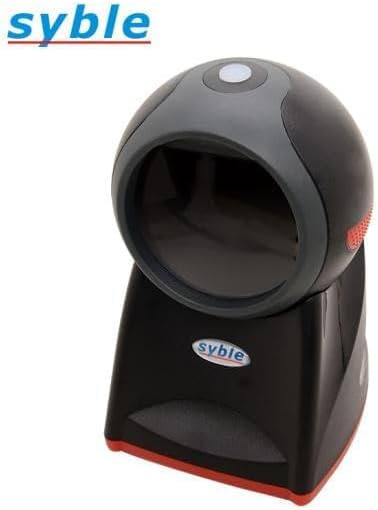
Figura 3: Fuq view of the scanner, illustrating the optimal area for barcode presentation.
6. Manutenzjoni
Manutenzjoni xierqa tiżgura l-lonġevità u l-prestazzjoni ottimali tal-iskaner tal-barcode tiegħek.
- Tindif tat-Tieqa tal-Iskennjar: Naddaf it-tieqa tal-iskannjar regolarment b'ċarruta ratba u mingħajr suf. Għal tbajja' persistenti, neħħi ftitampen the cloth with water or a mild, non-abrasive glass cleaner. Avoid harsh chemicals or abrasive materials that could scratch the window.
- Tindif Ġenerali: Imsaħ il-barra tal-iskaner b'ċarruta niexfa jew kemxejn nadifaamp drapp biex tneħħi t-trab u l-ħmieġ.
- Evita Likwidi: Do not immerse the scanner in water or expose it to excessive moisture.
- Ħażna: When not in use for extended periods, store the scanner in a clean, dry environment away from direct sunlight and extreme temperatures.
- Kura tal-Cable: Evita li tgħawweġ jew iddawwar il-kejbil USB b'mod eċċessiv, għax dan jista' jagħmel ħsara lill-wajers interni.
7 Issolvi l-problemi
Jekk tiltaqa' ma' problemi bl-iskaner tiegħek, irreferi għall-problemi u s-soluzzjonijiet komuni li ġejjin:
| Problema | Kawża Possibbli | Soluzzjoni |
|---|---|---|
| Scanner not powering on/no light. | Il-kejbil USB mhux imqabbad sew jew il-port USB huwa difettuż. | Ensure the USB cable is securely plugged into both the scanner and the computer. Try a different USB port on your computer. |
| L-iskaner mhux qed jaqra l-barcodes. | Barcode damaged, poor print quality, or scanner window is dirty. Incorrect barcode type. | Clean the scanning window. Ensure the barcode is clear and undamaged. Verify the barcode type is supported (1D/2D). Adjust distance and angle. |
| Barcode data not appearing on screen. | Application not in focus, or scanner not recognized by the system. | Ensure the cursor is in the desired text field of your application (e.g., Notepad, Word, POS software). Reconnect the USB cable. Restart the computer if necessary. |
| Scanner beeps but no data output. | Output mode misconfiguration (less likely for plug-and-play). | This model is typically plug-and-play. If this occurs, try reconnecting the USB cable. Ensure your application is ready to receive input. |
8. Speċifikazzjonijiet
| Karatteristika | Dettall |
|---|---|
| Mudell | XB-8602 |
| Tip ta 'Illuminazzjoni | Red LED, 630 nm wavelength |
| Reading Accuracy (1D Barcode) | 3 mil |
| Reading Accuracy (2D Data Matrix) | 7.5 mil |
| Reading Accuracy (2D PDF 417) | 4 mil |
| Qasam ta View (Orizzontali) | 46.1 grad |
| Qasam ta View (Vertikali) | 30.4 grad |
| Interfaces | USB HID / USB-COM / RS-232 |
| Temperatura operattiva | 0°C sa 50°C (32°F sa 122°F) |
| Apparati Kompatibbli | Smartphone, Laptop, Desktop Computer |
| Sors tal-Enerġija | Elettriku bil-fili (permezz tal-USB) |
| Scan Rata | 1500 frejm kull sekonda (fps) |
| Dimensjonijiet (L x W x H) | 18.8 x 13.9 x 11.2 ċm (7.4 x 5.5 x 4.4 pulzieri) |
| Piż | 500 gramma (1.1 lbs) |
| Manifattur | Syble-e |
| Pajjiż ta' Oriġini | Iċ-Ċina |
9. Garanzija u Appoġġ
For warranty information and technical support, please refer to the documentation provided at the time of purchase or contact your vendor. Keep your proof of purchase for any warranty claims.
Għal mistoqsijiet ġenerali jew aktar assistenza, jekk jogħġbok żur is-sit uffiċjali tal-manifattur websit jew ikkuntattja lid-dipartiment tas-servizz tal-konsumatur tagħhom.
Ask a question about this manual
Ask about setup, troubleshooting, compatibility, parts, safety, or missing instructions. Manuals+ will review the question and use this page’s manual context to help answer it.