
1. Matulview
The Moukey MAMP1 is a compact yet powerful 2.0 channel Bluetooth audio stereo amplifier receiver designed for various home audio applications. It delivers 400 watts of maximum power output, providing a high-quality audio experience for karaoke, home theater, acoustic sound systems, and monitor headphones. Featuring multiple input and output modes, EQ controls, Bluetooth 5.0 connectivity, and an HD LED screen, the MAMP1 offers versatile and user-friendly operation.
2. Informazzjoni Importanti dwar is-Sigurtà
- Read and heed all instructions.
- Tużax dan il-prodott ħdejn l-ilma.
- Naddaf biss b'ċarruta niexfa.
- Tiżgura l-voltage of your local mains supply matches the product's requirements.
- Do not block any ventilation openings. Install according to manufacturer's instructions.
- Tinstallax ħdejn xi sorsi tas-sħana bħal radjaturi, reġistri tas-sħana, stufi, jew apparat ieħor (inkluż amplifiers) li jipproduċu sħana.
- Uża biss aċċessorji/aċċessorji speċifikati mill-manifattur.
- Spluggja dan il-prodott waqt maltempati tas-sajjetti jew meta ma jintużax għal perjodi twal.
- Irreferi l-manutenzjoni kollha lil persunal tas-servizz kwalifikat.
3. Kontenut tal-Pakkett
- Moukey MAMP1 Audio Stereo Ampaktar ħaj
- Kontroll mill-bogħod
- Antenna FM
- Kejbil tal-Enerġija
- Manwal għall-Utent
4. Karatteristiċi tal-prodott
- 400 Watts Max Power: Compact yet powerful 2.0 Channel Bluetooth Audio Stereo Amplifier Receiver, ideal for karaoke, home theater, acoustic sound systems, and monitor headphones.
- Multiple Input and Output Modes: Supports 2 pairs of RCA audio inputs (for CD/DVD players), 2 x 1/4 inch (6.35mm) microphone inputs, USB (Max 64G), SD card (Max 32G), 3.5mm AUX IN, and FM radio. Features RCA Line Out and banana plug speaker outputs. Includes a 1/4 inch (6.35mm) headphone connection.
- Kontrolli EQ: Features clear, responsive buttons and knobs for microphone echo/volume, balance, bass, treble, master volume, input source, and unique folder/track control.
- Konnettività Bluetooth 5.0: Professional indoor stereo receiver with Bluetooth music streaming up to 40 feet / 10 meters or more. Easily pairs with smartphones, tablets, iPads, iPhones, and computers.
- HD LED Screen: Integrated FM radio with built-in LED display and front panel audio control center. FM Antenna and Remote Control included for distant audio adjustments.
5. Kontrolli tal-Panew ta 'quddiem
The front panel provides access to all essential controls for operating your Moukey MAMP1 ampaktar ħaj.
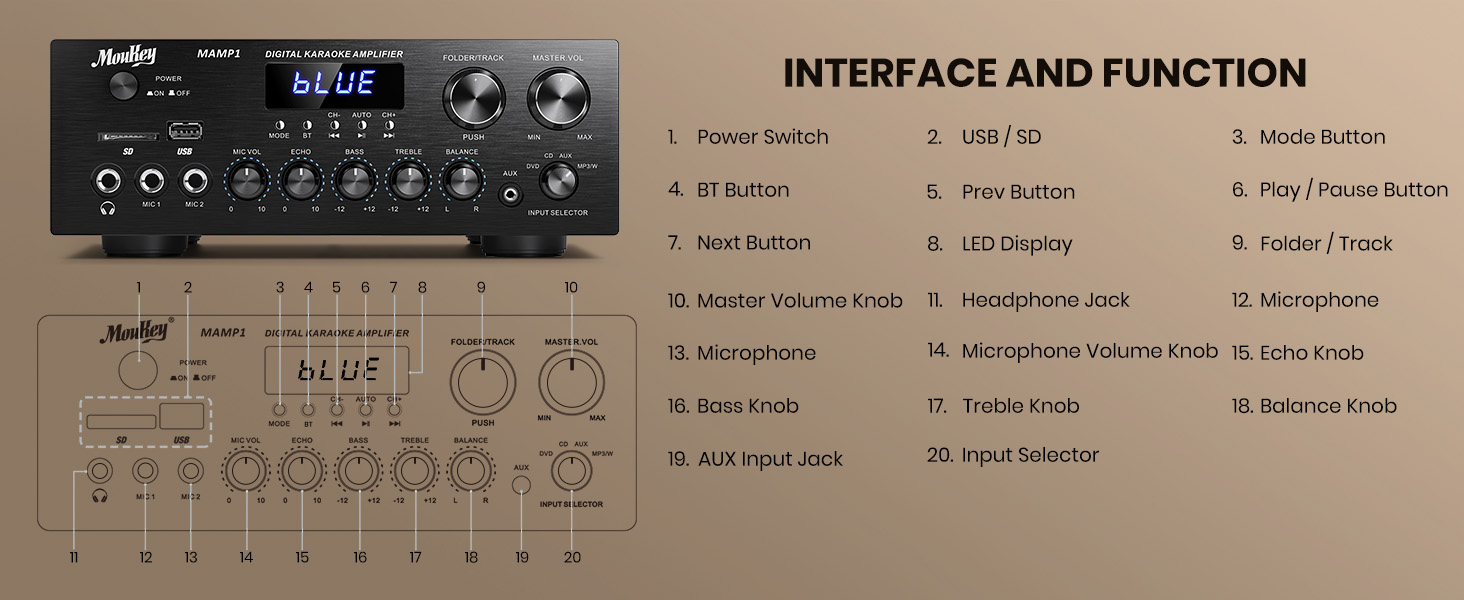
Figure 1: Moukey MAMP1 Tqassim tal-Panel ta' Quddiem
- Swiċċ tal-Enerġija: Agħfas biex tixgħel jew titfi l-unità.
- USB / SD Card Slot: Insert USB flash drives (max 64GB) or SD cards (max 32G) for MP3 playback.
- Buttuna tal-Modalità: Press to cycle through input sources (USB/SD, Bluetooth, FM, AUX, CD, DVD).
- Buttuna BT: Agħfas biex tagħżel il-modalità Bluetooth.
- Prev/Next Buttons: Navigate tracks in USB/SD/Bluetooth mode or stations in FM mode.
- Buttuna Play/Pause: Daqq jew waqqaf id-daqq tal-awdjo.
- Wiri LED: Juri l-modalità attwali, l-informazzjoni dwar it-trakka, jew il-frekwenza tal-FM.
- Buttuna tal-Fowlder/Track: Select folders or tracks.
- Pum tal-Volum Master: Jaġġusta l-volum ġenerali tal-ħruġ.
- Jack tal-headphone (6.35mm): Qabbad headphones għal smigħ privat.
- Microphone Inputs (MIC1, MIC2 - 6.35mm): Connect up to two microphones for karaoke or public address.
- Buttuna tal-Volum tal-Mikrofonu: Jaġġusta l-volum tal-mikrofoni konnessi.
- Pum Eku: Jaġġusta l-effett tal-eku għall-mikrofoni.
- Pum tal-bass: Jaġġusta l-ħruġ ta' frekwenza baxxa.
- Pum tat-Triple: Jaġġusta l-ħruġ ta' frekwenza għolja.
- Pum tal-Bilanċ: Jaġġusta l-bilanċ tal-kanal tax-xellug/tal-lemin.
- Manku tas-Selettur tal-Input: Manually select input sources (CD, AUX, DVD, MP3/BT).
6. Konnessjonijiet tal-Panew ta 'wara
The rear panel provides all necessary ports for connecting your audio sources and speakers.

Figure 2: Moukey MAMP1 Tqassim tal-Panew ta 'wara
- Ġak tal-Antenna FM: Qabbad l-antenna FM inkluża għar-riċeviment tar-radju.
- Audio Input (DVD/CD - RCA): Connect external audio sources like DVD or CD players using RCA cables.
- Line Out (RCA): Qabbad ma 'ieħor ampapparat li jerfa 'l-ħajja jew li jirrekordja.
- Speaker Output (Banana Plugs): Connect your passive speakers. Ensure correct polarity (+ to + and - to -).
- Input ta' Enerġija: Connect the power cable to a standard AC outlet.
7. Setup
7.1 Konnessjoni tal-Ispeaker
To connect your passive speakers to the Moukey MAMP1 amplifier, segwi dawn il-passi:

Figure 3: Speaker Connection Diagram
- Tiżgura l- ampL-alimentatur jintefa u jiġi skonnettjat mis-sokit tal-enerġija.
- Identify the positive (+) and negative (-) terminals on both your speakers and the ampaktar ħaj.
- For bare wire connections: Rotate and loosen the speaker knob on the amplifier. Insert the bare wire (remove approximately 10mm insulation). Tighten the knobs to secure the wires.
- Connect the positive (+) terminal of your speaker to the positive (+) terminal of the ampaktar ħaj.
- Connect the negative (-) terminal of your speaker to the negative (-) terminal of the ampaktar ħaj.
- Repeat for all speakers. Ensure all connections are secure to prevent short circuits.
7.2 Konnessjoni ta' Sorsi tal-Awdjo
- RCA Devices (CD/DVD Player): Use RCA cables to connect the audio output of your CD or DVD player to the corresponding RCA input jacks on the ampIl-pannell ta' wara tal-lifer.
- AUX Devices: Connect devices with a 3.5mm audio output (e.g., smartphone, tablet) to the 3.5mm AUX IN jack on the front panel.
- Mikrofoni: Plug 1/4 inch (6.35mm) microphones into the MIC1 or MIC2 jacks on the front panel.
- Antenna FM: Connect the included FM antenna to the FM ANT jack on the rear panel for radio reception.
7.3 Konnessjoni tal-Enerġija
- Ensure all audio and speaker connections are made.
- Connect the power cable to the AC POWER INPUT on the rear panel of the ampaktar ħaj.
- Ipplaggja t-tarf l-ieħor tal-kejbil tal-enerġija f'sokit tal-enerġija AC adattat.
8. Istruzzjonijiet Operattivi
8.1 Power On/Off
Agħfas il- QAWWA swiċċ fuq il-pannell ta' quddiem biex tixgħel amplifier ON or OFF. The LED display will illuminate when powered on.
8.2 Għażla tas-Sors tal-Input
Uża l- MODALITÀ buttuna jew il- SELEKTUR TAL-INPUT knob on the front panel to choose your desired audio source (Bluetooth, USB, SD, AUX, FM, CD, DVD).
8.3 Kontroll tal-Volum u t-Ton
- Volum Master: Dawwar il- MASTER VOL pum biex taġġusta l-livell ġenerali tal-ħoss.
- Volum tal-mikrofonu: Uża l- MIC VOL knob to adjust microphone volume independently.
- Eku: Adjust the microphone echo effect with the ECHO pum.
- Bass/Treble: Fine-tune the low and high frequencies using the BASS u TREBLE pumi.
- Bilanċ: Adjust the left/right channel balance with the BILANĊ pum.
8.4 Tqabbil tal-Bluetooth
- Agħfas il- MODALITÀ buttuna jew BT button to select Bluetooth mode. The LED display will show "BLUE".
- Fuq it-tagħmir mobbli tiegħek, ippermetti l-Bluetooth u fittex tagħmir disponibbli.
- Agħżel "MAMP1" from the list to pair. A confirmation tone will sound upon successful connection.
8.5 Daqq tal-USB/SD
- Insert a USB flash drive or SD card into the respective slot on the front panel.
- Il- amplifier will automatically switch to USB/SD mode and begin playback. If not, press the MODALITÀ buttuna biex tagħżelha.
- Uża l- QABEL / JMISS buttuni biex taqbeż it-traċċi u l- DĦABBA/PAWŻA buttuna biex tikkontrolla l-plejbek.
8.6 Tħaddim tar-Radju FM
- Kun żgur li l-antenna tal-FM hija konnessa mal-pannell ta' wara.
- Agħfas il- MODALITÀ button to select FM radio mode. The LED display will show the frequency.
- Agħfas il- AUTO buttuna biex tiskennja u ssalva awtomatikament l-istazzjonijiet FM disponibbli.
- Uża l- CH- u CH+ buttuni biex tinnaviga fl-istazzjonijiet salvati.
9. Manutenzjoni
- Żomm l-unità nadifa billi timsaħha b'ċarruta ratba u niexfa.
- Evita li tuża kimiċi ħarxa jew tindif li joborxu.
- Żgura ventilazzjoni xierqa billi żżomm il-ventijiet ħielsa minn ostakli.
- Aħżen il- amplifier f'post frisk u niexef 'il bogħod mix-xemx diretta u minn temperaturi estremi.
10 Issolvi l-problemi
| Problema | Kawża Possibbli | Soluzzjoni |
|---|---|---|
| Ebda qawwa | Power cable not connected; Power switch off; Outlet malfunction | Check power cable connection; Turn power switch ON; Test outlet with another device. |
| Ebda output tal-ħoss | Incorrect input source; Volume too low; Speaker connections loose/incorrect; Faulty audio cable | Select correct input source; Increase master volume; Check speaker wiring; Replace audio cables. |
| Il-Bluetooth mhux qed jgħaqqad | Not in Bluetooth mode; Device too far; Device already connected to another unit | Switch to Bluetooth mode; Move device closer; Disconnect from other devices and try again. |
| Akkoljenza fqira tal-FM | Antenna mhux konnessa; Sinjal dgħajjef | Connect FM antenna; Adjust antenna position for better reception. |
11. Speċifikazzjonijiet
| Karatteristika | Speċifikazzjoni |
|---|---|
| Brand | Moukey |
| Mudell | MAMP1 |
| Qawwa tal-Ħruġ | 400 Watts Max |
| Kanali | 2.0 Kanal |
| Verżjoni Bluetooth | 5.0 |
| Medda Bluetooth | Sa 40 pied / 10 metri |
| Interfaces tal-Input | 2x RCA (CD/DVD), 2x 1/4" (6.35mm) MIC, USB, SD, 3.5mm AUX IN, FM Antenna |
| Interfaces tal-Output | RCA Line Out, Banana Plug Speaker Outputs, 1/4" (6.35mm) Headphone |
| USB/SD Max Capacity | USB: 64G, SD: 32G |
| Rispons ta' Frekwenza | 20Hz-20kHz |
| Teknoloġija Tuner | FM |
| Dimensjonijiet tal-Prodott | 81.28 x 78.74 x 43.18 ċm; 3.19 kg |
12. Garanzija u Appoġġ
Moukey products are designed and manufactured to the highest quality standards. For detailed warranty information and customer support, please refer to the warranty card included in your package or visit the official Moukey website. If you encounter any issues or have questions regarding your MAMP1 amplifier, please contact Moukey customer service for assistance.