
ASUS ASUS - ROG Zephyrus
ASUS ROG Zephyrus 15.6" WQHD 165Hz Gaming Laptop User Manual
Model: ASUS - ROG Zephyrus | Brand: ASUS
1. Introduzzjoni
This manual provides comprehensive instructions for the ASUS ROG Zephyrus 15.6" WQHD 165Hz Gaming Laptop. Designed for high-performance gaming and demanding tasks, this laptop features an AMD Ryzen 9 6900HS processor, NVIDIA GeForce RTX 3060 graphics, 40GB DDR5 RAM, and a 4TB PCIe 4.0 SSD. It comes equipped with a vibrant WQHD 165Hz display and an RGB backlit keyboard, running on Windows 11. This guide will help you set up, operate, maintain, and troubleshoot your device to ensure optimal performance and longevity.

Figure 1.1: The ASUS ROG Zephyrus Gaming Laptop, showcasing its powerful AMD Ryzen 9 6900HS processor and NVIDIA GeForce RTX 3060 graphics capabilities.
2. Setup
2.1 Żpakkjar u Spezzjoni Inizjali
Carefully remove all components from the packaging. Verify that all items listed in the packing list are present and undamaged. The package includes the ASUS ROG Zephyrus laptop, power adapter, and a 256GB Docking Station Set.
2.2 Qawwa tal-Konnessjoni
- Qabbad l-adapter tal-enerġija mal-port tad-dħul tal-enerġija tal-laptop.
- Ipplaggja l-korda tad-dawl ġo żbokk tal-ħajt.
- Id-dawl indikatur tal-batterija se jixgħel, u jindika li l-laptop qed jiċċarġja.
2.3 L-Ewwel Boot u s-Setup tal-Windows 11
Press the power button to turn on the laptop. Follow the on-screen prompts to complete the Windows 11 setup process, including language selection, network connection, and user account creation.
2.4 Connecting the Docking Station Set
The included 256GB Docking Station Set enhances connectivity and storage. Connect the docking station to your laptop via a USB Type-C port. This set typically includes a 7-in-1 docking station with 256GB SSD, a 32GB MicroSD Card with Adapter, Type-C Data Cable, 3-in-1 Charging Cable, and a Suede Cleaning Cloth.

Figura 2.1: Aktarview of the 256GB Docking Station Set components, including the 7-in-1 docking station, MicroSD card, and various cables.

Figure 2.2: An alternative docking station set, which may include a 6-in-1 docking station and a 128GB M.2 NVME Solid State Drive, along with cables and adapter.
3. Istruzzjonijiet Operattivi
3.1 Karatteristiċi tal-Wiri
The laptop features a 15.6-inch WQHD (2560 x 1440 pixels) display with a 165Hz refresh rate, providing smooth visuals for gaming and multimedia. It supports Adaptive-Sync technology for tear-free gameplay and is Pantone Validated for accurate color reproduction. Enjoy enhanced visual experiences with Dolby Vision support.

Figure 3.1: Key display features of the ROG Zephyrus, highlighting its high refresh rate, color accuracy, and adaptive synchronization capabilities.
3.2 Prestazzjoni 'l fuqview
Equipped with an AMD Ryzen 9 6900HS CPU and NVIDIA GeForce RTX 3060 GPU, the laptop delivers robust performance for gaming and demanding applications. The 40GB DDR5 RAM ensures smooth multitasking, while the 4TB PCIe SSD provides ample and fast storage.
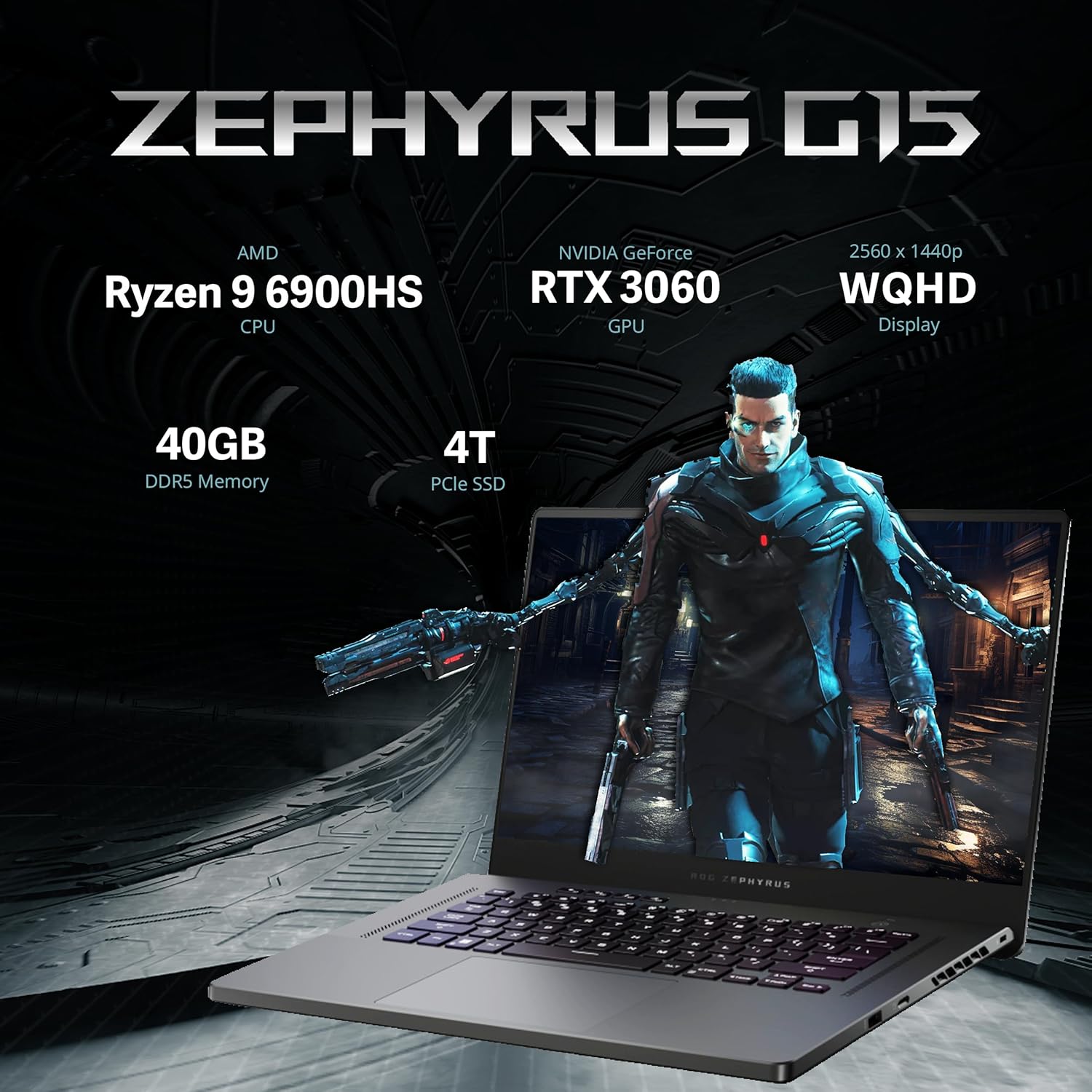
Figure 3.2: Visual representation of the ROG Zephyrus G15's core specifications, emphasizing its powerful CPU, GPU, memory, and storage.

Figure 3.3: The AMD CPU, built using cutting-edge 6nm technology, designed for heavy-duty workloads and high performance.
3.3 Tastiera u Touchpad
The laptop features an RGB backlit keyboard for comfortable typing in various lighting conditions. It includes gaming hotkeys with macro functions and a desktop-inspired layout for enhanced usability. The responsive touchpad provides precise cursor control.

Figure 3.4: Details of the laptop's keyboard, highlighting its RGB backlighting, dedicated hotkeys, and responsive touchpad for accurate input.
3.4 Sistema Awdjo
Experience immersive surround sound with Quad Speakers, AI Noise Cancellation, and a versatile 3D Mic Array. Dolby Atmos technology further enhances the audio experience, providing rich and clear sound.

Figure 3.5: Illustration of the laptop's advanced audio system, featuring multiple speakers, AI-powered noise cancellation, and immersive Dolby Atmos sound.
3.5 Portijiet u Konnettività
The laptop offers a variety of ports for connectivity, including:
- 1x port LAN RJ45
- 2x USB 3.2 Gen 2 Type-C ports
- 2x portijiet USB 3.2 Ġen 1 tat-Tip A
- 1x HDMI 2.0b port
- 1x 3.5mm Combo Audio Jack
- Slot tal-karta MicroSD
- Slot Kensington Lock
Wireless connectivity is provided via 802.11ax (Wi-Fi 6).

Figura 3.6: Dettaljata view of the laptop's side ports, illustrating options for power, external displays, network, audio, and various USB connections.
4. Manutenzjoni
4.1 Tindif tal-Laptop Tiegħek
- Uża drapp artab u mingħajr suf biex tnaddaf l-iskrin u x-chassis.
- Għal tbajja' iebsa, dampen the cloth slightly with water or a screen-safe cleaner.
- Evita li tisprejja likwidi direttament fuq il-laptop.
- Uża arja kkompressata biex tneħħi t-trab mit-tastiera u l-gradilji tal-ventilazzjoni.
4.2 Aġġornamenti tas-Software
Regularly check for and install Windows updates, graphics driver updates (NVIDIA), and ASUS utility updates to ensure optimal performance, security, and compatibility.
4.3 Kura tal-Batterija
- Evita li tiċċarġja l-batterija kompletament ta' spiss.
- Aħżen il-laptop f'post frisk u niexef jekk ma tużahx għal perjodi twal.
- Għal ħażna fit-tul, iċċarġja l-batterija sa madwar 50-60%.
5 Issolvi l-problemi
5.1 Kwistjonijiet Komuni u Soluzzjonijiet
| Problema | Kawża Possibbli | Soluzzjoni |
|---|---|---|
| Il-laptop ma jixgħelx | No power, discharged battery, faulty power adapter | Ensure power adapter is securely connected and outlet is functional. Charge battery for at least 30 minutes before attempting to power on. |
| Il-wiri huwa vojt | Sleep mode, external display connected, display driver issue | Press any key or move mouse to wake from sleep. Disconnect external displays. Update graphics drivers. |
| It-tastiera ma tirrispondix | Driver issue, software conflict | Restart the laptop. Check Device Manager for keyboard driver issues. |
| Prestazzjoni bil-mod | Too many background applications, insufficient RAM, overheating | Close unnecessary applications. Ensure proper ventilation. Check for malware. |
For more complex issues, refer to the ASUS official support websit jew ikkuntattja lis-servizz tal-konsumatur.
6. Speċifikazzjonijiet
| Karatteristika | Dettall |
|---|---|
| Brand | ASUS |
| Isem tal-Mudell | ASUS - ROG Zephyrus |
| Daqs tal-Iskrin | 15.6 Pulzier |
| Riżoluzzjoni tal-Iskrin | 2560 x 1440 pixels (WQHD) |
| Riżoluzzjoni Massima tal-Iskrin | 2560x1440 Pixel |
| Proċessur | AMD Ryzen 9 6900HS (3.3 GHz) |
| RAM | 40 GB DDR5 |
| Hard Drive | 4 TB PCIe SSD |
| Koproċessur tal-Grafika | NVIDIA GeForce RTX 3060 |
| Sistema Operattiva | Windows 11 Home |
| Tip bla fili | 802.11ax (Wi-Fi 6) |
| Kulur | Griż |
| Piż tal-oġġett | 4.19 liri |
| Dimensjonijiet tal-Prodott | 13.98 x 9.57 x 0.78 pulzieri |
| Karatteristika Speċjali | Tastiera backlit |
| Aċċessorji Inklużi | 256GB Docking Station Set (7-in-1 Docking Station w/256GB SSD, 32GB MicroSD Card w/Adapter, Type-C Data Cable, 3-in-1 Charging Cable, Suede Cleaning Cloth) |
7. Informazzjoni dwar Garanzija
The laptop comes with a 1-Year warranty on upgraded RAM/SSD components provided by SnowBell. Additionally, the original manufacturer's warranty from ASUS covers the remaining components for 1 year from the date of purchase. Please retain your proof of purchase for warranty claims.
For detailed warranty terms and conditions, please refer to the official ASUS warranty policy or contact SnowBell directly for upgraded components.
8. Appoġġ għall-Klijent
For technical assistance, troubleshooting, or warranty inquiries, please contact ASUS customer support through their official website. You can find support resources, FAQs, and contact information at the Appoġġ ASUS Websit.
For issues specifically related to the upgraded RAM/SSD components, please contact SnowBell, the provider of the upgrade.
Ask a question about this manual
Ask about setup, troubleshooting, compatibility, parts, safety, or missing instructions. Manuals+ will review the question and use this page’s manual context to help answer it.