
Vorago BSP-500-V2
Manwal tal-Utent tal-Ispeaker Bluetooth Vorago BSP-500-V2
Mudell: BSP-500-V2
Ditta: Vorago
1. Prodott Aktarview
The Vorago BSP-500-V2 is a portable Bluetooth speaker designed for robust performance and durability. It features IPX5 water resistance, making it suitable for various environments, including outdoor adventures and parties. This manual provides detailed instructions for setting up, operating, and maintaining your speaker.
Karatteristiċi ewlenin:
- Konnettività Stereo Veru Wireless (TWS): Connect two BSP-500-V2 speakers for an immersive stereo sound experience.
- Ħajja Estiża tal-Batterija: Enjoy up to 7 hours of music playback at 70% volume, thanks to its 2000 mAh battery.
- Iċċarġjar USB tat-Tip C: Port USB-C konvenjenti u modern għall-iċċarġjar.
- Konnettività versatili: Supports Bluetooth for wireless streaming and a 3.5mm auxiliary input for wired connections.
- Reżistenza għall-Ilma IPX5: Protected against low-pressure water jets from any direction.
Kontenut tal-Pakkett:
- Vorago BSP-500-V2 Bluetooth Speaker
- Cable tal-Iċċarġjar tal-USB tat-Tip-Ċ
- Cable Awdjo 3.5mm
- Manwal għall-Utent (dan id-dokument)
Dijagramma tal-Prodott:

Figura 1.1: Quddiem view of the Vorago BSP-500-V2 Bluetooth speaker, showcasing its mesh grille and central Vorago logo.

Figura 1.2: Angolat view of the speaker, highlighting its robust, rectangular design and integrated carrying strap.

Figura 1.3: Fuq view showing the control panel with power, volume down, play/pause, and volume up buttons.
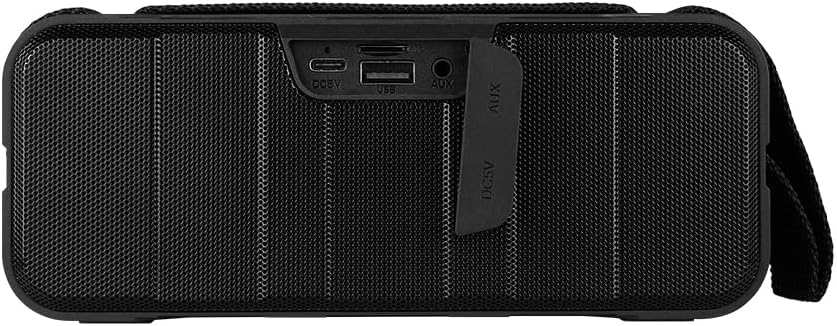
Figura 1.4: Wara view of the speaker, showing the protective flap covering the input ports.

Figure 1.5: Close-up of the input ports, including DC 5V (USB-C), USB-A, and AUX (3.5mm) inputs, protected by a rubber cover.
2. Informazzjoni dwar is-Sigurtà
- Tesponix l-ispiker għal temperaturi estremi (sħan jew kiesaħ).
- Evita li twaqqa’ jew tissuġġetta lill-kelliem għal impatti qawwija.
- Keep the speaker away from direct sunlight and heat sources.
- Do not disassemble, repair, or modify the speaker yourself. This will void the warranty.
- Ensure the port cover is securely closed when using the speaker near water to maintain IPX5 water resistance.
- Do not immerse the speaker in water. IPX5 rating protects against splashes and light rain, not submersion.
- Uża biss il-kejbil tal-iċċarġjar provdut jew kejbil USB tat-Tip C iċċertifikat għall-iċċarġjar.
- Naddaf l-ispiker b'ċarruta ratba u niexfa. Tużax prodotti tat-tindif jew solventi li joborxu.
3. Setup
3.1 Iċċarġjar tal-Ispeaker
- Open the protective rubber cover on the rear of the speaker to access the charging port.
- Connect the USB Type-C end of the charging cable to the speaker's DC 5V port.
- Qabbad it-tarf l-ieħor tal-kejbil USB ma' adapter tal-enerġija USB (mhux inkluż) jew mal-port USB tal-kompjuter.
- Id-dawl indikatur tal-iċċarġjar jixgħel waqt l-iċċarġjar u jintefa meta jkun iċċarġjat kompletament.
- Once charging is complete, securely close the protective rubber cover to maintain water resistance.
3.2 Tixgħel/Jitfi
- Biex Tixgħel: Agħfas u żomm il- Buttuna tal-qawwa on the top panel for approximately 3 seconds until you hear an audible prompt.
- Biex Tifi: Agħfas u żomm il- Buttuna tal-qawwa for approximately 3 seconds until you hear an audible prompt.
3.3 Tqabbil tal-Bluetooth
- Ensure the speaker is powered on. It will automatically enter Bluetooth pairing mode, indicated by a flashing LED light.
- Fuq l-apparat tiegħek (smartphone, tablet, laptop), attiva l-Bluetooth u fittex apparati disponibbli.
- Select "BSP-500-V2" from the list of found devices.
- Once successfully paired, the speaker will emit an audible confirmation, and the LED light will stop flashing and remain solid.
- L-ispiker jerġa' jikkonnettja awtomatikament mal-aħħar apparat imqabbad meta jixgħel, jekk l-apparat ikun fil-firxa u l-Bluetooth ikun attivat.
3.4 Tqabbil ta' Stereo Veru Wireless (TWS)
TWS allows you to connect two BSP-500-V2 speakers together for a true stereo sound experience.
- Ensure both BSP-500-V2 speakers are powered on and not connected to any other Bluetooth device.
- On one of the speakers (this will be the primary speaker), double-press the Buttuna Play/Pause. The speaker will enter TWS pairing mode.
- The two speakers will automatically search for and connect to each other. You will hear an audible confirmation once they are successfully paired.
- Once TWS is established, connect your device to the primary speaker via Bluetooth as described in Section 3.3.
- To disconnect TWS, double-press the Buttuna Play/Pause fuq kwalunkwe kelliem.
3.5 Auxiliary (AUX) Connection
For devices without Bluetooth, you can use the 3.5mm audio cable.
- Open the protective rubber cover on the rear of the speaker.
- Connect one end of the 3.5mm audio cable to the speaker's AUX port.
- Qabbad it-tarf l-ieħor tal-kejbil mal-jack tal-output tal-awdjo tat-tagħmir tiegħek.
- L-ispiker jaqleb awtomatikament għall-modalità AUX.
- Once disconnected, securely close the protective rubber cover.
4. Istruzzjonijiet Operattivi
4.1 Funzjonijiet tal-Buttuni:
| Buttuna | Funzjoni (Stampa Qasira) | Funzjoni (Agħfas fit-tul) |
|---|---|---|
| Buttuna tal-qawwa | N/A | Qawwa mixgħul/mitfi |
| buttuna Volum Down | Naqqas il-Volum | Track Preċedenti |
| Buttuna Play/Pause | Daqq/Pawża l-Mużika, Tweġiba/Tmiem is-Sejħa | Reject Call, Double-press for TWS Pairing |
| buttuna Volum Up | Żid il-Volum | Track li jmiss |
5. Manutenzjoni
- Tindif: Use a soft, dry, lint-free cloth to clean the speaker's surface. For stubborn dirt, slightly dampen the cloth with water. Do not use harsh chemicals, cleaning solvents, or strong detergents.
- Kura tar-Reżistenza għall-Ilma: Always ensure the rubber port cover on the back of the speaker is fully and securely sealed when using the speaker outdoors or near water. This maintains its IPX5 water resistance. After exposure to water, wipe the speaker dry before opening the port cover for charging or auxiliary connections.
- Ħażna: When not in use for extended periods, store the speaker in a cool, dry place, away from direct sunlight and extreme temperatures. It is recommended to charge the speaker fully before storing and to recharge it every few months to maintain battery health.
- Kura tal-batterija: To prolong battery life, avoid fully discharging the battery frequently. Charge the speaker when the low battery indicator is active.
6 Issolvi l-problemi
| Problema | Kawża Possibbli | Soluzzjoni |
|---|---|---|
| L-ispiker ma jixgħelx. | Batterija baxxa. | Charge the speaker fully using the provided USB Type-C cable. |
| Ma tistax tqabbad permezz tal-Bluetooth. | Speaker is not in pairing mode; Device's Bluetooth is off; Speaker is already connected to another device; Device is too far from speaker. | Ensure speaker is powered on and flashing (pairing mode). Turn on Bluetooth on your device. Disconnect from other devices. Move device closer to speaker (within 10 meters). |
| L-ebda ħoss jew volum baxx. | Volume too low on speaker or device; Incorrect input mode; Speaker not connected. | Increase volume on both speaker and connected device. Ensure correct mode (Bluetooth or AUX) is active. Verify successful Bluetooth pairing or AUX cable connection. |
| Distorsjoni tal-ħoss. | Volum għoli wisq; Apparat 'il bogħod wisq mill-ispiker; Interferenza. | Reduce volume on speaker and/or device. Move device closer to speaker. Avoid obstacles between speaker and device. |
| It-tqabbil tat-TWS ifalli. | Speakers are already paired to a device; Speakers are too far apart. | Ensure both speakers are disconnected from any Bluetooth devices. Place speakers close to each other during TWS pairing. |
7. Speċifikazzjonijiet
| Karatteristika | Dettall |
|---|---|
| Isem tal-Mudell | BSP-500-V2 |
| Tip ta' Kelliem | Multimedia |
| Karatteristika Speċjali | Bluetooth |
| Użu Rakkomandat | Għall-plejers tal-mużika |
| Apparati Kompatibbli | Laptop, MP3 Player, Smartphone, Tablet |
| Tip ta' Kontrollur | Buttuna |
| Surround Sound Channel Konfigurazzjoni | 5.0 |
| Ħajja tal-batterija | 7 Sigħat |
| Komponenti Inklużi | Speaker |
| Dimensjonijiet tal-Prodott | 5D x 15W x 18H ċentimetri |
| Piż tal-Prodott | 1 Kilogramma |
| Waterproof | Iva (IPX5) |
| Kapaċità tal-batterija | 2000 mAh |
| Ampitwal Tip | Attiva |
| Sors tal-Enerġija | Batterija |
| Rispons ta' Frekwenza | 180 Hz |
| Teknoloġija tal-Konnettività | Bluetooth |
| Modalità tal-Ħruġ tal-Awdjo | Stereo |
| Tip ta 'Immuntar | Immonta fuq il-mejda |
8. Garanzija u Appoġġ
The Vorago BSP-500-V2 Bluetooth Speaker comes with a limited warranty. Please refer to the warranty card included with your product for specific terms and conditions, or visit the official Vorago websit għal aktar dettalji.
For technical support, troubleshooting assistance, or warranty claims, please contact Vorago customer service through their official channels. You can find more information and contact details on the Vorago Brand Store on Amazon jew l-uffiċjal tagħhom websit.
Jekk jogħġbok żomm il-prova tax-xiri tiegħek għal skopijiet ta' garanzija.
Ask a question about this manual
Ask about setup, troubleshooting, compatibility, parts, safety, or missing instructions. Manuals+ will review the question and use this page’s manual context to help answer it.