Prodott Overview
This document provides comprehensive instructions for the use and maintenance of your replacement remote control. Designed for compatibility with various Manta LED TV models, including LED1903, LED-1903, LED2206, and LED-2206, this remote offers essential functions for controlling your television.

Figura 1: Quddiem view of the replacement remote control. The remote is black with grey buttons, featuring standard TV controls like power, number pad, volume, channel, menu, and playback buttons.
Konfigurazzjoni u Installazzjoni tal-Batterija
To begin using your new remote control, you will need to install batteries. This remote typically requires two AAA batteries (not included).
- Sib il-kompartiment tal-batterija: Turn the remote control over. The battery compartment cover is located on the back.
- Iftaħ il-Qoxra: Gently slide the battery compartment cover downwards or press the latch and lift, as indicated by the arrow or latch mechanism.
- Daħħal Batteriji: Insert two AAA batteries, ensuring the positive (+) and negative (-) terminals align correctly with the markings inside the compartment. Incorrect insertion can prevent the remote from functioning.
- Agħlaq il-Qoxra: Żerżaq l-għatu tal-kompartiment tal-batterija lura f'postu sakemm tikklikkja sew.
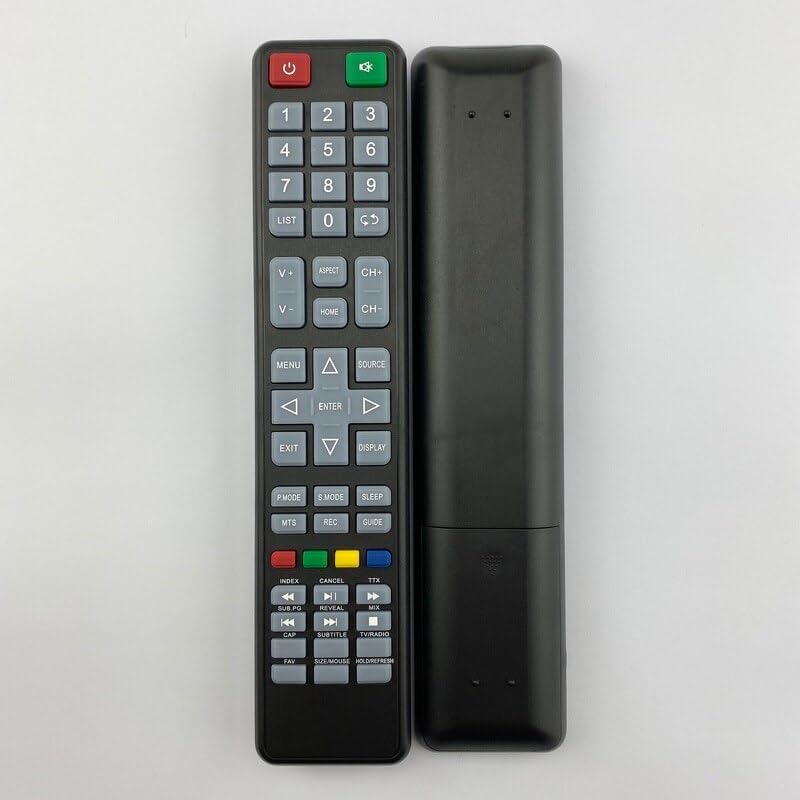
Figura 2: Lura view of the replacement remote control. This image shows the smooth back casing, where the battery compartment is located.
Once batteries are installed, the remote control is ready for use. Point the remote directly at your Manta TV's infrared receiver.
Istruzzjonijiet Operattivi
This section details the functions of the various buttons on your replacement remote control.
| Buttuna/Taqsima | Funzjoni |
|---|---|
| Qawwa (Aħmar) | Jixgħel jew jitfi t-TV (modalità standby). |
| Source (Green) | Switches between input sources (e.g., HDMI, AV, TV). |
| Numru Pad (0-9) | Directly selects TV channels or enters numerical values. |
| LISTA | Accesses the channel list. |
| V+/V- (Volume Up/Down) | Jaġġusta l-livell tal-volum. |
| CH+/CH- (Channel Up/Down) | Jibdel il-kanal tat-TV sekwenzjalment. |
| ASPETT | Jibdel il-proporzjon tal-aspett tal-iskrin. |
| HOME | Accesses the TV's main menu or smart features. |
| MENU | Jiftaħ il-menù tas-settings tat-TV. |
| Vleġeġ tan-Navigazzjoni ('Il fuq, 'l isfel, Xellug, Lemin) | Jinnaviga permezz tal-menus u l-għażliet. |
| DĦUL | Jikkonferma l-għażliet fil-menus. |
| ĦRUĠ | Joħroġ mill-menu jew funzjoni attwali. |
| DISPLAY | Shows current channel information or on-screen display. |
| P.MODE (Modalità tal-Immaġina) | Cycles through preset picture modes. |
| S.MODE (Modalità tal-Ħoss) | Cycles through preset sound modes. |
| L-IRQAD | Jissettja tajmer tal-irqad għat-TV. |
| MTS | Selects Multi-channel Television Sound (e.g., Stereo, SAP). |
| REC | Initiates recording if the TV supports PVR functionality. |
| GWIDA | Accesses the Electronic Program Guide (EPG). |
| Buttuni tal-Kulur (Aħmar, Aħdar, Isfar, Blu) | Context-sensitive functions within menus or smart TV applications. |
| Playback Controls (Rewind, Play/Pause, Fast Forward, Previous, Stop, Next) | Controls media playback for connected devices or internal media player. |
| SUBTITOLU | Ixgħel/itfi s-sottotitli. |
| TV / RADJU | Switches between TV and Radio modes (if supported). |
| FAV | Aċċessa l-lista tal-kanali favoriti. |
| SIZE/MOUSE/HOLD/FREEZE | Multi-function button, may control screen size, mouse pointer (if smart TV), or freeze frame. |
Note: Some functions may not be available or may operate differently depending on your specific Manta TV model. This remote is a replacement and may not replicate all functions of your original remote.
Manutenzjoni u Kura
- Tindif: Uża drapp artab u niexef biex tnaddaf il-kontroll remot. Tużax prodotti tat-tindif likwidi jew materjali li joborxu, għax jistgħu jagħmlu ħsara lill-wiċċ jew lill-komponenti interni.
- Sostituzzjoni tal-batterija: Replace batteries when the remote's response becomes sluggish or it stops working. Always replace both batteries at the same time with new ones of the same type.
- Ħażna: Jekk il-kontroll remot mhux se jintuża għal perjodu twil ta' żmien, neħħi l-batteriji biex tevita t-tnixxija u ħsara potenzjali. Aħżen f'post frisk u niexef.
- Evita l-Ħsara: Twaqqax il-kontroll remot, tesponihx għal temperaturi estremi, jew tgħaddasx fl-ilma.
Issolvi l-problemi
Jekk tesperjenza problemi bil-kontroll remot tiegħek, ipprova l-passi li ġejjin għas-soluzzjoni tal-problemi:
- Remote Mhux Jirrispondi:
- Iċċekkja jekk il-batteriji humiex imdaħħla sew bil-polarità korretta (+/-).
- Ibdel batteriji qodma b'oħrajn ġodda.
- Kun żgur li m'hemm l-ebda ostaklu bejn il-kontroll remot u s-senser infra-aħmar tat-TV.
- Kun żgur li tinsab fil-medda effettiva tas-sensor IR tat-TV.
- Buttuni Speċifiċi Mhux Jaħdmu:
- This replacement remote may not support all functions of your original TV remote. Refer to the "Operating Instructions" section for supported functions.
- Clean the button if it feels sticky or unresponsive.
- TV Not Responding to Power Button:
- Ensure the TV is plugged into a working power outlet and is not in a deep sleep mode.
- Try pressing the power button directly on the TV.
Speċifikazzjonijiet
| Karatteristika | Dettall |
|---|---|
| Tip ta' Prodott | Kontroll mill-Bogħod ta 'Sostituzzjoni |
| Brand | Ġeneriċi |
| Mudelli tat-TV Kompatibbli | Manta LED1903, LED-1903, LED2206, LED-2206 |
| Sors tal-Enerġija | 2 x Batteriji AAA (mhux inklużi) |
| Materjal | Plastic ABS |
| Kulur | Black or White (randomly sent) |
| Karatteristika Speċjali | Disinn ergonomiku |
| Numru Massimu ta' Apparat Appoġġjat | 5 (as per product specifications, though this remote is for one TV) |
| Apparati Kompatibbli (Ġenerali) | Television, Set Top Box, DVD/Blu-ray Player, Home Theater, Stereo System (as per product specifications, though this remote is primarily for TV) |
Garanzija u Appoġġ
Information regarding specific warranty terms for this replacement remote control is not provided in the product details. For any issues or support inquiries, please refer to the seller or the platform where the purchase was made.
As this is a generic replacement product, direct manufacturer support may not be available. It is recommended to contact the seller for assistance with product defects or operational questions not covered in this manual.


