
Introduzzjoni
This manual provides essential instructions for setting up, operating, and maintaining your ApoloSign NJP561P-Z Laptop Computer. Please read this manual thoroughly before using your device to ensure proper function and longevity.
Kontenut tal-Pakkett
- ApoloSign NJP561P-Z Laptop
- Adapter tal-Enerġija
- Manwal għall-Utent
Setup
L-Ewwel Użu u Iċċarġjar
Before initial use, connect the provided power adapter to the laptop's DCIN port and then to a power outlet. Allow the battery to charge fully. The DCIN port is located on the right side of the laptop.

Image: The ApoloSign NJP561P-Z laptop connected to its power adapter, illustrating the charging process.
Ibbutjar Inizjali
Press the power button located on the top right of the keyboard to turn on the laptop. Follow the on-screen instructions to complete the Windows 11 setup process, including language selection, network connection, and user account creation.
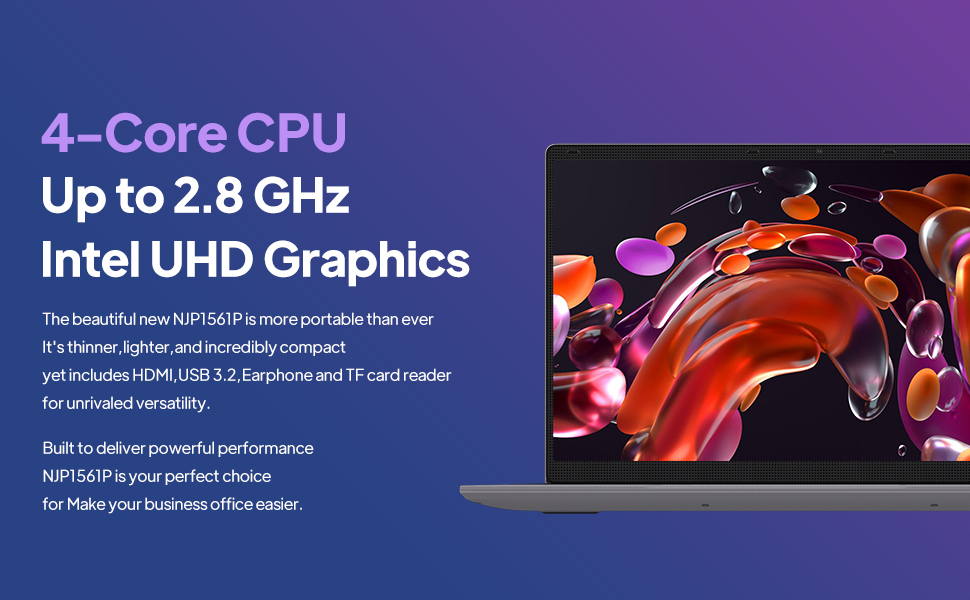
Image: The ApoloSign NJP561P-Z laptop displaying the Windows 11 operating system interface.
Istruzzjonijiet Operattivi
Tastiera u Touchpad
The laptop features a full-size QWERTY keyboard with an integrated numeric keypad for efficient data entry and typing. The touchpad supports multi-touch gestures for intuitive navigation and control of the operating system.

Immaġni: Close-up view of the ApoloSign NJP561P-Z laptop's full-size keyboard and touchpad.
Konnettività
The laptop supports Wi-Fi for wireless internet access and Ethernet for stable wired network connections. It offers a variety of ports for connecting external devices:
- USB 3.2 ports (x2): Għal trasferiment ta' dejta b'veloċità għolja ma' apparati kompatibbli.
- Ħruġ HDMI: Biex tikkonnettja ma' monitors jew projetturi esterni.
- Slot tal-Karta TF: Għall-espansjoni tal-ħażna jew it-trasferiment files minn karti tal-memorja.
- Microphone/Headphone jack: Għad-dħul u l-ħruġ tal-awdjo.
- DCIN: Port tad-dħul tal-enerġija.

Immaġni: Naħa waħda view of the ApoloSign NJP561P-Z laptop highlighting its various connectivity ports, including USB, HDMI, and TF Card slot.
Kamera
The integrated HD front camera is suitable for video conferencing, online classes, and virtual meetings.
Video: An official product video demonstrating the ApoloSign laptop's features, including the HD camera for video conferencing and various connectivity options.
Wiri
The 15.6-inch FHD IPS display offers clear and vibrant visuals with a resolution of 1920x1080 pixels. The screen can open up to 175 degrees, providing flexible viewangoli ta' inklinazzjoni għal diversi użi.

Image: The ApoloSign NJP561P-Z laptop showcasing its 15.6-inch IPS Full HD screen with a colorful display.
Manutenzjoni
Tindif
Use a soft, lint-free cloth to gently clean the screen and exterior surfaces of the laptop. For stubborn smudges, slightly dampen the cloth with water or a screen-safe cleaning solution. Avoid using harsh chemicals, abrasive materials, or excessive moisture.
Kura tal-batterija
To prolong the lifespan of your laptop's battery, avoid exposing the device to extreme temperatures (both hot and cold). It is also recommended to avoid frequently fully discharging the battery. The laptop is equipped with a 5000mAh Lithium-ion polymer battery, providing an estimated 5-6 hours of usage depending on workload.

Image: A graphic representation of the ApoloSign laptop's 5000mAh battery and its estimated 5-6 hours of endurance.
Issolvi l-problemi
Kwistjonijiet Komuni u Soluzzjonijiet
- Apparat mhux mixgħul: Kun żgur li l-adapter tal-enerġija huwa konness sew u li l-batterija għandha biżżejjed ċarġ. Ipprova żomm il-buttuna tal-enerġija għal 10-15 sekonda biex twettaq hard reset.
- Prestazzjoni bil-mod: Close unnecessary applications running in the background. Check for system updates and ensure your storage is not full. A system cleanup or disk defragmentation may also help.
- Touchpad unresponsive: Verify that the touchpad has not been accidentally disabled (often via a function key combination, e.g., Fn + F9 or F10). Restarting the laptop can often resolve temporary driver issues.
- Ebda konnessjoni Wi-Fi: Confirm that Wi-Fi is enabled in Windows settings. Check if your wireless router is functioning correctly and within range. Restarting both the laptop and the router can resolve connectivity problems.
- Problemi bil-wiri tal-iskrin: If the screen is blank or flickering, try connecting an external monitor via HDMI to determine if the issue is with the laptop's display or graphics card.
Speċifikazzjonijiet
| Karatteristika | Dettall |
|---|---|
| Brand | ApoloSign |
| Numru tal-Mudell | NJP561P-Z |
| Sistema Operattiva | Windows 11 |
| Daqs tal-Iskrin | 15.6 Pulzier |
| Riżoluzzjoni tal-Iskrin | 1920 x 1080 pixel (FHD IPS) |
| Proċessur | Intel Celeron N5095 Quad-Core (Up to 2.8GHz) |
| RAM | 12GB DDR4 SDRAM |
| Ħażna | 512GB SSD |
| Grafika | Grafika Intel UHD (Integrata) |
| Konnettività bla fili | Wi-Fi |
| Konnettività bil-fili | Ethernet |
| Portijiet | USB 3.2 (x2), HDMI, TF Card, Headphone Jack, DCIN |
| Piż tal-oġġett | 3.63 liri |
| Dimensjonijiet tal-Prodott | 14 x 9 x 0.8 pulzieri |
Garanzija u Appoġġ
For detailed warranty information, technical support, or service inquiries, please refer to the official ApoloSign webis-sit jew ikkuntattja lid-dipartiment tas-servizz tal-konsumatur tagħhom. Huwa rakkomandat li żżomm l-irċevuta tax-xiri tiegħek bħala prova tax-xiri għal kwalunkwe talba ta' garanzija.
Informazzjoni dwar is-Sigurtà
- Tesponix l-apparat għal temperaturi estremi, dawl tax-xemx dirett, jew umdità għolja.
- Evita li twaqqa 'l-apparat jew suġġett għal impatti qawwija.
- Use only the power adapter provided with your laptop to prevent damage.
- Keep liquids away from the device to prevent electrical hazards and damage.
- Tippruvax tiżżarma jew issewwi l-apparat int stess. Irreferi għal persunal tas-servizz kwalifikat.