
1. Introduzzjoni
The Lenovo ThinkPad P16 Gen 2 is a high-performance mobile workstation designed for demanding professional applications. It combines the portability of a laptop with the robust processing and graphics capabilities required for compute-intensive tasks, making it suitable for engineering, design, and content creation workflows.

Figure 1.1: Lenovo ThinkPad P16 Gen 2 Mobile Workstation displaying 3D animation software.
2. Setup
2.1 Tneħħija tal-kaxxa u Spezzjoni Inizjali
Neħħi bir-reqqa l-komponenti kollha mill-imballaġġ. Ivverifika li l-oġġetti li ġejjin huma preżenti:
- ThinkPad P16 Gen 2 21FA0032US Mobile Workstation
- Adapter AC
Inspect the workstation for any physical damage. If any components are missing or damaged, contact your vendor immediately.
2.2 Konnessjoni tal-Adapter tal-Enerġija
Connect the AC adapter to the power connector on your workstation. Plug the power cord into an electrical outlet. The battery will begin charging automatically.

Figura 2.1: Ġenb view of the ThinkPad P16 Gen 2, illustrating port locations including the power connector.
2.3 Qawwa Inizjali
Press the power button located on the keyboard deck to turn on the workstation. Follow the on-screen instructions to complete the initial setup of the Windows 11 Pro operating system.
3. Tħaddim tal-Istazzjon tax-Xogħol
3.1 Ġestjoni tal-Enerġija
- Qawwa Mixgħul: Agħfas il-buttuna tal-qawwa.
- Modalità Sleep: Agħlaq l-għatu jew agħfas il-buttuna tal-qawwa fil-qosor.
- Itfi: Ikklikkja l-buttuna Start, imbagħad Power > Shut down.
- Ibda mill-ġdid: Ikklikkja l-buttuna Start, imbagħad Power > Restart.
3.2 Tastiera u Apparati ta' Input
The ThinkPad P16 Gen 2 features a full-sized keyboard with a numeric keypad, a TrackPoint pointing device, and a multi-touch touchpad.
- TrackPoint: Use the red TrackPoint cap in the center of the keyboard for precise cursor control. The three buttons below the spacebar function as left-click, scroll, and right-click for the TrackPoint.
- Touchpad: The large multi-touch touchpad supports various gestures for navigation and control. Refer to Windows settings for customization.
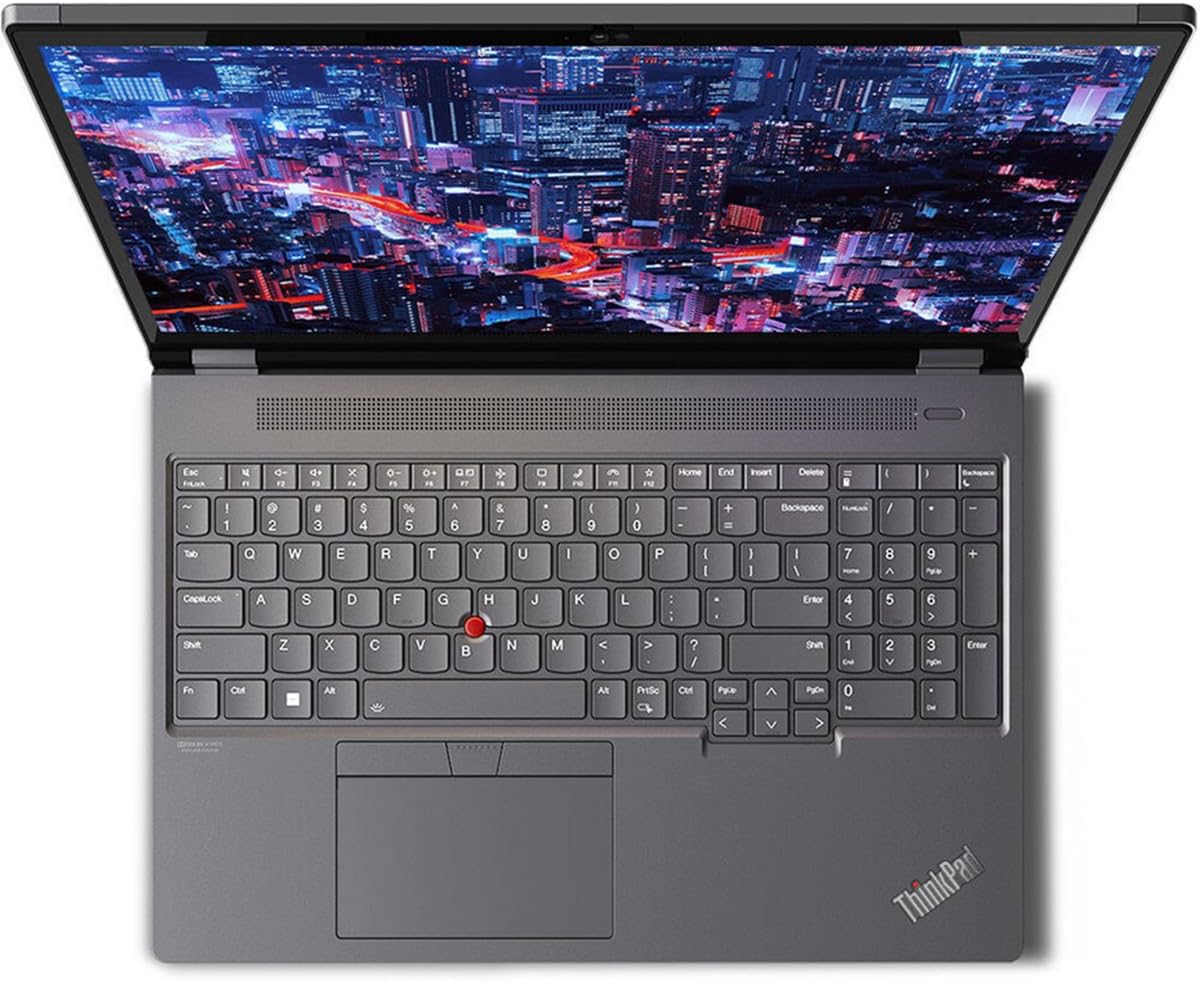
Figura 3.1: Minn fuq għal isfel view of the ThinkPad P16 Gen 2, highlighting the keyboard, TrackPoint, and touchpad.
3.3 Karatteristiċi tal-Wiri
The 16-inch WQXGA display offers a resolution of 2560 x 1600 pixels, providing clear and detailed visuals for professional tasks and multimedia consumption.
4. Manutenzjoni
4.1 Cleaning the Workstation
- Skrin: Uża ċarruta ratba u mingħajr ħelu dampImlaħlaħ bl-ilma jew b'soluzzjoni għat-tindif tal-iskrin. Tisprejjax likwidu direttament fuq l-iskrin.
- Tastiera u Chassis: Use a soft, dry cloth. For stubborn dirt, a cloth lightly dampened with isopropyl alcohol can be used. Avoid excessive moisture.
4.2 Kura tal-Batterija
To maximize battery lifespan, avoid extreme temperatures and prolonged storage at full or empty charge. Periodically allow the battery to discharge partially before recharging.
4.3 Aġġornamenti tas-Software
Iċċekkja u installa regolarment aġġornamenti tas-sistema operattiva (Windows Update) u aġġornamenti tas-sewwieqa (Lenovo Vantage jew Appoġġ Lenovo website) to ensure optimal performance and security.
5 Issolvi l-problemi
5.1 Kwistjonijiet Komuni u Soluzzjonijiet
- Workstation does not power on: Kun żgur li l-adapter tal-AC huwa konness sew u li s-sokit tal-enerġija jaħdem. Ipprova sokit ieħor.
- Problemi bil-wiri (l-ebda immaġni, teptip): Connect an external monitor to verify if the issue is with the internal display. Restart the workstation.
- Prestazzjoni bil-mod: Close unnecessary applications. Check for background processes. Ensure sufficient free storage space. Run a system diagnostic.
- Wireless connectivity problems: Ensure Wi-Fi is enabled. Restart the workstation and the wireless router. Update wireless drivers.
5.2 Meta Għandek Tikkuntattja l-Appoġġ
If you encounter persistent issues that cannot be resolved with the above steps, or if you suspect a hardware malfunction, contact Lenovo technical support for assistance.
6. Speċifikazzjonijiet
| Karatteristika | Speċifikazzjoni |
|---|---|
| Mudell | 21FA0032US |
| Proċessur | Intel Core i7-13700HX Hexadeca-core (16 Core) |
| RAM | 16 GB DDR5 SDRAM |
| Ħażna | 512 GB SSD |
| Wiri | 16-inch WQXGA (2560 x 1600 pixels) |
| Koproċessur tal-Grafika | NVIDIA RTX A1000 |
| Sistema Operattiva | Windows 11 Pro |
| Tip bla fili | 802.11ac |
| Piż tal-oġġett | 6.5 liri |
| Dimensjonijiet tal-Prodott (LxWxH) | 10.5 x 14.3 x 1.19 pulzieri |
| Kulur | Villi Iswed |
7. Garanzija u Appoġġ
Your Lenovo ThinkPad P16 Gen 2 Mobile Workstation comes with a standard manufacturer's warranty. For detailed information regarding warranty terms, coverage, and duration, please refer to the warranty documentation included with your product or visit the official Lenovo support websit.
For technical support, driver downloads, service requests, or to find authorized service centers, please visit the Lenovo support portal at support.lenovo.comŻomm in-numru tas-serje tal-prodott tiegħek lest meta tikkuntattja l-appoġġ.