
Looki LKI-Dispenser
Looki Hot Water Dispenser 3.0L - Model LKI-Dispenser
Your comprehensive guide to operating and maintaining your Looki Hot Water Dispenser.
Introduzzjoni
The Looki Hot Water Dispenser is designed to provide instant hot water for various beverages and quick meals. Featuring a 3.0-liter capacity, a touch display, and 2600W power, it offers convenience and efficiency for daily use. This manual provides detailed instructions for setup, operation, maintenance, and troubleshooting to ensure optimal performance and longevity of your appliance.
1. Setup
1.1 Disimballaġġ
Carefully remove all packaging materials from the dispenser. Ensure all components are present: the main unit, water reservoir, and drip tray. Retain packaging for future transport or storage if needed.
1.2 Tqegħid
Place the dispenser on a stable, flat, and heat-resistant surface, away from direct sunlight and heat sources. Ensure there is adequate ventilation around the unit. Do not place it near the edge of a countertop where it could be easily knocked over.
1.3 Il-mili tar-Reċipjent tal-Ilma
Remove the water reservoir from the back of the unit. Fill it with clean, cold tap water up to the MAX fill line (3.0L). Do not overfill. Reattach the reservoir securely to the main unit.

Image: A hand pouring water into the transparent water reservoir of the Looki Hot Water Dispenser, illustrating the filling process.

Image: The Looki Hot Water Dispenser in use, dispensing hot water into a glass, showcasinil-funzjoni primarja tagħha.
1.4 Użu Inizjali
Before first use, it is recommended to run a full cycle of hot water without any beverage to clean the internal components. Plug the power cord into a grounded electrical outlet. Place a large heat-resistant container under the dispenser spout. Select the highest temperature and maximum volume setting, then dispense. Discard this water. Repeat if desired.
2. Istruzzjonijiet Operattivi
2.1 Tixgħel/Jitfi
Agħfas il- Mixgħul/Mitfi button on the touch display to power the unit on or off. The LED display will illuminate when the unit is on.
Immaġni: Dettaljata view of the Looki Hot Water Dispenser's LED touch display, showing various icons for temperature, volume, milk function, and cleaning, with a hand interacting with the screen.
2.2 Aġġustament tat-Temperatura
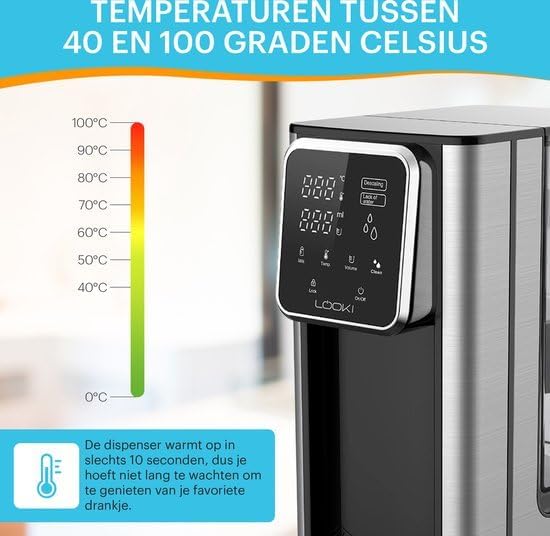
Uża l- Temp icon on the touch display to cycle through available temperature settings (e.g., 40°C to 100°C). Select the desired temperature for your beverage or meal.

Image: The Looki Hot Water Dispenser alongside a temperature scale ranging from 0°C to 100°C, highlighting its ability to dispense water at various temperatures within 10 seconds.
2.3 Aġġustament tal-Volum
Agħfas il- Volum icon to select the desired water volume to be dispensed. This feature helps in dispensing precise amounts of water.
2.4 Tqassim ta' Ilma sħun
Place your cup or container under the spout. Once temperature and volume are set, press the Dispensa button (often indicated by a water droplet icon or a large central button) to start dispensing. The dispenser will stop automatically once the selected volume is reached.

Image: A split image comparing the traditional method of boiling water with a kettle (top) versus the instant dispensing of hot water from the Looki Hot Water Dispenser (bottom), emphasizing convenience.
2.5 Milk Function (if applicable)
If your model includes a milk function, press the Ħalib icon to activate settings suitable for milk-based beverages. Refer to the display for specific instructions related to this function.
2.6 Karatteristiċi tas-Sigurtà
The Looki Hot Water Dispenser is equipped with automatic shut-off and overheat protection. The unit will automatically turn off if the water level is too low or if it detects overheating, ensuring safe operation.
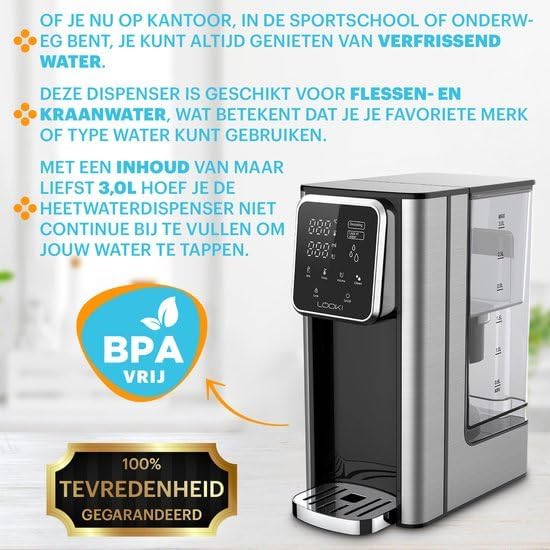
Image: A woman holding a cup of coffee next to the Looki Hot Water Dispenser, with icons below showing various uses like tea, coffee, hot chocolate, and bouillon, demonstrating versatility.
3. Manutenzjoni
3.1 Tindif
Regular cleaning ensures hygiene and extends the life of your dispenser. Unplug the unit before cleaning. Wipe the exterior with a soft, damp cloth. The drip tray can be removed and washed with warm, soapy water. Rinse thoroughly and dry before reattaching.
3.2 Funzjoni ta' Awto-Tindif
The dispenser features an integrated self-cleaning function. Refer to the display for the Nadif icon. Follow the on-screen prompts to initiate the cleaning cycle. This function helps to flush out internal components.
3.3 Tneħħija tal-Ġebla
Over time, mineral deposits (limescale) can build up, especially in hard water areas. The display may show a "Descaling" or "Calc" indicator. To descale, use a descaling solution specifically designed for hot water appliances, following the product's instructions. Alternatively, a mixture of white vinegar and water can be used (e.g., 1 part vinegar to 2 parts water). Fill the reservoir with the descaling solution, run a full cycle, then rinse by running several cycles with fresh water.
4 Issolvi l-problemi
| Problema | Kawża Possibbli | Soluzzjoni |
|---|---|---|
| Ma ngħatax ilma. | Water reservoir empty or not properly seated. | Fill the water reservoir. Ensure it is securely placed. |
| Ilma mhux sħun biżżejjed. | Incorrect temperature setting. Limescale buildup. | Check temperature setting. Perform descaling. |
| "Descaling" or "Calc" indicator on. | Limescale buildup detected. | Agħmel ċiklu ta' tneħħija tal-ġebla skont l-istruzzjonijiet tal-manutenzjoni. |
| L-unità mhux qed tixgħel. | Mhux imdaħħla. Problema bis-sokit tal-elettriku. | Ensure power cord is securely plugged in. Test outlet with another appliance. |
Jekk il-problema tippersisti wara li tipprova dawn is-soluzzjonijiet, jekk jogħġbok ikkuntattja l-appoġġ għall-klijenti.
5. Speċifikazzjonijiet
- Numru tal-Mudell: LKI-Dispenser
- Ditta: Ħares
- Kapaċità: 3.0 Litri
- Wattage: 2600 Watts
- Voltage: 240 Volts
- Kulur: Iswed
- Dimensjonijiet tal-Prodott: 26 x 15 x 30 ċm
- L-Ewwel Data Disponibbli: 21 ta’ Settembru, 2023
6. Garanzija u Appoġġ
This Looki Hot Water Dispenser comes with a 24-il xahar garanzija mid-data tax-xiri, li tkopri difetti fil-manifattura. Jekk jogħġbok żomm il-prova tax-xiri tiegħek għal talbiet ta' garanzija.
For technical support, troubleshooting assistance, or warranty inquiries, please contact Looki customer service. Refer to the product packaging or the Looki official webis-sit għall-aktar informazzjoni ta' kuntatt aġġornata.
Manufacturer: Looki
Dokumenti Relatati - LKI-Dispenser
 |
Looki Camera Pet Feeder: Manwal tal-Utent u Gwida għas-Setup Gwida komprensiva għall-Looki Camera Pet Feeder, li tiddettalja l-installazzjoni tal-ħardwer, is-setup tas-softwer permezz tal-Bluetooth jew il-modalità AP, tmigħ manwali u b'ħin determinat, vidjo viewing, settings addizzjonali, u FAQs dwar is-soluzzjoni tal-problemi. |
 |
Manwal tal-Utent Looki L1: Informazzjoni dwar is-Sigurtà, il-Garanzija, u l-Konformità Gwida komprensiva għall-prekawzjonijiet ta' sigurtà, it-termini tal-garanzija, u l-konformità regolatorja għall-apparat Looki L1, inklużi d-direttivi tal-FCC u tal-UE. |
 |
Manwal tal-Utent u Gwida għas-Setup tal-Kamera Looki 360° Pro Gwida komprensiva għat-twaqqif u l-użu tal-Looki 360° Pro Camera, inkluża l-installazzjoni, il-konnessjoni tal-app permezz ta' kodiċi QR jew modalità AP, u noti importanti dwar l-użu. |
 |
Manwal tal-Istruzzjonijiet tat-Tablet LOOKI - Konfigurazzjoni, Tħaddim, u Soluzzjoni tal-Problemi Manwal ta' struzzjonijiet komprensiv għall-LOOKI Tablet, li jiddeskrivi s-setup, l-operazzjonijiet bażiċi, il-karatteristiċi avvanzati bħall-Wi-Fi u l-Bluetooth, is-soluzzjoni ta' problemi komuni, l-ispeċifikazzjonijiet tekniċi, u informazzjoni dwar il-garanzija. |
 |
Manwal ta' Istruzzjonijiet għat-Tindif tat-Tapiti LOOKI Manwal ta' struzzjonijiet komprensiv għall-LOOKI Carpet Cleaner, li jagħti dettalji dwar l-istruzzjonijiet tas-sigurtà, it-tħaddim, it-tindif, il-manutenzjoni, u s-soluzzjoni tal-problemi. Tgħallem kif tuża u tieħu ħsieb b'mod effettiv l-apparat tat-tindif tat-twapet tiegħek. |
 |
Handleiding Looki BCS0150 V1.2: Installatie, Gebruik en FAQ Gedetailleerde gebruikershandleiding voor de Looki BCS0150 V1.2 smart security camera. Ontdek installatie-instructies, app-functies, tips en veelgestelde vragen voor een optimale bevearing van uw woning. |
Ask a question about this manual
Ask about setup, troubleshooting, compatibility, parts, safety, or missing instructions. Manuals+ will review the question and use this page’s manual context to help answer it.