
FOREVER Colorum
Manwal tal-Utent tal-Arloġġ Intelliġenti FOREVER Colorum CW-300
Your comprehensive guide to setting up and using your new smartwatch.
1. Introduzzjoni
The FOREVER Colorum CW-300 Smartwatch is designed to seamlessly integrate with most smartphones, offering a wide range of features for fitness tracking, communication, and daily convenience. Its intuitive 1.20-inch touchscreen display and Bluetooth 5.0 connectivity ensure a fast and stable connection.

Image: The FOREVER Colorum CW-300 Smartwatch in green, shown with its matching round carrying case. The watch face displays time, distance, and step count.
2. X'hemm fil-Kaxxa
Upon unboxing your FOREVER Colorum CW-300 Smartwatch, please ensure all components are present:
- Smartwatch CW-300
- Kaxxa tal-ġarr eleganti
- Cable tal-iċċarġjar tal-USB
- Manwal għall-utent

Image: The FOREVER Colorum CW-300 Smartwatch, its USB charging cable, and the matching round carrying case, laid out to show the contents of the product box.
3. Setup
3.1 Iċċarġjar tal-Ismartwatch
Before first use, fully charge your smartwatch. Connect the provided USB charging cable to the charging port on the back of the watch and plug the other end into a USB power adapter (not included) or a computer's USB port. The watch display will indicate charging status.
3.2 It-tqabbil mal-Ismartphone Tiegħek
- Download the official FOREVER companion application from your smartphone's app store (available for Android and iOS).
- Kun żgur li l-Bluetooth huwa attivat fuq l-ismartphone tiegħek.
- Open the FOREVER app and follow the on-screen instructions to search for and pair with your Colorum CW-300 smartwatch.
- Ikkonferma t-talba ta' tqabbil kemm fuq l-ismartphone tiegħek kif ukoll fuq l-ismartwatch.
Once paired, the watch will synchronize time and data with your smartphone.
4. Tħaddim tal-Ismartwatch
4.1 Navigazzjoni Bażika
The Colorum CW-300 features a responsive touchscreen. Swipe left, right, up, or down to navigate through menus and access different functions. Tap to select an option or confirm an action. The side button typically serves as a power button or a return-to-home function.
4.2 Traċċar tal-Fitness
Your smartwatch functions as a comprehensive fitness tracker, monitoring various health metrics:
- Kontatur tal-Passi: Automatically tracks your daily steps.
- Ħruq ta' Kaloriji: Jistima l-kaloriji maħruqa abbażi tal-attività tiegħek.
- Monitor tar-rata tal-qalb: Continuously or on-demand measures your heart rate.
- Analiżi tal-Irqad: Jimmonitorja x-xejriet u l-kwalità tal-irqad tiegħek.
- Menstrual Monitor: (For female users) Integrated feature to track menstrual cycles.
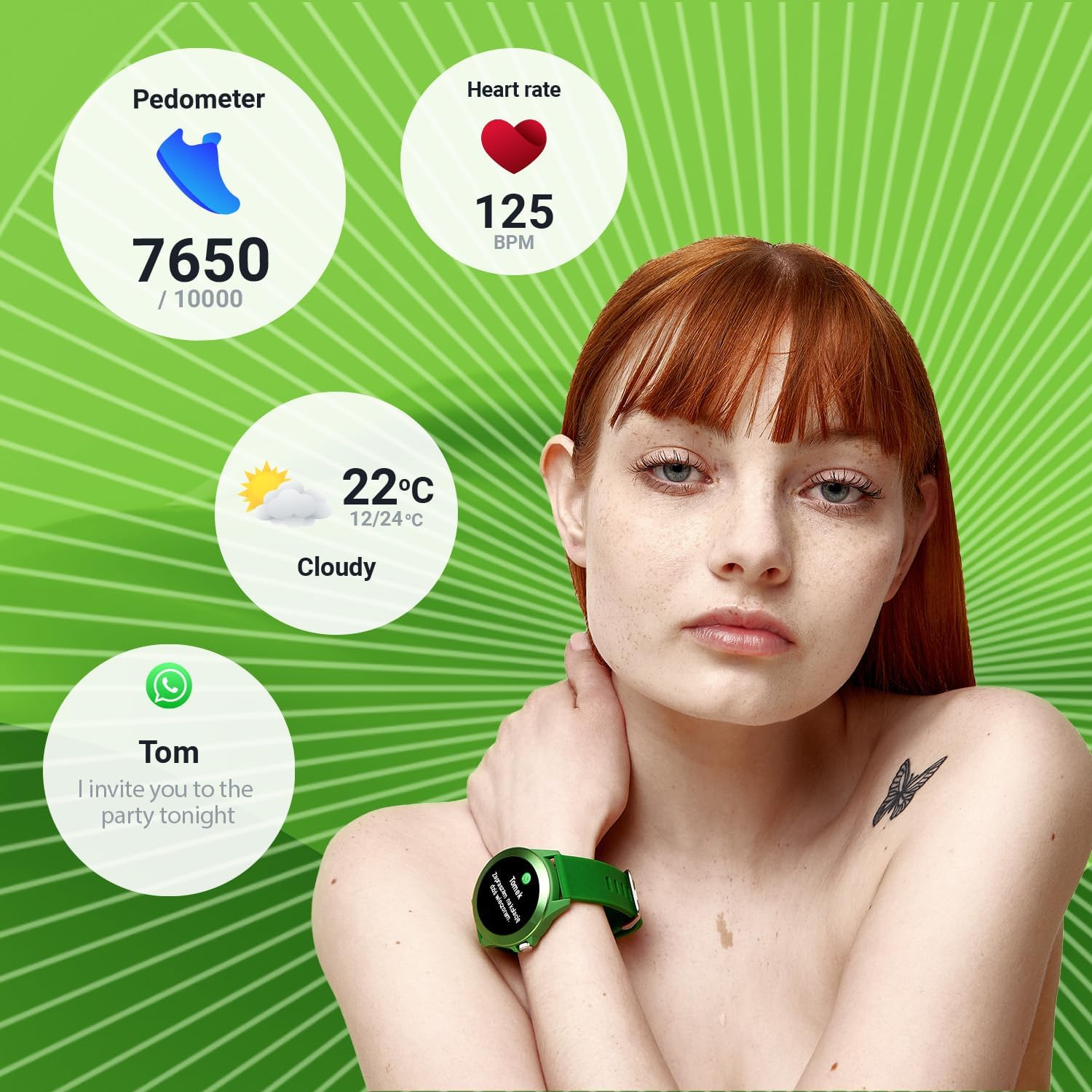
Image: A person wearing the smartwatch, with overlaid graphics showing pedometer steps, heart rate, current weather, and a message notification, illustrating the watch's tracking capabilities.

Image: Close-up of the smartwatch displaying a heart rate graph on its screen, with the green optical sensor on the back of the watch visible, indicating active heart rate measurement.
4.3 Modi Sportivi
The watch offers 14 different sport modes to track your workouts effectively. Select the appropriate mode before starting your activity for accurate data collection.
- Running
- Fitness
- Ċikliżmu
- Għawm
- Tixbit
- Marċ
- Taraġ
- Golf
- Yoga
- Mixi
- Jorbita
- Badminton
- Taħriġ
- Kayaking
- Treadmill
- Qbiż

Image: The smartwatch displaying a workout summary (duration, heart rate, calories burned) surrounded by icons representing various sport modes like running, cycling, swimming, and yoga.
4.4 Karatteristiċi Smart
- Notifiki: Irċievi notifiki ta' telefonati, messaġġi, u app direttament fuq il-polz tiegħek.
- Kontroll tal-Mużika: Ikkontrolla d-daqq tal-mużika fuq l-ismartphone tiegħek (daqq, pawża, aqbeż it-traċċi).
- Kamera mill-bogħod: Use your smartwatch as a remote shutter for your smartphone's camera.
5. Manutenzjoni
5.1 Tindif tal-Ismartwatch Tiegħek
Regularly clean your smartwatch to maintain its appearance and functionality. Use a soft, lint-free cloth. For stubborn dirt, slightly dampen the cloth with water. Avoid using harsh chemicals, abrasive materials, or strong detergents, as these can damage the watch's finish and seals.
5.2 Reżistenza għall-Ilma (IP68)
The Colorum CW-300 is IP68 rated, meaning it is resistant to dust and can withstand immersion in water up to 1.5 meters for up to 30 minutes. While suitable for swimming and daily splashes, avoid prolonged submersion, hot water, or steam, which can compromise the water resistance over time. Do not press buttons underwater.
5.3 Kura tal-Batterija
Biex ittawwal il-ħajja tal-batterija, evita li tiċċarġja l-arloġġ kompletament ta’ spiss. Iċċarġjah meta l-livell tal-batterija jkun baxx. Aħżen l-arloġġ f’post frisk u niexef meta ma tkunx qed tużah għal perjodi twal.
6 Issolvi l-problemi
6.1 L-arloġġ mhux qed jixgħel
- Kun żgur li l-arloġġ ikun iċċarġjat kompletament. Qabbad mal-ċarġer għal mill-inqas 30 minuti.
- Press and hold the side button for several seconds to attempt a forced restart.
6.2 Kwistjonijiet ta' Konnettività (Bluetooth)
- Kun żgur li l-Bluetooth huwa attivat fuq l-ismartphone u l-arloġġ tiegħek.
- Kun żgur li l-arloġġ jinsab fil-medda tal-Bluetooth tat-telefon tiegħek (tipikament 10 metri).
- Erġa' ibda kemm l-ismartphone tiegħek kif ukoll l-ismartwatch.
- If issues persist, try unpairing the device from your phone's Bluetooth settings and then re-pairing through the FOREVER app.
6.3 Inaccurate Readings (Heart Rate, Steps)
- Kun żgur li l-arloġġ jintlibes sew fuq il-polz tiegħek, la maħlul wisq u lanqas issikkat wisq.
- Naddaf is-sensor fuq wara tal-arloġġ.
- Ensure your personal information (height, weight) is accurately entered in the companion app.
6.4 Ħajja Qasira tal-Batterija
- Naqqas il-luminożità tal-iskrin.
- Limita n-numru ta' notifiki li tirċievi.
- Iddiżattiva l-monitoraġġ kontinwu tar-rata tal-qalb jekk mhux meħtieġ.
- Kun żgur li l-arloġġ ikun iċċarġjat kompletament kull darba.
7. Speċifikazzjonijiet
| Karatteristika | Dettall |
|---|---|
| Brand | GĦAL DEJJEM |
| Numru tal-Mudell | Colorum |
| Kulur | Aħdar |
| Daqs tal-Wiri | 1.20 inches (240 x 240 px resolution) |
| Sistema Operattiva | Wear OS (unknown version) |
| Konnettività | Bluetooth 5.0 |
| Apparati Kompatibbli | Smartphone (Android, iOS) |
| Karatteristiċi Speċjali | Text Messaging, Alarm Clock, Notifications, Menstrual Monitor |
| Tip ta 'batterija | Lithium-ion |
| Kapaċità tal-batterija | 200 mAh |
| Reżistenza għall-Ilma | IP68 |
| Ħażna Interna | 128 MB |
| GPS | Permezz ta’ smartphone |
| Forma | Round |
8. Garanzija u Appoġġ
For information regarding the product warranty, please refer to the warranty card included in your product packaging or visit the official FOREVER website. If you encounter any issues not covered in this manual or require further assistance, please contact FOREVER customer support through their official channels.
Note: Availability of spare parts information is not provided. Software updates are not guaranteed beyond initial release.
Ask a question about this manual
Ask about setup, troubleshooting, compatibility, parts, safety, or missing instructions. Manuals+ will review the question and use this page’s manual context to help answer it.