
Mibro XPAW015
Mibro Watch A2 User Manual
Mudell: XPAW015
1. Prodott Aktarview
The Mibro Watch A2 is a versatile smartwatch designed to enhance your daily life with advanced features and robust performance. It integrates a dual-core 2-in-1 Bluetooth chip for seamless connectivity, allowing for direct Bluetooth calls from your wrist. Featuring a vibrant 1.39-inch HD display, it offers clear visuals and intuitive navigation. The watch is equipped with an updated 4 PD heart rate monitor for comprehensive health tracking, including SpO2 measurement and sleep monitoring. With 70 dedicated sport modes and 2 ATM water resistance, it is suitable for various activities. The long-lasting battery provides up to 10 days of usage on a single charge.
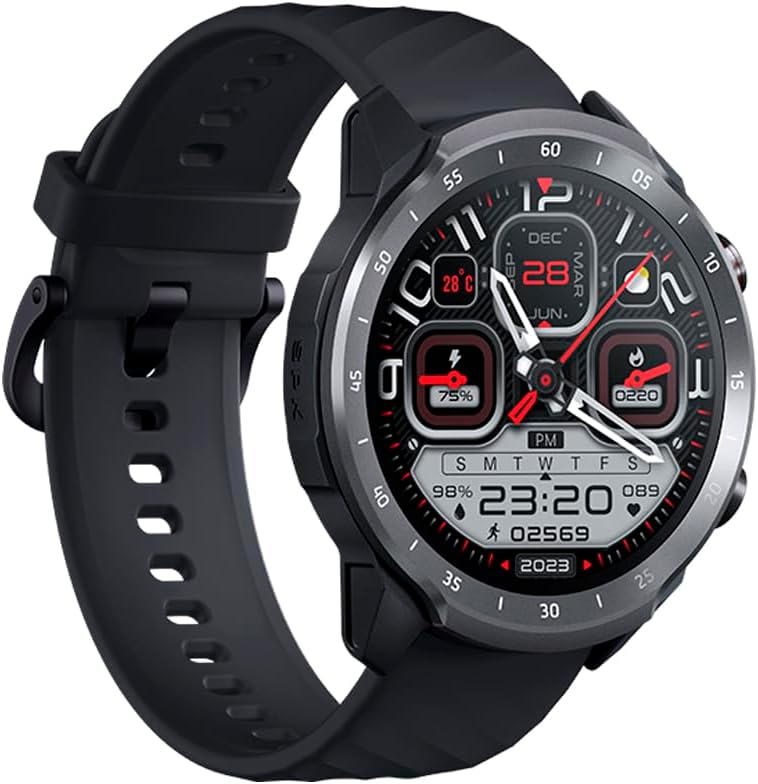
Figure 1.1: Mibro Watch A2, showcasing its design and strap.
2. Informazzjoni dwar is-Sigurtà
- Do not attempt to disassemble, repair, or modify the device. This may cause damage, fire, or electric shock.
- Keep the device away from extreme temperatures (hot or cold), direct sunlight, and moisture.
- Evita li tesponi l-apparat għal impatti jew vibrazzjonijiet qawwija.
- Use only the provided charging cable and adapter. Using unauthorized accessories may damage the device or pose safety risks.
- Consult a medical professional before starting any new exercise regimen or if you have pre-existing health conditions, especially if relying on the watch for health monitoring.
- The device is 2 ATM water-resistant, suitable for splashes and brief immersion. Do not use it for diving, hot showers, or high-speed water sports.
3. Kontenut tal-Pakkett
Jekk jogħġbok iċċekkja l-kontenut tal-pakkett meta tiftaħ il-kaxxa:
- Mibro Watch A2 Smartwatch
- Kejbil tal-Iċċarġjar Manjetiku
- Manwal għall-Utent
4. It-Tqassim u l-Komponenti tal-Prodott
Familiarize yourself with the main components of your Mibro Watch A2:

Figura 4.1: Quddiem view of the Mibro Watch A2 display and physical buttons.
- Wiri: 1.39-inch HD touchscreen for interaction and information display.
- Buttuni tal-ġenb: Typically used for power on/off, screen wake-up, and navigating menus.
- Sensor tar-rata tal-qalb: Located on the back of the watch, used for heart rate and SpO2 monitoring.
- Kuntatti tal-Iċċarġjar: Magnetic contacts on the back for connecting the charging cable.
- Ċinga: Adjustable and replaceable strap for comfortable wear.
5. Gwida ta' Setup
5.1. Iċċarġjar tal-Apparat
Before first use, fully charge your Mibro Watch A2.
- Connect the magnetic charging cable to the charging contacts on the back of the watch. Ensure the cable is securely attached.
- Ipplaggja t-tarf tal-USB tal-kejbil tal-iċċarġjar ma' adapter tal-enerġija USB standard (5V/1A rakkomandat) jew fil-port USB tal-kompjuter.
- The watch display will show the charging progress. A full charge typically takes approximately 2 hours.
5.2. Installazzjoni u Tqabbil tal-App
To unlock the full potential of your Mibro Watch A2, download and install the official Mibro Fit application on your smartphone.
- Niżżel l-App: Fittex għal "Mibro Fit" in the Apple App Store (for iOS) or Google Play Store (for Android) and install it.
- Irreġistra/Idħol: Open the Mibro Fit app and follow the on-screen instructions to register a new account or log in if you already have one.
- Ippermetti Bluetooth: Kun żgur li l-Bluetooth huwa attivat fuq l-ismartphone tiegħek.
- Pajjar l-Apparat: In the Mibro Fit app, navigate to the "Device" or "Add Device" section. Select "Mibro Watch A2" from the list of available devices.
- Ikkonferma l-Imqabbad: A pairing request will appear on both your watch and smartphone. Confirm the pairing on both devices.
- Imla Setup: Follow any remaining prompts in the app to complete the initial setup, including personal information and notification permissions.
6. Istruzzjonijiet Operattivi
6.1. Navigazzjoni Bażika
- Ixgħel l-Iskrin: Press the side button or raise your wrist.
- Swipe 'l fuq/'l isfel: Skrollja fil-menus u n-notifiki.
- Swipe Xellug/Lemin: Access quick functions or different data screens (e.g., heart rate, weather).
- Tektek: Agħżel oġġett jew ikkonferma azzjoni.
- Agħfas il-Buttuna tal-Ġenb: Return to the watch face or access the app list.
6.2. Sejħiet bil-Bluetooth
The Mibro Watch A2 supports Bluetooth calling directly from your wrist.

Figure 6.1: Using the Mibro Watch A2 for Bluetooth calls.
- Ensure your watch is successfully paired with your smartphone via Bluetooth.
- Tagħmel Sejħiet: Access the dial pad or contact list on your watch to initiate a call.
- Jirċievu Sejħiet: Meta tidħol telefonata, tista' twieġebha jew tirrifjutaha direttament mill-iskrin tal-arloġġ.
6.3. Monitoraġġ tas-Saħħa
The watch provides continuous health monitoring features.
- Rata tal-qalb: Swipe to the heart rate interface or select the heart rate app to view your current heart rate. The watch supports 24/7 heart rate monitoring.
- SpO2 (Ossiġenu tad-Demm): Access the SpO2 measurement function to check your blood oxygen saturation. Ensure the watch is snug on your wrist for accurate readings.
- Monitoraġġ tal-irqad: Wear the watch to bed, and it will automatically track your sleep patterns, including deep sleep, light sleep, and awake times. View detailed sleep data in the Mibro Fit app.

Figure 6.2: Blood oxygen measurement in progress on the Mibro Watch A2.
6.4. Modi Sportivi
The Mibro Watch A2 offers 70 sport modes to track your workouts.
- From the watch face, navigate to the "Workout" or "Sport" app.
- Select your desired sport mode (e.g., Running, Cycling, Walking).
- Tap to start the activity. The watch will begin recording data such as duration, calories burned, and heart rate.
- To pause or end an activity, swipe or press the side button as prompted on the screen.

Figure 6.3: Mibro Watch A2 tracking an outdoor activity.
6.5. Notifiki u Karatteristiċi Oħra
- Notifiki Intelliġenti: Receive call, message, and app notifications directly on your watch. Configure notification settings in the Mibro Fit app.
- Uċuħ tal-Għassa: Customize your watch face from a variety of options available in the Mibro Fit app or directly on the watch.
- Kontroll tal-Mużika: Ikkontrolla d-daqq tal-mużika fuq l-ismartphone tiegħek mill-arloġġ tiegħek.
- Temp: View aġġornamenti tat-temp f'ħin reali.
- Allarmi u Tajmers: Set alarms and use timer/stopwatch functions.
7. Manutenzjoni
- Tindif: Imsaħ l-arloġġ u ċ-ċinga regolarment b'ċarruta ratba uamp drapp. Evita li tuża kimiċi ħarxa jew materjali li joborxu.
- Reżistenza għall-Ilma: The Mibro Watch A2 is 2 ATM water-resistant. This means it can withstand splashes, rain, and brief immersion in shallow water. It is not suitable for swimming, diving, hot showers, or saunas. Always dry the watch thoroughly after exposure to water.
- Kura tal-batterija: To prolong battery life, avoid fully discharging the battery frequently. Charge the watch when the battery level is low. Store the watch in a cool, dry place if not used for extended periods.
- Aġġornamenti tas-Software: Regularly check for and install software updates via the Mibro Fit app to ensure optimal performance and access to new features.
8 Issolvi l-problemi
| Problema | Kawża / Soluzzjoni Possibbli |
|---|---|
| L-arloġġ ma jixgħelx. | Battery might be depleted. Connect the watch to the charger and allow it to charge for at least 10 minutes before attempting to turn it on. |
| Ma tistax tqabbad mal-ismartphone. |
|
| Qari mhux preċiż tar-rata tal-qalb/SpO2. |
|
| In-notifiki mhux qed jidhru. |
|
9. Speċifikazzjonijiet
| Karatteristika | Deskrizzjoni |
|---|---|
| Isem tal-Mudell | Mibro Watch A2 |
| Numru tal-Mudell | XPAW015 |
| Brand | Mibro |
| Daqs tal-Wiri | 1.39 Pulzier |
| Konnettività | Bluetooth |
| Karatteristiċi Speċjali | Software available in 26 languages, Bluetooth Calling, Heart Rate Monitoring, SpO2 Measurement, Sleep Tracking, 70 Sport Modes |
| Apparati Kompatibbli | Bluetooth-enabled smartphones, tablets, PCs, laptops |
| Kompożizzjoni tal-batterija | Lithium-ion |
| Ħajja tal-batterija | Sa 10-il jum (użu tipiku) |
| Reżistenza għall-Ilma | 2 ATM |
| GPS | GPS permezz ta' smartphone |
| Kapaċità tal-Ħżin tal-Memorja | 1 GB |
10. Garanzija u Appoġġ
Mibro products typically come with a limited warranty. Please refer to the warranty card included in your product packaging or visit the official Mibro websit għal termini u kundizzjonijiet dettaljati tal-garanzija speċifiċi għar-reġjun tiegħek.
For technical support, troubleshooting assistance, or service inquiries, please contact Mibro customer support through their official website or the contact information provided in the Mibro Fit application.
Official Mibro Store: Visit Mibro Store on Amazon
Ask a question about this manual
Ask about setup, troubleshooting, compatibility, parts, safety, or missing instructions. Manuals+ will review the question and use this page’s manual context to help answer it.