
1. Setup
This section guides you through the initial setup of your Natec ATX NPC-2038 Semi-Tower PC Case, from unpacking to component installation.
1.1 Disimballaġġ
- Carefully open the packaging and remove the PC case.
- Spezzjona l-kaxxa għal xi sinjali ta’ ħsara waqt it-trasport. Jekk issib ħsara, ikkuntattja lill-bejjiegħ tiegħek immedjatament.
- Remove all internal packaging materials and accessories. Keep the packaging for future transport or warranty claims.
1.2 Identifikazzjoni tal-Komponent
Familiarize yourself with the key components and features of your PC case.
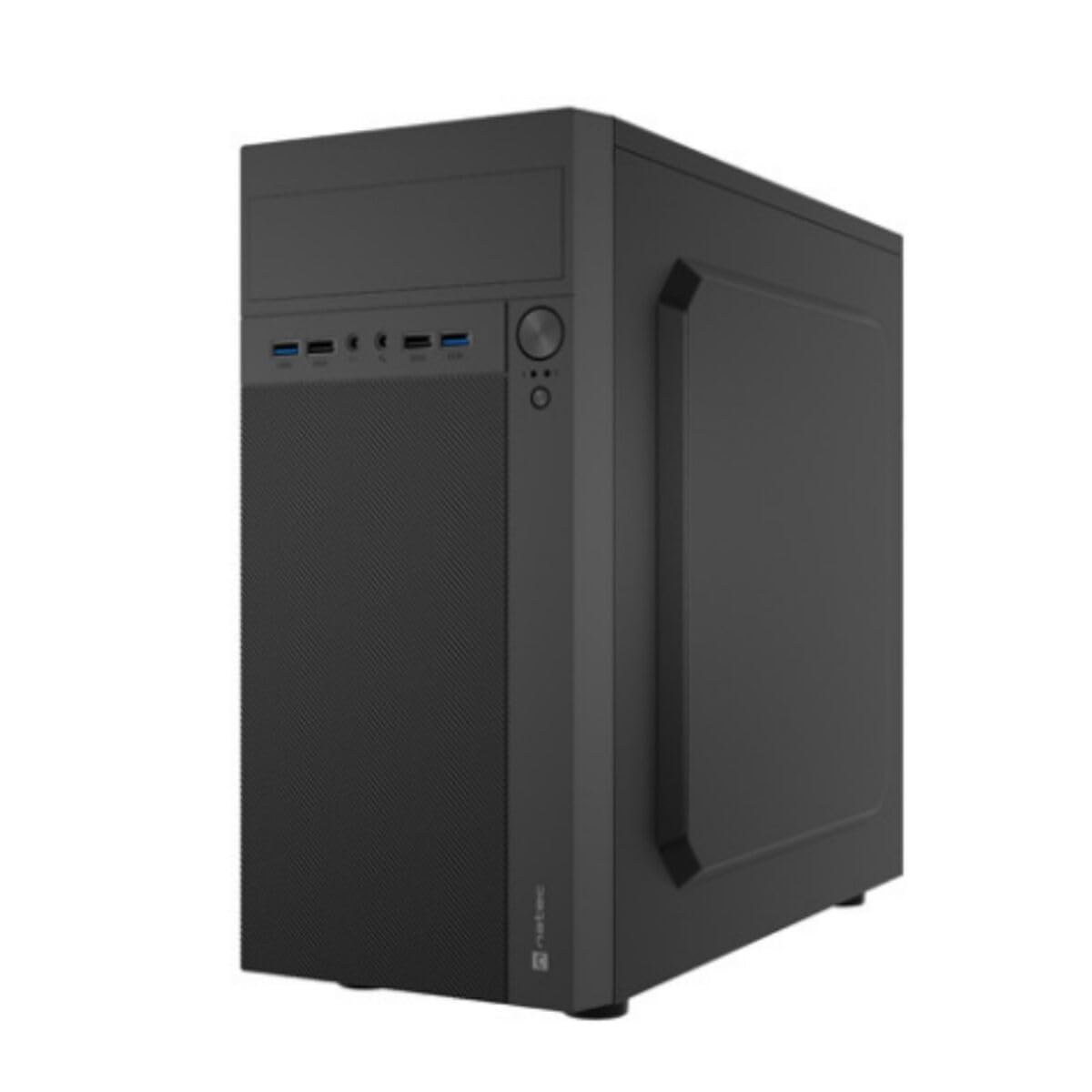
Stampa 1: Quddiem u ġenb view of the Natec ATX NPC-2038 Semi-Tower PC Case, highlighting its compact dimensions. The front panel features USB ports, audio jacks, and power/reset buttons. The case measures approximately 3.9 inches in depth, width, and height, indicating a compact design suitable for various setups.
- Panel ta' quddiem: Includes power button, reset button, USB 2.0 ports, USB 3.0 port, and audio input/output jacks.
- Pannelli tal-ġenb: Removable panels for easy access to internal components.
- Panel ta 'wara: Features expansion slots and an opening for the motherboard I/O shield.
- Bajja Interni: Provides space for 3.5-inch hard drives and other storage devices.
1.3 Installazzjoni
- Ipprepara l-Każ: Lay the case on its side and remove the side panel(s) by unscrewing the thumb screws at the rear.
- Installa Motherboard: Secure the Mini ATX motherboard onto the standoffs provided. Ensure all screws are tightened appropriately.
- Installa Provvista tal-Enerġija: Mount the power supply unit (PSU) in the designated front mount area. Connect the necessary power cables to the motherboard and other components.
- Installa Drives tal-Ħażna: Install 3.5-inch hard drives into the internal bays. Secure them with screws.
- Installa l-Kards tal-Espansjoni: Remove the necessary expansion slot covers and install any graphics cards or other expansion cards.
- Qabbad il-Kejbils tal-Panel ta' Quddiem: Connect the front panel USB, audio, power, and reset cables to the corresponding headers on your motherboard. Refer to your motherboard manual for specific pin layouts.
- Ġestjoni tal-Kejbil: Route cables neatly to ensure optimal airflow and a clean build.
- Agħlaq il-Każ: Reattach the side panel(s) and secure them with the thumb screws.
2. Istruzzjonijiet Operattivi
This section details how to power on your system and utilize the front panel connections.
2.1 Tixgħel
- Ensure all external peripherals (monitor, keyboard, mouse) are connected.
- Connect the power cable from your power supply unit to a wall outlet.
- Press the power button located on the front panel of the case. The system should initiate startup.
2.2 Konnessjonijiet ta' Front Panel
The front panel provides convenient access to various ports for your peripherals.
- Portijiet USB 2.0 (x2): For connecting standard USB devices such as keyboards, mice, and printers.
- Port tal-USB 3.0 (x1): For connecting high-speed USB devices like external hard drives or flash drives, offering faster data transfer rates.
- Audio Input (Microphone): Connect your microphone for voice communication.
- Audio Output (Headphones): Connect your headphones or speakers for audio playback.
3. Manutenzjoni
Manutenzjoni regolari tgħin biex tiżgura l-lonġevità u l-prestazzjoni ottimali tal-komponenti tal-PC tiegħek.
3.1 Tindif
- Barra: Uża artab, damp drapp biex timsaħ l-uċuħ ta’ barra tal-kaxxa. Evita prodotti tat-tindif li joborxu.
- Intern: Iftaħ il-kaxxa perjodikament u uża arja kkompressata biex tneħħi t-trab li jinġabar mill-fannijiet, is-sinkijiet tas-sħana, u komponenti oħra. Kun żgur li s-sistema tkun mitfija u skonnettjata qabel ma tnaddaf l-intern.
- Filtri tat-Trab: If your case includes dust filters, remove and clean them regularly to maintain good airflow.
3.2 Ġestjoni tal-Fluss tal-Arja
Proper airflow is crucial for cooling your components. Ensure that the case fans are clean and unobstructed. Consider the direction of airflow (intake vs. exhaust) to optimize cooling efficiency.
4 Issolvi l-problemi
This section addresses common issues you might encounter with your PC case and offers potential solutions.
| Problema | Kawża Possibbli | Soluzzjoni |
|---|---|---|
| Is-sistema ma tixgħel. | Kejbil tal-enerġija skonnettjat, swiċċ tal-PSU mitfi, buttuna tal-enerġija tal-pannell ta' quddiem mhux imqabbda sew. | Check power cable connection, ensure PSU switch is on, verify front panel power cable connection to motherboard. |
| USB ports not functioning. | Front panel USB cables not connected to motherboard. | Ensure USB 2.0 and USB 3.0 headers are correctly connected to the motherboard. |
| Il-ġakkijiet tal-awdjo mhux qed jaħdmu. | Il-kejbil tal-awdjo tal-pannell ta' quddiem mhux imqabbad mal-motherboard. | Verify the HD Audio cable is securely connected to the motherboard's audio header. |
| Komponenti li jisħnu żżejjed. | Poor airflow, dust buildup. | Clean dust filters and internal components. Ensure fans are properly oriented for optimal airflow. |
5. Speċifikazzjonijiet
Detailed technical specifications for the Natec ATX NPC-2038 Semi-Tower PC Case.
| Karatteristika | Valur |
|---|---|
| Brand | Natec |
| Isem tal-Mudell | HELIX (NPC-2038) |
| Tip ta' Każ | Torri tan-Nofs |
| Kompatibbiltà tal-motherboard | Mini ATX |
| Kulur | multicoloured (Black) |
| Materjal | Legierter Stahl (Alloy Steel) |
| Tip ta' Immuntar tal-Provvista tal-Enerġija | Muntatura ta ’Quddiem |
| Metodu tat-tkessiħ | Arja |
| Daqs tal-fann | 120 Millimetru |
| Numru ta 'Fannijiet | 1 (pre-installed, if applicable) |
| Total Expansion Slots Quantity | 4 |
| Total USB 2.0 Ports | 2 |
| Total USB 3.0 Ports | 1 |
| Internal Bays Quantity | 3 (for 3.5 Inches Hard Disk Form Factor) |
| Piż tal-oġġett | 1 Kilogrammi |
| Dimensjonijiet tal-oġġett (D x W x H) | 3.94"D x 3.94"W x 3.94"H (Approximate, based on provided data) |
| Użi Rakkomandati Għall-Prodott | General-Purpose Computing |
6. Informazzjoni dwar Garanzija
Natec products are manufactured to high-quality standards. This product is covered by a manufacturer's warranty against defects in materials and workmanship. The specific duration and terms of the warranty may vary by region and retailer. Please retain your proof of purchase for warranty claims. For detailed warranty information, refer to the documentation provided with your purchase or visit the official Natec websit.
7. Appoġġ
If you encounter any issues not covered in this manual or require further assistance, please contact Natec customer support or your retailer. You can typically find contact information on the official Natec webis-sit jew fuq l-imballaġġ tal-prodott tiegħek.
- Appoġġ onlajn: Visit the official Natec websit għal FAQs, sewwieqa, u riżorsi ta' appoġġ.
- Contact Retailer: For purchase-related issues or initial troubleshooting, your retailer may be able to provide immediate assistance.