
Xnbada RC03RFB-YKQ
Manwal tal-Utent tal-Kontroll mill-Bogħod Intelliġenti bla Fili Xnbada RC03RFB 2.4G RF 4 Żoni
Mudell: RC03RFB-YKQ | Marka: Xnbada
Introduzzjoni
L-Xnbada RC03RFB huwa kontroll remot mingħajr fili 2.4G RF b'4 żoni ddisinjat għal strixxi LED RGB, RGBW, u RGBCCT. Joffri kontroll komprensiv fuq il-kulur, il-luminożità, u l-modi dinamiċi għal diversi żoni ta' dawl. Dan il-manwal jipprovdi struzzjonijiet dettaljati għas-setup, it-tħaddim, u l-manutenzjoni tal-kontroll remot tiegħek.
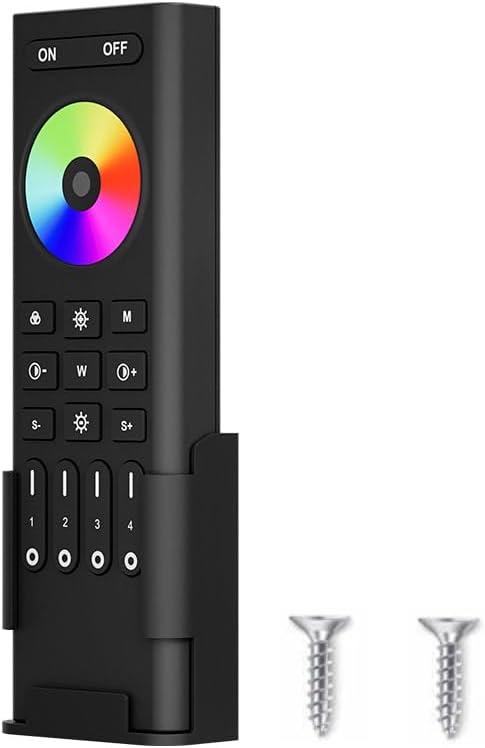
Immaġni: Xnbada RC03RFB Smart Remote Control, li juri r-remote, id-detentur tiegħu mwaħħal mal-ħajt, u żewġ viti żgħar għall-installazzjoni.
Speċifikazzjonijiet
| Karatteristika | Deskrizzjoni |
|---|---|
| Brand | Xnbada |
| Numru tal-Mudell | RC03RFB-YKQ |
| Tip ta' Kontroll | Wireless 2.4G RF |
| Tipi ta' LED Appoġġjati | RGB, RGBW, RGBCCT |
| Żoni ta' Kontroll | 4 Żoni |
| Distanza ta' Kontroll | Sa 30 metri (98 pied) |
| Sors tal-Enerġija | 2 x Batteriji AAA (mhux inklużi) |
| Dimensjonijiet | 5.91 x 2.17 x 0.98 pulzieri (140.1mm x 45.8mm x 17mm) |
| Materjal | Plastik |
| Karatteristiċi Speċjali | Konsum baxx ta' enerġija, 16-il miljun kulur, rata ta' komunikazzjoni mgħaġġla, swipe tal-iskrin tat-touch għall-kulur, 7 kuluri puri b'ċavetta waħda. |
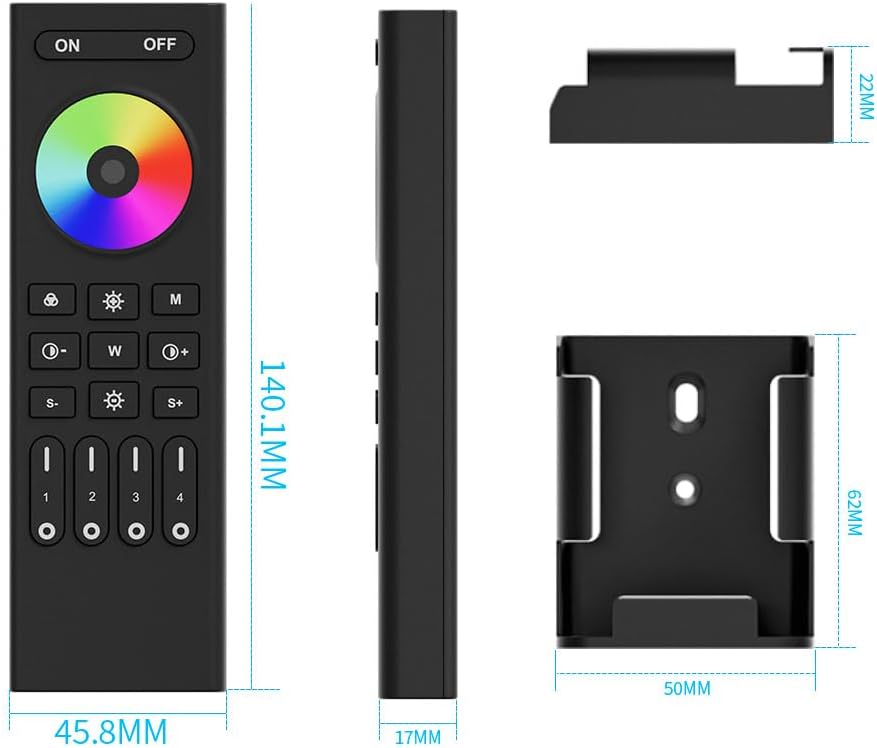
Immaġni: Dimensjonijiet dettaljati tal-kontroll remot RC03RFB u l-immuntar mal-ħajt li jakkumpanjah.
Prodott Overview
Il-kontroll remot RC03RFB għandu tqassim faċli għall-utent b'ċirku touch bil-kulur u buttuni ddedikati għal diversi funzjonijiet. Il-fehim tal-iskop ta' kull buttuna huwa essenzjali għal kontroll effettiv.

Immaġni: Dijagramma dettaljata li turi l-funzjoni ta' kull buttuna fuq il-kontroll remot RC03RFB.
- Buttuni ON/OFF: Agħfas biex tixgħel jew titfi l-apparati kollha konnessi.
- Ċirku tal-Kulur: Tmiss is-slajder biex tagħżel minn 16-il miljun kulur.
- Buttuna tal-Bdil ta' 7 Kuluri: Agħfas qasir biex taqleb bejn kuluri puri (oranġjo, isfar, aħdar, ċjan, blu, vjola, aħmar). Agħfas fit-tul għal bidliet gradwali tal-kulur.
- Buttuni tal-Aġġustament tal-Luminożità (S-/S+): Agħfas biex tnaqqas jew iddawwal id-dwal.
- Buttuna tal-Modi Dinamiċi (M): Agħfas ripetutament biex taqleb bejn diversi modi ta' dawl dinamiku.
- Buttuni tat-Temperatura/Saturazzjoni tal-Kulur (W, ikona tax-Xemx):
- Fil-modalità tad-dawl abjad: Agħfas 'W' biex tibdel id-dawl abjad għal abjad kiesaħ, 'Ikona tax-xemx' għal abjad sħun.
- Taħt il-modalità tad-dawl bil-kulur: Agħfas 'W' biex tnaqqas is-saturazzjoni, 'Ikona tax-Xemx' biex iżżid is-saturazzjoni.
- Buttuna tad-Dawl abjad: Agħfas biex tikseb dawl abjad pur.
- Buttuni tal-Luminożità Predefiniti (30%, 60%, 100%): Issettja l-livelli ta' luminożità malajr.
- Buttuni tal-Veloċità tal-Modalità Dinamika (S-/S+): Aġġusta l-veloċità tal-modi dinamiċi.
- Buttuni tal-Modalità ON/OFF/Dawl bil-Lejl taż-Żona (1-4): Ikkontrolla ż-żoni individwali. Agħfas qasir biex tixgħel/titfi ż-żona. Agħfas fit-tul għall-modalità tad-dawl bil-lejl.
Setup
1. Installazzjoni tal-batterija
Il-kontroll remot RC03RFB jeħtieġ żewġ batteriji AAA (mhux inklużi). Kun żgur li l-polarità tkun korretta meta ddaħħal il-batteriji.
2. Installazzjoni tal-Immonta tal-Ħajt
Ir-remote jiġi b'detentur immuntat mal-ħajt għal ħażna u aċċess konvenjenti. Uża l-viti pprovduti biex twaħħal id-detentur ma' wiċċ mixtieq.

Immaġni: Il-kontroll remot RC03RFB muri bil-muntatura tiegħu mal-ħajt u view ta’ warajh, li jindika l-kompartiment tal-batterija.
3. Istruzzjonijiet għall-Konnessjoni u t-Tneħħija tal-Konnessjoni
Il-kontroll remot jopera bl-użu tat-teknoloġija 2.4G RF u jeħtieġ li jkun konness ma' kontrolluri LED kompatibbli. Id-dawl jista' jibda jaħdem biss wara li jkun konness mar-remote.
Istruzzjonijiet tal-Kodiċi tal-Konnessjoni:
- Itfi l-enerġija lid-dawl/kontrollur LED. Stenna għal mill-inqas 10 sekondi.
- Ixgħel il-qawwa tad-dawl/kontrollur LED.
- Fi żmien 3 sekondi minn meta tixgħel id-dawl, agħfas qasir il-buttuna '1' (jew il-buttuna taż-żona mixtieqa 1-4) fuq il-kontroll remot 3 darbiet.
- Id-dawl LED għandu jteptep 3 darbiet bil-mod, u dan jindika li l-konnessjoni rnexxiet.
Nota: Jekk il-konnessjoni ma taħdimx (id-dawl ma jteptepx bil-mod), jekk jogħġbok irrepeti l-passi. Dawl li diġà ġie konness ma jistax jerġa' jiġi konness mal-istess remot/żona mingħajr ma l-ewwel jiġi skonnettjat.
Istruzzjonijiet tal-Kodiċi tat-Tħollija:
- Itfi l-enerġija lid-dawl/kontrollur LED. Stenna għal mill-inqas 10 sekondi.
- Ixgħel il-qawwa tad-dawl/kontrollur LED.
- Fi żmien 3 sekondi minn meta tixgħel id-dawl, agħfas qasir il-buttuna '1' (jew il-buttuna taż-żona mixtieqa 1-4) fuq il-kontroll remot 5 darbiet.
- Id-dawl LED għandu jteptep 10 darbiet malajr, u dan jindika li t-tneħħija tal-konnessjoni rnexxiet.
Nota: Jekk it-tneħħija tal-konnessjoni ma taħdimx (id-dawl ma jteptepx malajr), jekk jogħġbok irrepeti l-passi. Id-dwal li ma ġewx konnessi m'għandhomx għalfejn jiġu skonnessi.

Immaġni: Gwida viżwali għall-konnessjoni u t-tneħħija tal-konnessjoni tal-kontroll remot ma' strixxi tad-dawl LED.
Istruzzjonijiet Operattivi
Kontroll Bażiku
- Qawwa ON/OFF: Agħfas il- ON buttuna biex tixgħel l-apparati kollha konnessi. Agħfas il-buttuna OFF buttuna biex titfi l-apparati kollha konnessi.
- Għażla tal-Kulur: Uża l- Ċirku tal-kulur billi tmiss u tiżżerżaq subgħajk biex tagħżel minn 16-il miljun kulur.
- Aġġustament tal-luminożità: Uża l- S- u S+ buttuni biex tnaqqas jew iżżid il-luminożità. Tista' tuża wkoll il-buttuni ssettjati minn qabel ta' 30%, 60%, u 100%.
- Dawl abjad: Agħfas il-buttuna ddedikata għad-dawl abjad biex taqleb għal illuminazzjoni bajda pura.

Immaġni: Il-kontroll remot juri l-karatteristika ta' kontroll tas-slajd tal-pannell li jinbidel b'16-il miljun kulur.

Immaġni: Il-kontroll remot li juri l-kapaċitajiet tiegħu ta' aġġustament tat-temperatura tal-kulur u s-saturazzjoni.

Immaġni: Il-kontroll remot juri l-aġġustament tal-luminożità, inkluż modalità ta' dawl bil-lejl.
Kontroll Avvanzat
- Modi dinamiċi: Agħfas il- M buttuna biex tiċċikla bejn diversi effetti tad-dawl dinamiċi pprogrammati minn qabel. Aġġusta l-veloċità ta' dawn il-modi billi tuża l-buttuna S- u S+ buttuni.
- Kontroll tal-Grupp ta' 4 Żoni: Ir-remote jippermettilek tikkontrolla sa erba' żoni tad-dawl indipendenti. Uża l-buttuni apposta mmarkati 1, 2, 3, 4 biex tagħżel u tikkontrolla kull żona individwalment. Kull żona tista' tikkontrolla għadd kbir ta' kontrolluri tal-istrixxi LED.

Immaġni: Rappreżentazzjoni viżwali ta' kif il-kontroll remot jista' jimmaniġġja erba' żoni ta' dawl separati.

Immaġni: Illustrazzjoni tal-karatteristika ta' trasmissjoni awtomatika simultanja, fejn is-sinjal remot jista' jiġi trasmess bejn kontrolluri fi żmien 30 metru.
Kontrolluri Kompatibbli
Il-kontroll remot RC03RFB huwa ddisinjat biex jaħdem ma' kontrolluri LED speċifiċi ta' Xnbada. Mudelli kompatibbli jinkludu: C03W, C03Z, C04Z, C04W, C05W, C05Z, WB5, LM052, LM053, LM051. Kun żgur li l-kontrollur tiegħek huwa kompatibbli għal funzjonalità xierqa.
Immaġni: Għażla ta' kontrolluri LED kompatibbli (C01W, C02W, C03W, C04W, C05W, WB5, FUT037, C01Z, C02Z, C03Z, C04Z, C05Z, LM051, LM053) li jistgħu jintużaw mar-remote RC03RFB.
Manutenzjoni
- Tindif: Uża drapp artab u niexef biex tnaddaf il-kontroll remot. Tużax prodotti tat-tindif jew solventi li joborxu.
- Sostituzzjoni tal-batterija: Ibdel il-batteriji meta r-remote ma jirrispondix sew jew jieqaf jaħdem. Kun żgur li tuża żewġ batteriji AAA ġodda.
- Ħażna: Aħżen il-kontroll remot f'post frisk u niexef 'il bogħod mix-xemx diretta u minn temperaturi estremi.
Issolvi l-problemi
| Problema | Kawża Possibbli | Soluzzjoni |
|---|---|---|
| Remote ma jirrispondix | Batteriji baxxi jew mejta; Mhux konness mal-kontrollur; Barra mill-firxa. | Ibdel il-batteriji; Wettaq il-proċedura ta' kollegament (ara s-Setup); Ersaq eqreb lejn il-kontrollur (fi żmien 30m). |
| Id-dwal ma jibdlux il-kulur/il-luminożità | Modalità magħżula ħażina; Inkompatibilità tal-kontrollur; Kwistjoni ta' kollegament. | Kun żgur li qiegħed fil-modalità korretta tal-kulur/luminożità; Ivverifika l-kompatibbiltà tal-mudell tal-kontrollur; Erġa' qabbad ir-remote. |
| Il-proċedura ta' kollegament tfalli | Ħin mhux korrett; Diġà konness; Interruzzjoni tal-enerġija waqt il-konnessjoni. | Kun żgur li l-ħin huwa preċiż (fi żmien 3 sekondi minn meta tixgħel il-qawwa); Skonnettja l-ewwel jekk diġà tkun konnessa; Kun żgur li l-provvista tal-enerġija hija stabbli waqt il-konnessjoni. |
| Rispons inkonsistenti tal-buttuna | Interferenza; Batterija baxxa. | Naqqas is-sorsi potenzjali ta' interferenza (apparati oħra 2.4G); Ibdel il-batteriji. |
Video tal-Prodott
Vidjo: Dimostrazzjoni uffiċjali tal-Xnbada RGB RGBW RGBCCT Wireless Smart Remote fl-azzjoni, wirjaasinid-diversi karatteristiċi ta' kontroll tad-dawl u r-rispons tagħha.
Garanzija u Appoġġ
Għal informazzjoni dwar il-garanzija jew appoġġ tekniku rigward il-kontroll remot Xnbada RC03RFB tiegħek, jekk jogħġbok ikkuntattja lis-servizz tal-konsumatur ta' Xnbada direttament. Irreferi għall-imballaġġ tal-prodott jew għall-manwal uffiċjali ta' Xnbada. websit għad-dettalji tal-kuntatt.
Xnbada għandha l-għan li tipprovdi dawl innovattiv għad-djar u soluzzjonijiet intelliġenti għad-djar. Għal aktar assistenza, żur il-Ħanut uffiċjali ta' Xnbada fuq Amazon: Ħanut Xnbada.
Ask a question about this manual
Ask about setup, troubleshooting, compatibility, parts, safety, or missing instructions. Manuals+ will review the question and use this page’s manual context to help answer it.