1. Introduzzjoni
Grazzi tax-xiriasing the Generic BK-3001 Wireless Bluetooth Keyboard. This ultrathin 78-key keyboard is designed for seamless connectivity with various devices, including iPads, iPhones, and other compatible computers and tablets. It utilizes Bluetooth 3.0 technology for a stable and long-distance connection. Please read this manual carefully to ensure proper setup and operation of your new keyboard.
2. Kontenut tal-Pakkett
- 1 x Generic BK-3001 Wireless Bluetooth Keyboard
- 1 x Manwal għall-Utent
3. Prodott Aktarview
The BK-3001 keyboard features a compact design with 78 keys, including function keys and media controls. Its ultrathin profile makes it highly portable and suitable for various environments.

Immaġni: Minn fuq għal isfel view of the BK-3001 Wireless Bluetooth Keyboard, showcasing its 78-key layout and compact design.
4. Setup
4.1 Installazzjoni tal-batterija
- Sib il-kompartiment tal-batterija fuq in-naħa ta’ taħt tat-tastiera.
- Iftaħ il-kompartiment tal-batterija.
- Insert two (2) AAA batteries (not included) into the compartment, ensuring correct polarity (+/-).
- Agħlaq l-għatu tal-kompartiment tal-batterija sew.

Immaġni: Close-up view of the battery compartment on the underside of the BK-3001 Wireless Bluetooth Keyboard, showing where to insert AAA batteries.
4.2 Tqabbil ma' Apparati
- Turn on the keyboard by sliding the ON/OFF switch to the 'ON' position. The power indicator light may briefly illuminate.
- Press the 'CONNECT' button located near the ON/OFF switch. The Bluetooth indicator light will start blinking, indicating the keyboard is in pairing mode.
- On your device (iPad, iPhone, computer, tablet), go to the Bluetooth settings.
- Kun żgur li l-Bluetooth huwa attivat fuq it-tagħmir tiegħek.
- Fittex għal available Bluetooth devices. You should see "Bluetooth Keyboard" or a similar name appear in the list.
- Select the keyboard from the list to initiate the pairing process.
- If prompted, enter the displayed pairing code on the keyboard and press Enter.
- Once successfully paired, the Bluetooth indicator light on the keyboard will stop blinking and turn off, or remain solid, depending on the model. Your keyboard is now ready for use.

Immaġni: Close-up view of the power switch (OFF/ON) and the Bluetooth connect button on the back of the BK-3001 Wireless Bluetooth Keyboard.
5. Istruzzjonijiet Operattivi
After successful pairing, your keyboard will function as a standard input device. You can use it for typing, navigating, and executing commands on your connected device.
5.1 Ċwievet tal-Funzjoni
The keyboard includes a row of function keys (F1-F12) that may have secondary functions (e.g., media controls, volume, brightness) when pressed in combination with the 'Fn' key. Refer to your device's operating system for specific key mappings.
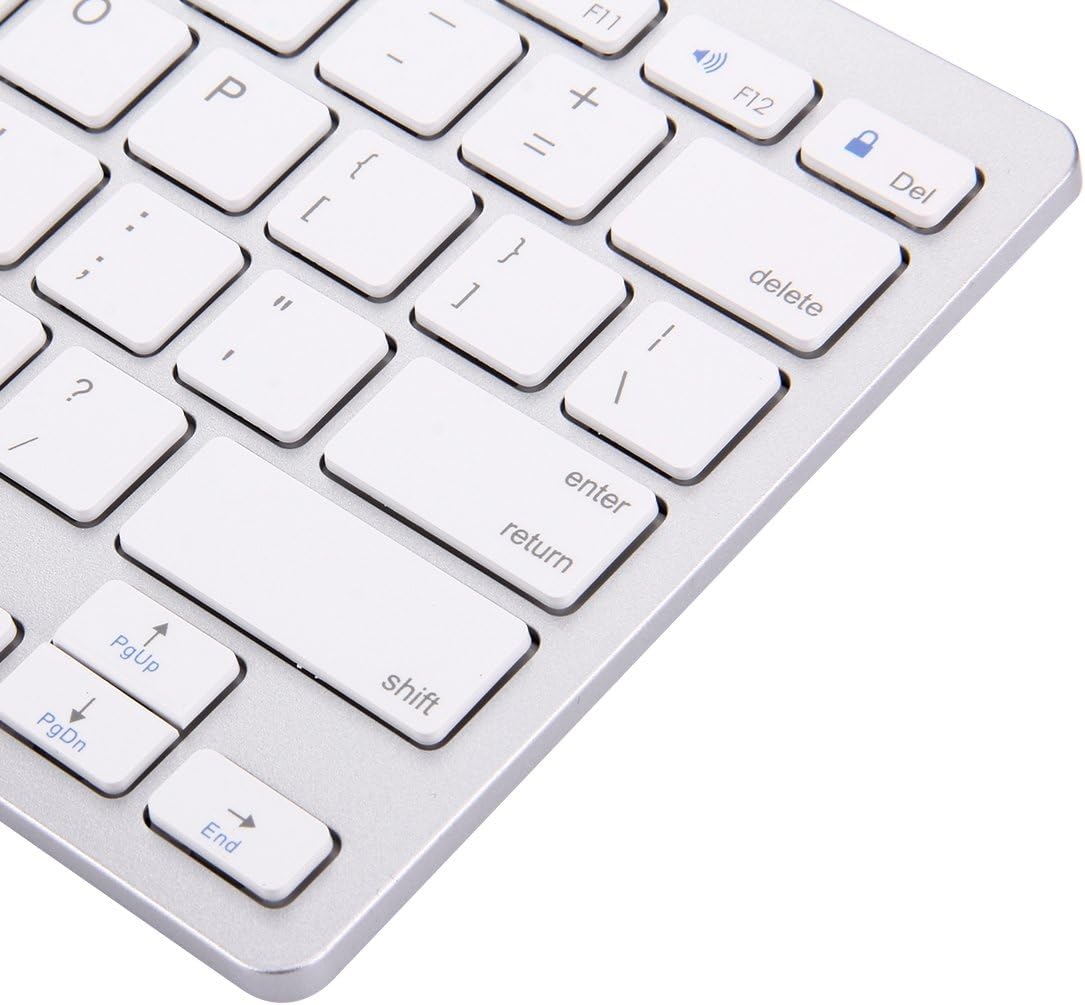
Image: Close-up of the right-hand side keys on the BK-3001 Wireless Bluetooth Keyboard, showing the Enter, Shift, Page Up, Page Down, and End keys.
5.2 Kompatibilità
The keyboard is compatible with devices supporting Bluetooth 3.0, including but not limited to:
- iPad (all generations with Bluetooth support)
- iPhone (all models with Bluetooth support)
- Pilloli u smartphones Android
- Windows computers and laptops
- Mac computers and laptops
6. Manutenzjoni
6.1 Tindif
To clean your keyboard, gently wipe the surface with a soft, dry, lint-free cloth. For stubborn dirt, slightly dampen the cloth with water or a mild, non-abrasive cleaning solution. Avoid excessive moisture and do not immerse the keyboard in liquid. The keyboard features a waterproof design, offering protection against minor spills, but it is not fully submersible.
6.2 Ħażna
When not in use for extended periods, turn off the keyboard to conserve battery life. Store the keyboard in a cool, dry place away from direct sunlight and extreme temperatures.
7 Issolvi l-problemi
7.1 Keyboard Not Connecting/Pairing
- Ensure the keyboard is turned ON and has fresh batteries.
- Kun żgur li l-Bluetooth huwa attivat fuq it-tagħmir tiegħek.
- Press the 'CONNECT' button on the keyboard to enter pairing mode.
- Move the keyboard closer to your device (within 10 meters).
- Forget/remove the keyboard from your device's Bluetooth list and try pairing again.
- Restart both the keyboard (turn off and on) and your device.
7.2 Iċ-Ċwievet Ma Jirrispondux
- Iċċekkja l-livell tal-batterija u ibdel jekk meħtieġ.
- Kun żgur li t-tastiera hija konnessa sew mat-tagħmir tiegħek.
- Ipprova erġa' qabbad il-konnessjoni Bluetooth.
- Clean any debris that might be under the keys.
7.3 Lag or Delayed Response
- Kun żgur li m'hemm l-ebda interferenzi qawwija (eż., routers tal-Wi-Fi, apparati oħra tal-Bluetooth) fil-qrib.
- Ersaq eqreb lejn l-apparat tiegħek.
- Iċċekkja l-livell tal-batterija.
8. Speċifikazzjonijiet
| Karatteristika | Deskrizzjoni |
|---|---|
| Mudell | BK-3001 |
| Teknoloġija tal-Konnettività | Bluetooth 3.0 |
| Numru ta' Ċwievet | 78 Ċwievet |
| Distanza Operattiva | Sa 10 metri (33 pied) |
| Sors tal-Enerġija | 2 x Batteriji AAA (mhux inklużi) |
| Apparati Kompatibbli | Laptop, Tablet, iPhone, iPad, Android devices |
| Karatteristiċi Speċjali | Ultrathin, Wireless, Waterproof, Ergonomic |
| Piż tal-oġġett | 380 Gramm |
| Numru tal-Parti tal-Manifattur | luqin 1 |
9. Informazzjoni dwar Garanzija
This product comes with a standard manufacturer's warranty. Please refer to the product packaging or your point of purchase for specific warranty terms and conditions. Keep your proof of purchase for any warranty claims.
10. Appoġġ għall-Klijent
If you encounter any issues or have questions not covered in this manual, please contact the seller or manufacturer for assistance. Provide your product model number (BK-3001) and a detailed description of the issue when seeking support.


