
1. Introduzzjoni
The SENCKIT Solar Motion Sensor Alarm Outdoor is a security device designed to detect movement and deter potential intruders using a combination of loud sounds and flashing lights. This device is suitable for various outdoor applications, including homes, villas, farms, barns, and yards, providing an additional layer of security.

Stampa 1.1: Quddiem view of the SENCKIT Solar Motion Sensor Alarm Outdoor, showcasing huwa aħmar casing, solar panel, speaker grille, and motion sensor.
2. Kontenut tal-Pakkett
Jekk jogħġbok ivverifika li l-oġġetti kollha huma preżenti fil-pakkett:
- 1 x SENCKIT Solar Motion Sensor Alarm Outdoor
- 1 x USB Iċċarġjar Cable
- 1 x Installation Kit (screws and wall anchors)
3. Speċifikazzjonijiet
| Karatteristika | Dettall |
|---|---|
| Panel Solari | 5*80mA Mono-silicon panel |
| Dwal LED | 6 biċċiet LED |
| Batterija | 3.7V 400mAH battery |
| Modalità tal-Iċċarġjar | Solar energy / DC charge (USB) |
| Ħin ta 'Ċarġ Solari | >8 hours (direct sunlight) |
| DC Charge Time | ≤1 hour (DC5V ≤1A) |
| Volum ta' Allarm | 129db (Dog barking & gunshot sound) |
| Klassifikazzjoni li ma jgħaddix ilma minnha | IP55 |
| Metodu ta' Kontroll | Touch (via switch key) |
| Medda Massimu | 8-il metru |
| Teknoloġija tas-Sensers | Sensor tal-Moviment |
| Piż tal-oġġett | 4.5 uqija |
| Dimensjonijiet tal-Prodott | 3.55 x 3.15 x 1.95 pulzieri |
| Sors tal-Enerġija | Imħaddem bil-batterija, Imħaddem bl-enerġija solari |
| Apparati Kompatibbli | Ditekter tal-moviment |
| Voltage | 5 Volts |
4. Setup u Installazzjoni
4.1 Iċċarġjar inizjali
Before first use, it is recommended to fully charge the device using the provided USB cable. Connect the USB cable to the DC charging port on the back of the alarm and plug it into a 5V USB power adapter (not included). A full charge via USB typically takes about 1 hour.
4.2 Għażla tal-Post
Choose an installation location that receives ample direct sunlight throughout the day to ensure efficient solar charging. The location should also provide an unobstructed view for the motion sensor to cover the desired area.

Image 4.1: Illustration of the two charging methods: solar charging via the top panel and DC charging via the USB port on the back.
4.3 Immuntar tal-Apparat
The alarm can be mounted using the screw holes on the back for wall installation or secured with an iron wire. Ensure the device is mounted securely at a height that allows for optimal motion detection, typically less than 4 meters, with a sensing distance of 5-8 meters.
- Immuntar tal-ħajt: Use the provided installation kit (screws and wall anchors) to securely attach the alarm to a wall or sturdy surface.
- Wire Binding: For temporary or alternative installations, the device can be bound with an iron wire through the designated slots.
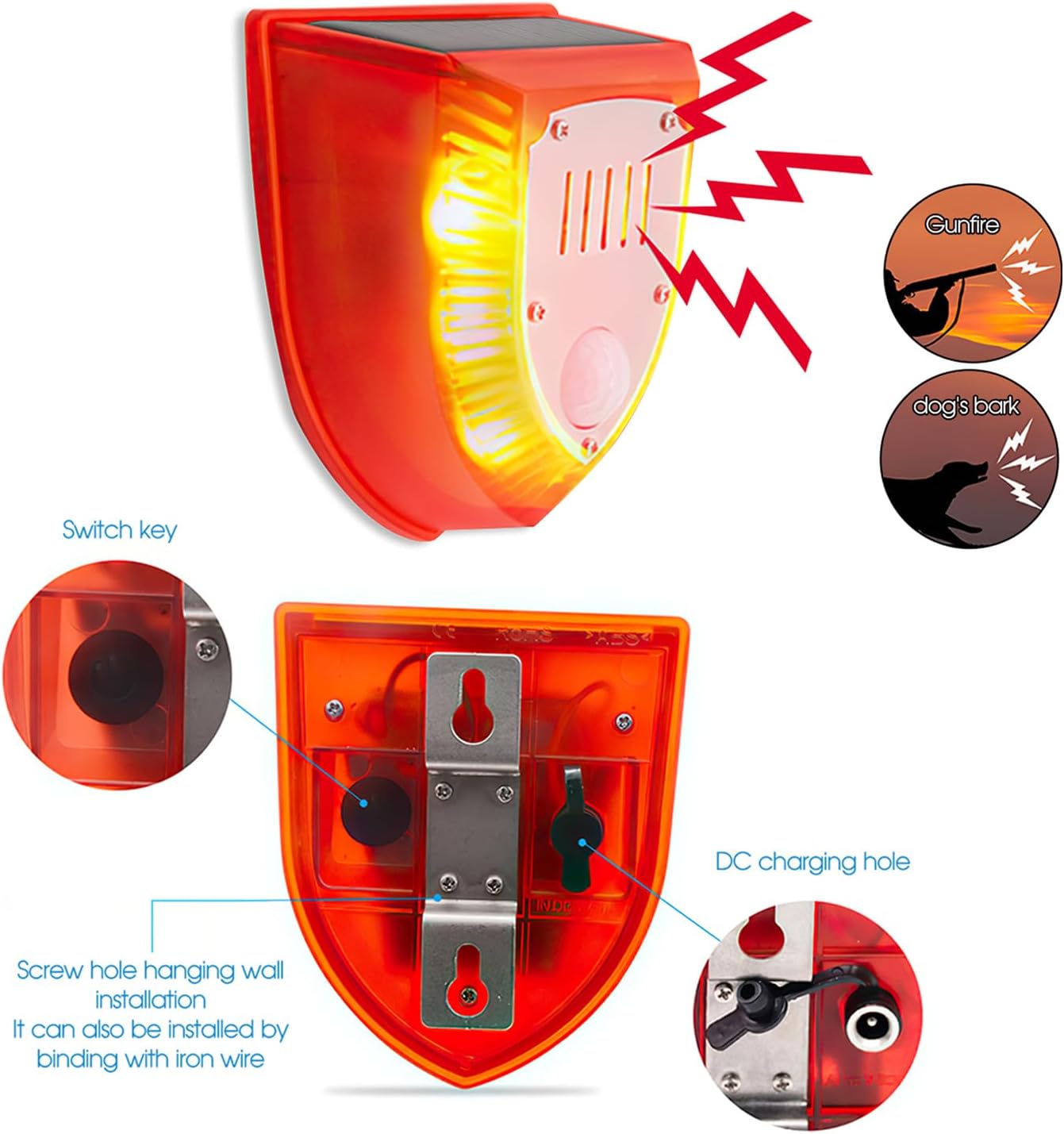
Stampa 4.2: Wara view of the alarm, highlighting the switch key, DC charging port, and mounting screw holes for installation.
5. Modi Operattivi
The SENCKIT Solar Motion Sensor Alarm features three distinct operating modes, selectable via the switch key located on the back of the device. Press the switch key to cycle through the modes.
- Mode 1: 24-Hour Detection (Dog Barking & Gunshot & Flashing)
In this mode, the alarm will activate with dog barking sounds, gunshot sounds, and flashing lights whenever motion is detected, regardless of the time of day. - Mode 2: Night-Time Detection (Dog Barking & Gunshot & Flashing)
This mode enables the alarm to activate with dog barking sounds, gunshot sounds, and flashing lights only when motion is detected during nighttime hours. - Mode 3: Night-Time Cyclic Flash & Alarm Sound (Automatic)
In this mode, the device will automatically flash and emit an alarm sound every 5 minutes during nighttime, even without motion detection, providing a continuous deterrent.

Image 5.1: The alarm in action, illustrating its ability to detect movement and activate its deterrent features, including flashing lights and sound.

Image 5.2: A visual representation of the alarm's wide sensing range, featuring a 125-degree induction angle and a detection distance of 5-8 meters.
6. Iċċarġjar
The SENCKIT Solar Motion Sensor Alarm supports two charging methods to ensure continuous operation:
- Iċċarġjar Solari: The integrated solar panel charges the internal battery when exposed to direct sunlight. For optimal performance, ensure the solar panel is clean and free from obstructions.
- Iċċarġjar USB: In periods of low sunlight or for faster charging, the device can be charged via the USB cable. Connect the cable to the DC charging port and a 5V USB power source.
7. Manutenzjoni
To ensure the longevity and optimal performance of your SENCKIT Solar Motion Sensor Alarm, follow these maintenance guidelines:
- Solar Panel Nadif: Imsaħ il-pannell solari regolarment b'ċarruta ratba u damp drapp biex tneħħi t-trab, il-ħmieġ, jew il-fdalijiet li jistgħu jfixklu l-effiċjenza tal-iċċarġjar.
- Iċċekkja għal Ostruzzjonijiet: Periodically inspect the motion sensor and surrounding area for any new obstructions (e.g., overgrown plants) that might block the sensor's field of view.
- Immuntar Sikur: Ensure the device remains securely mounted to prevent accidental falls or damage.
- Integrità li ma jgħaddix ilma minnha: While the device is IP55 waterproof, avoid submerging it in water or exposing it to high-pressure water jets.

Image 7.1: The alarm operating outdoors during rainfall, illustrating its IP55 dustproof and rainproof capabilities.
8 Issolvi l-problemi
If you encounter issues with your SENCKIT Solar Motion Sensor Alarm, refer to the following troubleshooting tips:
| Problema | Kawża Possibbli | Soluzzjoni |
|---|---|---|
| L-allarm ma jattivax | Ċarġ baxx tal-batterija L-issettjar tal-mod mhux korrett Sensorju tal-moviment imfixkel | Charge the device via USB or ensure sufficient solar exposure. Press the switch key to select the desired operating mode. Clear any obstructions from the motion sensor's view. |
| Device not charging via solar | Dawl tax-xemx insuffiċjenti Il-pannell solari huwa maħmuġ | Relocate the device to an area with more direct sunlight. Naddaf il-wiċċ tal-pannell solari. |
| Allarmi foloz | Movement from trees/bushes Annimali żgħar Irjieħ qawwija | Adjust the device's angle or relocate it to minimize detection of non-threats. Consider using Mode 2 (Night-Time Detection) if false alarms occur during the day due to environmental factors. |
| Alarm sound is too low | Environmental factors (e.g., distance, background noise) | Ensure the device is placed in a strategic location where the 129db sound can be most effective. The volume is fixed and not adjustable. |
9. Garanzija u Appoġġ
The SENCKIT Solar Motion Sensor Alarm Outdoor comes with a Servizz ta 'wara l-bejgħ ta' 24 xahar. For any inquiries or support needs, please contact customer service. We aim to respond to messages within 12 hours.

Immaġni 9.1: Eż.amples of the alarm's application in different outdoor environments, including agricultural settings and residential properties.