
1. Introduzzjoni
Welcome to your WOOXGEHM 4-in-1 Wired Arcade Fight Stick Joystick. This manual provides essential information for setting up, operating, and maintaining your new arcade controller. Designed for compatibility with Nintendo Switch, PC, PlayStation 3, and Android devices, this joystick enhances your gaming experience with precise control and turbo functions.
2. Informazzjoni dwar is-Sigurtà
Linji Gwida dwar is-Sigurtà
- Żomm l-apparat 'il bogħod mill-ilma u l-umdità.
- Evita li tesponi l-apparat għal temperaturi estremi.
- Tippruvax iżarma jew isewwi l-apparat lilek innifsek.
- Uża biss il-kejbils u l-aċċessorji pprovduti.
- Żomm fejn ma jintlaħaqx mit-tfal żgħar.
3. Kontenut tal-Pakkett
X'inhu Inkluż
- 1 x Universal Arcade Fight Stick
- 1 x Remote Lever Handle (Joystick)
- 1 x Fixed Small Parts (e.g., suction cups)
- 1 x Manwal ta 'Istruzzjoni
4. Prodott Aktarview
The WOOXGEHM Arcade Fight Stick is designed for comfort and precision, featuring a spherical metal joystick and six round control buttons. It also includes additional buttons for various functions and platform compatibility.

Figura 1: WOOXGEHM 4-in-1 Wired Arcade Fight Stick Joystick, top view. A black arcade fight stick with a red spherical joystick on the left and six red circular action buttons on the right. Smaller function buttons are located above the main action buttons. The surface features a racing car graphic.
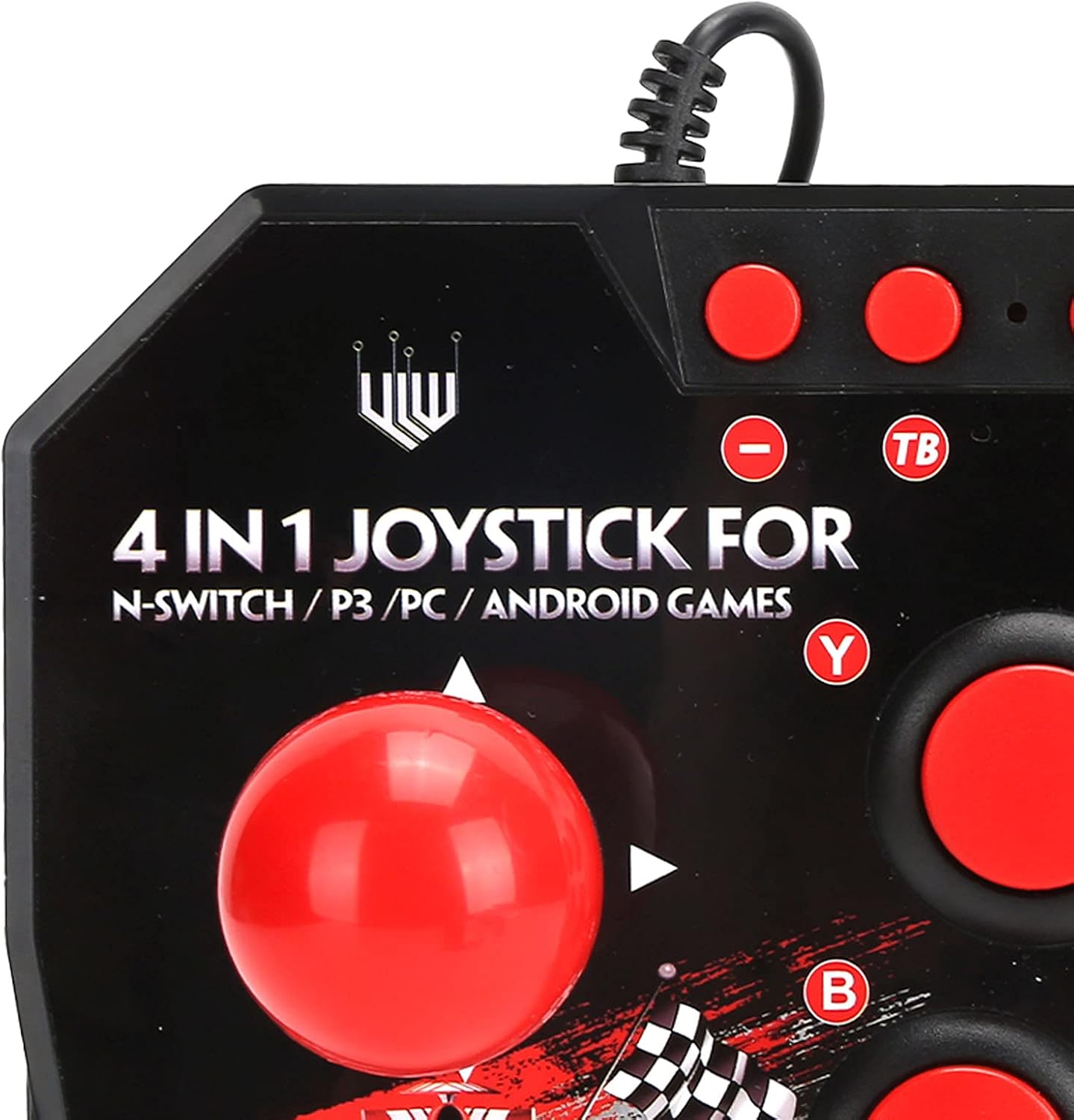
Figura 2: Close-up of WOOXGEHM 4-in-1 Wired Arcade Fight Stick Joystick buttons. A detailed view of the joystick's top panel, showing the "4 IN 1 JOYSTICK FOR N-SWITCH / P3 / PC / ANDROID GAMES" text, along with the red spherical joystick and several red action buttons labeled Y, B, X, A, L, R, and smaller buttons for Turbo functions.

Figura 3: Qiegħ view of WOOXGEHM 4-in-1 Wired Arcade Fight Stick Joystick with suction cups. The underside of the arcade fight stick, showing four clear suction cups designed to secure the device to a flat surface during use. The label indicates "Input: DC5V / 500mA", "Working current: 20mA", and "MADE IN CHINA".
5. Setup u Konnessjoni
The arcade fight stick connects via a wired USB cable. Ensure your console or device is powered on before connecting.
5.1 Konnessjoni man-Nintendo Switch
- Connect the USB cable from the arcade fight stick to an available USB port on your Nintendo Switch dock.
- Ensure "Pro Controller Wired Communication" is enabled in your Switch System Settings.
- The controller should be automatically recognized.
5.2 Konnessjoni tal-PC
- Connect the USB cable from the arcade fight stick to an available USB port on your PC.
- The system should automatically install the necessary drivers. If not, manual driver installation may be required (refer to your PC's operating system documentation).
- The controller will be recognized as a standard USB gamepad.
5.3 Konnessjoni mal-PlayStation 3 (PS3)
- Connect the USB cable from the arcade fight stick to an available USB port on your PS3 console.
- Il-kontrollur għandu jiġi rikonoxxut awtomatikament u lest għall-użu.
5.4 Konnessjoni ma' Apparat Android
- Connect the USB cable from the arcade fight stick to your Android device using an OTG (On-The-Go) adapter (not included).
- Kun żgur li t-tagħmir Android tiegħek jappoġġja l-funzjonalità OTG.
- The controller should be recognized as an external gamepad.

Figura 4: Multi-platform compatibility. This image illustrates the multi-platform compatibility of the arcade fight stick, showing it connected to a Nintendo Switch console, a PlayStation 3, a PC monitor, and an Android device, highlighting its versatility.

Figura 5: Plug-and-Play functionality. This image highlights the plug-and-play nature of the arcade fight stick, showing it connected to a PlayStation console, a Nintendo Switch, and a monitor displaying game content, emphasizing ease of use across platforms.
6. Istruzzjonijiet Operattivi
6.1 Kontrolli Bażiċi
- Joysticks: Use the spherical metal joystick for directional movement.
- Buttuni ta' Azzjoni: The six large round buttons (A, B, X, Y, L, R) are for primary game actions.
- Buttuni tal-Funzjoni: Smaller buttons above the main action buttons provide additional controls (e.g., Home, Select, Start).
6.2 Turbo Functions
The controller features turbo functions for rapid button presses.
- To activate Turbo for a button, press and hold the desired action button, then press the "TB" (Turbo) button. The button will now rapidly repeat its input when held down.
- To deactivate Turbo, press and hold the same action button, then press the "TB" button again.
6.3 Qlib tal-Modalità
The joystick may have a mode switch to toggle between different input modes (e.g., D-Pad, Left Analog Stick, Right Analog Stick) for specific games or platforms. Refer to the small buttons near the top left of the controller for these options.
7. Manutenzjoni u Kura
Kura tal-Prodott
- Tindif: Wipe the surface of the joystick with a soft, dry cloth. Do not use abrasive cleaners or solvents.
- Ħażna: Aħżen l-apparat f'post frisk u niexef 'il bogħod mix-xemx diretta meta ma tkunx qed tuża.
- Ġestjoni tal-Kejbil: Evita liwjiet qawwija jew ġbid eċċessiv tal-kejbil USB biex tevita l-ħsara.
8 Issolvi l-problemi
Kwistjonijiet Komuni u Soluzzjonijiet
- Controller not recognized:
Soluzzjoni: Ensure the USB cable is securely connected to both the joystick and the device/console.
Soluzzjoni: Għan-Nintendo Switch, ivverifika li "Pro Controller Wired Communication" hija attivata fis-settings tas-sistema.
Soluzzjoni: Ipprova qabbad ma 'port USB differenti.
Soluzzjoni: Restart your console/PC/Android device. - Buttons or joystick unresponsive:
Soluzzjoni: Disconnect and reconnect the joystick.
Soluzzjoni: Test the joystick on another compatible device to determine if the issue is with the controller or the device. - Il-funzjoni turbo ma taħdimx:
Soluzzjoni: Ensure you are correctly activating/deactivating the turbo mode as described in the Operating Instructions.
9. Speċifikazzjonijiet
Speċifikazzjonijiet Tekniċi
| Karatteristika | Dettall |
|---|---|
| Mudell | B0C7GYXMLZ |
| Brand | WOOXGEHM |
| Tip ta' Kontrollur | Kontroll tal-Buttuni, Joystick |
| Interface tal-Ħardwer | USB |
| Materjal | Acrylonitrile Butadiene Styrene (ABS) |
| Piż tal-oġġett | 0.52 Kilogrammi (1.14 libbra) |
| Daqs (Approx.) | 21 x 15 x 6 ċm (8.3 x 5.9 x 2.4 pulzieri) |
| Ħidma Voltage / Kurrenti | DC5V/20mA |
| Tul tal-Cable USB | 3 m / 9.8 pied |
| Kompatibilità | Nintendo Switch, PC, PS3, Android Games |

Figura 6: Speċifikazzjonijiet tekniċi fuqview. An image displaying the technical specifications of the arcade fight stick, including item type, material (ABS), size (21 x 15 x 6 cm), working voltage/current (DC5V/20mA), and USB cable length (3m/9.8ft), along with a list of package contents.
10. Garanzija u Appoġġ
Informazzjoni dwar Garanzija
This WOOXGEHM product comes with a standard manufacturer's warranty. For specific warranty terms and conditions, please refer to the warranty card included in your package or contact WOOXGEHM customer support.
Appoġġ għall-Klijent
If you encounter any issues or have questions regarding your Arcade Fight Stick, please visit the official WOOXGEHM websit jew ikkuntattja lis-servizz tal-konsumatur tagħhom għall-għajnuna.