
1. Introduzzjoni
Thank you for choosing the EKSA Wireless Headset H5. This headset is designed to provide clear communication and comfortable wear for various professional environments, including office work, call centers, and trucking. It features AI noise-cancelling technology, dual connectivity options (Bluetooth and USB dongle), and extended battery life. This manual provides detailed instructions for setup, operation, maintenance, and troubleshooting to ensure optimal performance.
2. Kontenut tal-Pakkett
Jekk jogħġbok ivverifika li l-oġġetti kollha huma preżenti fil-pakkett tiegħek:
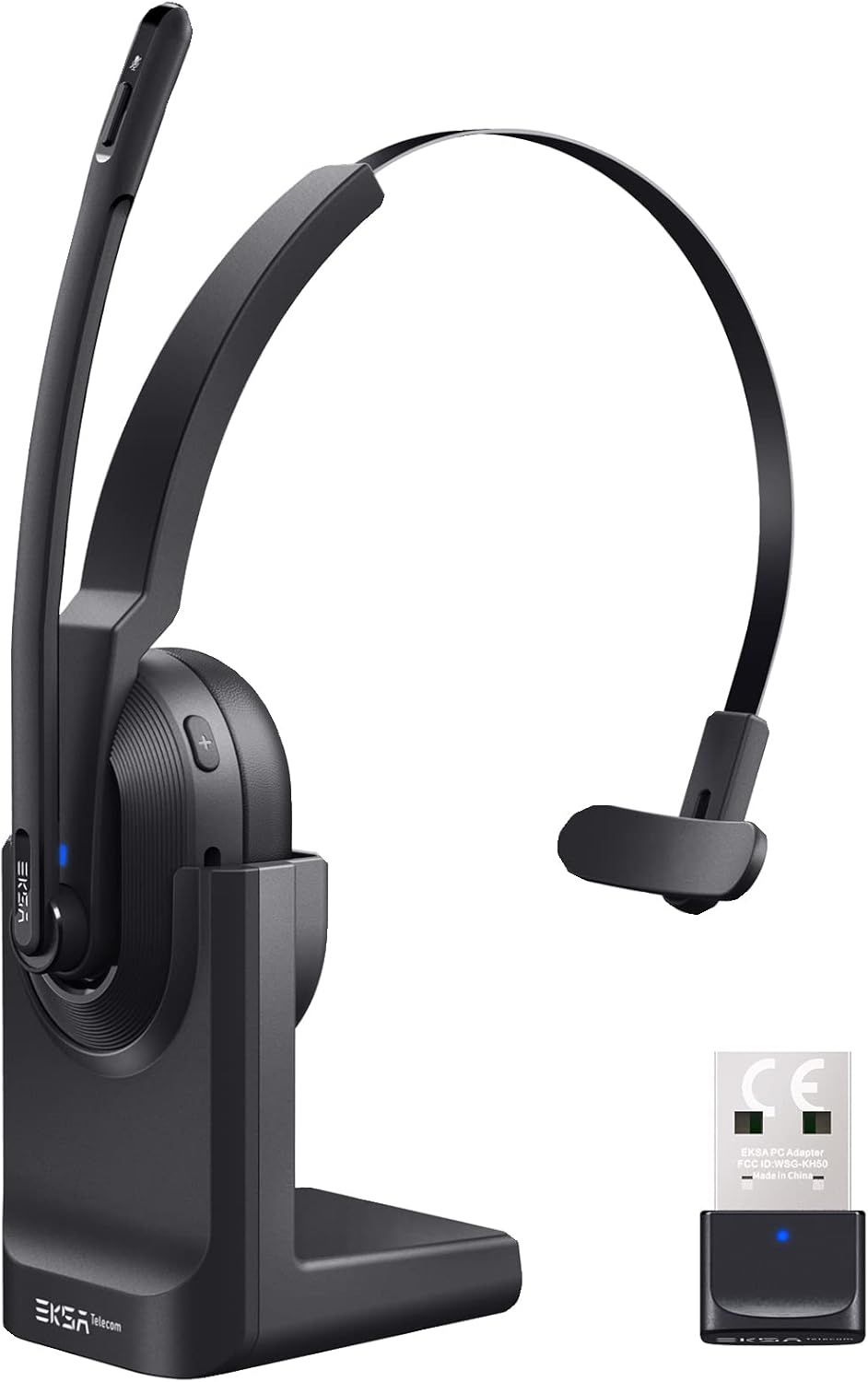
- EKSA Wireless Headset H5
- USB Dongle
- Bażi tal-Iċċarġjar
- Cable tal-Iċċarġjar tal-USB-C
- Manwal għall-Utent
3. Prodott Aktarview
Familiarize yourself with the components of your EKSA Wireless Headset H5.

4. Setup
4.1 Iċċarġjar tal-Headset
The headset supports two charging methods:
- Iċċarġjar Dirett: Connect the USB-C charging cable directly to the headset's Type-C port and a power source.
- Bażi tal-Iċċarġjar: Place the headset onto the included charging base. Ensure the charging contacts align. Connect the charging base to a power source using the USB-C cable.

A full charge takes approximately 1.5 hours. The headset provides up to 25 hours of talk time and 45 hours of music playback at 70% volume.

4.2 Konnessjoni permezz ta' USB Dongle
For PC and laptop connections, the USB dongle provides a stable wireless link.
- Insert the USB dongle into an available USB port on your PC or laptop.
- The LED indicator on the dongle will turn solid blue when successfully paired with the headset.
- On your PC/laptop, navigate to Settings > Ħoss.
- Issettja EKSA Telecom H5 as both the input and output device.

4.3 Konnessjoni permezz tal-Bluetooth 5.0
The headset can connect to mobile phones, tablets, and other Bluetooth-enabled devices.
- Ensure the headset is powered on and in pairing mode (the Bluetooth indicator will flash).
- Fuq it-tagħmir mobbli tiegħek, mur fuq Settings > Bluetooth & other devices.
- Agħżel "Żid Bluetooth jew apparat ieħor" u fittex "EKSA Telecom H5".
- Agħżel EKSA Telecom H5 to pair.
- Once connected, set EKSA Telecom H5 as the input and output device in your device's sound settings.


4.4 Meeting Application Settings
For applications like Zoom or Skype:
- In the application's audio/video settings, select EKSA Telecom H5 as both the microphone and speaker.

5. Istruzzjonijiet Operattivi
5.1 Kontrolli Bażiċi
- Power On/Off: Agħfas u żomm il-buttuna Multi-Funzjoni.
- Volum Up / Track Li jmiss: Press the '+' button. Hold for next track.
- Volume Down / Track Preċedenti: Press the '-' button. Hold for previous track.
- Tweġiba/Tmiem Sejħa: Press the Multi-Function Button during an incoming call or active call.
- Irrifjuta Sejħa: Press and hold the Multi-Function Button during an incoming call.
- Ixekkel/Istinka l-mikrofonu: Press the Mute Button located on the microphone arm.
5.2 L-Ilbies tal-Headset
The headset is designed for comfort and flexibility:
- The microphone arm can be rotated up to 270 degrees, allowing you to wear the headset on either your left or right ear.
- Aġġusta l-faxxa tar-ras għal tajbin sigur u komdu.

5.3 AI Noise Cancelling Microphone
The headset features an AI-powered Environmental Noise Cancelling (ENC) microphone with a Qualcomm chip. This technology intelligently suppresses up to 99.6% of environmental noise, ensuring your voice is clear during calls, even in noisy environments.


6. Manutenzjoni
Biex tiżgura l-lonġevità u l-prestazzjoni ottimali tal-headset tiegħek:
- Naddaf il-headset regolarment b'ċarruta ratba u niexfa.
- Evita li tesponi l-headset għal temperaturi estremi, umdità, jew dawl tax-xemx dirett.
- Tużax tindif jew solventi li joborxu.
- Store the headset in a cool, dry place when not in use, preferably on its charging base or in a protective case.
7 Issolvi l-problemi
| Problema | Kawża Possibbli | Soluzzjoni |
|---|---|---|
| Il-headset ma jixgħelx | Batterija baxxa | Charge the headset using the USB-C cable or charging base. |
| No sound/microphone not working | Not connected or incorrect audio settings | Ensure the headset is paired via Bluetooth or dongle. Check your device's sound settings to confirm "EKSA Telecom H5" is selected as input/output. |
| Poor sound quality/intermittent connection | Out of range, interference, or low battery | Move closer to the connected device (within 10 meters). Avoid strong electromagnetic interference. Charge the headset. |
| Ma nistax nqabbad permezz tal-Bluetooth | Headset not in pairing mode or device already connected | Ensure the headset is in pairing mode (flashing indicator). Disconnect from any other devices. Restart Bluetooth on your device. |
| AI Noise Cancelling not effective | Pożizzjoni tal-mikrofonu | Ensure the microphone is positioned correctly near your mouth for optimal voice pickup and noise suppression. |
8. Speċifikazzjonijiet
| Karatteristika | Dettall |
|---|---|
| Isem tal-Mudell | H5 |
| Teknoloġija tal-Konnettività | Wireless (Bluetooth 5.0, USB Dongle) |
| Firxa Wireless | Sa 10 metri |
| Ħajja tal-Batterija (Mużika) | Sa 45 sigħat (b'70% volum) |
| Ħajja tal-batterija (Tkellem) | Sa 25 sigħat (b'70% volum) |
| Ħin tal-Iċċarġjar | Appross. 1.5 sigħat |
| Kontroll tal-Ħoss | Active Noise Cancellation (AI Environmental Noise Cancelling) |
| Mikrofonu | 270° Rotatable, AI ENC |
| Piż | Approx. 75g (headset only) / 0.54 kg (packaged) |
| Materjal | Metall, plastik |
| Komponenti Inklużi | Charging Base, USB Dongle |
| Medda ta' Frekwenzi | 20 Hz - 20,000 Hz |
9. Garanzija u Appoġġ
EKSA products come with a standard manufacturer's warranty. For specific warranty details, please refer to the warranty card included in your package or visit the official EKSA website. For technical support, troubleshooting assistance, or any inquiries, please contact EKSA customer service through their official channels. You can find contact information on the EKSA webis-sit jew permezz tal-pjattaforma tax-xiri tiegħek.